no bootable device: f1 to retry...

aquarian

New member
Local time
5:28 PM
Messages
19
Location
Leeds, UK
Hi,

I have a dell inspiron 1545 laptop which has just been clean installed
with Windows 7 x64. I get an intermittent error on boot up

No bootable devices: f1 to retry, f2 for setup

If I press f1 it continues normally and boots up.

This is not a major problem yet but is it a symptom of something worse
and/or is there a fix?

I had Vista x64 before and would get the same error occasionally.

I spoke to dell support and they said it was a s/w error and would not
help me fix it - they did refer me to the paid for s/w support :mad:

Thanks for any help.
 

My Computer My Computer

Computer Manufacturer/Model Number
DELL inspiron 1545
OS
Windows 7 Home Premium x64
CPU
Intel Celeron dual core T3000 1.8Ghz
Motherboard
DELL 0G848F
Memory
4GB DDR2 (2x2GB)
Hard Drives
Toshiba MK2555GSX ATA 250GB
Set Win7 HD first to boot in BIOS setup.

If you need to boot CD/DVD using one-time BIOS Boot Menu key.

Do you have the latest BIOS version update?
 
Thanks, I changed HDD to boot first.

I have BIOS update A14 which I think is the latest.

Hopefully it wont occur again.
 

My Computer My Computer

Computer Manufacturer/Model Number
DELL inspiron 1545
OS
Windows 7 Home Premium x64
CPU
Intel Celeron dual core T3000 1.8Ghz
Motherboard
DELL 0G848F
Memory
4GB DDR2 (2x2GB)
Hard Drives
Toshiba MK2555GSX ATA 250GB
Unfortunately it is occurring again.

HDD is still first in the boot list.

I have run the F5 diagnostics no errors are reported.
 

My Computer My Computer

Computer Manufacturer/Model Number
DELL inspiron 1545
OS
Windows 7 Home Premium x64
CPU
Intel Celeron dual core T3000 1.8Ghz
Motherboard
DELL 0G848F
Memory
4GB DDR2 (2x2GB)
Hard Drives
Toshiba MK2555GSX ATA 250GB
Back up your data externally now. Make your Recovery Disk set.

Boot the Win7 DVD Repair console or Repair CD by tapping F12 key at bootup to run Startup Repair which will run numerous tests and if necessary repair or rewrite the critical MBR boot files: http://www.sevenforums.com/tutorials/681-startup-repair.html?ltr=S

Run http://www.sevenforums.com/tutorials/1538-sfc-scannow-command-system-file-checker.html

Then test your HD using maker's full diag/repair CD scan: http://www.tacktech.com/display.cfm?ttid=287

Next run http://www.sevenforums.com/tutorials/433-disk-check.html

To be complete in testing hardware, Test RAM using memtest86 CD for 5-6 passes.
 
It's either a BIOS error, or a problem with your hard drive not starting up in a timely manner. Either way, use your service tag on Dell's support site to check your BIOS level and download the diagnostics disc creator to test out your hard drive.
 

My Computer My Computer

OS
Windows 7 Ultimate x64 SP1
CPU
Intel Core i7-2600
Motherboard
Gigabyte GA-P67A-UD3P-B3
Memory
12 GB Patriot Extreme DDR3-1333
Graphics Card(s)
Nvidia GTX 470
Monitor(s) Displays
Dell UltraSharp 2209WA
Hard Drives
OCZ Agility3 240 GB, WD5001AALS, WD7501AALS
PSU
OCZ ModStream 700W
Case
CoolerMaster HAF 912 Advanced
Cooling
CoolerMaster Hyper 212 Plus
Check your installed BIOS version by typing System Information in Start Search box.

Or audit it from mobo using Belarc Advisor.
 
Thanks for the quick replies.

I ran scannow and it found no problems

I booted from the dvd into repair. The first thing it did was
claim an error starting up that it fixed. I restarted and ran
the startup repair again and it passed.

HD is Toshiba who dont provide diagnostics as far as I can see.

I will burn a dvd and run memtest in the next few days.

Bios is A14, 07/12/2009, I started out at Dells website with
the service tag to find what drivers I was missing.

Cheers.
 

My Computer My Computer

Computer Manufacturer/Model Number
DELL inspiron 1545
OS
Windows 7 Home Premium x64
CPU
Intel Celeron dual core T3000 1.8Ghz
Motherboard
DELL 0G848F
Memory
4GB DDR2 (2x2GB)
Hard Drives
Toshiba MK2555GSX ATA 250GB
Does the Repair (likely MBR) fix the issue?

Are you able to run a full HD scan using the F5 tools?

If not, try GWScan which works on most all models: GWSCAN 5.12 Unzips to C:cabs where you can browse to find ISO to burn.

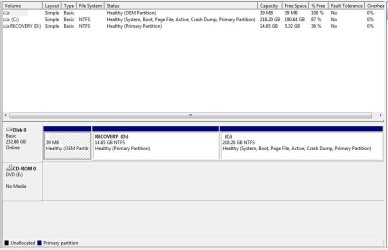
Please post back a screenshot of your full Disk Management drive map with listings, using Snipping Tool in Start Menu. Something might be obvious.

Also, google repeat errors in Device Manager>Admin View to see how others have resolved them. Study Performance log as well on Advanced Tools page accessed by clicking WEI score at Computer>Properties; check for cued issues at top of Tools page, Generate a System Health Report.
 
The problem has always been intermittent.
So far it has booted up 4 times without a problem.

I did the full hd scan 2 days ago when I first installed 7.
No problems were reported.

I'm being dumb but I dont know what you mean by
"full Disk Management drive map with listings"

Thanks again for the advice.
 

My Computer My Computer

Computer Manufacturer/Model Number
DELL inspiron 1545
OS
Windows 7 Home Premium x64
CPU
Intel Celeron dual core T3000 1.8Ghz
Motherboard
DELL 0G848F
Memory
4GB DDR2 (2x2GB)
Hard Drives
Toshiba MK2555GSX ATA 250GB
Start>rightclick Computer>Manage select Disk management, make full size, open Snipping Tool from Start Menu, choose REctangular Snip, draw box around drive map and full listings, save file. Post using Paper clip in reply box.
 
Thanks. Attached.
 

Attachments

  • disk.JPG
    disk.JPG
    53.2 KB · Views: 58

My Computer My Computer

Computer Manufacturer/Model Number
DELL inspiron 1545
OS
Windows 7 Home Premium x64
CPU
Intel Celeron dual core T3000 1.8Ghz
Motherboard
DELL 0G848F
Memory
4GB DDR2 (2x2GB)
Hard Drives
Toshiba MK2555GSX ATA 250GB
It looks correct, although I would want my Win7 partition in the preferred lower (left hand) address closer to where the disk reader parks.

As you learn more about your computer, you may want to do what many tech enthusiasts do and find a clean-copy Win7 installer to clean reinstall without the factory bloatware and OEM partitions that can corrupt Win7. We can help you do that here when you're ready.

Meanwhile, set a Restore Point and make your Factory Recovery Disks.

Then save a Win7 backup image externally so you can return to the current working state at any time by booting the Repair CD to "Recover Using an Image" should the restore point not be sufficient or disappear (you can Configure more space for Restore at Computer>Properties).
 
Last edited:
Thanks, overall I'm still far more impressed with Windows 7 than Vista.
The fast boot time alone sells it to me, and I've booted it a lot
over the last few days :)
 

My Computer My Computer

Computer Manufacturer/Model Number
DELL inspiron 1545
OS
Windows 7 Home Premium x64
CPU
Intel Celeron dual core T3000 1.8Ghz
Motherboard
DELL 0G848F
Memory
4GB DDR2 (2x2GB)
Hard Drives
Toshiba MK2555GSX ATA 250GB
Glad to hear it. You must have already edited your msconfig>Startup down to AV and gadgets/stikynotes to get rid of the freeloaders and spying. And use a lightweight free AV like MS Security Essentials with Win7 firewall.

Did you get a Dell Win7 upgrade kit? If not, when you speak with your tech support always ask them whether clean reinstalling Win7 over Vista keeps you from getting support (except for hardware) during warranty period. If they say yes, then never tell them you've installed Win7 - only speak in hypotheticals.

This way if you have an issue like you had, you can get fuller support without them just blaming it on the Win7 upgrade you did on your own.

If your F5 diagnostics work then it appears the clean install didn't break links to some Dell utilities. Do you have others still working? You really don't want any like a connection manager that replace the superior versions in Win7.
 
From that picture, that looks a little weird for the partitioning... Normally, most dells don't have the D recovery space at the front like that, it gets partitioned at the end like others.
 

My Computer My Computer

Computer Manufacturer/Model Number
Alienware Area 51 Desktop and Dell Inspirion 17R (N7010)
OS
Windows 7 Ultimate x64 and Home Premium x64
CPU
Intel i7 960 (3.2 GHz Quad Core)
Motherboard
Alienware Intel based X58
Memory
12 Gigs (Triple Channel)
Graphics Card(s)
Alienware OEM nVidia GTX 560 Ti (1.25 Gig)
Sound Card
Creative Labs X-Fi Titanium
Monitor(s) Displays
Samsung PX2370 LED 23" Monitor
Screen Resolution
1920x1080
Hard Drives
2 320 Gig SATA in Raid 1 Configuration (System/App)
1 1 Tera SATA (Games)
1 1 Tera SATA (Data/Music/Videos)
PSU
750 Watt Power Supply
Case
Alienware Area 51 Desktop
Cooling
Liquid Cooled
Keyboard
Logitech G510
Mouse
Microsoft Trackball Explorer
Internet Speed
Cable
Coming from experience, the less you tell Dell, the less you confuse them. Which IMO is easily done. If you do speak to them, try to boil it all down to a simple paragraph. In many cases, a Dell chat may serve you better.
 

My Computer My Computer

Computer Manufacturer/Model Number
Dell Studio 15 1558 Laptop
OS
Windows 7 Professional x64, SP1
CPU
i5-520M
Memory
8GB DDR3
Graphics Card(s)
ATI HD 4570, 512K
Hard Drives
Intel 320, 120GB
Other Info
Back-lit KB, web cam, 9 cell battery.
HD is Toshiba who dont provide diagnostics as far as I can see.
You misunderstood. Dell has a bootable tool available for download that will test any part of the system, including the hard drive. I wasn't referring to the Windows 7 DVD. The Dell tool you download lets you create a bootable CD, floppy, or USB drive to run the full diags from.
 

My Computer My Computer

OS
Windows 7 Ultimate x64 SP1
CPU
Intel Core i7-2600
Motherboard
Gigabyte GA-P67A-UD3P-B3
Memory
12 GB Patriot Extreme DDR3-1333
Graphics Card(s)
Nvidia GTX 470
Monitor(s) Displays
Dell UltraSharp 2209WA
Hard Drives
OCZ Agility3 240 GB, WD5001AALS, WD7501AALS
PSU
OCZ ModStream 700W
Case
CoolerMaster HAF 912 Advanced
Cooling
CoolerMaster Hyper 212 Plus
Glad to hear it. You must have already edited your msconfig>Startup down to AV and gadgets/stikynotes to get rid of the freeloaders and spying. And use a lightweight free AV like MS Security Essentials with Win7 firewall.

I have removed a few things from Startup.

I use AVG free but I have been reading on here that MS Security Essentials is good so I may look into that. I know AVG can be a bit greedy but I have used if for a number of years and it always worked well for me.


Did you get a Dell Win7 upgrade kit? If not, when you speak with your tech support always ask them whether clean reinstalling Win7 over Vista keeps you from getting support (except for hardware) during warranty period. If they say yes, then never tell them you've installed Win7 - only speak in hypotheticals.

This way if you have an issue like you had, you can get fuller support without them just blaming it on the Win7 upgrade you did on your own.
I bought the laptop with vista x64 preinstalled and later bought the upgrade disks.
The upgrade advisor would not complete as it was having problems removing the wireless
driver. I followed instructions on here and did a clean install instead using the upgrade
disk.

If your F5 diagnostics work then it appears the clean install didn't break links to some Dell utilities. Do you have others still working? You really don't want any like a connection manager that replace the superior versions in Win7.
After the clean install I went to the dell site to look for some drivers. It's possible I
reinstalled some of the Dell utilities as I followed their instructions as to what to
download and in what order to install them.

I was curious about the Win 7 connection manager as I saw references to it in another
thread. I will ask about this on one of the other boards here.
 

My Computer My Computer

Computer Manufacturer/Model Number
DELL inspiron 1545
OS
Windows 7 Home Premium x64
CPU
Intel Celeron dual core T3000 1.8Ghz
Motherboard
DELL 0G848F
Memory
4GB DDR2 (2x2GB)
Hard Drives
Toshiba MK2555GSX ATA 250GB
Back
Top