Brain Ache - BSOD problems, 2 gfx cards one new + totaly new rig

Kloral

New member
Local time
2:39 AM
Messages
17
Brain Ache - Totaly new rig divers not responding :/

Hello, let me start by saying thank you for taking the time to read this as it involves a problem that is making me want to throw my brand new gaming rig against the wall!

Ill start by posting my computers specs:

OS - Windows Professional x64
Intel Core i5 760 2.8ghz
8gb DDR3-1333 RAM
650w ATX PSU
ASrock H55M-Pro 1156 mainboard (BIOS version: 2.0)
HIS Radeon HD 5770 GFX Card (Driver version: 8.762.0.0)

All drivers are up-to-date and temps are fine.

Problem:

Three weeks ago i put together this system using only the Hard Drive and a Nvidia 9800 GTX+ from my old system. After becoming extreamly excited hoping to play Starcraft 2 in all its glory i discovered that every 3-5 mins the screen would start to tear up and eventually give me the message.

"Display driver stopped responding and has recovered"

This as you can imagin rearly worried me so i spent many hours searching the internet trying to find out why this was occuring. I came across many different people with the same problem and tried a few fixes that i came across (I will post what i have already tried at the end). So after many failed attempts to fix this problem i decided to buy a new grahpics card hoping it would solve the issue.

So today i recieved my new HIS Radeon HD 5770 highly antisipating the fact i may have everything working just the way it is ment to soon! After installing the new card (removing old nvidia drivers + CC cleaner first) and updating to the latest drivers via the ATI site i am STILL experancing this error except this time rather than getting screen tears it just locks up! :cry:

So this means it is not a problem with the graphics card and must be something else and considering i have all the most up-to-date drivers and it is a brand new rig i am completely out of ideas.

Here is what i have tried already:

Turn off Areo
MSconfig boot menu upto full 4 cores
Tried many, many different drivers
Updated BIOS driver

Thank you for your time reading this once again and i thank you for helping me, this rearly is making me want to cry and scream!

Also i was not sure where to post this so i am sorry for the double post!
 
Last edited:

My Computer My Computer

At a glance

Windows 7 Professional x64
OS
Windows 7 Professional x64
Hello Kloral and welcome to the Forum.

Please take a read of the information concerning "Display Driver Stopped Responding" below.

You may have to clean up your system with a program like Driver Sweeper when you switch video card brands to avoid driver conflict crashes.
But the TDR issue came before all that so you should treat both issues separately.

Hope this helps
*********************
"Display driver xxxxx stopped responding and was recovered"

Timeout Detection & Recovery (TDR) = "Display Driver Stopped Responding and was Recovered" is a useful feature that started in Vista and is also in W7 that allows the OS to try and recover from a video timeout so that the system does not crash to a bluescreen. Symptoms included a screen flash with the TDR message appearing one or more times or the screen blinking out to black. If the system cannot recover it will crash (Stop Error 116 typical). The issue is that the video card is not responding as expected. The solution is in the: why?

There is no one-size-fits-all solution to TDR errors. But the problem is usually found in the local environment (your computer). Finding the cause is a matter of checking every possible cause and uncovering the culprit through a simple process of elimination. By methodically running down a checklist of diagnostic procedures you should be able to find the cause and can correct it.

There are numerous reports of hardware solutions to TDR's. The most common are:

  • Poor Cooling
  • Problems with the power supply
  • Overclocking Issues
  • Bad System memory or incorrect memory timings
  • Defective PC Components

The order you do the diagnostics is not all that important. My personal strategy is to do the cheap & easy stuff first, the cheap & harder stuff next, and then the stuff that costs last. But whatever order you do it in you need to check or confirm the following:

SOFTWARE
Poorly written software and games will cause TDRs. But if this were the case it would affect lots of people, not just a few. Check the game's website & forums for patches and tips.
See if other people in the forums are having the same problem and if they were able to solve it and how.
You could also be asking too much of your video card. Check to see if your video card is tested and recommended for the game/program. Test the game at reduced settings.

WHAT ACTIONS CAUSE THE PROBLEM
It helps if you can isolate the actions that trigger the TDR. Most often it will be an application using 3D graphics. But if the incidents occur constantly it would point more towards defective hardware. If it happens more specifically (just when running Game X) it points towards overheating, settings, software, or driver issues.

GENERAL SYSTEM PERFORMANCE
You need to eliminate the possibility that your computer has a global problem. You can use a program like Prime95 to stress test your system. Free Software - GIMPS
You can run the "Stress Test" for a few hours or overnight. This will not tell you what the problem is, but it is helpful to uncover any issues your system has with instability and cooling.

OVERHEATING
Running a video intensive game for hours can generate some serious heat and overheating will cause video errors. You can check your temps by looking at your BIOS readings or use a free program like Speedfan SpeedFan - Access temperature sensor in your computer .
A real easy test is to just pull the side panel(s) off your case (You can also blow a house fan directly into the open case) and see if the problem goes away or gets better. If it does then the issue is definitely overheating. If you are overheating you need to look at installing some cooling upgrades. You want to look at ventilating the case (more or bigger fans), Upgrade your case to a larger gaming case (lots of fans, water-cooling), etc.
There are free utilities like BurninTest PassMark BurnInTest software - PC Reliability and Load Testing that you can use to test your system's cooling capability. Caution is recommended using these types of programs.

VIDEO DRIVERS
Bad drivers happen and they can get corrupted. Before installing or reinstalling any video drivers first completely uninstall all video software and the drivers. (Some people say to run a cleaner program from safe mode, some say this is unnecessary). Never rely on the driver package to overwrite the old drivers. Also: Delete the video driver folder (ex: C:\NVIDIA) in Windows Explorer (or windows may install the same drivers again!).
After uninstalling the old drivers and rebooting Windows 7 will install it's own WDDM 1.1 driver. Check for the video problem while using the generic Windows driver.
You can then install the latest drivers for your card (or try older drivers).
See This Tutorial: http://www.sevenforums.com/tutorials/43216-installing-updating-drivers-7-a.html#post414637

DEVICE MANAGER
Look in Device Manager and make sure there are no problem devices (yellow ! icon). Correct these by loading the correct drivers or disable the problem device and see if the video problem goes away.


POOR CONNECTIONS
Reseat video card and memory modules. Make sure the contacts are clean. Check all the electrical connections.

CHECK YOUR MOTHERBOARD VOLTAGES
In BIOS, check the listed voltages against the manufacturer recommended specs. Reset the voltages to factory defaults and see if the video problems disappear.

MEMORY
Memory errors can cause video problems. Run a program like Memtest86+ for at least 3 passes to see if there are any memory errors. Memtest86+ - Advanced Memory Diagnostic Tool .
You can also test for a bad memory module by installing one stick and testing, and then switch it out for the next stick, etc.

OVERCLOCKING
Overclocking can be a trial and error process. The clocks and/or multipliers you set or change for CPU, Memory, or GPU could be unstable. Eliminate this as a possibility by resetting these to their defaults to see if that clears the video problems. The simplest way to do this is to "Restore Bios Defaults", or Clear CMOS.

UNDERCLOCKING
Some people have reported that by going into the video cards control panel and "down-clocking" the cards performance settings they were able to clear up the TDRs. Since W7 does not seem to tolerate any hiccups in the GPU, this would allow you to run a poor perforning card in the W7 enviroment.
So for instance, you could set the GPU clock from a 777 MHz factory setting to 750MHz, and the ram clock from a 1126MHz factory setting to 1050Mhz, or similar small change for your particular card.


BIOS
Check for and install an updated BIOS, particularly if it says the newer BIOS corrects memory errors or bug fixes. You could also try loading the BIOS defaults.
While you are there, check the motherboard manufacturers forums to see if others are having issues with the same board.

WINDOWS POWER MANAGEMENT
Eliminate Power Management settings as a possible cause, especially if you are working with a laptop. These settings could be particularly important if the issue is in playing games.
Go to Control Panel > Hardware & Sound > Power Options. Under "Select a Power Plan" you will find that "Balanced" is the default setting.
At the bottom you will see a Down arrow next to "Show Additional Plans". Click that and select "High Performance". See if the TDR issue is affected.
Alternately, you can click "Change Plan Settings" next to the "Balanced" plan and change the setting to "Never" put the computer to sleep (This is the default on a desktop) and/or change when the display is turned off as a test.

POWER SUPPLY
You need to know that your power supply is delivering sufficient power. Power supply problems are the most common cause of video problems, especially using high end cards.
Check the power supply's amperage ratings. Be sure it has the ample amperage for your video card and the rest of the system.
Test the supply with multimeter to measure for a steady 12v to the card's power connectors. (The only true way to test a power supply would be to use the very expensive diagnostic equipment used in labs). But for us regular folks: I tested my power supply by hooking up my multimeter to the PCI-E connectors that I was using to power my video card (I used a spare pair from the power supply to run the card while I was testing). I then observed the meter while I used the computer, first watching the voltage, then the amps, to see if there was any drop-off or erratic behavior while booting or using the computer. My readings were rock solid. So I declared my power supply good.
Otherwise you need to replace the supply to eliminate this possibility. Or borrow one from another computer.

VIDEO CARD
I suspect that a video card must perform flawlessly to operate in a Windows 7 environment and run the most recent games. If you tried all the above diagnostics and no problems were found then that leaves you with only one possibility: a defective video card. Some brands have the problem more consistently than others. You could check their forums for clues.
You could try your card in another computer running W7 to see if the problem goes along with the card.
You could try a different card in your computer. I bought an inexpensive card to use. My TDR's disappeared using a "lesser" card. Or borrow a card from another computer.
Otherwise RMA or replace the card.

TDR complaints have come from PC owners running virtually every PC configuration. They occur regardless of which video engine, manufacturer, driver, or system used. They are too numerous to write off as a random problem, but at the same time if people are getting their systems to run correctly using the same hardware and software that you are then it follows that your problem must be solvable.

More Info Here:
Timeout Detection and Recovery of GPUs through WDDM
NVIDIA Statement on TDR Errors - NVIDIA Forums
27116: ATIKMDAG has stopped responding error message
 

My Computer My Computer

At a glance

Windows 7 64 Bit Home Premium SP1i7-3820GSkill F3-14900CL9Q - 16GBEVGA GeForce GTX660 - Driver 352.86
Computer type
PC/Desktop
Computer Manufacturer/Model Number
Home Built - Jan 2013
OS
Windows 7 64 Bit Home Premium SP1
CPU
i7-3820
Motherboard
Asus P9X79-PRO - Bios 4608
Memory
GSkill F3-14900CL9Q - 16GB
Graphics Card(s)
EVGA GeForce GTX660 - Driver 352.86
Sound Card
On board Realtek ALC898
Monitor(s) Displays
Acer S271HL
Screen Resolution
1920 x 1080
Hard Drives
#1- Samsung 840 Pro Series
#2- Western Digital WD1002FAEX Sata3 Black
#3- Western Digital WD1002FAEX Sata3 Black
PSU
Corsair CMPSU-850TX-V2 - 850 watt (by Seasonic)
Case
Corsair Obsidian 550D
Cooling
Standard 3 120mm case fans, Cooler Master Hyper 212 EVO
Keyboard
MS KC-0405
Mouse
Intellimouse 5-button
Internet Speed
56 Mbits/Sec (on a good day)
Antivirus
Avast & Malwarebytes
Browser
Firefox
Other Info
Asus DVD - DRW-24B1ST 24X
Is DirectX right up to date?
Download details: DirectX End-User Runtime


Starcraft seems a nightmare with 1,000's complaining about crashes. There were 132,000 posts on one particular item last time I looked.

Does your card crash @ any other time?
 

My Computer My Computer

At a glance

WIN7 Ultimate 64bitAMD FX8150/Trinity A10-5700G-Skill 2400 x2 @ 1866 (both pc's)Sapphire (factory OC version) AMD 7770
Computer type
PC/Desktop
Computer Manufacturer/Model Number
D.I.Y.
OS
WIN7 Ultimate 64bit
CPU
AMD FX8150/Trinity A10-5700
Motherboard
Asus Sabertooth v.1 /Asus F2A85-M Pro
Memory
G-Skill 2400 x2 @ 1866 (both pc's)
Graphics Card(s)
Sapphire (factory OC version) AMD 7770
Sound Card
onboard
Monitor(s) Displays
T260 Samsung
Screen Resolution
1920x1080
Hard Drives
Western Digital Sata 2TB/1TB Caviar Blacks
Buffalo 1TB usb (excellent drive)
PSU
Be-Quiet 700W E-9/Be-Quiet 550W E-9(E-9 = built by FSP)
Case
Antec P183/Antec P180mini
Cooling
x2 Xigmatek SXHH7-U01 + C-Master R4-EXBB-20PK-R0 120mm Fans
Keyboard
Cherry
Mouse
MS Explorer 3.0
Other Info
LG Blu ray combo
Pioneer 207D/208 Blu ray burners
Thank you for your answer and i will be sure to try all of those things that you have said! I have the latest DriectX as far as i am aware! (Edit, aye it is uptodate as i thaught!)

So far i have tried to take each stick of RAM out and boot up with one at a time, failed every time. Next i have tried using the drivers that Win7 installs which worked for a while but caused my new gfx card to go to 60-65o and eventually start screen tearing. Then the error happened again.

At the moment i have tried to use CC cleaner + the ati tool for removing and reinstalling completely the latest drivers. However there was a problem with this as it refused to correctly install the audio driver that came with the packages. I will post back an update on how things are going!

Thanks again for your help guys!
 

My Computer My Computer

At a glance

Windows 7 Professional x64
OS
Windows 7 Professional x64
Thank you for your answer and i will be sure to try all of those things that you have said! I have the latest DriectX as far as i am aware! (Edit, aye it is uptodate as i thaught!)

So far i have tried to take each stick of RAM out and boot up with one at a time, failed every time. Next i have tried using the drivers that Win7 installs which worked for a while but caused my new gfx card to go to 60-65o and eventually start screen tearing. Then the error happened again.

At the moment i have tried to use CC cleaner + the ati tool for removing and reinstalling completely the latest drivers. However there was a problem with this as it refused to correctly install the audio driver that came with the packages. I will post back an update on how things are going!

Thanks again for your help guys!

A classic but have read the manual?

If the HIS comes with onboard audio chip do you have to disable in motherboard bios?

It's a new install
So far everything points to malfunctioning PSU/electrics

I would recheck all connectors, make sure all pin shorts are over correct pin on the motherboard(esp bios reset)
All peripheral wires like front usb are on their pins correctly and are correct way around

Make sure there are no misplaced brass standoffs butting up/shorting against the back of the M/board,

Another one is the metal M/board I/O cover, if you dont place it correctly, metal cutout prongs go into ps2/USB/vga and short them

Make sure correct case wires are on the correct M/board pins too - easily missed!
After that I would swap out the PSU and test with another.
Rough guide for PSU - is power used by all parts + 30% headroom!
 

My Computer My Computer

At a glance

WIN7 Ultimate 64bitAMD FX8150/Trinity A10-5700G-Skill 2400 x2 @ 1866 (both pc's)Sapphire (factory OC version) AMD 7770
Computer type
PC/Desktop
Computer Manufacturer/Model Number
D.I.Y.
OS
WIN7 Ultimate 64bit
CPU
AMD FX8150/Trinity A10-5700
Motherboard
Asus Sabertooth v.1 /Asus F2A85-M Pro
Memory
G-Skill 2400 x2 @ 1866 (both pc's)
Graphics Card(s)
Sapphire (factory OC version) AMD 7770
Sound Card
onboard
Monitor(s) Displays
T260 Samsung
Screen Resolution
1920x1080
Hard Drives
Western Digital Sata 2TB/1TB Caviar Blacks
Buffalo 1TB usb (excellent drive)
PSU
Be-Quiet 700W E-9/Be-Quiet 550W E-9(E-9 = built by FSP)
Case
Antec P183/Antec P180mini
Cooling
x2 Xigmatek SXHH7-U01 + C-Master R4-EXBB-20PK-R0 120mm Fans
Keyboard
Cherry
Mouse
MS Explorer 3.0
Other Info
LG Blu ray combo
Pioneer 207D/208 Blu ray burners
Because you had nVidia drivers installed before, you need to be sure to clean up those nVidia remnants also.

This is one area where Guru3D - Driver Sweeper can be of help. It does more than CCleaner does. Most folks say to run it from Safe Mode after uninstalling the current video driver.

You just need to be careful using it. Lots of people inadvertently delete nVidia chipset drivers, which you do not want to do on a motherboard that uses them. Chipset drivers are not the same as video drivers! Read carefully.
 

My Computer My Computer

At a glance

Windows 7 64 Bit Home Premium SP1i7-3820GSkill F3-14900CL9Q - 16GBEVGA GeForce GTX660 - Driver 352.86
Computer type
PC/Desktop
Computer Manufacturer/Model Number
Home Built - Jan 2013
OS
Windows 7 64 Bit Home Premium SP1
CPU
i7-3820
Motherboard
Asus P9X79-PRO - Bios 4608
Memory
GSkill F3-14900CL9Q - 16GB
Graphics Card(s)
EVGA GeForce GTX660 - Driver 352.86
Sound Card
On board Realtek ALC898
Monitor(s) Displays
Acer S271HL
Screen Resolution
1920 x 1080
Hard Drives
#1- Samsung 840 Pro Series
#2- Western Digital WD1002FAEX Sata3 Black
#3- Western Digital WD1002FAEX Sata3 Black
PSU
Corsair CMPSU-850TX-V2 - 850 watt (by Seasonic)
Case
Corsair Obsidian 550D
Cooling
Standard 3 120mm case fans, Cooler Master Hyper 212 EVO
Keyboard
MS KC-0405
Mouse
Intellimouse 5-button
Internet Speed
56 Mbits/Sec (on a good day)
Antivirus
Avast & Malwarebytes
Browser
Firefox
Other Info
Asus DVD - DRW-24B1ST 24X
If the HIS comes with onboard audio chip do you have to disable in motherboard bios?

Yes it does, and no it doesn't. The audio on the video card (which is on all ATI cards from the HD 2xxx series and up) is only used when connecting via HDMI, other than that all sound is done by the sound card (onboard or actual card).

Because you had nVidia drivers installed before, you need to be sure to clean up those nVidia remnants also.

This shouldn't be a factor but I have been bitten by this enough in the past that I agree with running Driver Sweeper to get rid of the remnants of any Nvidia video drivers.

Also as the others have mentioned it would help to know what PSU is in the computer.
 

My Computer My Computer

At a glance

Win 7 Ultimate x64FX-8350 @ 4.6 GHz so farADATA XPG V1 Series Black 8GB DDR3 1600Sapphire R9 270x Dual-X
Computer type
PC/Desktop
Computer Manufacturer/Model Number
Me
OS
Win 7 Ultimate x64
CPU
FX-8350 @ 4.6 GHz so far
Motherboard
Asus M5A97 EVO
Memory
ADATA XPG V1 Series Black 8GB DDR3 1600
Graphics Card(s)
Sapphire R9 270x Dual-X
Sound Card
Xonar DGX w/ Corsair Vengence 1300
Monitor(s) Displays
Acer S232HL Abid
Screen Resolution
1920x1080
Hard Drives
120 GB OCZ Vertex 3
500 GB Seagate 7200.12
PSU
Antec Earthwatts 650W Green
Case
Antec Three Hundred
Cooling
Cooler Master 212 EVO
Keyboard
Logitech G510
Mouse
Logitech G500s
Internet Speed
35000/3000
Hey guys i discovered that my average CPU vCore voltage is between 0.89-0.99v occasioanly going upto 1.27 for a split second. I used openhardwaremoniter to detect this since CPU-Z didnt do it.

My GPU core voltage is a steady 1.20v according to openhardwaremoniter.

I don't know much about voltages but this seems wrong to me, could this be causing the problem since it only occurs when i put stress on the computer with high end games.
 
Last edited:

My Computer My Computer

At a glance

Windows 7 Professional x64
OS
Windows 7 Professional x64
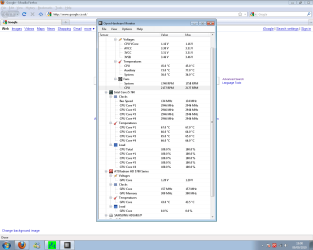
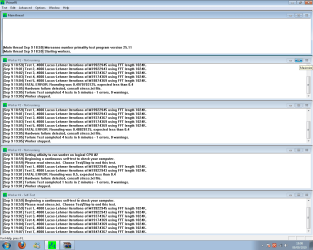
Here is a picture showing my computer during Prime95 stress test and when the stress test failed. I have no idea what this stuff means and would be eternaly gratful to anyone who could help me sort this out, thank you in advance!!!

As the stress test continued the core temps went upwars of 70 which am pritty sure isnt normal. Considering this hardware is less than 10 days old do you think i would be better off replacing it or do i5 just have awful cooling. Also i have a gryphin case with a 28cm fan on the side so i mean the cooling cant be that bad.
 

Attachments

  • Stress Test.png
    Stress Test.png
    34.7 KB · Views: 12
  • Stress Test Results.png
    Stress Test Results.png
    31.6 KB · Views: 10
Last edited:

My Computer My Computer

At a glance

Windows 7 Professional x64
OS
Windows 7 Professional x64
You can see in the Prime95 report that the hardware failure is detailed in a file named STRESS.TXT.

Can you find and post the contents of STRESS.TXT?

In the meantime I think you should run Memtest86+. Run it overnight for at least 3 passes, 5 or more is even better.

Have you made any changes (personalized your settings) in BIOS?

Is your RAM running at 1066 (default) or is is set to 1333Mhz?
 

My Computer My Computer

At a glance

Windows 7 64 Bit Home Premium SP1i7-3820GSkill F3-14900CL9Q - 16GBEVGA GeForce GTX660 - Driver 352.86
Computer type
PC/Desktop
Computer Manufacturer/Model Number
Home Built - Jan 2013
OS
Windows 7 64 Bit Home Premium SP1
CPU
i7-3820
Motherboard
Asus P9X79-PRO - Bios 4608
Memory
GSkill F3-14900CL9Q - 16GB
Graphics Card(s)
EVGA GeForce GTX660 - Driver 352.86
Sound Card
On board Realtek ALC898
Monitor(s) Displays
Acer S271HL
Screen Resolution
1920 x 1080
Hard Drives
#1- Samsung 840 Pro Series
#2- Western Digital WD1002FAEX Sata3 Black
#3- Western Digital WD1002FAEX Sata3 Black
PSU
Corsair CMPSU-850TX-V2 - 850 watt (by Seasonic)
Case
Corsair Obsidian 550D
Cooling
Standard 3 120mm case fans, Cooler Master Hyper 212 EVO
Keyboard
MS KC-0405
Mouse
Intellimouse 5-button
Internet Speed
56 Mbits/Sec (on a good day)
Antivirus
Avast & Malwarebytes
Browser
Firefox
Other Info
Asus DVD - DRW-24B1ST 24X
Thank you for taking the time to replay mate,

I havent changed anything manualy in the BIOS and also i do not know what speed my RAM is running at could you please tell me how i can check this, thanks!

The file stess.txt dosent specificly tell you what the problem was it just gives you a vague reveiw of what can go wrong, ill see if i can attach it here to show you what i mean!

Again thanks for replying mate, these mobo is very close to going back if i cant get this sorted soon.
 

Attachments

My Computer My Computer

At a glance

Windows 7 Professional x64
OS
Windows 7 Professional x64
You're right. Stress.txt is useless. But at least now we know you have a hardware problem.

A few ways to check the memory speed.

  • When you first boot your computer the amount of RAM and speed may show on the first boot screen that comes on the display. You can use the PAUSE key to freeze the screen to read it.
  • Or Enter the BIOS (that first boot screen will tell you what key to press to do this) and navigate to the tab that does overclocking or tweaking and look at the settings. Don't change anything and "Exit without Saving Changes" on the exit Tab after you've got all your info.

If you made no changes and this is a new build that you assembled then I bet the RAM is set at 1066 by default. That's OK for now, and eliminates any problems that may have been caused by changing the multiplier. Just leave it alone until you get this current problem sorted.

Run Memtest. Lets see if the RAM is good.
 
Last edited:

My Computer My Computer

At a glance

Windows 7 64 Bit Home Premium SP1i7-3820GSkill F3-14900CL9Q - 16GBEVGA GeForce GTX660 - Driver 352.86
Computer type
PC/Desktop
Computer Manufacturer/Model Number
Home Built - Jan 2013
OS
Windows 7 64 Bit Home Premium SP1
CPU
i7-3820
Motherboard
Asus P9X79-PRO - Bios 4608
Memory
GSkill F3-14900CL9Q - 16GB
Graphics Card(s)
EVGA GeForce GTX660 - Driver 352.86
Sound Card
On board Realtek ALC898
Monitor(s) Displays
Acer S271HL
Screen Resolution
1920 x 1080
Hard Drives
#1- Samsung 840 Pro Series
#2- Western Digital WD1002FAEX Sata3 Black
#3- Western Digital WD1002FAEX Sata3 Black
PSU
Corsair CMPSU-850TX-V2 - 850 watt (by Seasonic)
Case
Corsair Obsidian 550D
Cooling
Standard 3 120mm case fans, Cooler Master Hyper 212 EVO
Keyboard
MS KC-0405
Mouse
Intellimouse 5-button
Internet Speed
56 Mbits/Sec (on a good day)
Antivirus
Avast & Malwarebytes
Browser
Firefox
Other Info
Asus DVD - DRW-24B1ST 24X
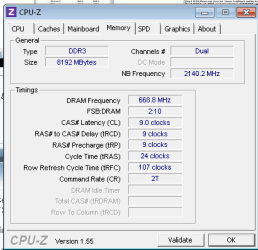
Here is my RAM readings from CPU-Z. Going to run memtest tonight ill post back the results tomorrow. I have removed the RAM and booted up one at a time already and the error persisted however.
 

Attachments

  • ram speed.png
    ram speed.png
    6.6 KB · Views: 4

My Computer My Computer

At a glance

Windows 7 Professional x64
OS
Windows 7 Professional x64
might i ask what kind of psu you bought if its a cheap one you might be under powering your rig with all that ram and that new gpu
 

My Computer My Computer

At a glance

windows 7AMD Phenom II X4 9658 gigs GskillGTX470
Computer Manufacturer/Model Number
custom
OS
windows 7
CPU
AMD Phenom II X4 965
Motherboard
M4N98TD EVO
Memory
8 gigs Gskill
Graphics Card(s)
GTX470
Sound Card
sound blaster
Monitor(s) Displays
2x hpw1907
Hard Drives
2X WD750
PSU
1100w rosewill
Case
Thermaltake Tsunami VA3000BWA Black Aluminum
Keyboard
g11
Mouse
logitech G7
Ok i just completed 2:30 running memtest. It completeled two cycles in which it passed both with no errors. I am unable to leave it running over night as the computer is in the bedroom and GF dosent want it on haha. :rolleyes:

Supose this rules out memory errors then?

My PSU is 650w ATX PSU although i know nothing else about it.
 
Last edited:

My Computer My Computer

At a glance

Windows 7 Professional x64
OS
Windows 7 Professional x64
Supose this rules out memory errors then?

As far as 2 passes goes, sure.

My PSU is 650w ATX PSU although i know nothing else about it, this part i got a friend of mine who works in computer maintence to order for me.

Prime 95 says you got a problem.
Did you check for cooling issues?
Other than that it could be power supply or motherboard.
 

My Computer My Computer

At a glance

Windows 7 64 Bit Home Premium SP1i7-3820GSkill F3-14900CL9Q - 16GBEVGA GeForce GTX660 - Driver 352.86
Computer type
PC/Desktop
Computer Manufacturer/Model Number
Home Built - Jan 2013
OS
Windows 7 64 Bit Home Premium SP1
CPU
i7-3820
Motherboard
Asus P9X79-PRO - Bios 4608
Memory
GSkill F3-14900CL9Q - 16GB
Graphics Card(s)
EVGA GeForce GTX660 - Driver 352.86
Sound Card
On board Realtek ALC898
Monitor(s) Displays
Acer S271HL
Screen Resolution
1920 x 1080
Hard Drives
#1- Samsung 840 Pro Series
#2- Western Digital WD1002FAEX Sata3 Black
#3- Western Digital WD1002FAEX Sata3 Black
PSU
Corsair CMPSU-850TX-V2 - 850 watt (by Seasonic)
Case
Corsair Obsidian 550D
Cooling
Standard 3 120mm case fans, Cooler Master Hyper 212 EVO
Keyboard
MS KC-0405
Mouse
Intellimouse 5-button
Internet Speed
56 Mbits/Sec (on a good day)
Antivirus
Avast & Malwarebytes
Browser
Firefox
Other Info
Asus DVD - DRW-24B1ST 24X
I have tried EVERYTHING and i mean everything. I seriously just F**king give up on this now.

PSU voltages after closer looking where fine 1.1-1.2 when computer is under stress. From what i can tell while reading on net this is fine.

Temps do go fairly high 70+ when running prime95 however while in game it never exceeded 65 and STILL crashed. This still might be it however i am pritty sure that sort of temp is not enough to cause it to crash over and over. Right now as i am typing this the 4 cores are between 31-34. :/

I have booted up and tried each RAM stick one at a time to still get the error. Ran memtest all be it for only 2:30 mins but still no errors.

I have completely removed all traces of graphics card drivers from my system and updated using the newest ones time and time again.

My BIOS was updated yeserday from 2.00 to 2.20 version which came out 2 days ago!

My GPU is brand new, not only is it brand new it dosent overheat and still gives me the error. Also i have tried my nvidia 9800 gtx+ which also gave me the error.

All the parts within the computer are fine, nothing is lose everything is in correct place. Everything is bloody BRAND NEW for crying out loud.

Prime95 did however say i have some sort of hardware error so this computer is going back on Sat.


However all that being said and rant over i must thank you guys here on this fourms for helping me and advising me on what to do. If you still do have any ideas i have a day and a half to try it because i seriously would prefare not to wait on getting this back.

Thanks in advance, Kloral.
 
Last edited:

My Computer My Computer

At a glance

Windows 7 Professional x64
OS
Windows 7 Professional x64
My PSU is 650w ATX PSU although i know nothing else about it, this part i got a friend of mine who works in computer maintence to order for me.

Might want to pop the side panel off and make note of the make and model of it. not all power supplies are created equal and a poor quality 650W PSU isn't as good or reliable as a good quality 400-450W PSU. Think of it as the heart of the system, and if it is the weakest link, then nothing else can or will run properly.
 

My Computer My Computer

At a glance

Win 7 Ultimate x64FX-8350 @ 4.6 GHz so farADATA XPG V1 Series Black 8GB DDR3 1600Sapphire R9 270x Dual-X
Computer type
PC/Desktop
Computer Manufacturer/Model Number
Me
OS
Win 7 Ultimate x64
CPU
FX-8350 @ 4.6 GHz so far
Motherboard
Asus M5A97 EVO
Memory
ADATA XPG V1 Series Black 8GB DDR3 1600
Graphics Card(s)
Sapphire R9 270x Dual-X
Sound Card
Xonar DGX w/ Corsair Vengence 1300
Monitor(s) Displays
Acer S232HL Abid
Screen Resolution
1920x1080
Hard Drives
120 GB OCZ Vertex 3
500 GB Seagate 7200.12
PSU
Antec Earthwatts 650W Green
Case
Antec Three Hundred
Cooling
Cooler Master 212 EVO
Keyboard
Logitech G510
Mouse
Logitech G500s
Internet Speed
35000/3000
My PSU is 650w ATX PSU although i know nothing else about it, this part i got a friend of mine who works in computer maintence to order for me.

Might want to pop the side panel off and make note of the make and model of it. not all power supplies are created equal and a poor quality 650W PSU isn't as good or reliable as a good quality 400-450W PSU. Think of it as the heart of the system, and if it is the weakest link, then nothing else can or will run properly.

Hey mate thanks for your advice, here are the things written on the side of my PSU.

AC INPUNT: 230VAC 10A 50-60 HZ MODEL: 650 UB.

DC OUTPUT +3.3v / +5v / +12v1 / +12v2 / -12v / +5vsb
MAX 28a / 3va / 20a / 19a / 0.3a / 25a

650w
 

My Computer My Computer

At a glance

Windows 7 Professional x64
OS
Windows 7 Professional x64
Mmmm.
That is this unit: CiT 650W Power Supply Unit with PSU and Dual 12V Rails - Black Edition: Amazon.co.uk: Computers & Accessories
And it is a prime suspect.

Those are marginal amperage ratings if they were honest and the power supply was producing the true maximum amount of current (even the good ones only do about 95% of the rated amperage in bench tests).

I recall reading that the 5770 class GPUs need 18a on the 12v to run at max.

EDIT: and you're running 8 Gigs of RAM which use a lot of juice.
 

My Computer My Computer

At a glance

Windows 7 64 Bit Home Premium SP1i7-3820GSkill F3-14900CL9Q - 16GBEVGA GeForce GTX660 - Driver 352.86
Computer type
PC/Desktop
Computer Manufacturer/Model Number
Home Built - Jan 2013
OS
Windows 7 64 Bit Home Premium SP1
CPU
i7-3820
Motherboard
Asus P9X79-PRO - Bios 4608
Memory
GSkill F3-14900CL9Q - 16GB
Graphics Card(s)
EVGA GeForce GTX660 - Driver 352.86
Sound Card
On board Realtek ALC898
Monitor(s) Displays
Acer S271HL
Screen Resolution
1920 x 1080
Hard Drives
#1- Samsung 840 Pro Series
#2- Western Digital WD1002FAEX Sata3 Black
#3- Western Digital WD1002FAEX Sata3 Black
PSU
Corsair CMPSU-850TX-V2 - 850 watt (by Seasonic)
Case
Corsair Obsidian 550D
Cooling
Standard 3 120mm case fans, Cooler Master Hyper 212 EVO
Keyboard
MS KC-0405
Mouse
Intellimouse 5-button
Internet Speed
56 Mbits/Sec (on a good day)
Antivirus
Avast & Malwarebytes
Browser
Firefox
Other Info
Asus DVD - DRW-24B1ST 24X
Back
Top