
You are using an out of date browser. It may not display this or other websites correctly.
You should upgrade or use an alternative browser.
You should upgrade or use an alternative browser.
os 64 bit doesnt use all 4 gb
- Thread starter igalep132
- Start date

zigzag3143
New member
- Local time
- 11:51 PM
- Messages
- 27,140
Hello,
I have win 7 enterprise 64 bit with 4 gb ram.
in device manager, i see that 4 gb is recognized, but actually only 3 gb has been used (it's written in bracket near to the recognized memory)
any idea why is that ?
thanks
snip a picture of the task manger tab performance and upload it to us.
My Computer
- Computer Manufacturer/Model Number
- HP Pavillion dv-7 1005 Tx
- OS
- Win 8 Release candidate 8400
- Memory
- 4 gigs
- Graphics Card(s)
- Nvidia 9600M
- Sound Card
- HD built-in
- Monitor(s) Displays
- 17" Wxga
- Screen Resolution
- 1440x900
- Cooling
- none
- Internet Speed
- 45Mb down 5Mb up
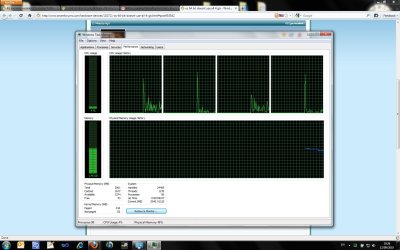

Hello,
I have win 7 enterprise 64 bit with 4 gb ram.
in device manager, i see that 4 gb is recognized, but actually only 3 gb has been used (it's written in bracket near to the recognized memory)
any idea why is that ?
thanks
You need to enable Memory remap in your BIOS if it is available
My Computer
- Computer type
- PC/Desktop
- Computer Manufacturer/Model Number
- Custom Build
- OS
- Windows 10 Pro x64, Arch Linux
- CPU
- Intel Core 2 Quad Q8200 OC'd 3.08GHz
- Motherboard
- Asus Rampage formula LGA775
- Memory
- 8GB DDR2 900Mhz
- Graphics Card(s)
- MSI GT730 2GB GDDR5 (Kepler)
- Sound Card
- Supreme FX2
- Monitor(s) Displays
- Samsung LS22F350 LED
- Screen Resolution
- 1080P
- Hard Drives
- Kingston SSDNow UV400 120GB, 500GB Hitachi, 2TB Samsung, 500GB Seagate FreeAgent, 640GB Samsung, 160GB Toshiba (Arch)
- PSU
- AeroCool 500W Bronze
- Cooling
- Cooler Master V6 + 3X fans
- Keyboard
- Prolink keyboard
- Mouse
- Logitech M705
- Internet Speed
- 1MiB/s
- Browser
- Chrome Beta
zigzag3143
New member
- Local time
- 11:51 PM
- Messages
- 27,140
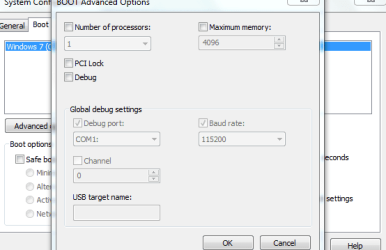
which tab ?
type msconfig in search>go to the advanced tab>look for max memory>uncheck and reboot
Did that help?
Good luck
Ken
My Computer
- Computer Manufacturer/Model Number
- HP Pavillion dv-7 1005 Tx
- OS
- Win 8 Release candidate 8400
- Memory
- 4 gigs
- Graphics Card(s)
- Nvidia 9600M
- Sound Card
- HD built-in
- Monitor(s) Displays
- 17" Wxga
- Screen Resolution
- 1440x900
- Cooling
- none
- Internet Speed
- 45Mb down 5Mb up

- Local time
- 9:21 AM
- Messages
- 831
My Computer
- Computer Manufacturer/Model Number
- aspire 5920
- OS
- Windows 8 Professional x64
- CPU
- core 2 duo T5550
- Memory
- 4 GB
- Graphics Card(s)
- GMA X3100
- Hard Drives
- 160 GB + 320 GB
- Internet Speed
- 2 mbps

Big help would be to know the make and model of the motherboard.
If the chipset on the motherboard only supports up to 4 GB of ram then what you see is what you get, and short of a new motherboard there is nothing you can do,
The system memory that is reported in the System Information dialog box in Windows Vista is less than you expect if 4 GB of RAM is installed
If the chipset on the motherboard only supports up to 4 GB of ram then what you see is what you get, and short of a new motherboard there is nothing you can do,
The system memory that is reported in the System Information dialog box in Windows Vista is less than you expect if 4 GB of RAM is installed
When the physical RAM that is installed on a computer equals the address space that is supported by the chipset, the total system memory that is available to the operating system is always less than the physical RAM that is installed. For example, consider a computer that has an Intel 975X chipset that supports 8 GB of address space. If you install 8 GB of RAM, the system memory that is available to the operating system will be reduced by the PCI configuration requirements. In this scenario, PCI configuration requirements reduce the memory that is available to the operating system by an amount that is between approximately 200 MB and approximately 1 GB. The reduction depends on the configuration.
My Computer
- Computer type
- PC/Desktop
- Computer Manufacturer/Model Number
- Me
- OS
- Win 7 Ultimate x64
- CPU
- FX-8350 @ 4.6 GHz so far
- Motherboard
- Asus M5A97 EVO
- Memory
- ADATA XPG V1 Series Black 8GB DDR3 1600
- Graphics Card(s)
- Sapphire R9 270x Dual-X
- Sound Card
- Xonar DGX w/ Corsair Vengence 1300
- Monitor(s) Displays
- Acer S232HL Abid
- Screen Resolution
- 1920x1080
- Hard Drives
- 120 GB OCZ Vertex 3
500 GB Seagate 7200.12
- PSU
- Antec Earthwatts 650W Green
- Case
- Antec Three Hundred
- Cooling
- Cooler Master 212 EVO
- Keyboard
- Logitech G510
- Mouse
- Logitech G500s
- Internet Speed
- 35000/3000
Humor us. Little things like this,
make it much easier to help you.
Also,
That says get rid of McAfee then.
make it much easier to help you.
Also,
the issue has started after i installed McAfee end point encryption, till then every thing was fine (4 gb was recognized and used)
That says get rid of McAfee then.
My Computer
- Computer type
- PC/Desktop
- Computer Manufacturer/Model Number
- Me
- OS
- Win 7 Ultimate x64
- CPU
- FX-8350 @ 4.6 GHz so far
- Motherboard
- Asus M5A97 EVO
- Memory
- ADATA XPG V1 Series Black 8GB DDR3 1600
- Graphics Card(s)
- Sapphire R9 270x Dual-X
- Sound Card
- Xonar DGX w/ Corsair Vengence 1300
- Monitor(s) Displays
- Acer S232HL Abid
- Screen Resolution
- 1920x1080
- Hard Drives
- 120 GB OCZ Vertex 3
500 GB Seagate 7200.12
- PSU
- Antec Earthwatts 650W Green
- Case
- Antec Three Hundred
- Cooling
- Cooler Master 212 EVO
- Keyboard
- Logitech G510
- Mouse
- Logitech G500s
- Internet Speed
- 35000/3000
Humor us. Little things like this,
Also,
That says get rid of McAfee then.the issue has started after i installed McAfee end point encryption, till then every thing was fine (4 gb was recognized and used)
Tell that to the IT department
My Computer
- OS
- 7

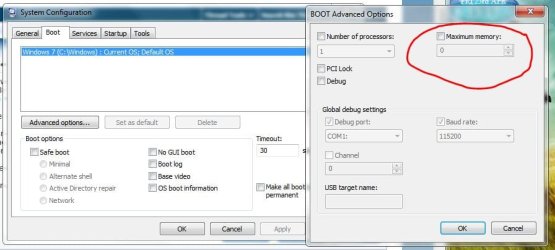
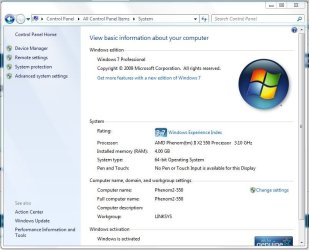
that's what i did, (my check box is checked) but still i get only 2.99 gb
Did you set max memory to zero (o) & then unchecked ? Click ok, close & reboot computer

Attachments
My Computer
- Computer type
- PC/Desktop
- Computer Manufacturer/Model Number
- Built them myself, Science Experiments !
- OS
- Win7 Enterprise, Win7 x86 (Ult 7600), Win7 x64 Ult 7600, TechNet RTM on AMD x64 (2.8Ghz)
- CPU
- AMD fx8350 4ghz, AMD-32 2400mhz, AMD-64 3200mhz, AMDx64 2.8G
- Motherboard
- SIS 755, ECS-K8M890M-M (Ult 7600), GigaByte & others
- Memory
- 2gb, 4gb on the Ult 7600, 4gb on Technet RTM, 32gb on FX8350
- Graphics Card(s)
- Draw my own Graphics, several nVidia cards
- Sound Card
- on motherboard
- Monitor(s) Displays
- 19" flat scr, 28" I-Inc widescr,22" Emprex Widescr, 23" Acer
- Screen Resolution
- 1280 x 1024, 1440 x 900, 1920 x 1080
- Hard Drives
- 6 pata Ide HD's & 2 Sata HD's
added 80gb external on Ult 7600 computer,
numerous extra 1tb, 2TB, 3Tb SATA HD's
A collection of ext HD Docks w/ HDs
- PSU
- 430w, 550w, 600w, 700, 800, etc
- Case
- All Generic Full Towers
- Cooling
- Open Air & a few fans, some w/ colored LEDs
- Keyboard
- Compaq & Dell recycled from GoodWill
- Mouse
- Made in China Optical Wired Mouse
- Internet Speed
- Fast Cable InterNet
- Antivirus
- AVG Free on 24 different Desktops, NO Problems!
- Browser
- IE 8 is preferred, but use FireFox sometimes
- Other Info
- Linksys Routers, switches, & Hubs
Too Many USB Flash Drives to count, Biggest is 64GB !
Eight computers in my home network.
Sixteen computers at my business network.
Linked via TeamViewer !
Lots of old used spare computer parts everywhere!

I'm Not advanced as most boffins here but,
The prob started when u installed somthing, Uninstall it, see if it comes back.
Also do you have a Onboard graphics card, If so your motherboard may be taking it for that.
The prob started when u installed somthing, Uninstall it, see if it comes back.
Also do you have a Onboard graphics card, If so your motherboard may be taking it for that.
My Computer
- Computer Manufacturer/Model Number
- Home Build.
- OS
- Windows 7 Home Pre
- CPU
- Q8200 Intell 2.333
- Motherboard
- Asus P5Q3 Delux
- Memory
- DDR3 1333 4gig
- Graphics Card(s)
- Ati HD4870
- Sound Card
- Onboard Soundmax. 7.1
- Monitor(s) Displays
- 1, 20" Samsung
- Screen Resolution
- 1600/900
- PSU
- Good enough
- Case
- Le Shark
- Cooling
- FAN FAN FAN FAN, Thermaltake Minitype 90 with speed fan 4.
- Keyboard
- Standard, Gaming Wolfking
- Mouse
- Cm-storm-inferno-wired-gaming-mouse
- Internet Speed
- Sky Crappy upto 20meg I get a whapping 5.8mbs.

The remainder is cached windows will use it when you have something that needs it Apps that take alot of ram useing like editing and workstation type stuff don't worry it is available when neededHello,
I have win 7 enterprise 64 bit with 4 gb ram.
in device manager, i see that 4 gb is recognized, but actually only 3 gb has been used (it's written in bracket near to the recognized memory)
any idea why is that ?
thanks
Also you need to fill in you're specs if it is like any other system nowdays most vidcards come with there own dedicated memory unless you are mainly useing the onboard vga basicly unless you are using onboard thats the only other way
but it shows something like 1564 mb cached means that either windows did this or the cpu or even the onboard but i doubt it ... i just think windows has it reserved for when you have something that needs the extra ram
My Computer
- Computer type
- PC/Desktop
- Computer Manufacturer/Model Number
- CoreI7-6700K MrFingerIII Special Builds
- OS
- Windows 10 Home Premium 64bit sp1
- CPU
- Intel I7-6700K @ 4.6 Ghz 1.344 volts everyday OC
- Motherboard
- Asrock Fatality K6 Z170 Socket 1151
- Memory
- 32GB G-Skill TridentZ 3200mhz 16-18-18-38 DDR4
- Graphics Card(s)
- Sli Gigabyte Windforce GTX 980 G1
- Sound Card
- AC97 Creative Rage Tactic 3D Headphones Bluetooth
- Monitor(s) Displays
- 27" Asus ROG Swift PG278Q G-Sync 48" Vizio Smart HD TV
- Screen Resolution
- 2560x1440p 27"- 48" Currently Gaming at 2560x1440p Res 2K
- Hard Drives
- 250GB Samsung Evo840SSD Seagate baracuda 500 GB WD Mybook 500Gb 1TB Seagate Barracuda
- PSU
- HX1050w Corsair Silver 80plus certified crosfire/sli
- Case
- Enthod Pro Full Tower
- Cooling
- Corsair H110i GT 280 mm High Performance WaterBlock
- Keyboard
- Logitech wireless keyboard
- Mouse
- Logitech wireless mouse
- Internet Speed
- Cox Cable 100+ mb
- Antivirus
- WebRoot Spysweeper with Antivirus
- Browser
- IE-10, Chrome, Opera
- Other Info
- My Other Rig is a AMD FX8320E @4.6Ghz 16GB Ballistic Sport Ram
Mobo Asrock Fatality 990FX 120GB OCZ SSD 1TB Seagate Barracuda Corsair H75 Cooling PSU Corsair CX750
GPU GTX Gigabyte 970G1
yes, i did it, doesn't helpthat's what i did, (my check box is checked) but still i get only 2.99 gb
Did you set max memory to zero (o) & then unchecked ? Click ok, close & reboot computer
i cant uninstall encryption program (it encrypted all my HD), the only thing is to re image my drive, and i do have separate video cardI'm Not advanced as most boffins here but,
The prob started when u installed somthing, Uninstall it, see if it comes back.
Also do you have a Onboard graphics card, If so your motherboard may be taking it for that.
The remainder is cached windows will use it when you have something that needs it Apps that take alot of ram useing like editing and workstation type stuff don't worry it is available when neededHello,
I have win 7 enterprise 64 bit with 4 gb ram.
in device manager, i see that 4 gb is recognized, but actually only 3 gb has been used (it's written in bracket near to the recognized memory)
any idea why is that ?
thanks
Also you need to fill in you're specs if it is like any other system nowdays most vidcards come with there own dedicated memory unless you are mainly useing the onboard vga basicly unless you are using onboard thats the only other way
but it shows something like 1564 mb cached means that either windows did this or the cpu or even the onboard but i doubt it ... i just think windows has it reserved for when you have something that needs the extra ram
as i told before, it started to be happened after i installed McAfee end point encryption, probably it takes that memory, but in their web site i didnt find any reference to this subject ...
My Computer
- OS
- 7
Similar threads
- Replies
- 15
- Views
- 3K

- Replies
- 7
- Views
- 3K

- Replies
- 18
- Views
- 9K