Enable Ready Boost in win 7?

Hong

New member
Local time
6:32 PM
Messages
5
recently, i edited something in regedit and stop some services in order to increase my windows boot speed.the problem now is i may b stop some services and cause ready boost not available now.i will attach the error message here... any idea? turning on "sysmain"? :sarc:
 

Attachments

  • Capture_2.jpg
    Capture_2.jpg
    17.7 KB · Views: 128

My Computer My Computer

At a glance

windows 7 ultimate 32-bit
OS
windows 7 ultimate 32-bit
The biggest mistake anyone can make with Windows 7 is to start disabling services. That was debateable back in Windows XP (ultimately proven false), but was never the case with Vista or Windows 7. So that leaves me with two points:

1. Go back and reenable everything you disabled. Then, follow the best tweaking advice out there: Leave it alone.
2. If you have less than 1 GB of system memory, you won't gain anything from using ReadyBoost anyway.
 

My Computer My Computer

At a glance

Windows 7 Ultimate x64 SP1Intel Core i7-260012 GB Patriot Extreme DDR3-1333Nvidia GTX 470
OS
Windows 7 Ultimate x64 SP1
CPU
Intel Core i7-2600
Motherboard
Gigabyte GA-P67A-UD3P-B3
Memory
12 GB Patriot Extreme DDR3-1333
Graphics Card(s)
Nvidia GTX 470
Monitor(s) Displays
Dell UltraSharp 2209WA
Hard Drives
OCZ Agility3 240 GB, WD5001AALS, WD7501AALS
PSU
OCZ ModStream 700W
Case
CoolerMaster HAF 912 Advanced
Cooling
CoolerMaster Hyper 212 Plus
How about if my system ram is 1.5 gb?

my system ram was 512mb before and i upgraded to 1.5gb.. so...ready boost give any speed changes for my laptop? another question is why stopping the services in windows 7 is a big mistake?
 

My Computer My Computer

At a glance

windows 7 ultimate 32-bit
OS
windows 7 ultimate 32-bit
For the first, with 512MB ReadyBoost would probably be a big help (because superfetch is pretty much limited, and might as well be off), but with 1.5GB it's debatable - it would depend on how you used your machine and how much disk access you do (remember, ReadyBoost memory isn't used as RAM, it's a disk cache - it helps with superfetch, but it is *not* additional RAM!).

Second, most (not all, but most) non-critical Windows 7 drivers and services are either configured for a manual or delayed start, meaning that for the most part, they will only use resources if you need them. If you are *sure* you won't need a service, you can set it to disabled, but you want to always keep track of the default states in case you have to go back and set them to enabled (or manual, depending on what the service was set to when you disabled it). Win7 is a far more efficient user of memory than even Vista was, and is light-years ahead of XP, so reducing potential functionality to save some resources at 512MB makes sense somewhat, but at 1.5GB or higher it really doesn't (and to be fair, I run Win7 on a few netbooks with 1GB of RAM, and have zero perf issues).

To configure and start SysMain again, run the following two commands from an elevated cmd prompt:
sc config SysMain start= auto
net start SysMain

 

My Computer My Computer

At a glance

Windows 10 Pro x64Intel Core i7 4790K @ 4.5GHz32GB DDR3Nvidia GeForce GTX970
Computer type
PC/Desktop
Computer Manufacturer/Model Number
Custom
OS
Windows 10 Pro x64
CPU
Intel Core i7 4790K @ 4.5GHz
Motherboard
Asus Maximus Hero VII
Memory
32GB DDR3
Graphics Card(s)
Nvidia GeForce GTX970
Sound Card
Realtek HD Audio
Screen Resolution
1920x1200
Hard Drives
1x Samsung 250GB SSD
4x WD RE 2TB (RAIDZ)
PSU
Corsair AX760i
Case
Fractal Design Define R4
Cooling
Noctua NH-D15
The biggest mistake anyone can make with Windows 7 is to start disabling services. That was debateable back in Windows XP (ultimately proven false), but was never the case with Vista or Windows 7.

My Vista computer has 137 services listed and my Win 7 computer has 164 services. As we know the number of services differ from computer to computer but with the number of kernel threads twice the size of XP or Vista the Win 7 OS has a proliferation of services that never existed in XP some of which are so future forward that the architecture is not yet in place to run some services.

An astute user with a complete guide to Win 7 services from Black Viper's Web Site can competently and confidently disable dozens of completely unneeded services in Win 7 and not harm the performance of the computer in any way.

Just because Hong seems to have made a simple mistake in disabling a service that can be remedied with the click of the mouse does not justify calling the disabling of unneeded services a huge mistake. I agree that caution should be taken, but why should anyone leave dozens of useless and unneeded services running some of which collect data for Microsoft even though the user has opted out of CEIP, or to run a fax machine that doesn't exist or a phantom printer?

To name just a few services I do not ever use there is Bitlocker, Bluetooth, Windows Disc Defragger, Encrypted File System, Game Console Service, Human Interface Device Access, Media Center Extender Service or Parental Controls and so I have disabled their respective services. And the list goes on and on of services that I simply don't need and so I have chosen to disable them which is like taking out the computer's trash because while I am running it the computer it will never ever need these services. How can this be considered a huge mistake?

I am not encouraging anyone to disable any of the 150+ services in their Win 7 computer because it will run quite nicely just as it is, but if you are like many of the Members here at the Windows 7 Forums you don't want unneeded services any more than all the GB's of crapware that manufactures put on the computers they sell because although they do not harm the computer both are also totally useless to an individual's operation of the computer and prevent the computer from running lean and clean as some people prefer to.

~Maxx~
.
da59fa57.png
 

My Computer My Computer

At a glance

Windows 7 x64 Home PremiumIntel Core i7 930 @ 2.8 Ghz Socket 1366 LGA8 GB 1366 Mhz DDR3 (PC3-10700) RAMATI Radeon 5770 1 GB DDR5 RAM
Computer Manufacturer/Model Number
HP HPE 270f
OS
Windows 7 x64 Home Premium
CPU
Intel Core i7 930 @ 2.8 Ghz Socket 1366 LGA
Motherboard
Pegatron Truckee v1.04E41
Memory
8 GB 1366 Mhz DDR3 (PC3-10700) RAM
Graphics Card(s)
ATI Radeon 5770 1 GB DDR5 RAM
Sound Card
Realtech High Definition
Monitor(s) Displays
32" Sony Bravia
Screen Resolution
1366 X 768
Hard Drives
Intel 25nm 120 GB Series 320 SSD HD Tune- 265 MBps Read/ 130 MBps Write

LaCie 1TB + 1TB RAID 0 eSATA Drive HD Tune- 160 MBps Read/ 90 MBps Write
Keyboard
Logitech Illuminated
Mouse
Logitech MX Revolution
Internet Speed
36.4 Mbps Maximum on a 37 Mbps Motorola SB501 Modem
For the first, with 512MB ReadyBoost would probably be a big help (because superfetch is pretty much limited, and might as well be off), but with 1.5GB it's debatable - it would depend on how you used your machine and how much disk access you do (remember, ReadyBoost memory isn't used as RAM, it's a disk cache - it helps with superfetch, but it is *not* additional RAM!).

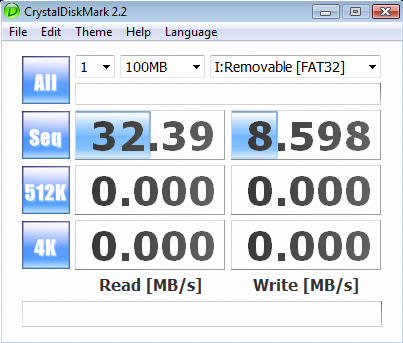
Hong- I agree with cluberti that ReadyBoost could help your RAM challenged computer to run better, but make sure to get as fast a USB Flash Drive as you can 30 MBps read speed would be good to shoot for and there are several out there that can do that.

~Maxx~
.
da59fa57.png
 

My Computer My Computer

At a glance

Windows 7 x64 Home PremiumIntel Core i7 930 @ 2.8 Ghz Socket 1366 LGA8 GB 1366 Mhz DDR3 (PC3-10700) RAMATI Radeon 5770 1 GB DDR5 RAM
Computer Manufacturer/Model Number
HP HPE 270f
OS
Windows 7 x64 Home Premium
CPU
Intel Core i7 930 @ 2.8 Ghz Socket 1366 LGA
Motherboard
Pegatron Truckee v1.04E41
Memory
8 GB 1366 Mhz DDR3 (PC3-10700) RAM
Graphics Card(s)
ATI Radeon 5770 1 GB DDR5 RAM
Sound Card
Realtech High Definition
Monitor(s) Displays
32" Sony Bravia
Screen Resolution
1366 X 768
Hard Drives
Intel 25nm 120 GB Series 320 SSD HD Tune- 265 MBps Read/ 130 MBps Write

LaCie 1TB + 1TB RAID 0 eSATA Drive HD Tune- 160 MBps Read/ 90 MBps Write
Keyboard
Logitech Illuminated
Mouse
Logitech MX Revolution
Internet Speed
36.4 Mbps Maximum on a 37 Mbps Motorola SB501 Modem
Hey guys, thanks lot for giving me suggestion!

if i use readyboost, what is the size that i should adjust for my usb pendrive for a better or obvious performance? ;)
 

My Computer My Computer

At a glance

windows 7 ultimate 32-bit
OS
windows 7 ultimate 32-bit
For the first, with 512MB ReadyBoost would probably be a big help (because superfetch is pretty much limited, and might as well be off), but with 1.5GB it's debatable - it would depend on how you used your machine and how much disk access you do (remember, ReadyBoost memory isn't used as RAM, it's a disk cache - it helps with superfetch, but it is *not* additional RAM!).

Second, most (not all, but most) non-critical Windows 7 drivers and services are either configured for a manual or delayed start, meaning that for the most part, they will only use resources if you need them. If you are *sure* you won't need a service, you can set it to disabled, but you want to always keep track of the default states in case you have to go back and set them to enabled (or manual, depending on what the service was set to when you disabled it). Win7 is a far more efficient user of memory than even Vista was, and is light-years ahead of XP, so reducing potential functionality to save some resources at 512MB makes sense somewhat, but at 1.5GB or higher it really doesn't (and to be fair, I run Win7 on a few netbooks with 1GB of RAM, and have zero perf issues).

To configure and start SysMain again, run the following two commands from an elevated cmd prompt:
sc config SysMain start= auto
net start SysMain

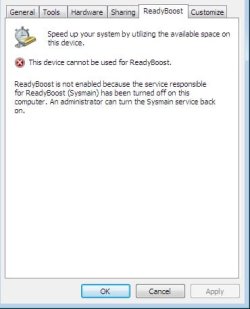
Hi, i finally found that i disabled the Superfetch before... but i watched a video on Youtube that told me that disabling superfetch can increase windows 7 performance, is it true?
 

My Computer My Computer

At a glance

windows 7 ultimate 32-bit
OS
windows 7 ultimate 32-bit
if i use readyboost, what is the size that i should adjust for my usb pendrive for a better or obvious performance? ;)

4 GB is the largest that ReadyBoost can use although Microsoft is trying to increase that amount so go with 4 GB.

e765564e.png


Like I said do try to get a USB Flash Drive that is capable of over 30 MBps sequential read time.

~Maxx~
.
938af360.png
 

My Computer My Computer

At a glance

Windows 7 x64 Home PremiumIntel Core i7 930 @ 2.8 Ghz Socket 1366 LGA8 GB 1366 Mhz DDR3 (PC3-10700) RAMATI Radeon 5770 1 GB DDR5 RAM
Computer Manufacturer/Model Number
HP HPE 270f
OS
Windows 7 x64 Home Premium
CPU
Intel Core i7 930 @ 2.8 Ghz Socket 1366 LGA
Motherboard
Pegatron Truckee v1.04E41
Memory
8 GB 1366 Mhz DDR3 (PC3-10700) RAM
Graphics Card(s)
ATI Radeon 5770 1 GB DDR5 RAM
Sound Card
Realtech High Definition
Monitor(s) Displays
32" Sony Bravia
Screen Resolution
1366 X 768
Hard Drives
Intel 25nm 120 GB Series 320 SSD HD Tune- 265 MBps Read/ 130 MBps Write

LaCie 1TB + 1TB RAID 0 eSATA Drive HD Tune- 160 MBps Read/ 90 MBps Write
Keyboard
Logitech Illuminated
Mouse
Logitech MX Revolution
Internet Speed
36.4 Mbps Maximum on a 37 Mbps Motorola SB501 Modem
I don't show ready boost on my win7 laptop:shock:
 

Attachments

  • Capture.JPG
    Capture.JPG
    191.7 KB · Views: 255

My Computer My Computer

At a glance

windows 7 professional & ultimate 64bit laptops2.27 boost to 2.53 & 2.53 boost to 2.804GBIntel® Graphics Media Accelerator HD
Computer Manufacturer/Model Number
Gateway/NV7923u & NV79C52u Laptops
OS
windows 7 professional & ultimate 64bit laptops
CPU
2.27 boost to 2.53 & 2.53 boost to 2.80
Motherboard
Mobile Intel® HM55 Express Chipset ???
Memory
4GB
Graphics Card(s)
Intel® Graphics Media Accelerator HD
Sound Card
realtek High-definition audio support
Monitor(s) Displays
17.3 " HD 1600 x 900
Hard Drives
hatachi Travelstar 5400 500GB & west digital 500GB
Internet Speed
35MB fios
if i use readyboost, what is the size that i should adjust for my usb pendrive for a better or obvious performance? ;)

4 GB is the largest that ReadyBoost can use although Microsoft is trying to increase that amount so go with 4 GB.

e765564e.png


Like I said do try to get a USB Flash Drive that is capable of over 30 MBps sequential read time.

~Maxx~
.
938af360.png

That's not true for Windows 7. Per Microsoft, you can use 8 devices for a max of 256gb for ReadyBoost. See at link here ReadyBoost - Windows 7 features - Microsoft Windows
 

My Computer My Computer

At a glance

Windows 7 Home Premium 64 bit4GB DDR3
OS
Windows 7 Home Premium 64 bit
Memory
4GB DDR3
An astute user with a complete guide to Win 7 services from Black Viper's Web Site can competently and confidently disable dozens of completely unneeded services in Win 7 and not harm the performance of the computer in any way.
Let's just say you are about 5-7 years late to that party. There's a reason why he's known as QuackViper, and why posting a link to his sites ruins a person's credibility. Yes, it is true he has updated his website some to remove some of his trouble advice, but his credibility has been completely gone for quite some time.
How can this be considered a huge mistake?
Because of dependencies, and due to the fact that these "tweaks" have been tested, retested, and then retested again until the reviewers have been blue in the face. Disabling services provides you with no gain whatsoever in terms of performance. It's honestly been this stale, and rehashed FAR too many times to even go into a big discussion. If you don't believe me, head over the HardForums.com, create a thread suggesting people follow BlackViper's advice, and wait to see what happens. You'll have developers from Microsoft posting links and suggested tests to prove that disabling services provides no benefit. it is to the point that the mere mention of BlackViper gets a person flamed. I could even give you the username of a guy who wrote several articles on testing methods, which were all confirmed by Anandtech as well.
but if you are like many of the Members here at the Windows 7 Forums you don't want unneeded services any more than all the GB's of crapware that manufactures put on the computers they sell because although they do not harm the computer both are also totally useless to an individual's operation of the computer and prevent the computer from running lean and clean as some people prefer to.
Somewhat incorrect. If you are like most enthusiasts or astute users, as you say, you'll know this has been rehashed to death, to the point it is now considered fact. I know that sounds harsh, and I'm not going to make any assumptions about your age, skill level, experience in computers, etc. All I'm going to tell you is that concept of disabling services in the name of performance or saving resources was utterly and completely debunked in XP, and even moreso in Vista and Windows 7.

However, you do bring up a good point in your last paragraph. ALL of my comments are referring to Windows services, not 3rd party apps. Most OEMs junk up their systems with unneeded crap that can be removed or disabled. That's why any enthusiast that buys an OEM system will wipe it clean and do a fresh install themselves. For those not wanting to go that route, apps like Revo Uninstaller and PC Decrapifier. Cleaning up 3rd party crap is always a good idea, and can definitely inprove performance, especially boot times. Ever troubleshoot a computer that has 4 different IM apps set to run at startup?
 

My Computer My Computer

At a glance

Windows 7 Ultimate x64 SP1Intel Core i7-260012 GB Patriot Extreme DDR3-1333Nvidia GTX 470
OS
Windows 7 Ultimate x64 SP1
CPU
Intel Core i7-2600
Motherboard
Gigabyte GA-P67A-UD3P-B3
Memory
12 GB Patriot Extreme DDR3-1333
Graphics Card(s)
Nvidia GTX 470
Monitor(s) Displays
Dell UltraSharp 2209WA
Hard Drives
OCZ Agility3 240 GB, WD5001AALS, WD7501AALS
PSU
OCZ ModStream 700W
Case
CoolerMaster HAF 912 Advanced
Cooling
CoolerMaster Hyper 212 Plus
Hi, i finally found that i disabled the Superfetch before... but i watched a video on Youtube that told me that disabling superfetch can increase windows 7 performance, is it true?
If you saw it on YouTube, it must be true :). In all seriousness, the only time I would consider disabling superfetch was if I had 512MB of RAM, or if I was using an SSD for my main hard disk (Win7 already does the latter if it detects your SSD properly). Superfetch actually makes Win7 *faster* by attempting to cache in RAM your most frequently accessed things from the hard disk, to speed up application load times. There are very few scenarios where disabling superfetch would improve performance, and all of those would be applicable only if you had less than 1GB of RAM in your machine.
 

My Computer My Computer

At a glance

Windows 10 Pro x64Intel Core i7 4790K @ 4.5GHz32GB DDR3Nvidia GeForce GTX970
Computer type
PC/Desktop
Computer Manufacturer/Model Number
Custom
OS
Windows 10 Pro x64
CPU
Intel Core i7 4790K @ 4.5GHz
Motherboard
Asus Maximus Hero VII
Memory
32GB DDR3
Graphics Card(s)
Nvidia GeForce GTX970
Sound Card
Realtek HD Audio
Screen Resolution
1920x1200
Hard Drives
1x Samsung 250GB SSD
4x WD RE 2TB (RAIDZ)
PSU
Corsair AX760i
Case
Fractal Design Define R4
Cooling
Noctua NH-D15
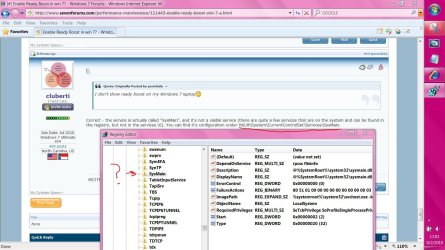
I don't show ready boost on my win7 laptop:shock:
Correct - the service is actually called "SysMain", and it's not a visible service (there are quite a few services that are on the system and can be found in the registry, but not in the services UI). You can find it's configuration under HKLM\System\CurrentControlSet\Services\SysMain.
 

My Computer My Computer

At a glance

Windows 10 Pro x64Intel Core i7 4790K @ 4.5GHz32GB DDR3Nvidia GeForce GTX970
Computer type
PC/Desktop
Computer Manufacturer/Model Number
Custom
OS
Windows 10 Pro x64
CPU
Intel Core i7 4790K @ 4.5GHz
Motherboard
Asus Maximus Hero VII
Memory
32GB DDR3
Graphics Card(s)
Nvidia GeForce GTX970
Sound Card
Realtek HD Audio
Screen Resolution
1920x1200
Hard Drives
1x Samsung 250GB SSD
4x WD RE 2TB (RAIDZ)
PSU
Corsair AX760i
Case
Fractal Design Define R4
Cooling
Noctua NH-D15
I don't show ready boost on my win7 laptop:shock:
Correct - the service is actually called "SysMain", and it's not a visible service (there are quite a few services that are on the system and can be found in the registry, but not in the services UI). You can find it's configuration under HKLM\System\CurrentControlSet\Services\SysMain.


is it there?
 

Attachments

  • Capture.JPG
    Capture.JPG
    184.5 KB · Views: 336

My Computer My Computer

At a glance

windows 7 professional & ultimate 64bit laptops2.27 boost to 2.53 & 2.53 boost to 2.804GBIntel® Graphics Media Accelerator HD
Computer Manufacturer/Model Number
Gateway/NV7923u & NV79C52u Laptops
OS
windows 7 professional & ultimate 64bit laptops
CPU
2.27 boost to 2.53 & 2.53 boost to 2.80
Motherboard
Mobile Intel® HM55 Express Chipset ???
Memory
4GB
Graphics Card(s)
Intel® Graphics Media Accelerator HD
Sound Card
realtek High-definition audio support
Monitor(s) Displays
17.3 " HD 1600 x 900
Hard Drives
hatachi Travelstar 5400 500GB & west digital 500GB
Internet Speed
35MB fios
Yes, that is it.
 

My Computer My Computer

At a glance

Windows 10 Pro x64Intel Core i7 4790K @ 4.5GHz32GB DDR3Nvidia GeForce GTX970
Computer type
PC/Desktop
Computer Manufacturer/Model Number
Custom
OS
Windows 10 Pro x64
CPU
Intel Core i7 4790K @ 4.5GHz
Motherboard
Asus Maximus Hero VII
Memory
32GB DDR3
Graphics Card(s)
Nvidia GeForce GTX970
Sound Card
Realtek HD Audio
Screen Resolution
1920x1200
Hard Drives
1x Samsung 250GB SSD
4x WD RE 2TB (RAIDZ)
PSU
Corsair AX760i
Case
Fractal Design Define R4
Cooling
Noctua NH-D15
So with a ssd on my sysytem and 4gb of ram is a 8gb patriot usb drive ready for boost gonna make anything faster for me or should i diss conect it?
 

My Computer My Computer

At a glance

Windows 7 UltimateAMD Athlon II X4 630 (95W) Quad Core Socket AM3Patriot Viper Series DDR3 PC3-10666 1333MHz 4...Geforce GTX550 TI
OS
Windows 7 Ultimate
CPU
AMD Athlon II X4 630 (95W) Quad Core Socket AM3
Motherboard
GIGABYTE MA785GMT-UD2H
Memory
Patriot Viper Series DDR3 PC3-10666 1333MHz 4GB CL 7-7-7-20
Graphics Card(s)
Geforce GTX550 TI
Sound Card
built in realtech hd
So with a ssd on my sysytem and 4gb of ram is a 8gb patriot usb drive ready for boost gonna make anything faster for me or should i diss conect it?
You have way more RAM than you would need to have to even consider ReadyBoost. I can think of plenty of good uses for that flash drive, and not one of them involves ReadyBoost.
 

My Computer My Computer

At a glance

Windows 7 Ultimate x64 SP1Intel Core i7-260012 GB Patriot Extreme DDR3-1333Nvidia GTX 470
OS
Windows 7 Ultimate x64 SP1
CPU
Intel Core i7-2600
Motherboard
Gigabyte GA-P67A-UD3P-B3
Memory
12 GB Patriot Extreme DDR3-1333
Graphics Card(s)
Nvidia GTX 470
Monitor(s) Displays
Dell UltraSharp 2209WA
Hard Drives
OCZ Agility3 240 GB, WD5001AALS, WD7501AALS
PSU
OCZ ModStream 700W
Case
CoolerMaster HAF 912 Advanced
Cooling
CoolerMaster Hyper 212 Plus
All I'm going to tell you is that concept of disabling services in the name of performance or saving resources was utterly and completely debunked in XP, and even moreso in Vista and Windows 7.

Unfortunately you are several years late in telling the 1,000's upon 1,000's of us who's computers have benefited from cutting the massive amount of totally unneeded services in Vista and Win 7 many of which are scheduled to run daily collecting data for Microsoft because we already know better and we greatly value our privacy.

~Maxx~
.
938af360.png
 

My Computer My Computer

At a glance

Windows 7 x64 Home PremiumIntel Core i7 930 @ 2.8 Ghz Socket 1366 LGA8 GB 1366 Mhz DDR3 (PC3-10700) RAMATI Radeon 5770 1 GB DDR5 RAM
Computer Manufacturer/Model Number
HP HPE 270f
OS
Windows 7 x64 Home Premium
CPU
Intel Core i7 930 @ 2.8 Ghz Socket 1366 LGA
Motherboard
Pegatron Truckee v1.04E41
Memory
8 GB 1366 Mhz DDR3 (PC3-10700) RAM
Graphics Card(s)
ATI Radeon 5770 1 GB DDR5 RAM
Sound Card
Realtech High Definition
Monitor(s) Displays
32" Sony Bravia
Screen Resolution
1366 X 768
Hard Drives
Intel 25nm 120 GB Series 320 SSD HD Tune- 265 MBps Read/ 130 MBps Write

LaCie 1TB + 1TB RAID 0 eSATA Drive HD Tune- 160 MBps Read/ 90 MBps Write
Keyboard
Logitech Illuminated
Mouse
Logitech MX Revolution
Internet Speed
36.4 Mbps Maximum on a 37 Mbps Motorola SB501 Modem
Unfortunately you are several years late in telling the 1,000's upon 1,000's of us who's computers have benefited from cutting the massive amount of totally unneeded services in Vista and Win 7 many of which are scheduled to run daily collecting data for Microsoft because we already know better and we greatly value our privacy.
I'll make a suggestion. Instead of treating this as a my opinion versus your opinion...do some of your own reading on the subject. The facts are out there, and have been for quite some time. I'd be more than happy to find you some links with credible, valid sources. Don't do it because of this "debate". Do it as a learning opportunity for yourself.

I can't stress it enough, that disabling Windows services isn't going to yield any performance gains. It's been proven time and time again, over and over, ad nauseum. I'm not here posting this to "win". I'm posting this information so facts are there for people wanting to know them. If you really don't buy into the facts yet, I'll be happy to dig up some links for you.
 

My Computer My Computer

At a glance

Windows 7 Ultimate x64 SP1Intel Core i7-260012 GB Patriot Extreme DDR3-1333Nvidia GTX 470
OS
Windows 7 Ultimate x64 SP1
CPU
Intel Core i7-2600
Motherboard
Gigabyte GA-P67A-UD3P-B3
Memory
12 GB Patriot Extreme DDR3-1333
Graphics Card(s)
Nvidia GTX 470
Monitor(s) Displays
Dell UltraSharp 2209WA
Hard Drives
OCZ Agility3 240 GB, WD5001AALS, WD7501AALS
PSU
OCZ ModStream 700W
Case
CoolerMaster HAF 912 Advanced
Cooling
CoolerMaster Hyper 212 Plus
Back
Top