USB Device already in use - but nothing plugged in?!

sitarra

New member
Local time
3:07 AM
Messages
23
Hi,
Firstly, sorry if this is in the wrong section, I wasn't sure which one to post this in.

This problem is driving me crazy, I've done everything I can think of to solve it but nothing has worked so far.

I am trying to plug in and use my USB midi controller, Akai's MPD32. It should just plug in and work, no drivers to install, just simple plug and play. It used to work but something is not working now.

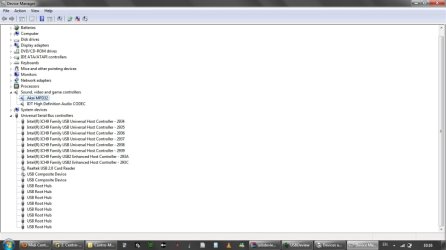
When it is plugged in I don't see the device icon in the tray but I can see it in Device Manager and Devices & Printers, both say it is working properly although it is listed as an audio device, which I don't know is how it should be as it is a midi controller, no audio is used. The device has power to it as well.

However, when I try to do anything with it I get errors. There is an editor specially made for this controller called Vyzex. When I try to use this it says:

"Can't open Midi Out Port Akai MPD32.
Driver may already be in use"

Then:

"Can't open Midi Out Port MIDIOUT2 (Akai MPD32).
Driver may already be in use".

It then asks me to select the input port, which shows the MPD32 ports but when I select one it says that the drivers are already in use - but I have nothing connected!

I try with MIDIOX (and midi monitor program) and it says "Undefined external error" when I try to select the midi port for MPD32.

My music program (Ableton Live 7.14) sees the MPD32 but the ports are greyed out, meaning it's not working for some reason. Ableton receives no midi data from the device.

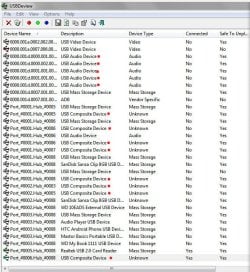
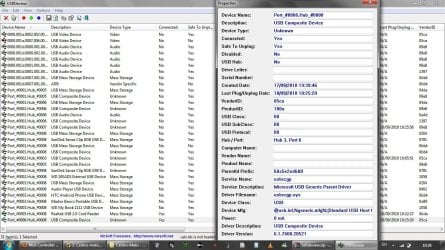
I have no idea what is using the driver or USB ports. I have tried all ports. I used USBDeview to see what was being used and there is a "USB Composite Device" in use but I have no idea what this is, there is nothing plugged in. I have attached a screenshot of this with the device details in case this helps.

I have also tried disabling my integrated webcam as I heard that Logitech can cause conflicts (mine isn't Logitech I don't think) but this didn't help. I have also attached a screenshot of the Device Manager.

Pulling my hair out with this. I really don't know what else to try.
 

Attachments
  • usbdeview.jpg
    usbdeview.jpg
    190 KB · Views: 85
  • devman.jpg
    devman.jpg
    46.9 KB · Views: 40

My Computer My Computer

At a glance

Windows 7 Home Premuim 64bitIntel Core2 Duo T66004gb
Computer Manufacturer/Model Number
Dell Inspiron 1545
OS
Windows 7 Home Premuim 64bit
CPU
Intel Core2 Duo T6600
Memory
4gb
Boot in clean boot mode
If the device works properly, follow instructions to find the cause.
 

My Computer My Computer

At a glance

Windows 10, Home Clean InstallIntel Core2 processsor Q8200(2.33Ghz 1333FSB)...6 gbATI Radeon 256MB HD3650
Computer type
PC/Desktop
Computer Manufacturer/Model Number
Dell XPS 420
OS
Windows 10, Home Clean Install
CPU
Intel Core2 processsor Q8200(2.33Ghz 1333FSB) Quad Core Tech
Motherboard
Dell
Memory
6 gb
Graphics Card(s)
ATI Radeon 256MB HD3650
Sound Card
Intergrated 7.1 Channel Audio
Monitor(s) Displays
Dell SP2009W 20"
Hard Drives
640 GB Serial ATA Hard drive
Cooling
Fan
Keyboard
Dell USB Keyboard
Mouse
Dell Premium Optical USB
Internet Speed
DSL 2.85
Hi Rich,

I tried the clean boot with out the startup services as instructed but I still had the same problem. The instructions seem to say just repeating the same step but if I had already booted without startup services isn't just going to be the same?

I'm a bit confused about what I'm supposed to be doing. Should I be stopping the Windows services as well as startup services?
 

My Computer My Computer

At a glance

Windows 7 Home Premuim 64bitIntel Core2 Duo T66004gb
Computer Manufacturer/Model Number
Dell Inspiron 1545
OS
Windows 7 Home Premuim 64bit
CPU
Intel Core2 Duo T6600
Memory
4gb
If you did the clean boot and the problem still existed, clean boot cannot help us. Try in safe mode, now.
http://www.sevenforums.com/tutorials/69585-safe-mode.html

Also run an antivirus scan
Download and scan with malwarebytes. Make sure you update and do the full scan

Lets be sure something not wanted is not using the port.
 

My Computer My Computer

At a glance

Windows 10, Home Clean InstallIntel Core2 processsor Q8200(2.33Ghz 1333FSB)...6 gbATI Radeon 256MB HD3650
Computer type
PC/Desktop
Computer Manufacturer/Model Number
Dell XPS 420
OS
Windows 10, Home Clean Install
CPU
Intel Core2 processsor Q8200(2.33Ghz 1333FSB) Quad Core Tech
Motherboard
Dell
Memory
6 gb
Graphics Card(s)
ATI Radeon 256MB HD3650
Sound Card
Intergrated 7.1 Channel Audio
Monitor(s) Displays
Dell SP2009W 20"
Hard Drives
640 GB Serial ATA Hard drive
Cooling
Fan
Keyboard
Dell USB Keyboard
Mouse
Dell Premium Optical USB
Internet Speed
DSL 2.85
I just tried in safe mode but no programs are recognising the USB device so I couldn't test it.
 

My Computer My Computer

At a glance

Windows 7 Home Premuim 64bitIntel Core2 Duo T66004gb
Computer Manufacturer/Model Number
Dell Inspiron 1545
OS
Windows 7 Home Premuim 64bit
CPU
Intel Core2 Duo T6600
Memory
4gb
To keep us occupied while looking for an answer run the anti virus and malwarebytes

While that is running go to device manager make sure that all drivers are up to date and no yellow markers are showing.

Update all port drivers.
 

My Computer My Computer

At a glance

Windows 10, Home Clean InstallIntel Core2 processsor Q8200(2.33Ghz 1333FSB)...6 gbATI Radeon 256MB HD3650
Computer type
PC/Desktop
Computer Manufacturer/Model Number
Dell XPS 420
OS
Windows 10, Home Clean Install
CPU
Intel Core2 processsor Q8200(2.33Ghz 1333FSB) Quad Core Tech
Motherboard
Dell
Memory
6 gb
Graphics Card(s)
ATI Radeon 256MB HD3650
Sound Card
Intergrated 7.1 Channel Audio
Monitor(s) Displays
Dell SP2009W 20"
Hard Drives
640 GB Serial ATA Hard drive
Cooling
Fan
Keyboard
Dell USB Keyboard
Mouse
Dell Premium Optical USB
Internet Speed
DSL 2.85
If you have some sort of equip attached to a port like this
MPD32 Performance Pad Controller

Uninstall.

Leave only the mouse and keyboard in ports, for a test.
 

My Computer My Computer

At a glance

Windows 10, Home Clean InstallIntel Core2 processsor Q8200(2.33Ghz 1333FSB)...6 gbATI Radeon 256MB HD3650
Computer type
PC/Desktop
Computer Manufacturer/Model Number
Dell XPS 420
OS
Windows 10, Home Clean Install
CPU
Intel Core2 processsor Q8200(2.33Ghz 1333FSB) Quad Core Tech
Motherboard
Dell
Memory
6 gb
Graphics Card(s)
ATI Radeon 256MB HD3650
Sound Card
Intergrated 7.1 Channel Audio
Monitor(s) Displays
Dell SP2009W 20"
Hard Drives
640 GB Serial ATA Hard drive
Cooling
Fan
Keyboard
Dell USB Keyboard
Mouse
Dell Premium Optical USB
Internet Speed
DSL 2.85
I've run a quick scan with Malwarebytes and Avast which showed nothing, running a full scan on Avast now but I don't think anything will show up.

I've gone through every device driver in Device Manager and tried to update it but everything was using the latest.

I am running a laptop to the only thing attached is the power cable. I plugged the MPD32 in and uninstalled it from the Sound, Video & Games Controller section in Device Manager, and then unplugged.
 

My Computer My Computer

At a glance

Windows 7 Home Premuim 64bitIntel Core2 Duo T66004gb
Computer Manufacturer/Model Number
Dell Inspiron 1545
OS
Windows 7 Home Premuim 64bit
CPU
Intel Core2 Duo T6600
Memory
4gb
I've run a quick scan with Malwarebytes and Avast which showed nothing, running a full scan on Avast now but I don't think anything will show up.

I've gone through every device driver in Device Manager and tried to update it but everything was using the latest.

I am running a laptop to the only thing attached is the power cable. I plugged the MPD32 in and uninstalled it from the Sound, Video & Games Controller section in Device Manager, and then unplugged.


First, it's normal for USB controllers to be seen as an audio device.

Looks like you have multiple instances of the generic driver loaded. Not sure why unless it's been plugged into more than one USB port or a hub.

This might take registry editing. After my Yamaha-77 keyboard quit earlier this year I picked up an Oxygen61 (USB) to get me by untill the Yamaha is repaired.

I'm going to look in the registry (long time experienced reg editor) and see if I can locate where the multiple instances might be installed.

Ap
 

My Computer My Computer

At a glance

Windows 7 Home PremiumIntel Core 2 Duo @ 3.00gHz4 GBATI Radeon HD 2600 XT
Computer Manufacturer/Model Number
Assembled in my workshop
OS
Windows 7 Home Premium
CPU
Intel Core 2 Duo @ 3.00gHz
Motherboard
Gigabyte GA-P35-S3G
Memory
4 GB
Graphics Card(s)
ATI Radeon HD 2600 XT
Sound Card
RME 24/96 Card, Realtek Internal Audio PreSonus FireStudio
Monitor(s) Displays
Acer 1917 (x2)
Screen Resolution
1280 x 1024 on both monitors
Hard Drives
Three 250GB Seagate SATA Barracuda 7200rpm
PSU
Rosewill 500-watt
Case
Rosewill mid-tower
Cooling
Noctua NH-U9B (CPU), PwrSupply fan + single large case Fan
Keyboard
Macally w/2/USB ports.
Mouse
Trackman Wheel
Other Info
Event 20/20 bas studio monitors, Yamaha sub.
Rackmount Korg/Roland/Yamaha synthesizers,
Cubase MIDI/audio recording. Sony Soundforge audio/mastering software. CD Architect Mastering. RME & Presonus audio interfaces.
I captured your screen grab and marked what looks to be multiple devices, I'm guessing you finally had one to many USB devices loaded for the Akai and Windows finally became confused and for some reason has kept one loaded.

ClipScreen.jpg

One thing to try, with the keyboard plugged in go into Device manager double click on the device in "sound, video & game controllers" go to the drivers tab and "uninstall" if the device show as still present, delete it as well.

Unplug the keyboard, shut the computer OFF, in a couple of minutes boot the machine, wit until it settles then plug the keyboard in. Try and always use the same USB port.

Also... have you installed any other USB devices before your keyboard stopped working.. you have -a lot- of USB devices listed.

If all elses fails registry editing would be the next step.

Ap
 

My Computer My Computer

At a glance

Windows 7 Home PremiumIntel Core 2 Duo @ 3.00gHz4 GBATI Radeon HD 2600 XT
Computer Manufacturer/Model Number
Assembled in my workshop
OS
Windows 7 Home Premium
CPU
Intel Core 2 Duo @ 3.00gHz
Motherboard
Gigabyte GA-P35-S3G
Memory
4 GB
Graphics Card(s)
ATI Radeon HD 2600 XT
Sound Card
RME 24/96 Card, Realtek Internal Audio PreSonus FireStudio
Monitor(s) Displays
Acer 1917 (x2)
Screen Resolution
1280 x 1024 on both monitors
Hard Drives
Three 250GB Seagate SATA Barracuda 7200rpm
PSU
Rosewill 500-watt
Case
Rosewill mid-tower
Cooling
Noctua NH-U9B (CPU), PwrSupply fan + single large case Fan
Keyboard
Macally w/2/USB ports.
Mouse
Trackman Wheel
Other Info
Event 20/20 bas studio monitors, Yamaha sub.
Rackmount Korg/Roland/Yamaha synthesizers,
Cubase MIDI/audio recording. Sony Soundforge audio/mastering software. CD Architect Mastering. RME & Presonus audio interfaces.
Thanks for the response Aphelion.

It's possible that it has been plugged in to multiple usb ports, since I had this laptop I've only used it a few times so I probably forget which port I plug it in to. I have had one or two other controllers too (not anymore though) which might be adding to the confusion. I only have this one now so all the rest can be deleted from the registry if that is possible.

I tried your suggestion of uninstalling it and turning off etc but it hasn't helped unfortunately.

I'm concerned about this 'usb composite device' that runs with nothing plugged in, it seems strange to me.

I've run full scans and nothing was found.
 

My Computer My Computer

At a glance

Windows 7 Home Premuim 64bitIntel Core2 Duo T66004gb
Computer Manufacturer/Model Number
Dell Inspiron 1545
OS
Windows 7 Home Premuim 64bit
CPU
Intel Core2 Duo T6600
Memory
4gb
Thanks for the response Aphelion.

I tried your suggestion of uninstalling it and turning off etc but it hasn't helped unfortunately.

I'm concerned about this 'usb composite device' that runs with nothing plugged in, it seems strange to me.


Have you edited a registry before?

I can post the information you need to most likely correct the problem but it might seem a daunting task if you've never edited the registry before.


The USB Ports information is found here:

HKEY_LOCAL_MACHINE / SYSTEM / CurrentControlSet / Enum / USB

You should be able to find all of the port listings + USB Audio Devices and Composite Devices there.

First I would search out all instances of the MIDI IN & OUT ports related to your keyboard and delete those, I would also search out the keyboard by name MPD32
and delete any related keys... being careful not to delete root keys unless they directly mention the MIDI IN/OUT ports or MPD32.

Then take a look at the USB ports.


If you just want to try deleting the ports, go to Device Manager... then to the USB section, take a look there and delete the composite and audio devices.

Disclaimer.. you can seriously foul up your machine editing the registry, it can render the OS unusable or unbootable.

+++Back the system up before jumping in.+++

On the plus side, you're not in areas that are likely the mess things up too badly.


Ap
 
Last edited:

My Computer My Computer

At a glance

Windows 7 Home PremiumIntel Core 2 Duo @ 3.00gHz4 GBATI Radeon HD 2600 XT
Computer Manufacturer/Model Number
Assembled in my workshop
OS
Windows 7 Home Premium
CPU
Intel Core 2 Duo @ 3.00gHz
Motherboard
Gigabyte GA-P35-S3G
Memory
4 GB
Graphics Card(s)
ATI Radeon HD 2600 XT
Sound Card
RME 24/96 Card, Realtek Internal Audio PreSonus FireStudio
Monitor(s) Displays
Acer 1917 (x2)
Screen Resolution
1280 x 1024 on both monitors
Hard Drives
Three 250GB Seagate SATA Barracuda 7200rpm
PSU
Rosewill 500-watt
Case
Rosewill mid-tower
Cooling
Noctua NH-U9B (CPU), PwrSupply fan + single large case Fan
Keyboard
Macally w/2/USB ports.
Mouse
Trackman Wheel
Other Info
Event 20/20 bas studio monitors, Yamaha sub.
Rackmount Korg/Roland/Yamaha synthesizers,
Cubase MIDI/audio recording. Sony Soundforge audio/mastering software. CD Architect Mastering. RME & Presonus audio interfaces.
  • Like
Reactions: JMH
Make a system restore point, first, too.
 

My Computer My Computer

At a glance

Windows 10, Home Clean InstallIntel Core2 processsor Q8200(2.33Ghz 1333FSB)...6 gbATI Radeon 256MB HD3650
Computer type
PC/Desktop
Computer Manufacturer/Model Number
Dell XPS 420
OS
Windows 10, Home Clean Install
CPU
Intel Core2 processsor Q8200(2.33Ghz 1333FSB) Quad Core Tech
Motherboard
Dell
Memory
6 gb
Graphics Card(s)
ATI Radeon 256MB HD3650
Sound Card
Intergrated 7.1 Channel Audio
Monitor(s) Displays
Dell SP2009W 20"
Hard Drives
640 GB Serial ATA Hard drive
Cooling
Fan
Keyboard
Dell USB Keyboard
Mouse
Dell Premium Optical USB
Internet Speed
DSL 2.85
Thanks for posting that. I have done a little reg editing before but not a great deal.

I deleted all the MPD32, USB Audio even the Composite Devices but it doesn't seem to have solved the problem. After doing this and plugging the MPD32 back in the Composite Device and MPD32 reinstall themselves but everything is the same as before.

I tried disabling the Composite Device in Device Manager while the MPD32 was plugged in and that stopped the MPD from being recognised by any programs so I assume it's something related to the MPD.

I'm getting so fed of this issue, I'm quite tempted to just reinstall Windows but that's a real pain in the *** to have to do that and reinstall everything else. This is what drives me mad about making music on computers, sometimes it seems you spend more time being technician than musician.
 

My Computer My Computer

At a glance

Windows 7 Home Premuim 64bitIntel Core2 Duo T66004gb
Computer Manufacturer/Model Number
Dell Inspiron 1545
OS
Windows 7 Home Premuim 64bit
CPU
Intel Core2 Duo T6600
Memory
4gb
sitarra,

I have the exact same problem with my akai mpk49... did you find a solution? where you able to get your mpd32 working again? if yes, how?
 

My Computer My Computer

At a glance

win 7 64 bit
OS
win 7 64 bit
Look for a program called USBdeview, I've only used it once for a USB problem like yours but it worked a treat. You can see everything USB that's ever been used, you can uninstall all the USB devices you know won't ever be needed including the problematical one (and any duplicates) you want to work properly, and then let Windows re-discover it again as if it's a new system.
 

My Computer My Computer

At a glance

Windows 7
OS
Windows 7
eye10sbks,

I did try the program that sbrads mentions (or one like it, I don't remember the name) but it didn't solve the problem for me. I did find a solution however.

Unfortunately it was to reinstall windows but only in the way that it keeps everything on your computer (sorry I don't know what this is called, Upgrade install I think - http://www.sevenforums.com/tutorials/3413-repair-install.html).

Bit of a hassle but everything was left intact and I was able to use MPD afterwards.
 

My Computer My Computer

At a glance

Windows 7 Home Premuim 64bitIntel Core2 Duo T66004gb
Computer Manufacturer/Model Number
Dell Inspiron 1545
OS
Windows 7 Home Premuim 64bit
CPU
Intel Core2 Duo T6600
Memory
4gb
Back
Top