Ok Brand New LifeCam HD-3000 Works on another Win 7 PC, but on mine it only works on Skype, but not in any other software,
Doesn't work on Test My Cam, Doesn't work on MS Movie Maker Audio shows up but blank for Webcam, In Wondershare Video Editor I get "device initialization error device occupied"
I have removed Skype and all other webcam software, This is the 1st webcam I have had on this PC, so no old driver conflicts.
I have uninstalled and re installed drivers, I have let windows install its own drivers,
I have tried a clean boot, I have used Resource Hacker to look for Handles and dll's but finds nothing,
It shows up in device manager in correct sections imaging devices and sound and video,
I've tried Splitcam, Manycams and similar but still not working.
I've tried Troubleshooting but it finds nothing.
I've asked on Microsoft and the reg is ok
The blue indication light is not flashing so it's not in use.
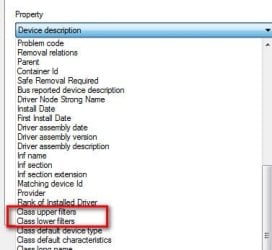
HKEY_LOCAL_MACHINE\SYSTEM\CurrentControlSet\Control\Class\{6BDD1FC6-810F-11D0-BEC7-08002BE2092F} "UpperFilterscontainksthunk"
BUT
HKEY_LOCAL_MACHINE\SYSTEM\ControlSet001\Control\Class\{6BDD1FC5-810F-11D0-BEC7-08002BE2092F} contains Upperfilters IRENUM So I dunno if this is a problem...?
As they say it's Twisting my Melon... :-( I don't want a format and new install of win7
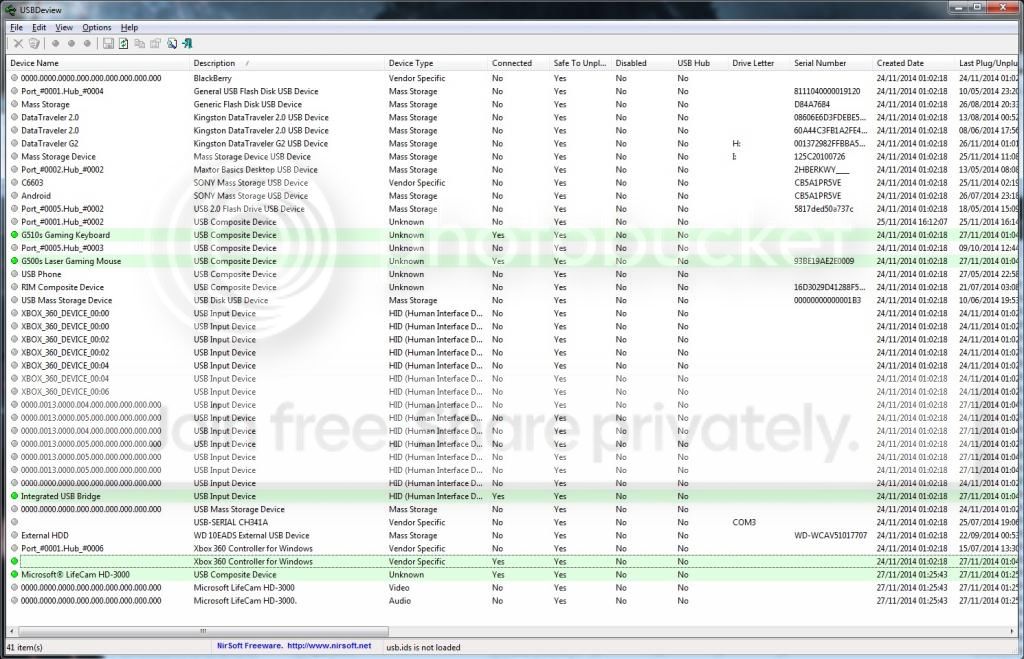
USBDeview
I don't know why Xbox 360 shows up multiple time, I have one wireless device connected which allows me to connect upto 4 pads.
I notice that the webcam device name is 0000.0000.000 etc ...? and it says Not Connected..?
Doesn't work on Test My Cam, Doesn't work on MS Movie Maker Audio shows up but blank for Webcam, In Wondershare Video Editor I get "device initialization error device occupied"
I have removed Skype and all other webcam software, This is the 1st webcam I have had on this PC, so no old driver conflicts.
I have uninstalled and re installed drivers, I have let windows install its own drivers,
I have tried a clean boot, I have used Resource Hacker to look for Handles and dll's but finds nothing,
It shows up in device manager in correct sections imaging devices and sound and video,
I've tried Splitcam, Manycams and similar but still not working.
I've tried Troubleshooting but it finds nothing.
I've asked on Microsoft and the reg is ok
The blue indication light is not flashing so it's not in use.
HKEY_LOCAL_MACHINE\SYSTEM\CurrentControlSet\Control\Class\{6BDD1FC6-810F-11D0-BEC7-08002BE2092F} "UpperFilterscontainksthunk"
BUT
HKEY_LOCAL_MACHINE\SYSTEM\ControlSet001\Control\Class\{6BDD1FC5-810F-11D0-BEC7-08002BE2092F} contains Upperfilters IRENUM So I dunno if this is a problem...?
As they say it's Twisting my Melon... :-( I don't want a format and new install of win7
USBDeview
I don't know why Xbox 360 shows up multiple time, I have one wireless device connected which allows me to connect upto 4 pads.
I notice that the webcam device name is 0000.0000.000 etc ...? and it says Not Connected..?
My Computer
At a glance
Windows 7 Ultimate x64AMD 835016 Gig DDR3MSI R9270 x2 CrossFire
- Computer type
- PC/Desktop
- Computer Manufacturer/Model Number
- Custom Build
- OS
- Windows 7 Ultimate x64
- CPU
- AMD 8350
- Motherboard
- Gigabyte GA-970A-UD3P AMD Socket AM3+
- Memory
- 16 Gig DDR3
- Graphics Card(s)
- MSI R9270 x2 CrossFire
- Hard Drives
- 2x 1TB
- Antivirus
- Microsoft Security Essentials
- Browser
- IE,Chrome,Firefox