NEW Context Menu - Edit for Desktop

How to Edit the Desktop "NEW" Context Menu in Windows 7

This tutorial shows you how to do this

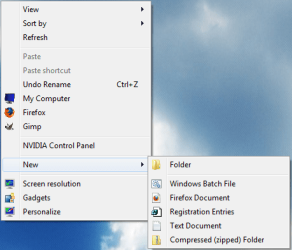
BEFORE
before.png
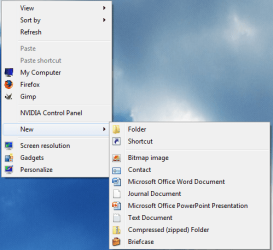
AFTER
after.png


Here's How:
1. To delete all the items from the new list run this reg file:
View attachment clear.reg
2. To add HTML, BAT, REG to the new list run this reg file:
View attachment addregbathtml.reg
3. To remove HTML, BAT, REG from the list run this reg file:
View attachment removeregbathtml.reg
4. To restore all default items run this reg file:
View attachment restore.reg
   Tip
To add extensions of your choice to the list write in notepad below, save it as "whatever.reg" and run it.
NOTE: Replace .png with the file extension you want to add and replace whatever with anything you want.

Code:
Windows Registry Editor Version 5.00
 
[HKEY_CLASSES_ROOT\[B][COLOR=red].png[/COLOR][/B]\ShellNew]
"NullFile"=""


Last edited by a moderator:
not working

Hi i was already posting there my issue with new textfile .. i'm able to add it to centext menu but not to new context menu. the registry entries are set up correctly so can somebody help me? Can be this issue caused by microsoft office 2003 or some other text editor?
 

My Computer

OS
Windows 7
Last edited:

My Computer

Computer type
PC/Desktop
Computer Manufacturer/Model Number
Self built custom
OS
64-bit Windows 11 Pro for Workstations
CPU
Intel i7-8700K OC'd to 5 GHz
Motherboard
ASUS ROG Maximus XI Formula Z390
Memory
64 GB (4x16GB) G.SKILL TridentZ RGB DDR4 3600 MHz
Graphics Card(s)
ASUS ROG-STRIX-GTX1080TI-O11G-GAMING
Sound Card
Integrated
Monitor(s) Displays
2 x Samsung Odyssey G7 27"
Screen Resolution
2560x1440
Hard Drives
1TB Samsung 990 PRO M.2,
4TB Samsung 990 PRO PRO M.2,
TerraMaster F8 SSD Plus NAS
PSU
Seasonic Prime Titanium 850W
Case
Thermaltake Core P3
Cooling
Corsair Hydro H115i
Keyboard
Logitech wireless K800
Mouse
Logitech MX Master 4
Internet Speed
2 Gb/s Download and 100 Mb/s Upload
Antivirus
Malwarebyte Anti-Malware Premium
Browser
Google Chrome
Other Info
Logitech Z625 speaker system,
Logitech BRIO 4K Pro webcam,
HP Color LaserJet Pro MFP M477fdn,
APC SMART-UPS RT 1000 XL - SURT1000XLI,
Galaxy S23 Plus phone
Hello Bullet,

This tutorial will show you how to restore Text Document back to the New context menu. It's the same in Windows 7 as Vista. :)

http://www.sevenforums.com/tutorials/28677-new-context-menu-remove-restore-default-menu-items.htmlhttp://www.vistax64.com/tutorials/154554-new-context-menu-restore-default-menu-items.html
I wrote that all registry entries are correct this tutorial didn't help me so i'm writting if there is any other way how to solove my problem
 
Last edited by a moderator:

My Computer

OS
Windows 7
Bullet,

You didn't specify what reg files were correct or not, and what you tried. It had to be posted for clarity.

Doing a repair install will fix this for you without losing anything.
 

My Computer

Computer type
PC/Desktop
Computer Manufacturer/Model Number
Self built custom
OS
64-bit Windows 11 Pro for Workstations
CPU
Intel i7-8700K OC'd to 5 GHz
Motherboard
ASUS ROG Maximus XI Formula Z390
Memory
64 GB (4x16GB) G.SKILL TridentZ RGB DDR4 3600 MHz
Graphics Card(s)
ASUS ROG-STRIX-GTX1080TI-O11G-GAMING
Sound Card
Integrated
Monitor(s) Displays
2 x Samsung Odyssey G7 27"
Screen Resolution
2560x1440
Hard Drives
1TB Samsung 990 PRO M.2,
4TB Samsung 990 PRO PRO M.2,
TerraMaster F8 SSD Plus NAS
PSU
Seasonic Prime Titanium 850W
Case
Thermaltake Core P3
Cooling
Corsair Hydro H115i
Keyboard
Logitech wireless K800
Mouse
Logitech MX Master 4
Internet Speed
2 Gb/s Download and 100 Mb/s Upload
Antivirus
Malwarebyte Anti-Malware Premium
Browser
Google Chrome
Other Info
Logitech Z625 speaker system,
Logitech BRIO 4K Pro webcam,
HP Color LaserJet Pro MFP M477fdn,
APC SMART-UPS RT 1000 XL - SURT1000XLI,
Galaxy S23 Plus phone
Brink, you have to be the most prolific teacher on the net! Much appreciated. I was hoping to open these as suggested in notepad and learn a little bit. I tried to remove briefcase and link, but ended up removing everything. I restored it back, but I'm curious about how to remove only what I want.

When I opened up restore it looked like much more information than what was in remove. can you tell us any more about how to do this? I have never in all the years of using Windows selected Briefcase. I would love to remove it.
 

My Computer

Computer Manufacturer/Model Number
Assembled by me
OS
Windows 7 Professional 64-bit
CPU
Intel Core i7-960 Bloomfield 3.2GHz 8MB L3 Cache Quad-Core
Motherboard
ASUS P6X58D Premium LGA 1366 Intel X58 SATA 6Gb/s USB 3.0
Memory
12 gb Corsair Dominator DDR3 1866 (PC3 15000) Triple Channel
Graphics Card(s)
XFX Radeon HD 5770 1GB 128-bit DDR5
Sound Card
Asus Essence STX Audiophile Heaven!
Monitor(s) Displays
ViewSonic VP201b
Screen Resolution
1600 x 1200
Hard Drives
(1) Crucial Real SSD C300
(2) WD Velociraptor 300gb
(1) Seagate DB35 750gb
PSU
Seasonic 750 Gold
Case
Lian Li 2100
Cooling
Noctua
Keyboard
Microsoft Wireless Comfort 5000
Mouse
Logitech USB Trackman Wheel
Internet Speed
1gp/s
Last edited:

My Computer

Computer type
PC/Desktop
Computer Manufacturer/Model Number
Self built custom
OS
64-bit Windows 11 Pro for Workstations
CPU
Intel i7-8700K OC'd to 5 GHz
Motherboard
ASUS ROG Maximus XI Formula Z390
Memory
64 GB (4x16GB) G.SKILL TridentZ RGB DDR4 3600 MHz
Graphics Card(s)
ASUS ROG-STRIX-GTX1080TI-O11G-GAMING
Sound Card
Integrated
Monitor(s) Displays
2 x Samsung Odyssey G7 27"
Screen Resolution
2560x1440
Hard Drives
1TB Samsung 990 PRO M.2,
4TB Samsung 990 PRO PRO M.2,
TerraMaster F8 SSD Plus NAS
PSU
Seasonic Prime Titanium 850W
Case
Thermaltake Core P3
Cooling
Corsair Hydro H115i
Keyboard
Logitech wireless K800
Mouse
Logitech MX Master 4
Internet Speed
2 Gb/s Download and 100 Mb/s Upload
Antivirus
Malwarebyte Anti-Malware Premium
Browser
Google Chrome
Other Info
Logitech Z625 speaker system,
Logitech BRIO 4K Pro webcam,
HP Color LaserJet Pro MFP M477fdn,
APC SMART-UPS RT 1000 XL - SURT1000XLI,
Galaxy S23 Plus phone
You're awesome! If I'm half as smart as my Wife says I'm not, I should be able to look at it and learn twice as much as I deserve.

Attempts at humor aside, can you explain why there was so much more information in the restore file than the remove file? That's what made me stop. I didn't want to edit the files without understanding exactly what I was doing and end up with a corrupt registry.
 

My Computer

Computer Manufacturer/Model Number
Assembled by me
OS
Windows 7 Professional 64-bit
CPU
Intel Core i7-960 Bloomfield 3.2GHz 8MB L3 Cache Quad-Core
Motherboard
ASUS P6X58D Premium LGA 1366 Intel X58 SATA 6Gb/s USB 3.0
Memory
12 gb Corsair Dominator DDR3 1866 (PC3 15000) Triple Channel
Graphics Card(s)
XFX Radeon HD 5770 1GB 128-bit DDR5
Sound Card
Asus Essence STX Audiophile Heaven!
Monitor(s) Displays
ViewSonic VP201b
Screen Resolution
1600 x 1200
Hard Drives
(1) Crucial Real SSD C300
(2) WD Velociraptor 300gb
(1) Seagate DB35 750gb
PSU
Seasonic 750 Gold
Case
Lian Li 2100
Cooling
Noctua
Keyboard
Microsoft Wireless Comfort 5000
Mouse
Logitech USB Trackman Wheel
Internet Speed
1gp/s
Sure thing.

There is less in the remove file since it only requires deleting the one registry key to remove all of the subkeys and entries for it to remove the context menu item.

When restoring it the context menu item, you have to restore the default key and all of the separate subkeys and entries as well. They do not get added back by just adding the main key.
 

My Computer

Computer type
PC/Desktop
Computer Manufacturer/Model Number
Self built custom
OS
64-bit Windows 11 Pro for Workstations
CPU
Intel i7-8700K OC'd to 5 GHz
Motherboard
ASUS ROG Maximus XI Formula Z390
Memory
64 GB (4x16GB) G.SKILL TridentZ RGB DDR4 3600 MHz
Graphics Card(s)
ASUS ROG-STRIX-GTX1080TI-O11G-GAMING
Sound Card
Integrated
Monitor(s) Displays
2 x Samsung Odyssey G7 27"
Screen Resolution
2560x1440
Hard Drives
1TB Samsung 990 PRO M.2,
4TB Samsung 990 PRO PRO M.2,
TerraMaster F8 SSD Plus NAS
PSU
Seasonic Prime Titanium 850W
Case
Thermaltake Core P3
Cooling
Corsair Hydro H115i
Keyboard
Logitech wireless K800
Mouse
Logitech MX Master 4
Internet Speed
2 Gb/s Download and 100 Mb/s Upload
Antivirus
Malwarebyte Anti-Malware Premium
Browser
Google Chrome
Other Info
Logitech Z625 speaker system,
Logitech BRIO 4K Pro webcam,
HP Color LaserJet Pro MFP M477fdn,
APC SMART-UPS RT 1000 XL - SURT1000XLI,
Galaxy S23 Plus phone
I think I have something weird going on. I thought I did it with my editing of a removal .reg file yesterday, but I just ran the remove.reg for the Briefcase and it removes everything except "Library".
 

My Computer

Computer Manufacturer/Model Number
Assembled by me
OS
Windows 7 Professional 64-bit
CPU
Intel Core i7-960 Bloomfield 3.2GHz 8MB L3 Cache Quad-Core
Motherboard
ASUS P6X58D Premium LGA 1366 Intel X58 SATA 6Gb/s USB 3.0
Memory
12 gb Corsair Dominator DDR3 1866 (PC3 15000) Triple Channel
Graphics Card(s)
XFX Radeon HD 5770 1GB 128-bit DDR5
Sound Card
Asus Essence STX Audiophile Heaven!
Monitor(s) Displays
ViewSonic VP201b
Screen Resolution
1600 x 1200
Hard Drives
(1) Crucial Real SSD C300
(2) WD Velociraptor 300gb
(1) Seagate DB35 750gb
PSU
Seasonic 750 Gold
Case
Lian Li 2100
Cooling
Noctua
Keyboard
Microsoft Wireless Comfort 5000
Mouse
Logitech USB Trackman Wheel
Internet Speed
1gp/s
In Libraries, that is the only option you have. Right click on the desktop instead to see all of them.

In your root folders (ex: C: ), you will also only have New - Folder available.
 

My Computer

Computer type
PC/Desktop
Computer Manufacturer/Model Number
Self built custom
OS
64-bit Windows 11 Pro for Workstations
CPU
Intel i7-8700K OC'd to 5 GHz
Motherboard
ASUS ROG Maximus XI Formula Z390
Memory
64 GB (4x16GB) G.SKILL TridentZ RGB DDR4 3600 MHz
Graphics Card(s)
ASUS ROG-STRIX-GTX1080TI-O11G-GAMING
Sound Card
Integrated
Monitor(s) Displays
2 x Samsung Odyssey G7 27"
Screen Resolution
2560x1440
Hard Drives
1TB Samsung 990 PRO M.2,
4TB Samsung 990 PRO PRO M.2,
TerraMaster F8 SSD Plus NAS
PSU
Seasonic Prime Titanium 850W
Case
Thermaltake Core P3
Cooling
Corsair Hydro H115i
Keyboard
Logitech wireless K800
Mouse
Logitech MX Master 4
Internet Speed
2 Gb/s Download and 100 Mb/s Upload
Antivirus
Malwarebyte Anti-Malware Premium
Browser
Google Chrome
Other Info
Logitech Z625 speaker system,
Logitech BRIO 4K Pro webcam,
HP Color LaserJet Pro MFP M477fdn,
APC SMART-UPS RT 1000 XL - SURT1000XLI,
Galaxy S23 Plus phone
Learned something new. I thought anywhere in explorer brought up the same menu. Much appreciated.
 

My Computer

Computer Manufacturer/Model Number
Assembled by me
OS
Windows 7 Professional 64-bit
CPU
Intel Core i7-960 Bloomfield 3.2GHz 8MB L3 Cache Quad-Core
Motherboard
ASUS P6X58D Premium LGA 1366 Intel X58 SATA 6Gb/s USB 3.0
Memory
12 gb Corsair Dominator DDR3 1866 (PC3 15000) Triple Channel
Graphics Card(s)
XFX Radeon HD 5770 1GB 128-bit DDR5
Sound Card
Asus Essence STX Audiophile Heaven!
Monitor(s) Displays
ViewSonic VP201b
Screen Resolution
1600 x 1200
Hard Drives
(1) Crucial Real SSD C300
(2) WD Velociraptor 300gb
(1) Seagate DB35 750gb
PSU
Seasonic 750 Gold
Case
Lian Li 2100
Cooling
Noctua
Keyboard
Microsoft Wireless Comfort 5000
Mouse
Logitech USB Trackman Wheel
Internet Speed
1gp/s
You're welcome Barefoot. :)
 

My Computer

Computer type
PC/Desktop
Computer Manufacturer/Model Number
Self built custom
OS
64-bit Windows 11 Pro for Workstations
CPU
Intel i7-8700K OC'd to 5 GHz
Motherboard
ASUS ROG Maximus XI Formula Z390
Memory
64 GB (4x16GB) G.SKILL TridentZ RGB DDR4 3600 MHz
Graphics Card(s)
ASUS ROG-STRIX-GTX1080TI-O11G-GAMING
Sound Card
Integrated
Monitor(s) Displays
2 x Samsung Odyssey G7 27"
Screen Resolution
2560x1440
Hard Drives
1TB Samsung 990 PRO M.2,
4TB Samsung 990 PRO PRO M.2,
TerraMaster F8 SSD Plus NAS
PSU
Seasonic Prime Titanium 850W
Case
Thermaltake Core P3
Cooling
Corsair Hydro H115i
Keyboard
Logitech wireless K800
Mouse
Logitech MX Master 4
Internet Speed
2 Gb/s Download and 100 Mb/s Upload
Antivirus
Malwarebyte Anti-Malware Premium
Browser
Google Chrome
Other Info
Logitech Z625 speaker system,
Logitech BRIO 4K Pro webcam,
HP Color LaserJet Pro MFP M477fdn,
APC SMART-UPS RT 1000 XL - SURT1000XLI,
Galaxy S23 Plus phone
not sure if this is the right place to post, but I was reading on Tech Spot, and they linked to a program that will let you customize the context menu.

Here's the link to the article

Context Menu Editor
 

My Computer

Computer Manufacturer/Model Number
Custom Built
OS
Windows 7 Pro 64-bit
CPU
AMD Phenom II X2 550 BE
Motherboard
ASUS M4A79XTD EVO
Memory
A-Data DDR3 1600 4gb
Graphics Card(s)
HIS Radeon HD 4670
Sound Card
VIA VT1708S (8 channel onboard)
Monitor(s) Displays
Dell 23" S2309W
Screen Resolution
1920 x 1080
Hard Drives
WD 320,750gb, Seagate 500gb External Backup
PSU
Rosewill Green Series 430W
Case
Coolermaster
Cooling
Scythe SCKTN-3000
Custom remove items from context menu

I tried to remove Microsoft Access, Publisher, Excel, as well as Adobe Acrobat PDF, and LiveCycle using the follow commands, but had no luck.

Code:
Windows Registry Editor Version 5.00

[-HKEY_CLASSES_ROOT\.accdb\Access.Database.12\ShellNew]

[-HKEY_CLASSES_ROOT\.pub\Publisher.Document.12\ShellNew]

[-HKEY_CLASSES_ROOT\.xlsx\Excel.Worksheet.12\ShellNew]

[-HKEY_CLASSES_ROOT\.xdp\LiveCyle.Document.12\ShellNew]

[-HKEY_CLASSES_ROOT\.pdf\Acrobat.Document.12\ShellNew]
Do I have the wrong name after the extension for some of these entries? Thanks for the help!
 

Attachments

  • desktop-context-items-to-delete.jpg
    desktop-context-items-to-delete.jpg
    140.3 KB · Views: 1,184

My Computer

Computer Manufacturer/Model Number
Gateway M6827
OS
Win 7 Professional 32-bit
CPU
Intel Core 2 Duo CPU T5750 @ 2.00 GHz
Memory
3GB
Monitor(s) Displays
ViewSonic Vx900
Screen Resolution
1280x1024
Hard Drives
150GB Hard Drive
I tried the reg entry 3-4 times to add an item to the "New" sub-menu. It accepts the entry, but the item doesn't show up. I even tried it manually, but the same result.

I copied and pasted the entry here, changing only the exctension (frompng to dbx).

What the heck is goign wrong here? I tried it with all my add-ons disabled. Nada.

What the heck?

Regards,
Chuck Billow
 

My Computer

OS
Windows 7 b7000
Is their any way to do this without registry files. So i can choose what i want to remove as some of the new shortcuts i have currently they are only from WinRaR and Open Office and i would like to not remove all the entry's from Open Office but some.

I am wondering if their is an app for this? I dont know how it works with windows 7 in Windows XP it was simple the new menu just linked to a folder with shortcuts that could be added or removed. Right now i dont believe it is similar since the registry is involved.

So any help is appreciated I read about how you can use ShellEX View to do this although i dont know how. that is if it even does what i thought it could do? What is this APP specifically made for?

Sorry for bringing up an old post but i thought it would be better than making a new one although if i get no replys i may have too, I just dont want to clutter up the forum.
Thanks in advance!
 

My Computer

Computer Manufacturer/Model Number
HP DV7 3165dx
OS
Windows 7 Home Premium X64
CPU
AMD Turion II Ultra Dual-Core Mobile M620
Memory
4GB DDR 800
Graphics Card(s)
ATI M Radeon HD 4200
Sound Card
IDT High Def SRS Audio
Screen Resolution
1600x900
Hard Drives
Hitachi 500GB Sata 7200 RPM
Mouse
Razer Copperhead
Internet Speed
20 Mbits
i hav an exam on monday. after that i'll make an app for that:)
 

My Computer

OS
windows 7 Ultimate 32bit
CPU
intel c2d e7200 2.53ghz
Motherboard
asus p5gcmx/1333
Memory
2gb DDR2
Graphics Card(s)
nvidia GeForce 7300SE
Monitor(s) Displays
samsung sync master 793s
Screen Resolution
1280X1024
Hard Drives
250gb seagate
Case
Circle
Keyboard
iball
Mouse
iball
Internet Speed
512kbps
.java filetype wont work

Hi.

I am new to registry editing, and having some trouble getting this to work with some filetypes. I have been at it for a couple of hours now, and I am about to give up.This is what I would like to do:

As I recently have started java programming I would like to have the option to right click, and choose new java document.

I have sucsessfully added other filetypes such as HTML, XML and REG files to the "new" context menu. The ".JAVA" file type however, will not show up.

I have used this registry entry:
Windows Registry Editor Version 5.00

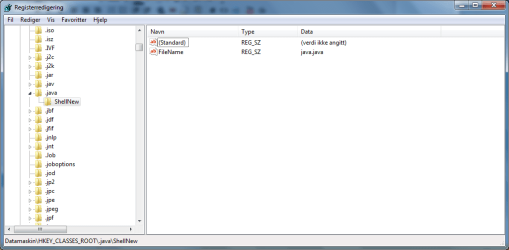
[HKEY_CLASSES_ROOT\.java\ShellNew]
"NullFile"=""

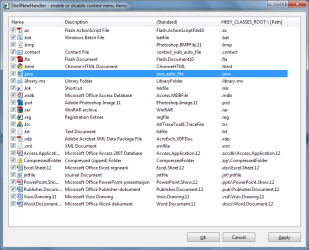
It shows up correctly when I look for it in Regedit, and also when I look in this program: ShellNewHandler (ShellNewHandler | Download ShellNewHandler software for free at SourceForge.net). I also noticed in this program(see jpg attachment) that .BMP and .TRC filetypes should be visible in the new context menu - but they are not. There is also no description to any of the three file types (.JAVA,.BMP and .TRC) - could this be the problem? If so, how can I add a file type description?

I also read on some forum that it may be because the file type has no associated class(?) but there was no solution, and I do not remember where I read it. I also have tried setting Notepad to be the default editor, but it does not seem to help...

Does anyone have any idea that can help? I am getting pretty frustrated not getting this to work..


I would appreciate any help :)
 

Attachments

  • 2010-09-22.png
    2010-09-22.png
    80.3 KB · Views: 602
  • 2010-09-22_2.png
    2010-09-22_2.png
    65.5 KB · Views: 447

My Computer

OS
Windows 7 Ultimate 64 bit
Back
Top