Latest Version of Adobe Flash Player

You need to install flash again for firefox as it installs a plugin.
 

My Computer

Computer Manufacturer/Model Number
self built
OS
Windows 7 Professional 64-bit
CPU
Intel E8400 3GHz
Motherboard
Intel DX48BT2
Memory
Kingston PC3-10700H 4Gb
Graphics Card(s)
XFX Radeon HD 5850 BlackEd.
Sound Card
Asus Xonar DG
Monitor(s) Displays
2x Samsung SM-T220HD 22"
Screen Resolution
1680x1050 on two monitors
Hard Drives
OCZ Vertex 2 120gb 3.5" (OS)
Seagate Momentus XT 500gb
Samsung F3 1Tb (games)
2x Samsung F1 1Tb
PSU
Thermaltake ToughPower 850w
Case
Thermaltake Armor
Cooling
Scythe Mugen II
Keyboard
Microsoft Comfort Curve USB
Mouse
Razer Diamondback 3G
Internet Speed
8128/443
I installed it today on my fresh RC install.
At first, i tried using install_flash_player_ax.exe, which is the default 1.5mb manual install from Adobes' website.
That didn't work, it reported itself successfull and when i re-launched IE8 and went to youtube.com, i had no flash objects.

So i grabbed install_flash_player_10_active_x.msi as recommended here.
At first that spat out an error along the lines of "Could not complete operation, the installation was interupted."

However after right-clicking it and going "TroubleShoot Compatability" and then "Start the Program" it worked fine.

To be honest, my impression is that if you don't click that "Allow" button on widows security quick enough, it simply stalls.
I don't think the issues with install_flash_player_10_active_x.msi are actually compatability issues... seems more like you just have to react quickly enough and click "Allow" before the software packages' inbuilt timer expires and it grinds to a halt, causing the error seen above.

EDIT: Remember if you use the InPrivate feature of IE8, you will not have the add-on "Shockwave Flash Object 10.0.22.87" required to display websites like youtube.com properly. That's because InPrivate automatically disables all add-ons on launch.
It's not broken. I thought mine was for a minute until i realised InPrivate loads without add-ons, haha!
 
Last edited:

My Computer

OS
Windows 7 dual with XP SP2 ((Highly Custom))
CPU
Intel Core2Duo e7300 sometimes @ 3.33Ghtz
Motherboard
Gigabyte G31M-S2L
Memory
2gb Kingston HyperX
Graphics Card(s)
nVidia 9800GT 1gb
Sound Card
Onboard Realtech AC97 High Definition codec
Monitor(s) Displays
HP P1120 21" CRT
Screen Resolution
1600x1200
Hard Drives
WD 250gb caviar
WD 500GB SATAII
PSU
Gigabyte bundled 550w
Case
Gigabyte Generic
Cooling
stock
Keyboard
POS $25 cheapo because i type too fast, wears down kb's
Mouse
M$ Intellipoint 1.1 5 button
Internet Speed
ADSL2 @ max 1.3MBYTE/sec down, 1 up.
i wish someone would post how you can tell whether you're running 32bit or 64bit in IE8. can you tell from this:

version: 8.0.7100.0
cipher strength: 256-bit
product id: 00447-321-7001231-70882
update versions: 0

??
 

My Computer

Computer Manufacturer/Model Number
ASUS G50Vt
OS
dual vista/win7
CPU
2.13 INTEL DUO CORE
Motherboard
ASUS (i'm only guessin there)
Memory
4GIG
Graphics Card(s)
NVIDA 9500M
Sound Card
onboard 5.1
Monitor(s) Displays
15.4" lcd (attaching a 32" lcd to watch movies in WMP
Screen Resolution
1366x768
Hard Drives
250GIG
PSU
laptop
Case
laptop
Cooling
laptop
Keyboard
laptop
Mouse
laptop (+external wireless 5key mouse)
Internet Speed
8gig/1oo.5up
Other Info
i have 2 laptops, both dual boot vista/win7, and a mac quad with 2 19" monitors, all hooked up into my 300w audio system with JBL & macintosh amps, cerwin vega and klipsch speakers (iow, it's a sweet system)
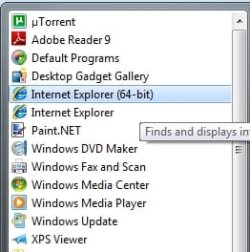
Unless you go to the start menu and select the x64 IE from all programs then you will be using x86 IE.

2009-05-16_143200.jpg
 

My Computer

Computer Manufacturer/Model Number
Home Brew
OS
Windows 7 Ultimate Vista Ultimate x64
CPU
Core 2 Duo E8500 3.16Ghz @ 3.8Ghz
Motherboard
eVGA 750i FTW
Memory
2x2Gigs Patriot PC2-6400 LL
Graphics Card(s)
Inno3D GeForce GTX260 216 SP
Monitor(s) Displays
ASUS VW222U 22" 2ms Response time
Screen Resolution
1680x1050
Hard Drives
SATA 150GB
SATA II 250GB
USB IDE 750GB Ext.
PSU
HYTEC 600W & Thermaltake 650W Toughpower Power Exp
Case
Thermaltake Armor LCS (Liquid Cooling System)
Cooling
Liquid Cooling System
Keyboard
Logitech G15 Gaming Keyboard
Mouse
Logitech G9 Gaming Mouse
i wish someone would post how you can tell whether you're running 32bit or 64bit in IE8. can you tell from this:

version: 8.0.7100.0
cipher strength: 256-bit
product id: 00447-321-7001231-70882
update versions: 0

??

Hello IeQ,

That would be for the 32-bit IE8 version. If it was the 64-bit version, you would see 64-bit to the right of the version number. :)

Shawn
 

My Computer

Computer type
PC/Desktop
Computer Manufacturer/Model Number
Self built custom
OS
64-bit Windows 11 Pro for Workstations
CPU
Intel i7-8700K OC'd to 5 GHz
Motherboard
ASUS ROG Maximus XI Formula Z390
Memory
64 GB (4x16GB) G.SKILL TridentZ RGB DDR4 3600 MHz
Graphics Card(s)
ASUS ROG-STRIX-GTX1080TI-O11G-GAMING
Sound Card
Integrated
Monitor(s) Displays
2 x Samsung Odyssey G7 27"
Screen Resolution
2560x1440
Hard Drives
1TB Samsung 990 PRO M.2,
4TB Samsung 990 PRO PRO M.2,
TerraMaster F8 SSD Plus NAS
PSU
Seasonic Prime Titanium 850W
Case
Thermaltake Core P3
Cooling
Corsair Hydro H115i
Keyboard
Logitech wireless K800
Mouse
Logitech MX Master 4
Internet Speed
2 Gb/s Download and 100 Mb/s Upload
Antivirus
Malwarebyte Anti-Malware Premium
Browser
Google Chrome
Other Info
Logitech Z625 speaker system,
Logitech BRIO 4K Pro webcam,
HP Color LaserJet Pro MFP M477fdn,
APC SMART-UPS RT 1000 XL - SURT1000XLI,
Galaxy S23 Plus phone
Hello NocturnalMyk,

Without knowing what the error message is, here are a few things to check:
  • Be sure to save it to your computer first, then install.
  • In 64-bit Windows 7, open the default 32-bit IE8. This will only install on the 32-bit IE8, not on the 64-bit IE8.
  • Try installing from the link in the first post here.
Hope this helps for now,
Shawn
 

My Computer

Computer type
PC/Desktop
Computer Manufacturer/Model Number
Self built custom
OS
64-bit Windows 11 Pro for Workstations
CPU
Intel i7-8700K OC'd to 5 GHz
Motherboard
ASUS ROG Maximus XI Formula Z390
Memory
64 GB (4x16GB) G.SKILL TridentZ RGB DDR4 3600 MHz
Graphics Card(s)
ASUS ROG-STRIX-GTX1080TI-O11G-GAMING
Sound Card
Integrated
Monitor(s) Displays
2 x Samsung Odyssey G7 27"
Screen Resolution
2560x1440
Hard Drives
1TB Samsung 990 PRO M.2,
4TB Samsung 990 PRO PRO M.2,
TerraMaster F8 SSD Plus NAS
PSU
Seasonic Prime Titanium 850W
Case
Thermaltake Core P3
Cooling
Corsair Hydro H115i
Keyboard
Logitech wireless K800
Mouse
Logitech MX Master 4
Internet Speed
2 Gb/s Download and 100 Mb/s Upload
Antivirus
Malwarebyte Anti-Malware Premium
Browser
Google Chrome
Other Info
Logitech Z625 speaker system,
Logitech BRIO 4K Pro webcam,
HP Color LaserJet Pro MFP M477fdn,
APC SMART-UPS RT 1000 XL - SURT1000XLI,
Galaxy S23 Plus phone
unable to get flash outside of IE

I'm running the latest Windows 7 RC (64-bit). I'm unable to get Flash to work in any browser but IE. So far I've tried Firefox 3.x, Firefox 3.5x beta, and Chrome. (edit: 7100, didn't know a later build was leaked).


I've done tons of searching and see some of the following common solutions:

- Use a 32bit firefox instead of 64. I'm using firefox and not their 64 bit builds (minefield or the other one). Just Firefox 3.0.10 from It's Time to Get Personal . If there is another specific 32-bit version I'm supposed to use please let me know but as far as I know that is 32-bit. It's installed in Program Files (x86).

- Javascript blocked or noscript or similar - Not my issue.

- Reinstall flash and or Firefox and/or remove profile information - I've reinstalled lots of times in many permutations (flash then firefox, firefox then flash, flash then firefox then flash, etc). Nothing has worked.

- Run FF in compatibility mode. I've tried to run with recommended (win xp) compatibility and this doesn't get Flash to work either.

- Install using the msi instead of the .exe - did not help. Have run install as administrator and with compatibility.

- There is no firewall/antivirus/etc blocking Firefox.

Nothing is listed for Flash in the list of plugins.

As far as I know people have gotten Flash to work on Win7 (64-bit) with the normal (32b) version of Firefox, so I'm really at a loss at this point as to what the problem could be.

Anyone have some ideas?

Thanks
 
Last edited:

My Computer

OS
Windows 7 7100 x64
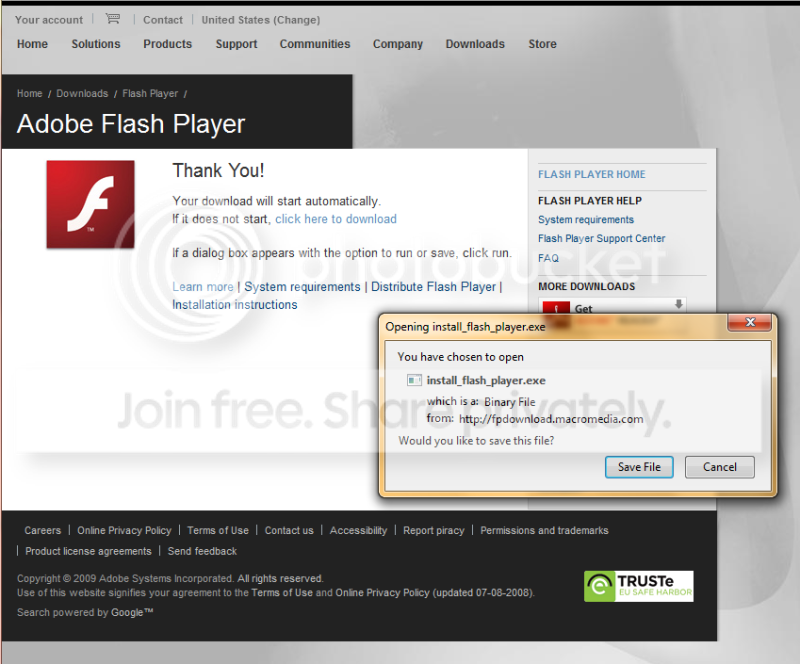
http://fpdownload.macromedia.com/get/flashplayer/current/install_flash_player.exe

To manually navigate;
1) start at Adobe - Adobe Flash Player
2) click windows vista/xp/2003/2000
3) click continue
4) At "Select version to download…" make sure you're selecting "Flash Player 10 for Windows" not "Flash Player 10 for Windows Internet Explorer".

5) Click Agree and Install Now.
6) you should see this;
flash.png
 

My Computer

OS
Windows 7 dual with XP SP2 ((Highly Custom))
CPU
Intel Core2Duo e7300 sometimes @ 3.33Ghtz
Motherboard
Gigabyte G31M-S2L
Memory
2gb Kingston HyperX
Graphics Card(s)
nVidia 9800GT 1gb
Sound Card
Onboard Realtech AC97 High Definition codec
Monitor(s) Displays
HP P1120 21" CRT
Screen Resolution
1600x1200
Hard Drives
WD 250gb caviar
WD 500GB SATAII
PSU
Gigabyte bundled 550w
Case
Gigabyte Generic
Cooling
stock
Keyboard
POS $25 cheapo because i type too fast, wears down kb's
Mouse
M$ Intellipoint 1.1 5 button
Internet Speed
ADSL2 @ max 1.3MBYTE/sec down, 1 up.
FWIW:

I have Flash working in both IE and Firefox.

Generated: Tue May 19 2009 20:50:08 GMT-0400 (Eastern Daylight Time)
User Agent: Mozilla/5.0 (Windows; U; Windows NT 6.1; en-US; rv:1.9.1b5pre) Gecko/20090519 Firefox/3.5b4pre (.NET CLR 3.5.30729)
Build ID: 20090519043912


Installed Plugins: (7)
- DNA Plug-in: npbtdna.dll
- Delivery Network Acceleration by BitTorrent™
- Mozilla Default Plug-in: npnul32.dll
- Default Plug-in
- Shockwave Flash: NPSWF32.dll
- Shockwave Flash 10.0 r22
- Shockwave for Director: np32dsw.dll
- Adobe Shockwave for Director Netscape plug-in, version 11.5

- Silverlight Plug-In: npctrl.dll
- 2.0.40115.0
- Windows Live® Photo Gallery: NPWLPG.dll
- NPWLPG
- Windows Presentation Foundation: NPWPF.dll
- Windows Presentation Foundation (WPF) plug-in for Mozilla browsers
 

My Computers

System One System Two

  • Computer type
    PC/Desktop
    Computer Manufacturer/Model Number
    The Beast Model A (homebrew)
    OS
    Windows 11 21H2 Current build
    CPU
    AMD Ryzen 9 3950X
    Motherboard
    MSI MEG X570 GODLIKE
    Memory
    4 * 32 GB - Corsair Vengeance 3600 MHz
    Graphics Card(s)
    EVGA GeForce RTX 3080 Ti XC3 ULTRA GAMING (12G-P5-3955-KR)
    Sound Card
    Realtek® ALC1220 Codec
    Monitor(s) Displays
    2x Eve Spectrum ES07D03 4K Gaming Monitor (Matte) | Eve Spec
    Screen Resolution
    3x 3840 x 2160
    Hard Drives
    3x Samsung 980 Pro NVMe PCIe 4 M.2 2 TB SSD (MZ-V8P2T0B/AM) } 3x Sabrent Rocket NVMe 4.0 1 TB SSD
    PSU
    PC Power & Cooling’s Silencer Series 1050 Watt, 80 Plus Plat
    Case
    Fractal Design Define 7 XL Dark ATX Full Tower Case
    Cooling
    SteelSeries Apex Pro Wired Gaming Keyboard
    Keyboard
    SteelSeries Apex Pro
    Mouse
    Logitech MX Master 3S | MX Master 3 for business
    Internet Speed
    AT&T LightSpeed Gigabit Duplex Ftth
    Antivirus
    Windows Defender + MB 3
    Browser
    Nightly (default) + Firefox (stable),Chrome, Edge
  • Computer type
    PC/Desktop
    System Manufacturer/Model Number
    Dell Latitude E5470
    OS
    ChromeOS Flex Dev Channel (current)
    CPU
    Intel(R) Core(TM) i5-6300U CPU @ 2.40GHz, 2501 Mhz, 2 Core(s), 4 Logical Processor(s)
    Motherboard
    Dell
    Memory
    16 GB
    Graphics Card(s)
    Intel(R) HD Graphics 520
    Sound Card
    Intel(R) HD Graphics 520 + RealTek Audio
    Monitor(s) Displays
    Dell laptop display 15"
    Screen Resolution
    1920 * 1080
    Hard Drives
    Toshiba 128GB M.2 22300 drive
    INTEL Cherryville 520 Series SSDSC2CW180A 180 GB SATA III SSD
    PSU
    Dell
    Case
    Dell
    Cooling
    Dell
    Keyboard
    Dell
    Mouse
    Logitech MX Master 3S (shared w. Sys 1) | Dell TouchPad
    Internet Speed
    AT&T LightSpeed Gigabit Duplex Ftth
The new guy...

Before I found this thread, I submitted a post at:
Windows 7, Internet Explorer, Adobe Flash Player 10 Active X; Flickers and flashes anyone?

I am new to Windows 7, 64 bit anything, and posting to forums. So, please bare with me. I could use a little help (some would say a lot of help).

I just installed Windows 7 RC today. I Like it. I like it a lot. It's fast, pretty, and somewhat familiar.

System Information:
Dell Latitude D620 laptop.
Intel Core 2 CPU T5500 @ 1.66GHz 1.67 GHz
1.0 GB RAM
64 Bit OS

The Issue:
When viewing webpages with images (and flash content), the webpage flickers or flashes briefly when I scroll or move the page.

I am not entirely sure of the differences in 64 bit / 32 bit operating systems and applications. However, I noticed that there are 2 Internet Explorers installed with Winidows 7. Both are IE8, however one is "64 bit". I started off with the 64 bit browser and came to a webpage with Flash content. It prompted me to install flash. I expect to download plugins since the OS is freshly installed. I was directed to the Flash website and tried to download the player/plugin. However, I recieved a notice stating that Flash does not support a 64 bit browser. I closed the browser and opened the 32 bit version. I went to the Flash website and downloaded to goods. Now, I am getting the flickers and flashes when viewing many website with images and Flash content.
For a test, I just opened the 64 bit browser and went too Yahoo.com. I did NOT recieve the flickers and flashes that I do on the 32 bit version of IE.

I hope I didn't over complicate the issue and provided enough information. In the end, my question is somewhat simple. What would you reccomend I install on my system to allow me to view the mojority of websites on the web.
Be well
Shawn (The New Guy... since there is another Shawn)

 

My Computer

Computer Manufacturer/Model Number
Dell Latitude D620
OS
Windows 7 RC
CPU
Intel Core 2 @ 1.66 1.67
Flash Player is still not supported for playback in a 64-bit browser yet.
WOW, how a company like Adobe can be so stupid?
 

My Computer

OS
Win Sev7n 7201 x64
CPU
Intel Core 2 Duo e6750 2.66Ghz
Motherboard
Gigabyte GA-P35-DS3R Rev1.0
Memory
Crucial 2x1GB DDR2 800Mhz
Graphics Card(s)
Leadtek Geforce 8800 GTS 640MB
Monitor(s) Displays
Samsung 206BW
Screen Resolution
1650x1080
Hard Drives
Intel Matrix Storage Raid 0 - 2 drives
Intel Matrix Storage Raid 1 - 2 drives
PSU
NoName
Internet Speed
SFR ADSL 8Mbits
wait, what?
Excuse me, but i'd like to see even ONE website that has such high video quality they'd warrant a 64 bit Flash.
 

My Computer

OS
Windows 7 dual with XP SP2 ((Highly Custom))
CPU
Intel Core2Duo e7300 sometimes @ 3.33Ghtz
Motherboard
Gigabyte G31M-S2L
Memory
2gb Kingston HyperX
Graphics Card(s)
nVidia 9800GT 1gb
Sound Card
Onboard Realtech AC97 High Definition codec
Monitor(s) Displays
HP P1120 21" CRT
Screen Resolution
1600x1200
Hard Drives
WD 250gb caviar
WD 500GB SATAII
PSU
Gigabyte bundled 550w
Case
Gigabyte Generic
Cooling
stock
Keyboard
POS $25 cheapo because i type too fast, wears down kb's
Mouse
M$ Intellipoint 1.1 5 button
Internet Speed
ADSL2 @ max 1.3MBYTE/sec down, 1 up.
WOW, how a company like Adobe can be so stupid?

Well, unfortunately no one has a 64-bit flash add-on available. :(


wait, what?
Excuse me, but i'd like to see even ONE website that has such high video quality they'd warrant a 64 bit Flash.

True, but it's more that people with a 64-bit OS would just want it so that they can browse from a 64-bit browser instead and still be able to see flash video.
 

My Computer

Computer type
PC/Desktop
Computer Manufacturer/Model Number
Self built custom
OS
64-bit Windows 11 Pro for Workstations
CPU
Intel i7-8700K OC'd to 5 GHz
Motherboard
ASUS ROG Maximus XI Formula Z390
Memory
64 GB (4x16GB) G.SKILL TridentZ RGB DDR4 3600 MHz
Graphics Card(s)
ASUS ROG-STRIX-GTX1080TI-O11G-GAMING
Sound Card
Integrated
Monitor(s) Displays
2 x Samsung Odyssey G7 27"
Screen Resolution
2560x1440
Hard Drives
1TB Samsung 990 PRO M.2,
4TB Samsung 990 PRO PRO M.2,
TerraMaster F8 SSD Plus NAS
PSU
Seasonic Prime Titanium 850W
Case
Thermaltake Core P3
Cooling
Corsair Hydro H115i
Keyboard
Logitech wireless K800
Mouse
Logitech MX Master 4
Internet Speed
2 Gb/s Download and 100 Mb/s Upload
Antivirus
Malwarebyte Anti-Malware Premium
Browser
Google Chrome
Other Info
Logitech Z625 speaker system,
Logitech BRIO 4K Pro webcam,
HP Color LaserJet Pro MFP M477fdn,
APC SMART-UPS RT 1000 XL - SURT1000XLI,
Galaxy S23 Plus phone
Well, unfortunately no one has a 64-bit flash add-on available. :(

True, but it's more that people with a 64-bit OS would just want it so that they can browse from a 64-bit browser instead and still be able to see flash video.
It's exactly my point. I don't care about 64bits flash, I just want to be able to use my x64 browser and see flash animation. I'm not sure it's a big deal for Adobe.
 

My Computer

OS
Win Sev7n 7201 x64
CPU
Intel Core 2 Duo e6750 2.66Ghz
Motherboard
Gigabyte GA-P35-DS3R Rev1.0
Memory
Crucial 2x1GB DDR2 800Mhz
Graphics Card(s)
Leadtek Geforce 8800 GTS 640MB
Monitor(s) Displays
Samsung 206BW
Screen Resolution
1650x1080
Hard Drives
Intel Matrix Storage Raid 0 - 2 drives
Intel Matrix Storage Raid 1 - 2 drives
PSU
NoName
Internet Speed
SFR ADSL 8Mbits

My Computer

Computer type
PC/Desktop
Computer Manufacturer/Model Number
Me
OS
Win 7 Ultimate x64
CPU
FX-8350 @ 4.6 GHz so far
Motherboard
Asus M5A97 EVO
Memory
ADATA XPG V1 Series Black 8GB DDR3 1600
Graphics Card(s)
Sapphire R9 270x Dual-X
Sound Card
Xonar DGX w/ Corsair Vengence 1300
Monitor(s) Displays
Acer S232HL Abid
Screen Resolution
1920x1080
Hard Drives
120 GB OCZ Vertex 3
500 GB Seagate 7200.12
PSU
Antec Earthwatts 650W Green
Case
Antec Three Hundred
Cooling
Cooler Master 212 EVO
Keyboard
Logitech G510
Mouse
Logitech G500s
Internet Speed
35000/3000
yes thats already known. So not very helpful for Windows users.
 

My Computer

Computer Manufacturer/Model Number
self built
OS
Windows 7 Professional 64-bit
CPU
Intel E8400 3GHz
Motherboard
Intel DX48BT2
Memory
Kingston PC3-10700H 4Gb
Graphics Card(s)
XFX Radeon HD 5850 BlackEd.
Sound Card
Asus Xonar DG
Monitor(s) Displays
2x Samsung SM-T220HD 22"
Screen Resolution
1680x1050 on two monitors
Hard Drives
OCZ Vertex 2 120gb 3.5" (OS)
Seagate Momentus XT 500gb
Samsung F3 1Tb (games)
2x Samsung F1 1Tb
PSU
Thermaltake ToughPower 850w
Case
Thermaltake Armor
Cooling
Scythe Mugen II
Keyboard
Microsoft Comfort Curve USB
Mouse
Razer Diamondback 3G
Internet Speed
8128/443
working

working great for me IE8/WIN7×64bits
 

My Computer

Computer Manufacturer/Model Number
own built
OS
win 7 home premium
CPU
Intel core I7-920
Motherboard
ga-ex58-ud3r
Memory
KINGSTON KVR1066D3N7/3G ValueRAM
Graphics Card(s)
Gigabyte GT 430
Monitor(s) Displays
PRIMARY: samsung 2333m 23' , SECONDARY : SAMSUNG 32'
Screen Resolution
1080p , 1360*768
Hard Drives
Intel® X25-V Value SATA Solid-State Drive / WD caviar black 750G
PSU
Cooler Master GX Series RS750 750W
Case
azza 910
Cooling
Zalman 9900
Internet Speed
20 MB
Doubtless you are using 32-bit version of IE8.
 

My Computer

Computer Manufacturer/Model Number
self built
OS
Windows 7 Professional 64-bit
CPU
Intel E8400 3GHz
Motherboard
Intel DX48BT2
Memory
Kingston PC3-10700H 4Gb
Graphics Card(s)
XFX Radeon HD 5850 BlackEd.
Sound Card
Asus Xonar DG
Monitor(s) Displays
2x Samsung SM-T220HD 22"
Screen Resolution
1680x1050 on two monitors
Hard Drives
OCZ Vertex 2 120gb 3.5" (OS)
Seagate Momentus XT 500gb
Samsung F3 1Tb (games)
2x Samsung F1 1Tb
PSU
Thermaltake ToughPower 850w
Case
Thermaltake Armor
Cooling
Scythe Mugen II
Keyboard
Microsoft Comfort Curve USB
Mouse
Razer Diamondback 3G
Internet Speed
8128/443
It would also help a great deal if Adobe would specify on their download pages exactly which versions of Windows it does support, 32 or 64-bit.
I'm not a 64-bit-er yet, but soon will be soon so am planning ahead...LOL.
 

My Computer

Computer type
PC/Desktop
Computer Manufacturer/Model Number
Alienware® ALX X58
OS
Win 7 Ult SP1/Win 10 Pro (all x64)
CPU
Intel® Core™ i7-975 Extreme O/C to 4.02 GHz, 8MB Cache
Motherboard
Asus® P6T Deluxe V2 X58 LGA1366
Memory
24GB Corsair Vengeance DDR3 SDRAM at 1600MHz - 6 x 4096MB
Graphics Card(s)
1792 MB NVIDIA® GeForce® GTX 295 Dual Core
Sound Card
Onboard Soundmax® High-Definition 7.1 Performance Audio
Monitor(s) Displays
Samsung XL2370 LED backlit 23" W/S 2ms response time
Screen Resolution
1920 X 1080
Hard Drives
2 x 500gb SATA II
1 x 1TB SATA II
1 external eSATA LaCie 3TB
(Non-RAID)
PSU
Alienware® 1200 Watt Multi-GPU
Case
Alienware® P2 ALX Chassis with AlienIce™ 3.0 Video Cooling
Cooling
Alienware® High-Perf. Liquid Cooling + Acoustic Dampening
Keyboard
Microsoft® Wireless Entertainment 8000 + Logitech® G15 Wired
Mouse
Microsoft® Wireless Laser 8000 + Logitech® G9 Wired
Internet Speed
1Gb/s
Antivirus
McAfee LiveSafe
Browser
Firefox - latest
Other Info
Using non-RAID on purpose as I find RAID to be too temperamental.
Now set to AHCI
Back
Top