
You are using an out of date browser. It may not display this or other websites correctly.
You should upgrade or use an alternative browser.
You should upgrade or use an alternative browser.
NO INTERNET right from the start
- Thread starter Sickgodv3
- Start date

First off welcome to the sevenforums!
The first thing to look at when trying to see 7 connected is the settings seen in the Network+Sharing section of the control panel. That should be set to "private" for residential not "work place" or "public" since will tend to hamper everything if not configured correctly.
With XP you already have a working connection setup and configured explaining why you get right back online when going there. For 7 now you will have to establish a new private network connection. How are you connecting through a dsl or cable modem?
The first thing to look at when trying to see 7 connected is the settings seen in the Network+Sharing section of the control panel. That should be set to "private" for residential not "work place" or "public" since will tend to hamper everything if not configured correctly.
With XP you already have a working connection setup and configured explaining why you get right back online when going there. For 7 now you will have to establish a new private network connection. How are you connecting through a dsl or cable modem?
My Computers
System One System Two
-
- Computer type
- PC/Desktop
- Computer Manufacturer/Model Number
- Custom builds = 2
- OS
- W7 Ultimate x64/W10 Pro x64/W11 Pro Triple Boot - Main PC W7 Remote PC Micro ATX W7 Pro x64/W11 Pro
- CPU
- AMD Phenom II X4 975 Deneb 3.6ghz - 965 2nd remote pc
- Motherboard
- Gigabyte GA-790XTA-UD4-Gigabyte GA-880GM-D2H remote pc
- Memory
- Kingston Hyper X DDR3 1600 1.5v 16gb - Hyper X Fury 8gb 2nd
- Graphics Card(s)
- MSI HD Radeon 5750 1gb - MSI HD Radeon 6450 on mini tower
- Sound Card
- Creative Labs X-Fi Xtreme Audio P - Realtek onooard 2nd case
- Monitor(s) Displays
- ASUS VW199T-P 19" HP 2082a Main-HP 2082a 20" remote pc
- Screen Resolution
- Asus 1440x900 - HP 1600x900
- Hard Drives
- WD Black 1TB HD per OS W7, W10, and pending W11 presently on 500gb OS Drive - Pending Triple 1TB HDs for Spanned Storage/backup volume
Single 2TB external USB enclosure, single 1TB System 7 Host/Boot drive, Pending 8TB external HD for system image b
- PSU
- Corsair 750TX - primary / Corsair CX600 - second
- Case
- Antec 900-2 - SSD compatible / NZXT Vulcan mini tower
- Cooling
- Zalman CNPS9900A
- Keyboard
- AZIO L70 Backlit Letters Gaming - ONN Cordless/USB
- Mouse
- MSI DS200 Programmable, Logitech Cordless
- Internet Speed
- 30mbps upgrade - primary hard wired - mini tower usb WiFi
- Antivirus
- GFI VIPRE Internet Security 2014 on W7 2016 beta on W10,
- Browser
- Cyberfox, WaterFox 64bit FF variants, FireFox x64, Pale Moon
- Other Info
- Accomdata fan cooled usb 2.0 PIDE/Sata II, III external enclosure.
Sambient usb/eSata PATA/Sata II, III external enclosure.
-
- Computer type
- PC/Desktop
- System Manufacturer/Model Number
- CUSTOM ASSEMBLY
- OS
- W7 Pro x64/W11 Pro
- CPU
- AMD Deneb 3.6ghz - 965
- Motherboard
- Gigabyte GA-880GM-D2H remote pc
- Memory
- Kingston Hyper X Fury 8gb
- Graphics Card(s)
- MSI HD Radeon 6450 DVI Output
- Sound Card
- Realtek onooard Creative or Other separate PENDING
- Monitor(s) Displays
- VIZIO 32" LCD TV Separate LCD Pending
- Screen Resolution
- 1600x1080
- Hard Drives
- WD 500GB OS Host/Boot WD Green 1TB Storage/Backup
- PSU
- Corsair 600W - THERMALTAKE 600W spare case
- Case
- NZXT Vulcan mini tower
- Cooling
- Twin 120mm Top Fans - 240mm Side Cover
- Keyboard
- ONN Cordless/USB Logitech Cordless
- Mouse
- ONN USB/Cordless - Logitech Cordless
- Internet Speed
- DSL 5G
- Browser
- MS Edge, FireFox, WaterFox x64, FireFox Nightly
- Other Info
- OS Testing-Remote Access to Main TeamViewer
but i guess my real question is how to i find out what the name of the eathernet build in card is, it seems like i need to install the driver for it to be used, but idk what the name is, and i also have a belkin G wireless desktop card tht i put in it and i downloaded the driver and put it on a usb and installed it to the windows 7, but it still doesnt see the desktop card it self...also when i went to start the belkin wireless utilty it got an error, so my best bet is the cord, its just weird for me to be installing the driver for the cord(ever windows b4 it i just had the cord plugged in and it new it was there) so idk, plz help me, thank you 
My Computer
- OS
- Windows XP
I've been using a Motorla model since actually changing ISPs here just to be able to connect online in the 64bit 7! The old dsl setup just couldn't cut it there.
Presently I still have to figure out how to get one of the routers here working. The simple prompt when first finishing up the installation of 7 for private immediately saw a working connection.
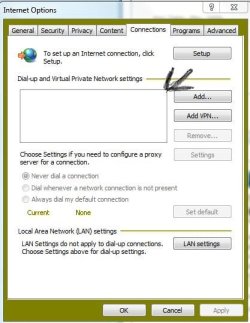
The second thing you can look while in the control panel or a simple right click on the IE 8 tools>internet options>connections is to make sure there are no items like vpn or anything else seen in the small window there. If you are seeing the unable to connect, redial sequence you won't! The image here shows what you should see instead being nothing but an empty window.
Presently I still have to figure out how to get one of the routers here working. The simple prompt when first finishing up the installation of 7 for private immediately saw a working connection.
The second thing you can look while in the control panel or a simple right click on the IE 8 tools>internet options>connections is to make sure there are no items like vpn or anything else seen in the small window there. If you are seeing the unable to connect, redial sequence you won't! The image here shows what you should see instead being nothing but an empty window.
Attachments
My Computers
System One System Two
-
- Computer type
- PC/Desktop
- Computer Manufacturer/Model Number
- Custom builds = 2
- OS
- W7 Ultimate x64/W10 Pro x64/W11 Pro Triple Boot - Main PC W7 Remote PC Micro ATX W7 Pro x64/W11 Pro
- CPU
- AMD Phenom II X4 975 Deneb 3.6ghz - 965 2nd remote pc
- Motherboard
- Gigabyte GA-790XTA-UD4-Gigabyte GA-880GM-D2H remote pc
- Memory
- Kingston Hyper X DDR3 1600 1.5v 16gb - Hyper X Fury 8gb 2nd
- Graphics Card(s)
- MSI HD Radeon 5750 1gb - MSI HD Radeon 6450 on mini tower
- Sound Card
- Creative Labs X-Fi Xtreme Audio P - Realtek onooard 2nd case
- Monitor(s) Displays
- ASUS VW199T-P 19" HP 2082a Main-HP 2082a 20" remote pc
- Screen Resolution
- Asus 1440x900 - HP 1600x900
- Hard Drives
- WD Black 1TB HD per OS W7, W10, and pending W11 presently on 500gb OS Drive - Pending Triple 1TB HDs for Spanned Storage/backup volume
Single 2TB external USB enclosure, single 1TB System 7 Host/Boot drive, Pending 8TB external HD for system image b
- PSU
- Corsair 750TX - primary / Corsair CX600 - second
- Case
- Antec 900-2 - SSD compatible / NZXT Vulcan mini tower
- Cooling
- Zalman CNPS9900A
- Keyboard
- AZIO L70 Backlit Letters Gaming - ONN Cordless/USB
- Mouse
- MSI DS200 Programmable, Logitech Cordless
- Internet Speed
- 30mbps upgrade - primary hard wired - mini tower usb WiFi
- Antivirus
- GFI VIPRE Internet Security 2014 on W7 2016 beta on W10,
- Browser
- Cyberfox, WaterFox 64bit FF variants, FireFox x64, Pale Moon
- Other Info
- Accomdata fan cooled usb 2.0 PIDE/Sata II, III external enclosure.
Sambient usb/eSata PATA/Sata II, III external enclosure.
-
- Computer type
- PC/Desktop
- System Manufacturer/Model Number
- CUSTOM ASSEMBLY
- OS
- W7 Pro x64/W11 Pro
- CPU
- AMD Deneb 3.6ghz - 965
- Motherboard
- Gigabyte GA-880GM-D2H remote pc
- Memory
- Kingston Hyper X Fury 8gb
- Graphics Card(s)
- MSI HD Radeon 6450 DVI Output
- Sound Card
- Realtek onooard Creative or Other separate PENDING
- Monitor(s) Displays
- VIZIO 32" LCD TV Separate LCD Pending
- Screen Resolution
- 1600x1080
- Hard Drives
- WD 500GB OS Host/Boot WD Green 1TB Storage/Backup
- PSU
- Corsair 600W - THERMALTAKE 600W spare case
- Case
- NZXT Vulcan mini tower
- Cooling
- Twin 120mm Top Fans - 240mm Side Cover
- Keyboard
- ONN Cordless/USB Logitech Cordless
- Mouse
- ONN USB/Cordless - Logitech Cordless
- Internet Speed
- DSL 5G
- Browser
- MS Edge, FireFox, WaterFox x64, FireFox Nightly
- Other Info
- OS Testing-Remote Access to Main TeamViewer
hmm, the no internet connection in the bottom right is red(saying nothing is connected), when i plug in the cord it should connect right there, this is frustrating coz i didnt for see this being a problem , idk what to do
My Computer
- OS
- Windows XP
but i guess my real question is how to i find out what the name of the eathernet build in card is, it seems like i need to install the driver for it to be used, but idk what the name is, and i also have a belkin G wireless desktop card tht i put in it and i downloaded the driver and put it on a usb and installed it to the windows 7, but it still doesnt see the desktop card it self...also when i went to start the belkin wireless utilty it got an error, so my best bet is the cord, its just weird for me to be installing the driver for the cord(ever windows b4 it i just had the cord plugged in and it new it was there) so idk, plz help me, thank you
You'll have to slow down a bit since we are missing each other's replies. If you are using the port built into the board itself that's considered onboard Lan there. If the modem is strictly ethernet and doesn't connect by usb but through the router and then to the port on the board you don't want a second wireless adapter for the same router active at the same time.
The first place to look is in the device manager under network adapters. For a direct hard wired connection if you see that then the wireless adapter for the same connection would need to be disabled.
If you are not hard wired to the router but only using the wireles usb adapter that would be the place to look as well to right click on that item and see if it shows "device is working properly".
For system wide information that will shows precisely what make and model board you are running a free System Info for Windows tool will do that for you easy enough. SIW | System Information for Windows by Gabriel Topala
That's also one of the recommended free programs seen in the software section as well. http://www.sevenforums.com/software/92-free-great-programs-windows-7-a.html
My Computers
System One System Two
-
- Computer type
- PC/Desktop
- Computer Manufacturer/Model Number
- Custom builds = 2
- OS
- W7 Ultimate x64/W10 Pro x64/W11 Pro Triple Boot - Main PC W7 Remote PC Micro ATX W7 Pro x64/W11 Pro
- CPU
- AMD Phenom II X4 975 Deneb 3.6ghz - 965 2nd remote pc
- Motherboard
- Gigabyte GA-790XTA-UD4-Gigabyte GA-880GM-D2H remote pc
- Memory
- Kingston Hyper X DDR3 1600 1.5v 16gb - Hyper X Fury 8gb 2nd
- Graphics Card(s)
- MSI HD Radeon 5750 1gb - MSI HD Radeon 6450 on mini tower
- Sound Card
- Creative Labs X-Fi Xtreme Audio P - Realtek onooard 2nd case
- Monitor(s) Displays
- ASUS VW199T-P 19" HP 2082a Main-HP 2082a 20" remote pc
- Screen Resolution
- Asus 1440x900 - HP 1600x900
- Hard Drives
- WD Black 1TB HD per OS W7, W10, and pending W11 presently on 500gb OS Drive - Pending Triple 1TB HDs for Spanned Storage/backup volume
Single 2TB external USB enclosure, single 1TB System 7 Host/Boot drive, Pending 8TB external HD for system image b
- PSU
- Corsair 750TX - primary / Corsair CX600 - second
- Case
- Antec 900-2 - SSD compatible / NZXT Vulcan mini tower
- Cooling
- Zalman CNPS9900A
- Keyboard
- AZIO L70 Backlit Letters Gaming - ONN Cordless/USB
- Mouse
- MSI DS200 Programmable, Logitech Cordless
- Internet Speed
- 30mbps upgrade - primary hard wired - mini tower usb WiFi
- Antivirus
- GFI VIPRE Internet Security 2014 on W7 2016 beta on W10,
- Browser
- Cyberfox, WaterFox 64bit FF variants, FireFox x64, Pale Moon
- Other Info
- Accomdata fan cooled usb 2.0 PIDE/Sata II, III external enclosure.
Sambient usb/eSata PATA/Sata II, III external enclosure.
-
- Computer type
- PC/Desktop
- System Manufacturer/Model Number
- CUSTOM ASSEMBLY
- OS
- W7 Pro x64/W11 Pro
- CPU
- AMD Deneb 3.6ghz - 965
- Motherboard
- Gigabyte GA-880GM-D2H remote pc
- Memory
- Kingston Hyper X Fury 8gb
- Graphics Card(s)
- MSI HD Radeon 6450 DVI Output
- Sound Card
- Realtek onooard Creative or Other separate PENDING
- Monitor(s) Displays
- VIZIO 32" LCD TV Separate LCD Pending
- Screen Resolution
- 1600x1080
- Hard Drives
- WD 500GB OS Host/Boot WD Green 1TB Storage/Backup
- PSU
- Corsair 600W - THERMALTAKE 600W spare case
- Case
- NZXT Vulcan mini tower
- Cooling
- Twin 120mm Top Fans - 240mm Side Cover
- Keyboard
- ONN Cordless/USB Logitech Cordless
- Mouse
- ONN USB/Cordless - Logitech Cordless
- Internet Speed
- DSL 5G
- Browser
- MS Edge, FireFox, WaterFox x64, FireFox Nightly
- Other Info
- OS Testing-Remote Access to Main TeamViewer

Juzz4Fun
New member
- Local time
- 9:19 AM
- Messages
- 6
Im having a similar issue with the no connection error right from the start. Firstly, I have installed the 32bit version on Pc#1 with no issues at all. Just recently installed it to Pc#2 in which it doesnt recognize I have a network connection at all. Before 7 I had Linux on it and it worked fine? This is the same disc I used for PC1 and after unplugging the router wire/cable and changing it out with another pc's that worked fine, when I turned it on it still gave me the same error, I did get it twice so far to get it to connect up to my router and to go online, but the second you do a restart on the Pc it goes back to no network msg. Also says I am or may be missing a driver for it which is weird as I did a windows update the last time I did get on it so wouldnt think it would be missing a driver. I have it hard wired straight to my router with other pc's on the router which all work fine using a E/Net cable.
I also have two different E/Net jacks on my M/Board and it does it on either one of them.
Weird.
I also have two different E/Net jacks on my M/Board and it does it on either one of them.
Weird.
My Computer
- Computer Manufacturer/Model Number
- Customed X 4
- OS
- Windows ME, WIndows XP Media 2005, Mandriva, WIndows 7-64bit
- CPU
- 3800X2, 9850 Amdx4, P4 1.6, C2D
- Motherboard
- ABIT/Foxconn
- Memory
- 8 Gigs 1066, 4 gigs 800, 2 gigs 800, 256 megs Rdram
- Graphics Card(s)
- 9800GT, 7900Gs, 6600Gt
- Sound Card
- Realtech
- Monitor(s) Displays
- 26" Lcd. 19" Lcd
- Screen Resolution
- 1680x1050, 1280x1024
- Hard Drives
- 1 Tb/640Gb
250 Gb
160Gbx2
30 Gig
- PSU
- 700 Ocz Ultimate
- Case
- Hush (Nzxt), XCruiser (Aspire), Thermaltake X-7000, Guardian
- Cooling
- Artic-64, Thermaltake G/O
- Keyboard
- Saitek - Eclipse
- Mouse
- Logiteck - Trackball
- Internet Speed
- Cable
i am using the port built into the board itself (onboard Lan), like u said...my belkin G wireless desktop card, is a pci card thts in the pc...i also have a E/net pci card for the cord...also how do i get to device manager under network adapters? (i played arond on win7 for 3hours last night and went through alot of menus but still no luck,,,,
My Computer
- OS
- Windows XP
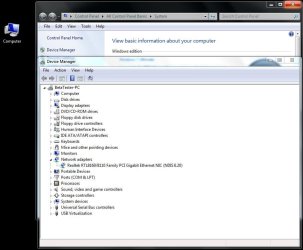
The device manager itself is found with a new icon for it in the control panel or simply right clicking on the computer icon on the desktop if you have that visible. Right on the upper left side as shown in the image here you then see the device manager link you click on to bring the next screen for the DM itself.
Attachments
My Computers
System One System Two
-
- Computer type
- PC/Desktop
- Computer Manufacturer/Model Number
- Custom builds = 2
- OS
- W7 Ultimate x64/W10 Pro x64/W11 Pro Triple Boot - Main PC W7 Remote PC Micro ATX W7 Pro x64/W11 Pro
- CPU
- AMD Phenom II X4 975 Deneb 3.6ghz - 965 2nd remote pc
- Motherboard
- Gigabyte GA-790XTA-UD4-Gigabyte GA-880GM-D2H remote pc
- Memory
- Kingston Hyper X DDR3 1600 1.5v 16gb - Hyper X Fury 8gb 2nd
- Graphics Card(s)
- MSI HD Radeon 5750 1gb - MSI HD Radeon 6450 on mini tower
- Sound Card
- Creative Labs X-Fi Xtreme Audio P - Realtek onooard 2nd case
- Monitor(s) Displays
- ASUS VW199T-P 19" HP 2082a Main-HP 2082a 20" remote pc
- Screen Resolution
- Asus 1440x900 - HP 1600x900
- Hard Drives
- WD Black 1TB HD per OS W7, W10, and pending W11 presently on 500gb OS Drive - Pending Triple 1TB HDs for Spanned Storage/backup volume
Single 2TB external USB enclosure, single 1TB System 7 Host/Boot drive, Pending 8TB external HD for system image b
- PSU
- Corsair 750TX - primary / Corsair CX600 - second
- Case
- Antec 900-2 - SSD compatible / NZXT Vulcan mini tower
- Cooling
- Zalman CNPS9900A
- Keyboard
- AZIO L70 Backlit Letters Gaming - ONN Cordless/USB
- Mouse
- MSI DS200 Programmable, Logitech Cordless
- Internet Speed
- 30mbps upgrade - primary hard wired - mini tower usb WiFi
- Antivirus
- GFI VIPRE Internet Security 2014 on W7 2016 beta on W10,
- Browser
- Cyberfox, WaterFox 64bit FF variants, FireFox x64, Pale Moon
- Other Info
- Accomdata fan cooled usb 2.0 PIDE/Sata II, III external enclosure.
Sambient usb/eSata PATA/Sata II, III external enclosure.
-
- Computer type
- PC/Desktop
- System Manufacturer/Model Number
- CUSTOM ASSEMBLY
- OS
- W7 Pro x64/W11 Pro
- CPU
- AMD Deneb 3.6ghz - 965
- Motherboard
- Gigabyte GA-880GM-D2H remote pc
- Memory
- Kingston Hyper X Fury 8gb
- Graphics Card(s)
- MSI HD Radeon 6450 DVI Output
- Sound Card
- Realtek onooard Creative or Other separate PENDING
- Monitor(s) Displays
- VIZIO 32" LCD TV Separate LCD Pending
- Screen Resolution
- 1600x1080
- Hard Drives
- WD 500GB OS Host/Boot WD Green 1TB Storage/Backup
- PSU
- Corsair 600W - THERMALTAKE 600W spare case
- Case
- NZXT Vulcan mini tower
- Cooling
- Twin 120mm Top Fans - 240mm Side Cover
- Keyboard
- ONN Cordless/USB Logitech Cordless
- Mouse
- ONN USB/Cordless - Logitech Cordless
- Internet Speed
- DSL 5G
- Browser
- MS Edge, FireFox, WaterFox x64, FireFox Nightly
- Other Info
- OS Testing-Remote Access to Main TeamViewer
The one thing I could add in here is the likely need to unplug the power for the modem while already booted in Windows and wait a minute or so to plug the power back in. That will recycle the power and allow a fresh detection of the connection itself. With a router added in you would unplug right after or right before the modem and replug that back in after the modem.
That was seen for one configuration with a different brand modem used here from that support site as one thing to try. You'll likely see something like that at the Road Runner site as well.
That was seen for one configuration with a different brand modem used here from that support site as one thing to try. You'll likely see something like that at the Road Runner site as well.
My Computers
System One System Two
-
- Computer type
- PC/Desktop
- Computer Manufacturer/Model Number
- Custom builds = 2
- OS
- W7 Ultimate x64/W10 Pro x64/W11 Pro Triple Boot - Main PC W7 Remote PC Micro ATX W7 Pro x64/W11 Pro
- CPU
- AMD Phenom II X4 975 Deneb 3.6ghz - 965 2nd remote pc
- Motherboard
- Gigabyte GA-790XTA-UD4-Gigabyte GA-880GM-D2H remote pc
- Memory
- Kingston Hyper X DDR3 1600 1.5v 16gb - Hyper X Fury 8gb 2nd
- Graphics Card(s)
- MSI HD Radeon 5750 1gb - MSI HD Radeon 6450 on mini tower
- Sound Card
- Creative Labs X-Fi Xtreme Audio P - Realtek onooard 2nd case
- Monitor(s) Displays
- ASUS VW199T-P 19" HP 2082a Main-HP 2082a 20" remote pc
- Screen Resolution
- Asus 1440x900 - HP 1600x900
- Hard Drives
- WD Black 1TB HD per OS W7, W10, and pending W11 presently on 500gb OS Drive - Pending Triple 1TB HDs for Spanned Storage/backup volume
Single 2TB external USB enclosure, single 1TB System 7 Host/Boot drive, Pending 8TB external HD for system image b
- PSU
- Corsair 750TX - primary / Corsair CX600 - second
- Case
- Antec 900-2 - SSD compatible / NZXT Vulcan mini tower
- Cooling
- Zalman CNPS9900A
- Keyboard
- AZIO L70 Backlit Letters Gaming - ONN Cordless/USB
- Mouse
- MSI DS200 Programmable, Logitech Cordless
- Internet Speed
- 30mbps upgrade - primary hard wired - mini tower usb WiFi
- Antivirus
- GFI VIPRE Internet Security 2014 on W7 2016 beta on W10,
- Browser
- Cyberfox, WaterFox 64bit FF variants, FireFox x64, Pale Moon
- Other Info
- Accomdata fan cooled usb 2.0 PIDE/Sata II, III external enclosure.
Sambient usb/eSata PATA/Sata II, III external enclosure.
-
- Computer type
- PC/Desktop
- System Manufacturer/Model Number
- CUSTOM ASSEMBLY
- OS
- W7 Pro x64/W11 Pro
- CPU
- AMD Deneb 3.6ghz - 965
- Motherboard
- Gigabyte GA-880GM-D2H remote pc
- Memory
- Kingston Hyper X Fury 8gb
- Graphics Card(s)
- MSI HD Radeon 6450 DVI Output
- Sound Card
- Realtek onooard Creative or Other separate PENDING
- Monitor(s) Displays
- VIZIO 32" LCD TV Separate LCD Pending
- Screen Resolution
- 1600x1080
- Hard Drives
- WD 500GB OS Host/Boot WD Green 1TB Storage/Backup
- PSU
- Corsair 600W - THERMALTAKE 600W spare case
- Case
- NZXT Vulcan mini tower
- Cooling
- Twin 120mm Top Fans - 240mm Side Cover
- Keyboard
- ONN Cordless/USB Logitech Cordless
- Mouse
- ONN USB/Cordless - Logitech Cordless
- Internet Speed
- DSL 5G
- Browser
- MS Edge, FireFox, WaterFox x64, FireFox Nightly
- Other Info
- OS Testing-Remote Access to Main TeamViewer
Similar threads
- Replies
- 9
- Views
- 4K
- Replies
- 5
- Views
- 2K

- Replies
- 6
- Views
- 3K
- Replies
- 20
- Views
- 4K