

- Local time
- 5:09 PM
- Messages
- 1,258
The Reliability Monitor of Windows 7 is a very handy tool for monitoring the history of when which applications have failed.
Being a developer, it is to be expected that applications that are "In-Development" will cause problems, which in turn negativly affects the scores of the Windows Reliability Monitor. I utility I'm creating (for personal use) crashes regularly when closed, but also only if it is run from within the RAD Studio 2010 IDE. If I run the compiled EXE from Windows Explorer, then it does not crash, so I suspect that it is some kind of incompatibility between Windows 7 and the Delphi Debugger.

As you can imagine, this scenario is seriously affecting my Reliability Monitor:
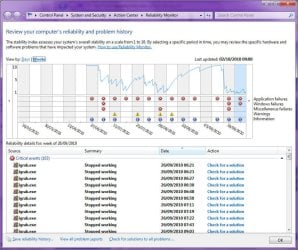
So what I'd like to know is whether or not there is a way for me to "exclude" the IGRAB.EXE from being monitored by the Windows Reliability Monitor, so that it can display only those failures that I'm interested in, without my own development projects from screwing up the scores?
I suppose I could attempt to debug what is causing the crash, but so far none of the normal debugging techniques have worked. As I said, the crash only happens if the Delphi IDE was used to launch the program...
Being a developer, it is to be expected that applications that are "In-Development" will cause problems, which in turn negativly affects the scores of the Windows Reliability Monitor. I utility I'm creating (for personal use) crashes regularly when closed, but also only if it is run from within the RAD Studio 2010 IDE. If I run the compiled EXE from Windows Explorer, then it does not crash, so I suspect that it is some kind of incompatibility between Windows 7 and the Delphi Debugger.
As you can imagine, this scenario is seriously affecting my Reliability Monitor:
So what I'd like to know is whether or not there is a way for me to "exclude" the IGRAB.EXE from being monitored by the Windows Reliability Monitor, so that it can display only those failures that I'm interested in, without my own development projects from screwing up the scores?
I suppose I could attempt to debug what is causing the crash, but so far none of the normal debugging techniques have worked. As I said, the crash only happens if the Delphi IDE was used to launch the program...
My Computer
At a glance
Windows 7 Professional 32-bit SP1AMD A4/A63.00GB EDOVMware SVGA 3D
- Computer type
- PC/Desktop
- Computer Manufacturer/Model Number
- Virtual Machine
- OS
- Windows 7 Professional 32-bit SP1
- CPU
- AMD A4/A6
- Motherboard
- Intel Corporation 440BX Desktop Reference Platform
- Memory
- 3.00GB EDO
- Graphics Card(s)
- VMware SVGA 3D
- Sound Card
- High Definition Audio Device
- Monitor(s) Displays
- Generic Non-PnP Monitor on VMware SVGA 3D
- Screen Resolution
- 1440x900
- Hard Drives
- 1 x 60GB VMware Virtual SATA Hard Drive ATA Device
- Antivirus
- Kaspersky Total Security


