do I still need a program to get to ftp sites?

Laryl

New member
Local time
10:15 AM
Messages
25
Location
Yuma, AZ
I know very little (ok next to nothing) about ftp except.. I have a little one page website and my xp setup was to use ws-ftp to log into the server where I could change my page by editing and file and images.

Does windows 7 have something built in, or do I need to upgrade my ws-ftp software to access a server? I saw something about ftp in a tutorial about enabling programs, but I don't know what that was all about.

Loving how much I'm finding out on my own via your tutorials, but I'm not finding enough on doing ftp stuff.
 

My Computer My Computer

Computer Manufacturer/Model Number
custom
OS
Windows 7 home 64bit
CPU
Intel Q8400 quadcore
Motherboard
Intel DQ45CB
Memory
Kingston DDR2-800 8gb
Graphics Card(s)
nVidia 9800GT 512mb
Sound Card
integrated
Monitor(s) Displays
Samsung 2493HM, Samsung 2494
Screen Resolution
1920x1200 primary, 1920x1080 second
Hard Drives
Seagate 1tb SATA , Seagate 1.5tb SATA (x2)
PSU
Viotek 600w
Case
Antec 300 midtower
Cooling
140mm top, dual 120mm exhaust
Keyboard
Microsoft Natural usb
Mouse
Microsoft intellimouse explorer 2
Internet Speed
7mbps
Other Info
APC UPS backup 750ES
replying to my own post here but WOW is w7 amazing or what?! :)

I used this post to get myself setup.. http://www.sevenforums.com/network-sharing/84989-desktop-ftp-client-map-network-drive.html

Now I have a shortcut that when I click it, I'm there. I can drag straight to it, click and download to edit my html and send it back up, changed (is there an easier way?)

happy happy, now on to the next challenge... slowly but surely winning the new pc game
 

My Computer My Computer

Computer Manufacturer/Model Number
custom
OS
Windows 7 home 64bit
CPU
Intel Q8400 quadcore
Motherboard
Intel DQ45CB
Memory
Kingston DDR2-800 8gb
Graphics Card(s)
nVidia 9800GT 512mb
Sound Card
integrated
Monitor(s) Displays
Samsung 2493HM, Samsung 2494
Screen Resolution
1920x1200 primary, 1920x1080 second
Hard Drives
Seagate 1tb SATA , Seagate 1.5tb SATA (x2)
PSU
Viotek 600w
Case
Antec 300 midtower
Cooling
140mm top, dual 120mm exhaust
Keyboard
Microsoft Natural usb
Mouse
Microsoft intellimouse explorer 2
Internet Speed
7mbps
Other Info
APC UPS backup 750ES
You can ftp from the command prompt....that's normally how I do it. But I'm guessing you might prefer a GUI...for that I recommend filezilla client. It's free and very stable and easy to use.
 

My Computer My Computer

Computer Manufacturer/Model Number
Self-Built in July 2009
OS
Windows 7 Ultimate x64
CPU
Intel Q9550 2.83Ghz OC'd to 3.40Ghz
Motherboard
Gigabyte GA-EP45-UD3R rev. 1.1, F12 BIOS
Memory
8GB G.Skill PI DDR2-800, 4-4-4-12 timings
Graphics Card(s)
EVGA 1280MB Nvidia GeForce GTX570
Sound Card
Realtek ALC899A 8 channel onboard audio
Monitor(s) Displays
23" Acer x233H
Screen Resolution
1920x1080
Hard Drives
Intel X25-M 80GB Gen 2 SSD
Western Digital 1TB Caviar Black, 32MB cache. WD1001FALS
PSU
Corsair 620HX modular
Case
Antec P182
Cooling
stock
Keyboard
ABS M1 Mechanical
Mouse
Logitech G9 Laser Mouse
Internet Speed
15/2 cable modem
Other Info
Windows and Linux enthusiast. Logitech G35 Headset.
Another recommendation for FileZilla here.
 

My Computer My Computer

Computer Manufacturer/Model Number
self built
OS
Windows 7 Professional 64-bit
CPU
Intel E8400 3GHz
Motherboard
Intel DX48BT2
Memory
Kingston PC3-10700H 4Gb
Graphics Card(s)
XFX Radeon HD 5850 BlackEd.
Sound Card
Asus Xonar DG
Monitor(s) Displays
2x Samsung SM-T220HD 22"
Screen Resolution
1680x1050 on two monitors
Hard Drives
OCZ Vertex 2 120gb 3.5" (OS)
Seagate Momentus XT 500gb
Samsung F3 1Tb (games)
2x Samsung F1 1Tb
PSU
Thermaltake ToughPower 850w
Case
Thermaltake Armor
Cooling
Scythe Mugen II
Keyboard
Microsoft Comfort Curve USB
Mouse
Razer Diamondback 3G
Internet Speed
8128/443
I would still prefer to do it within an app, rather than map a network drive for it. Filezilla is free, and works very well.
 

My Computer My Computer

OS
Windows 7 Ultimate x64 SP1
CPU
Intel Core i7-2600
Motherboard
Gigabyte GA-P67A-UD3P-B3
Memory
12 GB Patriot Extreme DDR3-1333
Graphics Card(s)
Nvidia GTX 470
Monitor(s) Displays
Dell UltraSharp 2209WA
Hard Drives
OCZ Agility3 240 GB, WD5001AALS, WD7501AALS
PSU
OCZ ModStream 700W
Case
CoolerMaster HAF 912 Advanced
Cooling
CoolerMaster Hyper 212 Plus
I would still prefer to do it within an app, rather than map a network drive for it. Filezilla is free, and works very well.

I did it via mapping the drive (whatever that means) and it works great. So, I'm curious why you would rather do it via an app instead? To me it seems like one less program to load and one less clump of clutter in the registry. Maybe I'm missing something with using an app for it? In my case it's just a couple files I update, the html and the one photo that is there right now.
 

My Computer My Computer

Computer Manufacturer/Model Number
custom
OS
Windows 7 home 64bit
CPU
Intel Q8400 quadcore
Motherboard
Intel DQ45CB
Memory
Kingston DDR2-800 8gb
Graphics Card(s)
nVidia 9800GT 512mb
Sound Card
integrated
Monitor(s) Displays
Samsung 2493HM, Samsung 2494
Screen Resolution
1920x1200 primary, 1920x1080 second
Hard Drives
Seagate 1tb SATA , Seagate 1.5tb SATA (x2)
PSU
Viotek 600w
Case
Antec 300 midtower
Cooling
140mm top, dual 120mm exhaust
Keyboard
Microsoft Natural usb
Mouse
Microsoft intellimouse explorer 2
Internet Speed
7mbps
Other Info
APC UPS backup 750ES
filezilla can do a little more than windows explorer - such as comparing a local and remote folder, setting up queues, allow you to pause/resume file transfers, speed limiting etc.

you may not need these extra features for your simple site - so the mapped network drive option is probably fine for your needs.
 

My Computer My Computer

Computer Manufacturer/Model Number
mickey megabyte 1234
OS
ultimate 64 sp1
CPU
i5 2500K [email protected]
Motherboard
MSI P67A-GD53
Memory
8 gigs GSkill Ripjaws 1600
Graphics Card(s)
amd hd6950
Sound Card
creative x-fi gamer
Monitor(s) Displays
samsung 24"
Screen Resolution
1920x1080
Hard Drives
ocz vertex 2e 60 gig, samsung f3 1tb, buffalo 2tb ext
PSU
antec 550
Case
antec three hundred
Cooling
i'm a cooling fan
Keyboard
saitek eclipse ii
Mouse
logitech g3
Internet Speed
about 4 Mbps
Other Info
i love win7
filezilla can do a little more than windows explorer - such as comparing a local and remote folder, setting up queues, allow you to pause/resume file transfers, speed limiting etc.

you may not need these extra features for your simple site - so the mapped network drive option is probably fine for your needs.

Ok thanks.. yes those are things I don't need at all. Good to learn all this though, even us old grandmas can learn hehe.. I have threatened I may never get another new computer or os again though LOL ...just hope I don't die before I'm tempted. :)
 

My Computer My Computer

Computer Manufacturer/Model Number
custom
OS
Windows 7 home 64bit
CPU
Intel Q8400 quadcore
Motherboard
Intel DQ45CB
Memory
Kingston DDR2-800 8gb
Graphics Card(s)
nVidia 9800GT 512mb
Sound Card
integrated
Monitor(s) Displays
Samsung 2493HM, Samsung 2494
Screen Resolution
1920x1200 primary, 1920x1080 second
Hard Drives
Seagate 1tb SATA , Seagate 1.5tb SATA (x2)
PSU
Viotek 600w
Case
Antec 300 midtower
Cooling
140mm top, dual 120mm exhaust
Keyboard
Microsoft Natural usb
Mouse
Microsoft intellimouse explorer 2
Internet Speed
7mbps
Other Info
APC UPS backup 750ES
I personally use the FireFTP Firefox addin. That way I can FTP right from a browser tab, no need to open another app.
 

My Computer My Computer

Computer type
PC/Desktop
Computer Manufacturer/Model Number
Home Built desktop, Dell G15 5511 Gaming laptop,MS Surface Pro 7 tablet
OS
W10 Pro desktop, W11 laptop, W11 Pro tablet (all 64-bit)
CPU
3.7Ghz 8700K i7, i7-11800H, i7-1065G7
Motherboard
ASUS TUF Z370-Pro Gaming in desktop
Memory
16G desktop, 16G laptop, 4G tablet
Graphics Card(s)
AMD Radeon RX580, RTX 3060, Intel Iris Plus
Sound Card
High Definition Audio (Built-in to mobo)
Monitor(s) Displays
Samsung U32J59 32" (2x), 15.6", 12"
Screen Resolution
3840x2160, 3840x2160, 1920x1080, 2160x1440
Hard Drives
500G SSD for OS; 2T, 10T & 15T HDDs for Data on Desktop, 1TB SSD laptop, 128G SSD tablet.
PSU
Corsair CX 750M
Case
Antec 100
Cooling
CM 212+
Keyboard
IBM Model M - used continuously since 1986
Mouse
Microsoft Pro IntelliMouse
Internet Speed
400M down 8M up
Antivirus
Windows Defender
Browser
FireFox
Other Info
Built my first computer (8Mhz 8088cpu, 640K RAM, 20MB HDD, 2 360K floppy drives) in 1985 and have been building them for myself, relatives and friends ever since.
I personally use the FireFTP Firefox addin. That way I can FTP right from a browser tab, no need to open another app.

good to know ff has addon for it.. for now I'm good with the windows doing it. thanks guys!
 

My Computer My Computer

Computer Manufacturer/Model Number
custom
OS
Windows 7 home 64bit
CPU
Intel Q8400 quadcore
Motherboard
Intel DQ45CB
Memory
Kingston DDR2-800 8gb
Graphics Card(s)
nVidia 9800GT 512mb
Sound Card
integrated
Monitor(s) Displays
Samsung 2493HM, Samsung 2494
Screen Resolution
1920x1200 primary, 1920x1080 second
Hard Drives
Seagate 1tb SATA , Seagate 1.5tb SATA (x2)
PSU
Viotek 600w
Case
Antec 300 midtower
Cooling
140mm top, dual 120mm exhaust
Keyboard
Microsoft Natural usb
Mouse
Microsoft intellimouse explorer 2
Internet Speed
7mbps
Other Info
APC UPS backup 750ES
I did it via mapping the drive (whatever that means) and it works great. So, I'm curious why you would rather do it via an app instead?
Mapping a drive is what usually happens on a business computer, to connect you to network servers/drives everytime you boot your system. I don't use my FTP site everyday, nor frequently at all, so I'd rather use a program to handle the jobs than have something running/connecting each time I start my computer. If it was something I used everyday, I'd consider running it as a mapped drive. I also like a lot of the features that an app brings, such as file resume.
 

My Computer My Computer

OS
Windows 7 Ultimate x64 SP1
CPU
Intel Core i7-2600
Motherboard
Gigabyte GA-P67A-UD3P-B3
Memory
12 GB Patriot Extreme DDR3-1333
Graphics Card(s)
Nvidia GTX 470
Monitor(s) Displays
Dell UltraSharp 2209WA
Hard Drives
OCZ Agility3 240 GB, WD5001AALS, WD7501AALS
PSU
OCZ ModStream 700W
Case
CoolerMaster HAF 912 Advanced
Cooling
CoolerMaster Hyper 212 Plus
I did it via mapping the drive (whatever that means) and it works great. So, I'm curious why you would rather do it via an app instead?
Mapping a drive is what usually happens on a business computer, to connect you to network servers/drives everytime you boot your system. I don't use my FTP site everyday, nor frequently at all, so I'd rather use a program to handle the jobs than have something running/connecting each time I start my computer. If it was something I used everyday, I'd consider running it as a mapped drive. I also like a lot of the features that an app brings, such as file resume.
When you create the mapped drive, the default is to reconnect at logon but it is a simple checkbox that only needs to be unchecked to make it a one-time thing.
 

My Computer My Computer

Computer type
PC/Desktop
Computer Manufacturer/Model Number
Home Built desktop, Dell G15 5511 Gaming laptop,MS Surface Pro 7 tablet
OS
W10 Pro desktop, W11 laptop, W11 Pro tablet (all 64-bit)
CPU
3.7Ghz 8700K i7, i7-11800H, i7-1065G7
Motherboard
ASUS TUF Z370-Pro Gaming in desktop
Memory
16G desktop, 16G laptop, 4G tablet
Graphics Card(s)
AMD Radeon RX580, RTX 3060, Intel Iris Plus
Sound Card
High Definition Audio (Built-in to mobo)
Monitor(s) Displays
Samsung U32J59 32" (2x), 15.6", 12"
Screen Resolution
3840x2160, 3840x2160, 1920x1080, 2160x1440
Hard Drives
500G SSD for OS; 2T, 10T & 15T HDDs for Data on Desktop, 1TB SSD laptop, 128G SSD tablet.
PSU
Corsair CX 750M
Case
Antec 100
Cooling
CM 212+
Keyboard
IBM Model M - used continuously since 1986
Mouse
Microsoft Pro IntelliMouse
Internet Speed
400M down 8M up
Antivirus
Windows Defender
Browser
FireFox
Other Info
Built my first computer (8Mhz 8088cpu, 640K RAM, 20MB HDD, 2 360K floppy drives) in 1985 and have been building them for myself, relatives and friends ever since.
ok guys help me out here... I'm not on any network here, so this would only effect the ftp site I'm guessing, right? So, is what you are saying is that when I reboot/login it is going out and connecting to that site? I only want it to do it WHEN I click on it.. sure don't want that connection open all the time. So if I'm on the right track ..where/what checkbox makes "it a one-time thing" and what does that mean exactly?

I wrote to the friend where the server is, to ask if it was ok for me to access it in this way but he must be gone and hasn't replied yet.
 

My Computer My Computer

Computer Manufacturer/Model Number
custom
OS
Windows 7 home 64bit
CPU
Intel Q8400 quadcore
Motherboard
Intel DQ45CB
Memory
Kingston DDR2-800 8gb
Graphics Card(s)
nVidia 9800GT 512mb
Sound Card
integrated
Monitor(s) Displays
Samsung 2493HM, Samsung 2494
Screen Resolution
1920x1200 primary, 1920x1080 second
Hard Drives
Seagate 1tb SATA , Seagate 1.5tb SATA (x2)
PSU
Viotek 600w
Case
Antec 300 midtower
Cooling
140mm top, dual 120mm exhaust
Keyboard
Microsoft Natural usb
Mouse
Microsoft intellimouse explorer 2
Internet Speed
7mbps
Other Info
APC UPS backup 750ES
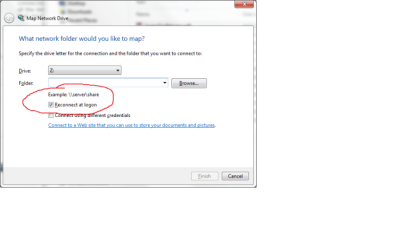
The checkbox is on the dialog box where you enter the URL for the ftp location.
 

Attachments

  • map_drive.png
    map_drive.png
    18.9 KB · Views: 3

My Computer My Computer

Computer type
PC/Desktop
Computer Manufacturer/Model Number
Home Built desktop, Dell G15 5511 Gaming laptop,MS Surface Pro 7 tablet
OS
W10 Pro desktop, W11 laptop, W11 Pro tablet (all 64-bit)
CPU
3.7Ghz 8700K i7, i7-11800H, i7-1065G7
Motherboard
ASUS TUF Z370-Pro Gaming in desktop
Memory
16G desktop, 16G laptop, 4G tablet
Graphics Card(s)
AMD Radeon RX580, RTX 3060, Intel Iris Plus
Sound Card
High Definition Audio (Built-in to mobo)
Monitor(s) Displays
Samsung U32J59 32" (2x), 15.6", 12"
Screen Resolution
3840x2160, 3840x2160, 1920x1080, 2160x1440
Hard Drives
500G SSD for OS; 2T, 10T & 15T HDDs for Data on Desktop, 1TB SSD laptop, 128G SSD tablet.
PSU
Corsair CX 750M
Case
Antec 100
Cooling
CM 212+
Keyboard
IBM Model M - used continuously since 1986
Mouse
Microsoft Pro IntelliMouse
Internet Speed
400M down 8M up
Antivirus
Windows Defender
Browser
FireFox
Other Info
Built my first computer (8Mhz 8088cpu, 640K RAM, 20MB HDD, 2 360K floppy drives) in 1985 and have been building them for myself, relatives and friends ever since.
The checkbox is on the dialog box where you enter the URL for the ftp location.

I don't know if I checked that or not at installation, I probably did? So, am I connected to it all the time or only when I click on my icon and have that folder/drive open so I can see over there? Is there a way to check now, a way to change the setting? and if you don't check that how/when does it connect?

thanks in advance
 

My Computer My Computer

Computer Manufacturer/Model Number
custom
OS
Windows 7 home 64bit
CPU
Intel Q8400 quadcore
Motherboard
Intel DQ45CB
Memory
Kingston DDR2-800 8gb
Graphics Card(s)
nVidia 9800GT 512mb
Sound Card
integrated
Monitor(s) Displays
Samsung 2493HM, Samsung 2494
Screen Resolution
1920x1200 primary, 1920x1080 second
Hard Drives
Seagate 1tb SATA , Seagate 1.5tb SATA (x2)
PSU
Viotek 600w
Case
Antec 300 midtower
Cooling
140mm top, dual 120mm exhaust
Keyboard
Microsoft Natural usb
Mouse
Microsoft intellimouse explorer 2
Internet Speed
7mbps
Other Info
APC UPS backup 750ES
When you map to an ftp location, it only connects when you click on it. However, once you click on it, it stays connected until you manually disconnect (right-click on the link and select disconnect) or you reboot.

The checkbox I mentioned earlier only applies to mapped drives.
 

My Computer My Computer

Computer type
PC/Desktop
Computer Manufacturer/Model Number
Home Built desktop, Dell G15 5511 Gaming laptop,MS Surface Pro 7 tablet
OS
W10 Pro desktop, W11 laptop, W11 Pro tablet (all 64-bit)
CPU
3.7Ghz 8700K i7, i7-11800H, i7-1065G7
Motherboard
ASUS TUF Z370-Pro Gaming in desktop
Memory
16G desktop, 16G laptop, 4G tablet
Graphics Card(s)
AMD Radeon RX580, RTX 3060, Intel Iris Plus
Sound Card
High Definition Audio (Built-in to mobo)
Monitor(s) Displays
Samsung U32J59 32" (2x), 15.6", 12"
Screen Resolution
3840x2160, 3840x2160, 1920x1080, 2160x1440
Hard Drives
500G SSD for OS; 2T, 10T & 15T HDDs for Data on Desktop, 1TB SSD laptop, 128G SSD tablet.
PSU
Corsair CX 750M
Case
Antec 100
Cooling
CM 212+
Keyboard
IBM Model M - used continuously since 1986
Mouse
Microsoft Pro IntelliMouse
Internet Speed
400M down 8M up
Antivirus
Windows Defender
Browser
FireFox
Other Info
Built my first computer (8Mhz 8088cpu, 640K RAM, 20MB HDD, 2 360K floppy drives) in 1985 and have been building them for myself, relatives and friends ever since.
When you map to an ftp location, it only connects when you click on it. However, once you click on it, it stays connected until you manually disconnect (right-click on the link and select disconnect) or you reboot.

The checkbox I mentioned earlier only applies to mapped drives.

Well now I'm more confused... what I have is called a 'network location' and it's a folder shortcut (that doesn't lead to a drive in properties or the discription or anything) .. when I right click that shortcut I don't have an option to disconnect (makes sense because it's only a shortcut) and I don't know which "drive" we are talking about. help?
 

My Computer My Computer

Computer Manufacturer/Model Number
custom
OS
Windows 7 home 64bit
CPU
Intel Q8400 quadcore
Motherboard
Intel DQ45CB
Memory
Kingston DDR2-800 8gb
Graphics Card(s)
nVidia 9800GT 512mb
Sound Card
integrated
Monitor(s) Displays
Samsung 2493HM, Samsung 2494
Screen Resolution
1920x1200 primary, 1920x1080 second
Hard Drives
Seagate 1tb SATA , Seagate 1.5tb SATA (x2)
PSU
Viotek 600w
Case
Antec 300 midtower
Cooling
140mm top, dual 120mm exhaust
Keyboard
Microsoft Natural usb
Mouse
Microsoft intellimouse explorer 2
Internet Speed
7mbps
Other Info
APC UPS backup 750ES
Back
Top