Only 8 GB Ram recognised of 12 GB

Danii

New member
Local time
2:15 AM
Messages
22
Hello,
i am dealing with a very strange problem right now.

first of all, my system specs:
PT6 SE Mainboard
Intel Core I7 920
12 GB ram (6 x 2GB DDR3)
Nvidia GTX 260
Windows 7 Ultimate 64 bit

Recently windows 7 only shows me 8 of 12 GB Ram, when I check with CPUID it shows me all 12 GB ram. The bios shows me 8 as well.
what is wrong and how can I fix this? I thought of the mainboard or the chips being bad but if that would be the case CPUID woudnt show me all 12 GB RAM.
 

My Computer My Computer

At a glance

Windows 7 Ultimate 64 bitIntel Core i7-920 4-Cores 2,66GHz 8 Threads 8...12 GBNvidia GTX260 896MB DVI HDTV PCI-Express
Computer Manufacturer/Model Number
Asus
OS
Windows 7 Ultimate 64 bit
CPU
Intel Core i7-920 4-Cores 2,66GHz 8 Threads 8MB Cache
Motherboard
ASUS P6T SE
Memory
12 GB
Graphics Card(s)
Nvidia GTX260 896MB DVI HDTV PCI-Express
Hard Drives
1500 GB seagate Barracuda
Case
ATX Tower 6XG3BS
Cooling
Noctua NH-D14
Keyboard
Logitech DiNovo Edge
Mouse
Logitech MXair
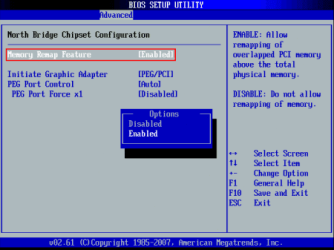
Enable 'Memory Remap' in your BIOS

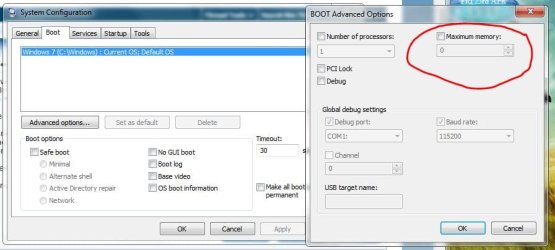
Uncheck Max mem from msconfig (msconfig>Boot>Advanced options)
 

My Computer My Computer

At a glance

Windows 10 Pro x64, Arch LinuxIntel Core 2 Quad Q8200 OC'd 3.08GHz8GB DDR2 900MhzMSI GT730 2GB GDDR5 (Kepler)
Computer type
PC/Desktop
Computer Manufacturer/Model Number
Custom Build
OS
Windows 10 Pro x64, Arch Linux
CPU
Intel Core 2 Quad Q8200 OC'd 3.08GHz
Motherboard
Asus Rampage formula LGA775
Memory
8GB DDR2 900Mhz
Graphics Card(s)
MSI GT730 2GB GDDR5 (Kepler)
Sound Card
Supreme FX2
Monitor(s) Displays
Samsung LS22F350 LED
Screen Resolution
1080P
Hard Drives
Kingston SSDNow UV400 120GB, 500GB Hitachi, 2TB Samsung, 500GB Seagate FreeAgent, 640GB Samsung, 160GB Toshiba (Arch)
PSU
AeroCool 500W Bronze
Cooling
Cooler Master V6 + 3X fans
Keyboard
Prolink keyboard
Mouse
Logitech M705
Internet Speed
1MiB/s
Browser
Chrome Beta
Thanks for the quick reply, where do I find that option?
 

My Computer My Computer

At a glance

Windows 7 Ultimate 64 bitIntel Core i7-920 4-Cores 2,66GHz 8 Threads 8...12 GBNvidia GTX260 896MB DVI HDTV PCI-Express
Computer Manufacturer/Model Number
Asus
OS
Windows 7 Ultimate 64 bit
CPU
Intel Core i7-920 4-Cores 2,66GHz 8 Threads 8MB Cache
Motherboard
ASUS P6T SE
Memory
12 GB
Graphics Card(s)
Nvidia GTX260 896MB DVI HDTV PCI-Express
Hard Drives
1500 GB seagate Barracuda
Case
ATX Tower 6XG3BS
Cooling
Noctua NH-D14
Keyboard
Logitech DiNovo Edge
Mouse
Logitech MXair
Also check in System Configuration for Maximum Memory set to Zero (0)

If not, set that & save & reboot computer.
 

Attachments

  • Maximum_memory.JPG
    Maximum_memory.JPG
    51.3 KB · Views: 368

My Computer My Computer

At a glance

Win7 Enterprise, Win7 x86 (Ult 7600), Win7 x6...AMD fx8350 4ghz, AMD-32 2400mhz, AMD-64 3200m...2gb, 4gb on the Ult 7600, 4gb on Technet RTM,...Draw my own Graphics, several nVidia cards
Computer type
PC/Desktop
Computer Manufacturer/Model Number
Built them myself, Science Experiments !
OS
Win7 Enterprise, Win7 x86 (Ult 7600), Win7 x64 Ult 7600, TechNet RTM on AMD x64 (2.8Ghz)
CPU
AMD fx8350 4ghz, AMD-32 2400mhz, AMD-64 3200mhz, AMDx64 2.8G
Motherboard
SIS 755, ECS-K8M890M-M (Ult 7600), GigaByte & others
Memory
2gb, 4gb on the Ult 7600, 4gb on Technet RTM, 32gb on FX8350
Graphics Card(s)
Draw my own Graphics, several nVidia cards
Sound Card
on motherboard
Monitor(s) Displays
19" flat scr, 28" I-Inc widescr,22" Emprex Widescr, 23" Acer
Screen Resolution
1280 x 1024, 1440 x 900, 1920 x 1080
Hard Drives
6 pata Ide HD's & 2 Sata HD's
added 80gb external on Ult 7600 computer,
numerous extra 1tb, 2TB, 3Tb SATA HD's
A collection of ext HD Docks w/ HDs
PSU
430w, 550w, 600w, 700, 800, etc
Case
All Generic Full Towers
Cooling
Open Air & a few fans, some w/ colored LEDs
Keyboard
Compaq & Dell recycled from GoodWill
Mouse
Made in China Optical Wired Mouse
Internet Speed
Fast Cable InterNet
Antivirus
AVG Free on 24 different Desktops, NO Problems!
Browser
IE 8 is preferred, but use FireFox sometimes
Other Info
Linksys Routers, switches, & Hubs
Too Many USB Flash Drives to count, Biggest is 64GB !
Eight computers in my home network.
Sixteen computers at my business network.
Linked via TeamViewer !
Lots of old used spare computer parts everywhere!
I checked Maximum Memory and it was allready unchecked.
And I still cant find Memory remapping in my Bios...
its not under Chipset.
 

My Computer My Computer

At a glance

Windows 7 Ultimate 64 bitIntel Core i7-920 4-Cores 2,66GHz 8 Threads 8...12 GBNvidia GTX260 896MB DVI HDTV PCI-Express
Computer Manufacturer/Model Number
Asus
OS
Windows 7 Ultimate 64 bit
CPU
Intel Core i7-920 4-Cores 2,66GHz 8 Threads 8MB Cache
Motherboard
ASUS P6T SE
Memory
12 GB
Graphics Card(s)
Nvidia GTX260 896MB DVI HDTV PCI-Express
Hard Drives
1500 GB seagate Barracuda
Case
ATX Tower 6XG3BS
Cooling
Noctua NH-D14
Keyboard
Logitech DiNovo Edge
Mouse
Logitech MXair
Each different Mfg of Bios's seems to hide it it different sub-menus. Sometimes, I have to go through each menu & sub-menu, 1 at a time until I find what I need to change.
 

My Computer My Computer

At a glance

Win7 Enterprise, Win7 x86 (Ult 7600), Win7 x6...AMD fx8350 4ghz, AMD-32 2400mhz, AMD-64 3200m...2gb, 4gb on the Ult 7600, 4gb on Technet RTM,...Draw my own Graphics, several nVidia cards
Computer type
PC/Desktop
Computer Manufacturer/Model Number
Built them myself, Science Experiments !
OS
Win7 Enterprise, Win7 x86 (Ult 7600), Win7 x64 Ult 7600, TechNet RTM on AMD x64 (2.8Ghz)
CPU
AMD fx8350 4ghz, AMD-32 2400mhz, AMD-64 3200mhz, AMDx64 2.8G
Motherboard
SIS 755, ECS-K8M890M-M (Ult 7600), GigaByte & others
Memory
2gb, 4gb on the Ult 7600, 4gb on Technet RTM, 32gb on FX8350
Graphics Card(s)
Draw my own Graphics, several nVidia cards
Sound Card
on motherboard
Monitor(s) Displays
19" flat scr, 28" I-Inc widescr,22" Emprex Widescr, 23" Acer
Screen Resolution
1280 x 1024, 1440 x 900, 1920 x 1080
Hard Drives
6 pata Ide HD's & 2 Sata HD's
added 80gb external on Ult 7600 computer,
numerous extra 1tb, 2TB, 3Tb SATA HD's
A collection of ext HD Docks w/ HDs
PSU
430w, 550w, 600w, 700, 800, etc
Case
All Generic Full Towers
Cooling
Open Air & a few fans, some w/ colored LEDs
Keyboard
Compaq & Dell recycled from GoodWill
Mouse
Made in China Optical Wired Mouse
Internet Speed
Fast Cable InterNet
Antivirus
AVG Free on 24 different Desktops, NO Problems!
Browser
IE 8 is preferred, but use FireFox sometimes
Other Info
Linksys Routers, switches, & Hubs
Too Many USB Flash Drives to count, Biggest is 64GB !
Eight computers in my home network.
Sixteen computers at my business network.
Linked via TeamViewer !
Lots of old used spare computer parts everywhere!
I just went throu every sub menu & menu in my Bios and there was no such thing as Memory remmaping. How can this be? could it be that the Asus PT6 SE doesent support that function?
 

My Computer My Computer

At a glance

Windows 7 Ultimate 64 bitIntel Core i7-920 4-Cores 2,66GHz 8 Threads 8...12 GBNvidia GTX260 896MB DVI HDTV PCI-Express
Computer Manufacturer/Model Number
Asus
OS
Windows 7 Ultimate 64 bit
CPU
Intel Core i7-920 4-Cores 2,66GHz 8 Threads 8MB Cache
Motherboard
ASUS P6T SE
Memory
12 GB
Graphics Card(s)
Nvidia GTX260 896MB DVI HDTV PCI-Express
Hard Drives
1500 GB seagate Barracuda
Case
ATX Tower 6XG3BS
Cooling
Noctua NH-D14
Keyboard
Logitech DiNovo Edge
Mouse
Logitech MXair
What speed are you running the RAM at? When using all six slots in the P6T it is recommended not to use any of the XMS settings.
 

My Computer My Computer

At a glance

Main - Windows 7 Pro SP1 64-Bit; 2nd - Window...Main - Core i7 2600K; 2nd - Core i7 920Main - 16GB Corsair Vengeance; 2nd - 12GB Cor...Main - XFX Radeon 6870 1GB; 2nd - XFX Radeon ...
Computer Manufacturer/Model Number
Self
OS
Main - Windows 7 Pro SP1 64-Bit; 2nd - Windows Server 2008 R2
CPU
Main - Core i7 2600K; 2nd - Core i7 920
Motherboard
Main - Asus P8Z68-V Pro/Gen3; 2nd - Gigabyte GA-EX58-UDR3
Memory
Main - 16GB Corsair Vengeance; 2nd - 12GB Corsair Vengeance
Graphics Card(s)
Main - XFX Radeon 6870 1GB; 2nd - XFX Radeon 4870 1GB
Sound Card
Both: Onboard Realtek Azalia
Monitor(s) Displays
Main - Hann 25" + I-INC 25" + Acer 23"; 2nd - Upgrading Soon
Screen Resolution
Main - 1920x1080 (All Three Monitors); 2nd - Upgrading Soon
Hard Drives
Main - (1) Crucial M4 128GB (Boot)
Main - (1) Seagate 2TB 64MB Cache (Data)
Main - (1) Seagate 2TB 64MB Cache (Data Backup)
2nd - (1) Intel X25-M SSD 80GB (Boot)
2nd - (3) Seagate 1TB 32MB Cache (Data Backup)
2nd - (1) Seagate 320GB (Because)
PSU
Main - OCZ 600W Modular; 2nd - OCZ 600W
Case
Main - Thermaltake Element G; 2nd - NZXT something or other
Cooling
Main - Corsair H80; 2nd - Prolimatech Megahalems
Keyboard
Main - Razer Reclusa; 2nd - Old MS Keyboard
Mouse
Main - Logitech MX Revolution; 2nd - Old MS Mouse
Internet Speed
20Mbps Time-Warner Cable
Where do I find that Information?
And what does XMS mean?
 

My Computer My Computer

At a glance

Windows 7 Ultimate 64 bitIntel Core i7-920 4-Cores 2,66GHz 8 Threads 8...12 GBNvidia GTX260 896MB DVI HDTV PCI-Express
Computer Manufacturer/Model Number
Asus
OS
Windows 7 Ultimate 64 bit
CPU
Intel Core i7-920 4-Cores 2,66GHz 8 Threads 8MB Cache
Motherboard
ASUS P6T SE
Memory
12 GB
Graphics Card(s)
Nvidia GTX260 896MB DVI HDTV PCI-Express
Hard Drives
1500 GB seagate Barracuda
Case
ATX Tower 6XG3BS
Cooling
Noctua NH-D14
Keyboard
Logitech DiNovo Edge
Mouse
Logitech MXair
okay I think I found my memory speed, I have a programm called AIDA64 wich shows DDR3-1333 (667 MHz) as the speed of all 6 modules.
 

My Computer My Computer

At a glance

Windows 7 Ultimate 64 bitIntel Core i7-920 4-Cores 2,66GHz 8 Threads 8...12 GBNvidia GTX260 896MB DVI HDTV PCI-Express
Computer Manufacturer/Model Number
Asus
OS
Windows 7 Ultimate 64 bit
CPU
Intel Core i7-920 4-Cores 2,66GHz 8 Threads 8MB Cache
Motherboard
ASUS P6T SE
Memory
12 GB
Graphics Card(s)
Nvidia GTX260 896MB DVI HDTV PCI-Express
Hard Drives
1500 GB seagate Barracuda
Case
ATX Tower 6XG3BS
Cooling
Noctua NH-D14
Keyboard
Logitech DiNovo Edge
Mouse
Logitech MXair

My Computer My Computer

At a glance

Windows 7 ultimate 64 bit / XP Home sp3intel Core 2 Duo E8400 3.0ghz8 gigs 1066 OCZ Fata1tyEVGA GTX 580 Call of Duty Black Ops Edition
Computer Manufacturer/Model Number
Self Built
OS
Windows 7 ultimate 64 bit / XP Home sp3
CPU
intel Core 2 Duo E8400 3.0ghz
Motherboard
Asus P5ND bios 1401
Memory
8 gigs 1066 OCZ Fata1ty
Graphics Card(s)
EVGA GTX 580 Call of Duty Black Ops Edition
Sound Card
Creative Soundblaster Audigy 2zs
Monitor(s) Displays
Asus 24in LCD's 2MS X2
Screen Resolution
1920x1080p @60Hz
Hard Drives
WD Caviar 500 Black/ WD Caviar 200 Blue
PSU
OCZ 700W GameXtreme
Case
NZXT Apollo
Cooling
Corsair H50 CPU/120mm x3 /60mm x2 /Corsair Dominator Ram
Keyboard
Logitech Bluetooth Wireless MX5000
Mouse
Logitech Bluetooth Wireless MX1000
Internet Speed
Download 19.83 Upload 0.97
Other Info
Logitech Z2300 Speakers/ Bose Noise Cancelling Headphones/Avermedia PCI-e Hybrid TV Bravo/Epson NX415 all in one/ 4 Port Powered USB Hub/ LG 10x Bluray Burner /TSST Corp DVDRW External
I downloaded the Manual for your MB, But scanning it quickly I couldn't find anything about Memory remapping in the Bios section. :confused:

Here is a link to get this manual

:ar:
iUserManual user's guide, owner's manual and operating instructions. P6T SE Manual&url=aHR0cDovL2RsY2RuZXQuYXN1cy5jb20vcHViL0FTVVMvbWIvTEdBMTM2Ni9QNlRfU0UvRTQ0ODFfUDZUX1NFX21hbnVhbC56aXA%3D
 

My Computer My Computer

At a glance

Win7 Enterprise, Win7 x86 (Ult 7600), Win7 x6...AMD fx8350 4ghz, AMD-32 2400mhz, AMD-64 3200m...2gb, 4gb on the Ult 7600, 4gb on Technet RTM,...Draw my own Graphics, several nVidia cards
Computer type
PC/Desktop
Computer Manufacturer/Model Number
Built them myself, Science Experiments !
OS
Win7 Enterprise, Win7 x86 (Ult 7600), Win7 x64 Ult 7600, TechNet RTM on AMD x64 (2.8Ghz)
CPU
AMD fx8350 4ghz, AMD-32 2400mhz, AMD-64 3200mhz, AMDx64 2.8G
Motherboard
SIS 755, ECS-K8M890M-M (Ult 7600), GigaByte & others
Memory
2gb, 4gb on the Ult 7600, 4gb on Technet RTM, 32gb on FX8350
Graphics Card(s)
Draw my own Graphics, several nVidia cards
Sound Card
on motherboard
Monitor(s) Displays
19" flat scr, 28" I-Inc widescr,22" Emprex Widescr, 23" Acer
Screen Resolution
1280 x 1024, 1440 x 900, 1920 x 1080
Hard Drives
6 pata Ide HD's & 2 Sata HD's
added 80gb external on Ult 7600 computer,
numerous extra 1tb, 2TB, 3Tb SATA HD's
A collection of ext HD Docks w/ HDs
PSU
430w, 550w, 600w, 700, 800, etc
Case
All Generic Full Towers
Cooling
Open Air & a few fans, some w/ colored LEDs
Keyboard
Compaq & Dell recycled from GoodWill
Mouse
Made in China Optical Wired Mouse
Internet Speed
Fast Cable InterNet
Antivirus
AVG Free on 24 different Desktops, NO Problems!
Browser
IE 8 is preferred, but use FireFox sometimes
Other Info
Linksys Routers, switches, & Hubs
Too Many USB Flash Drives to count, Biggest is 64GB !
Eight computers in my home network.
Sixteen computers at my business network.
Linked via TeamViewer !
Lots of old used spare computer parts everywhere!
Memory Remap is located in BIOS/Advanced/Chipset/Northbridge Chipset Configuration in most Asus MBs

sa.png
 

My Computer My Computer

At a glance

Windows 10 Pro x64, Arch LinuxIntel Core 2 Quad Q8200 OC'd 3.08GHz8GB DDR2 900MhzMSI GT730 2GB GDDR5 (Kepler)
Computer type
PC/Desktop
Computer Manufacturer/Model Number
Custom Build
OS
Windows 10 Pro x64, Arch Linux
CPU
Intel Core 2 Quad Q8200 OC'd 3.08GHz
Motherboard
Asus Rampage formula LGA775
Memory
8GB DDR2 900Mhz
Graphics Card(s)
MSI GT730 2GB GDDR5 (Kepler)
Sound Card
Supreme FX2
Monitor(s) Displays
Samsung LS22F350 LED
Screen Resolution
1080P
Hard Drives
Kingston SSDNow UV400 120GB, 500GB Hitachi, 2TB Samsung, 500GB Seagate FreeAgent, 640GB Samsung, 160GB Toshiba (Arch)
PSU
AeroCool 500W Bronze
Cooling
Cooler Master V6 + 3X fans
Keyboard
Prolink keyboard
Mouse
Logitech M705
Internet Speed
1MiB/s
Browser
Chrome Beta
I checked there allready and the only configuration under Chipset is Intel VT-d Configuration.
and I also checked the manual and i didnt find anything about memory remap...
how do I fix this?
 

My Computer My Computer

At a glance

Windows 7 Ultimate 64 bitIntel Core i7-920 4-Cores 2,66GHz 8 Threads 8...12 GBNvidia GTX260 896MB DVI HDTV PCI-Express
Computer Manufacturer/Model Number
Asus
OS
Windows 7 Ultimate 64 bit
CPU
Intel Core i7-920 4-Cores 2,66GHz 8 Threads 8MB Cache
Motherboard
ASUS P6T SE
Memory
12 GB
Graphics Card(s)
Nvidia GTX260 896MB DVI HDTV PCI-Express
Hard Drives
1500 GB seagate Barracuda
Case
ATX Tower 6XG3BS
Cooling
Noctua NH-D14
Keyboard
Logitech DiNovo Edge
Mouse
Logitech MXair
If the BIOS only shows 8 then you likely have dead or loose memory. That is, of course, assuming your board supports over 8 GB of memory. Power off the system, and reseat each memory stick to eliminate that as an issue.
 

My Computer My Computer

At a glance

Windows 7 Ultimate x64 SP1Intel Core i7-260012 GB Patriot Extreme DDR3-1333Nvidia GTX 470
OS
Windows 7 Ultimate x64 SP1
CPU
Intel Core i7-2600
Motherboard
Gigabyte GA-P67A-UD3P-B3
Memory
12 GB Patriot Extreme DDR3-1333
Graphics Card(s)
Nvidia GTX 470
Monitor(s) Displays
Dell UltraSharp 2209WA
Hard Drives
OCZ Agility3 240 GB, WD5001AALS, WD7501AALS
PSU
OCZ ModStream 700W
Case
CoolerMaster HAF 912 Advanced
Cooling
CoolerMaster Hyper 212 Plus
Check the fine print in your manual. Some motherboards will only support the maximum amount of RAM at a certain frequency. You might have to under clock your RAM to be able to use all of it.
 

My Computer My Computer

At a glance

Windows 10 Education 64 bitAMD Phenom II X4 980 Black Edition Deneb 3.7GHz8GB 4GBx2 Kingston PC10600 DDR3 1333 MemoryZotac NVIDIA Geforce GT640 2 Gig DDR3 PCIe
Computer type
PC/Desktop
Computer Manufacturer/Model Number
Home Built
OS
Windows 10 Education 64 bit
CPU
AMD Phenom II X4 980 Black Edition Deneb 3.7GHz
Motherboard
Asus M4N68T-M V2 µATX Motherboard
Memory
8GB 4GBx2 Kingston PC10600 DDR3 1333 Memory
Graphics Card(s)
Zotac NVIDIA Geforce GT640 2 Gig DDR3 PCIe
Sound Card
VIA VT1708s High Definition Audio 8-channel Onboard
Monitor(s) Displays
22" LG E2242 1080p and 2 19" I-INC AG191D
Screen Resolution
1280x1024 - 1920x1080 - 1280x1024
Hard Drives
Crucial M100 256 GB SSD and 500 GB WD Blue SATA
PSU
Thermaltake TR 620
Case
Power Up Black ATX Mid-Tower Case
Cooling
Stock heatsink and fan
Keyboard
Logitech Wireless K350 Wave
Mouse
Logitech Wireless M570 Trackman Wheel
Internet Speed
80 Mbps Down 30 Mbps Up
Antivirus
Windows Defender
Browser
Internet Explorer 11
Other Info
HP DVD1040e Lightscribe - External USB2
I have an Asus board and encountered a similar problem. Turned out the ram modules were the same model but the P/N's were slightly different. Matched the P/N's and the problem went away.
 

My Computer My Computer

At a glance

W7x64 Ult.i7 97512GB Corsair DomEvga GTX285
Computer Manufacturer/Model Number
HB
OS
W7x64 Ult.
CPU
i7 975
Motherboard
P6T7 SC
Memory
12GB Corsair Dom
Graphics Card(s)
Evga GTX285
Sound Card
OB
Monitor(s) Displays
HP LP2475
Screen Resolution
1920x1200
Hard Drives
Velociraptors Raid0 BU
Crucial M4 OS
WD RE4 Data
PSU
PC Power & Cooling 950
Case
Chieftec Bravo
Cooling
Air 6 GentleTyphoon
Keyboard
Logitech Illuminated
Mouse
Logitech MX518
Where do I find that Information?
And what does XMS mean?
XMS = eXtended Memory Specification

In short, it is a memory specification you set in the BIOS when using high-end RAM.

Check the fine print in your manual. Some motherboards will only support the maximum amount of RAM at a certain frequency. You might have to under clock your RAM to be able to use all of it.
Exactly. That's what I was getting at with the XMS comment. :thumbsup:

I have an Asus board and encountered a similar problem. Turned out the ram modules were the same model but the P/N's were slightly different. Matched the P/N's and the problem went away.
Definitely worth a look. :thumbsup:

Are your six sticks all matched? Try using three at a time in the appropriate slots for triple-channel use and see if you have a dud.

A quick look around the ASUS site also shows that it could also be a bent pin in the CPU socket.
 

My Computer My Computer

At a glance

Main - Windows 7 Pro SP1 64-Bit; 2nd - Window...Main - Core i7 2600K; 2nd - Core i7 920Main - 16GB Corsair Vengeance; 2nd - 12GB Cor...Main - XFX Radeon 6870 1GB; 2nd - XFX Radeon ...
Computer Manufacturer/Model Number
Self
OS
Main - Windows 7 Pro SP1 64-Bit; 2nd - Windows Server 2008 R2
CPU
Main - Core i7 2600K; 2nd - Core i7 920
Motherboard
Main - Asus P8Z68-V Pro/Gen3; 2nd - Gigabyte GA-EX58-UDR3
Memory
Main - 16GB Corsair Vengeance; 2nd - 12GB Corsair Vengeance
Graphics Card(s)
Main - XFX Radeon 6870 1GB; 2nd - XFX Radeon 4870 1GB
Sound Card
Both: Onboard Realtek Azalia
Monitor(s) Displays
Main - Hann 25" + I-INC 25" + Acer 23"; 2nd - Upgrading Soon
Screen Resolution
Main - 1920x1080 (All Three Monitors); 2nd - Upgrading Soon
Hard Drives
Main - (1) Crucial M4 128GB (Boot)
Main - (1) Seagate 2TB 64MB Cache (Data)
Main - (1) Seagate 2TB 64MB Cache (Data Backup)
2nd - (1) Intel X25-M SSD 80GB (Boot)
2nd - (3) Seagate 1TB 32MB Cache (Data Backup)
2nd - (1) Seagate 320GB (Because)
PSU
Main - OCZ 600W Modular; 2nd - OCZ 600W
Case
Main - Thermaltake Element G; 2nd - NZXT something or other
Cooling
Main - Corsair H80; 2nd - Prolimatech Megahalems
Keyboard
Main - Razer Reclusa; 2nd - Old MS Keyboard
Mouse
Main - Logitech MX Revolution; 2nd - Old MS Mouse
Internet Speed
20Mbps Time-Warner Cable
Thanks for the anwsers.
I dont thing that the sticks are bad because CPUZ recognises all six slots with all six sticks. And besides, this problem is new... just a couple of days ago all 12 GB ram were showing in windows and in Bios...

The only thing that might make sense is the bent CPU sockel pin, because some days ago I installed a new cpu cooler and I removed the CPU to remove all of the Thermal compund from the cooler before. So im guessing its possible that I bent a CPU sockel pin during that process. I think it is worth a look. And if thats the case, is there a way to bend it back?

I dont undestand anything about underclocking or anything related to that topic...

all the sticks are the same model but what does P/N mean, and were do I find that information?
 

My Computer My Computer

At a glance

Windows 7 Ultimate 64 bitIntel Core i7-920 4-Cores 2,66GHz 8 Threads 8...12 GBNvidia GTX260 896MB DVI HDTV PCI-Express
Computer Manufacturer/Model Number
Asus
OS
Windows 7 Ultimate 64 bit
CPU
Intel Core i7-920 4-Cores 2,66GHz 8 Threads 8MB Cache
Motherboard
ASUS P6T SE
Memory
12 GB
Graphics Card(s)
Nvidia GTX260 896MB DVI HDTV PCI-Express
Hard Drives
1500 GB seagate Barracuda
Case
ATX Tower 6XG3BS
Cooling
Noctua NH-D14
Keyboard
Logitech DiNovo Edge
Mouse
Logitech MXair
Sorry, P/N = part number.
 

My Computer My Computer

At a glance

W7x64 Ult.i7 97512GB Corsair DomEvga GTX285
Computer Manufacturer/Model Number
HB
OS
W7x64 Ult.
CPU
i7 975
Motherboard
P6T7 SC
Memory
12GB Corsair Dom
Graphics Card(s)
Evga GTX285
Sound Card
OB
Monitor(s) Displays
HP LP2475
Screen Resolution
1920x1200
Hard Drives
Velociraptors Raid0 BU
Crucial M4 OS
WD RE4 Data
PSU
PC Power & Cooling 950
Case
Chieftec Bravo
Cooling
Air 6 GentleTyphoon
Keyboard
Logitech Illuminated
Mouse
Logitech MX518
Back
Top