
Ran out of 8 GB of ram during a new Windows 7 64 bit install

xenphor

New member
Local time
7:38 PM
Messages
7
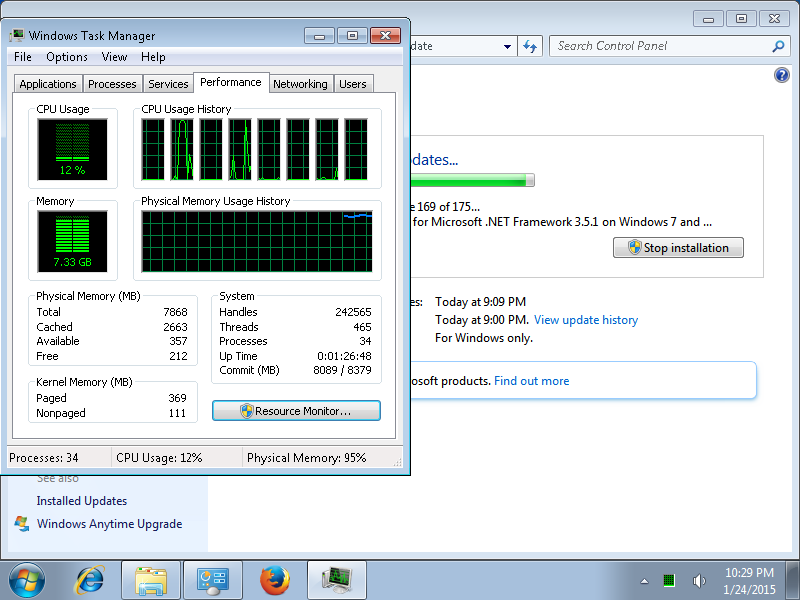
Can anybody explain this screenshot?
iGsMtxM.png


All I was doing was installing updates and then I start getting messages about closing programs because I am running out of ram (!??). This is a 64 bit install on an 8 GB machine with nothing else running in the background besides maybe a browser.

Only thing I could think of is that I think I was using an outdated ISO image because I had to install more updates than usual.
 

My Computer My Computer

At a glance

Windows 7 64bit Professionali5 3570k8 gbNvidia gtx 680
Computer type
PC/Desktop
Computer Manufacturer/Model Number
custom
OS
Windows 7 64bit Professional
CPU
i5 3570k
Motherboard
Asus p8z77 v lk
Memory
8 gb
Graphics Card(s)
Nvidia gtx 680
Hard Drives
2 SATA
Antivirus
Clamav
Browser
Firefox

My Computer My Computer

At a glance

Windows 10, Home Clean InstallIntel Core2 processsor Q8200(2.33Ghz 1333FSB)...6 gbATI Radeon 256MB HD3650
Computer type
PC/Desktop
Computer Manufacturer/Model Number
Dell XPS 420
OS
Windows 10, Home Clean Install
CPU
Intel Core2 processsor Q8200(2.33Ghz 1333FSB) Quad Core Tech
Motherboard
Dell
Memory
6 gb
Graphics Card(s)
ATI Radeon 256MB HD3650
Sound Card
Intergrated 7.1 Channel Audio
Monitor(s) Displays
Dell SP2009W 20"
Hard Drives
640 GB Serial ATA Hard drive
Cooling
Fan
Keyboard
Dell USB Keyboard
Mouse
Dell Premium Optical USB
Internet Speed
DSL 2.85
how could there be a virus if it was after I just formatted the computer? I have checked the ram before using memtest and Linpack and it passed.
 

My Computer My Computer

At a glance

Windows 7 64bit Professionali5 3570k8 gbNvidia gtx 680
Computer type
PC/Desktop
Computer Manufacturer/Model Number
custom
OS
Windows 7 64bit Professional
CPU
i5 3570k
Motherboard
Asus p8z77 v lk
Memory
8 gb
Graphics Card(s)
Nvidia gtx 680
Hard Drives
2 SATA
Antivirus
Clamav
Browser
Firefox
Click on Resource Monitor in the Task Manager Performance tab.
Look at the Memory tab in Resource Monitor.
See if you can find what process(s) are using a large amount of RAM.
You can click on column headings to sort the data.
Post a screen print of the Memory tab if needed.
 

My Computer My Computer

At a glance

Multi-Boot W7_Pro_x64 W8.1_Pro_x64 W10_Pro_x6...AMD Athlon II x4 6206GB GSkill DDR2 800AMD 4670 GPU + AMD 4200 IGP
Computer type
PC/Desktop
Computer Manufacturer/Model Number
home built
OS
Multi-Boot W7_Pro_x64 W8.1_Pro_x64 W10_Pro_x64 +Linux_VMs +Chromium_VM
CPU
AMD Athlon II x4 620
Motherboard
Gigabyte GA-MA785G-UD3H
Memory
6GB GSkill DDR2 800
Graphics Card(s)
AMD 4670 GPU + AMD 4200 IGP
Sound Card
on board Realtek ALC889A
Monitor(s) Displays
RCA 40" LCD TV, Insignia 32" LCD TV, HP 15" LCD monitor
Screen Resolution
1680 x 1050
Hard Drives
OCZ Vertex 3 120GB,
Samsung F3 1TB (3),
Several others - WD, Seagate, Hitachi, ...
PSU
Corsair 500 W
Case
Rosewill mid tower
Cooling
CM 90mm rifle
Keyboard
Gyration wireless, Logitech wireless, Dell USB wired
Mouse
Gyration wireless, Logitech wireless, V7 USB wired
Internet Speed
Spectrum - 100Mbps D / 10Mbps U
Antivirus
Avast, MBAM3, EMET, WinPatrol
Browser
Pale Moon, Firefox, IE
Other Info
2 multi-boot PC's
Mainly HTPC/Office/Gen purpose (no gaming).
Trendnet USB KVM.
LG DVD burner/Blue Ray Player.
Tray system for removable SATA backup drives.

Not currently OCd, under-volted.
I use Hybrid sleep, rarely re-boot or shutdown.

Hauppauge HD-PVR, Avermedia PCIe TV Tuner, Hauppauge PCI TV Tuner.
Yeah I got something similar on a recent build (4770K 8GB) using sp1 iso then doing all the updates at once I didn't get a warning, but RAM was getting near max. I think maybe Windows needs a bit of RAM for several years worth of patches. Could explain why my 8GB builds take less time than others with 2GB (swapping ?). I don't think this RAM thing is a problem - my build was OK.
 

My Computer My Computer

At a glance

Windows 7 Pro x64 sp1i7 4770K8GB Corsair Vengeance 1600MHzonboard
Computer type
PC/Desktop
Computer Manufacturer/Model Number
self build
OS
Windows 7 Pro x64 sp1
CPU
i7 4770K
Motherboard
MSI B85M-E45
Memory
8GB Corsair Vengeance 1600MHz
Graphics Card(s)
onboard
Monitor(s) Displays
LG 27MP35
Screen Resolution
1920-1080
Hard Drives
Seagate 2TB
PSU
Cooler Master GX 750
Case
Antec 300
Cooling
Seidon 120V
Internet Speed
60/18
Antivirus
MSE
Browser
Firefox
Back
Top