

We all know what the CPU is, some of us know how it works. To me it is a bit of a mystery how it does all it does.
Here is an old AMD Athlon64 3500+, 2.2Ghz and it is about 1 9/16th" square. A pretty tiny device containing millions or billions of transisters, memory controller, instructions, and the heart of the computer, running a timer to schedule computer events. Really small thing.
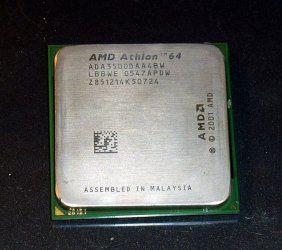
But what you were looking at is but a cover for the CPU itself, the die which contains all that wonderful and mysterious electronics and logic. Being a tinkerer I decided to pop the cap off this retired piece of electronics magic to see what was inside...
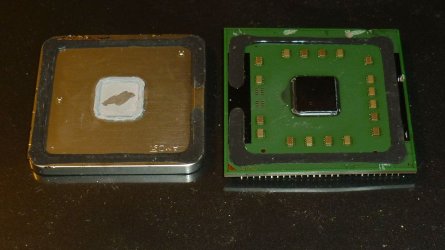
And here it is, the CPU die, the tiny square in the center of a green circuit board. This one has 14 smaller silicon blocks soldered around it with space for two more, possibly for making the same CPU perform differently. Note that it is it the exact center of the unit. People obsess over how/where/how much thermal paste to apply. This shows that the center of the cap is where one would need it to get it properly covered. The manufacturer uses a heavy-duty thermal to seat the cover to the CPU die.
The underside of the cover appears golden colored in this photo, but looks like the outside of the cover to the naked eye, possibly some sort of a shield? The cover isn't attracted by a magnet, so it is stainless steel or some non iron based alloy.
EDIT: The Integrated Heat Sink (IHS) is solid copper plated with nickel.

Here is a close up of the die and its board. The board material is opaque and must be multi-layered to connect the CPU and the 14 blocks to 939 pins (for this model) on the opposite side of it. These pins must fit perfectly into the socket on the motherboard, connecting everything to the many circuits on it.
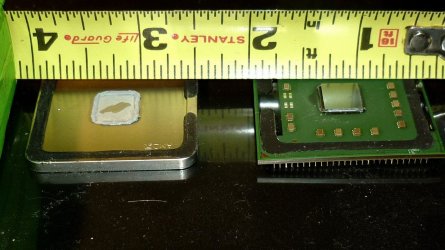
The die is a small 5/16th" square and looks to be about 1/64th thick. The cover is solid and about 1/8" thick. The CPU die must have hundreds of inter connected layers and sectors. These little guys do a helluva job for their small size.
This is a single core CPU and only 2,2Ghz. Changing out a motherboard once I bent the pins on my PhenomII X4, 3.4 Ghz, rendering it a paperweight. I decided to pop its top too to see the difference. To my surprize, the die in the 4 core CPU was the same size! I think that is amazing.
The 3500+ is 130nm (nanometer) technology, and the Phenom is 45nm. This is, as I understand, the diameter of the "wires" which are inside the CPU die connecting everthing. The current Intel chips are 32nm. A nanometer is one Billionth of a meter.
Here is an old AMD Athlon64 3500+, 2.2Ghz and it is about 1 9/16th" square. A pretty tiny device containing millions or billions of transisters, memory controller, instructions, and the heart of the computer, running a timer to schedule computer events. Really small thing.
But what you were looking at is but a cover for the CPU itself, the die which contains all that wonderful and mysterious electronics and logic. Being a tinkerer I decided to pop the cap off this retired piece of electronics magic to see what was inside...
And here it is, the CPU die, the tiny square in the center of a green circuit board. This one has 14 smaller silicon blocks soldered around it with space for two more, possibly for making the same CPU perform differently. Note that it is it the exact center of the unit. People obsess over how/where/how much thermal paste to apply. This shows that the center of the cap is where one would need it to get it properly covered. The manufacturer uses a heavy-duty thermal to seat the cover to the CPU die.
The underside of the cover appears golden colored in this photo, but looks like the outside of the cover to the naked eye, possibly some sort of a shield? The cover isn't attracted by a magnet, so it is stainless steel or some non iron based alloy.
EDIT: The Integrated Heat Sink (IHS) is solid copper plated with nickel.
Here is a close up of the die and its board. The board material is opaque and must be multi-layered to connect the CPU and the 14 blocks to 939 pins (for this model) on the opposite side of it. These pins must fit perfectly into the socket on the motherboard, connecting everything to the many circuits on it.
The die is a small 5/16th" square and looks to be about 1/64th thick. The cover is solid and about 1/8" thick. The CPU die must have hundreds of inter connected layers and sectors. These little guys do a helluva job for their small size.
This is a single core CPU and only 2,2Ghz. Changing out a motherboard once I bent the pins on my PhenomII X4, 3.4 Ghz, rendering it a paperweight. I decided to pop its top too to see the difference. To my surprize, the die in the 4 core CPU was the same size! I think that is amazing.
The 3500+ is 130nm (nanometer) technology, and the Phenom is 45nm. This is, as I understand, the diameter of the "wires" which are inside the CPU die connecting everthing. The current Intel chips are 32nm. A nanometer is one Billionth of a meter.
Last edited:
My Computer
- Computer type
- PC/Desktop
- Computer Manufacturer/Model Number
- Home Built Desktop By DataTech
- OS
- Windows 7 Ultimate X64 SP1
- CPU
- Intel i5-2550K, Differing ~4.4-4.8GHz No built in GPU
- Motherboard
- ASUS P8Z68-V PRO/GEN3
- Memory
- 16GB G.Skill Sniper 1866MHz @ 2133MHz 2x8GB
- Graphics Card(s)
- ASUS GTX650TIB-DC2OC-2GD5, (650TI Boost)
- Sound Card
- Onboard Realtek 5-1
- Monitor(s) Displays
- Samsung P2570HD
- Screen Resolution
- 1920x1080
- Hard Drives
- Samsung 840 Pro 256GB SSD for OS, 500GB Seagate Constellation (Enterprise drive) for Data
- PSU
- Corsair HX650W
- Case
- Inwin Dragon Rider
- Cooling
- Hyper 212 EVO w/two Noctua fans, push-pull, @1300 RPM
- Keyboard
- E-Z Eyes, bright yellow keys with large characters
- Mouse
- steelseries SENSEI Laser Pro Gaming
- Internet Speed
- 48-51Mbs Mbs down, 11 Mbs up Xfinity Cable
- Antivirus
- Norton Internet Security 2013
- Browser
- IE 10, Opera, Pale Moon if needed
- Other Info
- 4 case fans, LG BluRay-RE, ASUS DVD-RW, Mr. Fusion power supply, 1.21 gigawatts.


