Show us your SSD performance

Status
Not open for further replies.
Ok so I have a new motherboard being delivered tomorrow as the current one is very cheap.

I know how to enable AHCI in windows now.

Apart from that , where is the best place to plug the SSD on the new mobo?

And I keep hearing about RAID , is this something I need to know about that will benefit the SSD?

Heres the ports on the new mobo -

5 xSATA 3 Gb/s ports
Intel® Matrix Storage Technology Support RAID 0,1,5,10
JMicron® JMB361 SATA & PATA controllers:
1 x Ultra DMA 133 / 100 / 66 for up to 2 PATA devices
1 x External SATA 3Gb/s port (SATA On-the-Go)
Silicon Image Sil5723 (Drive Xpert technology):
2 x SATA 3Gb/s ports

Thanks for the help guys

Paul.

I have seen some issues resulting from the OS HDD/SSD not being plugged into SATA 3 Gb/s port0, the first port.
It use to make a difference but, with newer motherboards it shouldn't matter.
I still use port0 for my OS SSD.

Use the standard motherboard controller, not the JMicron.

Agree with whs RAID is a lot of work for what you get. One SSD should be fast enough, two SSDs are more expensive for the noticeable performance.
It depends on what your doing. Normal usage I would go with one.

Before you install Win7, change your BIOS setting to AHCI. Then you won't have to do it afterwards.
 
Last edited:

My Computer My Computer

Computer type
PC/Desktop
Computer Manufacturer/Model Number
76~2.0
OS
Windows 7 Ult x64 - SP1/ Windows 8 Pro x64
CPU
Intel Core i5-3570K 4.6GHz
Motherboard
Gigabyte GA-Z77X UD3H, f18
Memory
8GB (2X4GB) DDR3 1600 Corsair Vengeance CL8 1.5v
Graphics Card(s)
Sapphire HD 7770 Vapor-X OC 1GB DDR5
Sound Card
Onboard VIA VT2021
Monitor(s) Displays
22" LCD Dell
Screen Resolution
1680x1050
Hard Drives
Samsung 840Pro 128GB SSD,
Seagate Barracuda 500GB SATA2 7200rpm 32MB cache, Seagate Barracuda 1TB SATA2 7200rpm 32MB cache,
PSU
Corsair HX650W
Case
Cooler Master Storm Scout
Cooling
Corsair H80 2x12cm Noctua NF P12 , 2x14cm case fans
Keyboard
Logitech Wave
Mouse
CM Sentinel
Internet Speed
Dismal
Antivirus
Avast
Browser
Opera Next
Other Info
Haswell laptop: HP Envy 17t-j, i7-4700MQ, GeForce 740M 2GB DDR3, 17.3" Full HD 1920x1080, 16GB RAM, Samsung 840 Pro 128GB, 1TB Hitachi 7200 HDD,
Desktop: eSATA ports,
External eSATA Seagate 500GB SATA2 7200rpm,
External WD USB 500GB
+1. A single SSD is all you really need as it is the access time which is important and more doesn't equal quicker access.
 

My Computer My Computer

Computer Manufacturer/Model Number
tw33k
OS
Windows 7 Ultimate (x64) SP1
CPU
Intel 3770k 4.6GHz
Motherboard
ASUS Maximus V Formula
Memory
8GB (2x 4GB) Crucial Ballistix
Graphics Card(s)
Sapphire 7950 (1060/1600)
Sound Card
On Board Realtek HD Audio
Monitor(s) Displays
27" Acer B273HU (via HDMI)
Screen Resolution
2048 x 1152
Hard Drives
Crucial M4 128GB
2TB WD Black
1TB Samsung F3 SATA
1TB WD Elite External
2TB WD USB 3.0
PSU
Corsair AX750 Gold
Case
Corsair Obsidian 800DW
Cooling
Corsair H100 (2x AP-121/2x UK-3000 push/pull)
Keyboard
Microsoft Wireless 5000
Mouse
Microsoft Wireless 5000
Internet Speed
5mb/s
Other Info
Logitech z-2300 2.1 speakers
Lamptron FC-5 v2
Agree that Single SSD is almost always the best route to go. RAID really bumps those benchmarks of raw throughput...but unless you are using your SSD drives for storage then it's kinda a moot point. It's the microsecond access times that are the key factor as said above and that is why running an SSD is such a great performance gain when you upgrade to one.
 

My Computer My Computer

Computer Manufacturer/Model Number
Self-Built in July 2009
OS
Windows 7 Ultimate x64
CPU
Intel Q9550 2.83Ghz OC'd to 3.40Ghz
Motherboard
Gigabyte GA-EP45-UD3R rev. 1.1, F12 BIOS
Memory
8GB G.Skill PI DDR2-800, 4-4-4-12 timings
Graphics Card(s)
EVGA 1280MB Nvidia GeForce GTX570
Sound Card
Realtek ALC899A 8 channel onboard audio
Monitor(s) Displays
23" Acer x233H
Screen Resolution
1920x1080
Hard Drives
Intel X25-M 80GB Gen 2 SSD
Western Digital 1TB Caviar Black, 32MB cache. WD1001FALS
PSU
Corsair 620HX modular
Case
Antec P182
Cooling
stock
Keyboard
ABS M1 Mechanical
Mouse
Logitech G9 Laser Mouse
Internet Speed
15/2 cable modem
Other Info
Windows and Linux enthusiast. Logitech G35 Headset.
Ok thanks for all the replies to that one guys , appreciate it :cool:
 

My Computer My Computer

OS
Windows 7 Professional 64 bit
As far as RAID 0 goes, with software RAID you will get diminishing returns after more than 3 drives are added to the array. With 4 drives you need a PCI-e RAID controller to get better numbers.

I've seen the tests and real world performance does get better as you add more drives. The PC mark Vantage results prove this beyond any shadow of a doubt. The downside is that with each added drive you increase the risk of data loss. Not to mention that trim won't work if you are using RAID.
 
Last edited:

My Computer My Computer

Computer type
PC/Desktop
Computer Manufacturer/Model Number
Home built
OS
Windows 7 Ult, Windows 8.1 Pro,
CPU
Q9650-4.275GHz, E8600 4.5GHz, E6750-3.8GHz
Motherboard
Evga 780i FTW
Memory
G.Skill PC2 9600 1200Mhz 5 5 5 15 2T
Graphics Card(s)
GTX480
Sound Card
Asus Xonar D2
Monitor(s) Displays
HannsG
Screen Resolution
1680X1050
Hard Drives
GSkill Phoenix Pro 120GB SSD
PSU
ThermalTake Toughpower 1000Watt modular
Case
ThermalTake XaserV
Cooling
Xigmatek S1283
Keyboard
Logitech G15
Mouse
Logitech G9
Internet Speed
T1
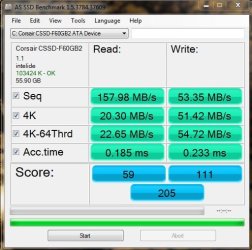
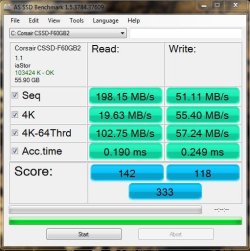
Well , new motherboard installed and AHCI enabled.

It has definatly made a difference check out the before and after shots below.

And also the WEI score has gone from 7.3 to 7.5

Sadly I have a new problem now though. Before I had the cpu clocked to 3.1ghz , totally stable ran for months like this.
With the new mobo I cannot seem to overclock it past 2.6ghz and even then its causing the pc to power down randomly which is not good so its back to stock for now.
 

Attachments

  • AS.JPG
    AS.JPG
    49.6 KB · Views: 6
  • newAS.JPG
    newAS.JPG
    49.6 KB · Views: 4

My Computer My Computer

OS
Windows 7 Professional 64 bit
...Sadly I have a new problem now though. Before I had the cpu clocked to 3.1ghz , totally stable ran for months like this.
With the new mobo I cannot seem to overclock it past 2.6ghz and even then its causing the pc to power down randomly which is not good so its back to stock for now.
Tried any voltage tweaks?
 

My Computer My Computer

Computer Manufacturer/Model Number
Self
OS
Main - Windows 7 Pro SP1 64-Bit; 2nd - Windows Server 2008 R2
CPU
Main - Core i7 2600K; 2nd - Core i7 920
Motherboard
Main - Asus P8Z68-V Pro/Gen3; 2nd - Gigabyte GA-EX58-UDR3
Memory
Main - 16GB Corsair Vengeance; 2nd - 12GB Corsair Vengeance
Graphics Card(s)
Main - XFX Radeon 6870 1GB; 2nd - XFX Radeon 4870 1GB
Sound Card
Both: Onboard Realtek Azalia
Monitor(s) Displays
Main - Hann 25" + I-INC 25" + Acer 23"; 2nd - Upgrading Soon
Screen Resolution
Main - 1920x1080 (All Three Monitors); 2nd - Upgrading Soon
Hard Drives
Main - (1) Crucial M4 128GB (Boot)
Main - (1) Seagate 2TB 64MB Cache (Data)
Main - (1) Seagate 2TB 64MB Cache (Data Backup)
2nd - (1) Intel X25-M SSD 80GB (Boot)
2nd - (3) Seagate 1TB 32MB Cache (Data Backup)
2nd - (1) Seagate 320GB (Because)
PSU
Main - OCZ 600W Modular; 2nd - OCZ 600W
Case
Main - Thermaltake Element G; 2nd - NZXT something or other
Cooling
Main - Corsair H80; 2nd - Prolimatech Megahalems
Keyboard
Main - Razer Reclusa; 2nd - Old MS Keyboard
Mouse
Main - Logitech MX Revolution; 2nd - Old MS Mouse
Internet Speed
20Mbps Time-Warner Cable
This before and after comparison of post 726 is really interesting. It looks like there was an improvement with AHCI - but for real life nothing has really changed. Let me explain: Since I assume that this is the OS disk, there are 2 things that count for the speed:

a) Access time
b) 4K reads

However, as you can see, with or without AHCI you get the same numbers. And that is why people are not really seeing a difference in real life.
It may be interesting to get all excited about the other numbers - and if that were a data disk it may have an impact - but for an OS disk all the other numbers are really irrelevant.
 

My Computer My Computer

Computer Manufacturer/Model Number
HP, Dell, Gateway, Toshiba - 4 laptops and 2 desktops
OS
Vista, Windows7, Mint Mate, Zorin, Windows 8
CPU
from 1.6GHz Duo to i7
Monitor(s) Displays
2x HP w2207
Hard Drives
5x HDD, 7x SSD, 12x Externals
Keyboard
with trackball - no mices
Mouse
Trackball mice
Internet Speed
DSL 6000
Whats the difference between 4K and 4k-64Thrd? Cause it looks like the 4K-64Thrd reads went up quite a bit.
 

My Computer My Computer

Computer Manufacturer/Model Number
Dell XPS 430
OS
Windows 7 Professional x64 6.1 Build 7600
CPU
Intel Core 2 Quad Q9400 2.66Ghz
Motherboard
Dell Inc. 0G254H
Memory
8GB DDR3 PC3-10700H (1333Mhz)
Graphics Card(s)
Visiontek ATI Radeon HD4850
Sound Card
Intel® 7.1 channel High Definition Audio
Monitor(s) Displays
Asus VH222H 22"
Screen Resolution
1920x1080
Hard Drives
OS: Kingston SSDNow V Series SNV425-S2BD/64GB

Data: Western Digital Caviar Blue 320GB, 7200 RPM
PSU
Dell 425watt PSU
Case
Dell XPS 430
Cooling
Stock
Keyboard
Microsoft Wireless Keyboard 1000
Mouse
Microsoft Wireless Optical Mouse 2000
Internet Speed
20Mb/s Down 5Mb/s Up
Other Info
Logitech X-540 5.1 Channel Surround Sound System
Yeah I was wandering that wakeboardr116.

Looks like they went up 4 fold!
 

My Computer My Computer

OS
Windows 7 Professional 64 bit
Would have to look a the code to get really specific but I was assuming that that means that there were 64 threads launched all reading 4k blocks at the same time and the total throughput of all threads combined.

At any time your Windows and programs can be running 100, 200 300 or more threads at once with quite a few of them doing File IO.

It appears that the standard IDE drivers only allow a single thread to access to the drive at a time whereas you can get several more threads asking for data at the same time in AHCI mode which probably handles Windows overlapping IO modes MUCH better.

This probably helps with program launches, boot time and single specialized prgrams that use multithreading properly and do heavy disk IO.
 

My Computer My Computer

Computer Manufacturer/Model Number
Scratch built
OS
Windows 7 x64 Ultimate
CPU
i7 960
Motherboard
Asus P6X58D
Memory
12 Gig Corsair Dominator
Graphics Card(s)
Nvidia 480
Sound Card
Maudio Delta 44 + breakout box
Monitor(s) Displays
Dell UltraSharp U2410 24in and Samsung 21 dual monitors
Screen Resolution
1920x1200 and 1280x1024
Hard Drives
Primary: Intel X-25M G2 160G SSD
Secondary: Segate baracuda 1.0 TB
HDs in AHCI mode.
PSU
Corasair TX850
Case
Cooler Master HAF
Cooling
Corsair H50
Keyboard
Logitech G15 + N52 game pad
Mouse
Logitech MX518
Internet Speed
15kbs down 4.5kbps up
Other Info
WEI 7.6
CPU & RAM 7.6
Graphics 7.9
Hard disk 7.7
In the 4K test, the speed of random read/writes is measured. The 4-64K test is similar but read/writes are distributed over 64 threads. It is designed to show the difference between IDE and AHCI modes.

Edit: fseal was faster - lol
 

My Computer My Computer

Computer Manufacturer/Model Number
HP, Dell, Gateway, Toshiba - 4 laptops and 2 desktops
OS
Vista, Windows7, Mint Mate, Zorin, Windows 8
CPU
from 1.6GHz Duo to i7
Monitor(s) Displays
2x HP w2207
Hard Drives
5x HDD, 7x SSD, 12x Externals
Keyboard
with trackball - no mices
Mouse
Trackball mice
Internet Speed
DSL 6000
Well , new motherboard installed and AHCI enabled.

It has definatly made a difference check out the before and after shots below.

And also the WEI score has gone from 7.3 to 7.5

Sadly I have a new problem now though. Before I had the cpu clocked to 3.1ghz , totally stable ran for months like this.
With the new mobo I cannot seem to overclock it past 2.6ghz and even then its causing the pc to power down randomly which is not good so its back to stock for now.

Looks much better.

What is the new motherboard?
Is it in your system specs or is that the old one?
 

My Computer My Computer

Computer type
PC/Desktop
Computer Manufacturer/Model Number
76~2.0
OS
Windows 7 Ult x64 - SP1/ Windows 8 Pro x64
CPU
Intel Core i5-3570K 4.6GHz
Motherboard
Gigabyte GA-Z77X UD3H, f18
Memory
8GB (2X4GB) DDR3 1600 Corsair Vengeance CL8 1.5v
Graphics Card(s)
Sapphire HD 7770 Vapor-X OC 1GB DDR5
Sound Card
Onboard VIA VT2021
Monitor(s) Displays
22" LCD Dell
Screen Resolution
1680x1050
Hard Drives
Samsung 840Pro 128GB SSD,
Seagate Barracuda 500GB SATA2 7200rpm 32MB cache, Seagate Barracuda 1TB SATA2 7200rpm 32MB cache,
PSU
Corsair HX650W
Case
Cooler Master Storm Scout
Cooling
Corsair H80 2x12cm Noctua NF P12 , 2x14cm case fans
Keyboard
Logitech Wave
Mouse
CM Sentinel
Internet Speed
Dismal
Antivirus
Avast
Browser
Opera Next
Other Info
Haswell laptop: HP Envy 17t-j, i7-4700MQ, GeForce 740M 2GB DDR3, 17.3" Full HD 1920x1080, 16GB RAM, Samsung 840 Pro 128GB, 1TB Hitachi 7200 HDD,
Desktop: eSATA ports,
External eSATA Seagate 500GB SATA2 7200rpm,
External WD USB 500GB
Sorry Dave , I forgot to update my system spec last night.

Done now.

Its an Asus P5QD Turbo btw.


Cheers

Paul.
 

My Computer My Computer

OS
Windows 7 Professional 64 bit
What are the temps?

Did you run Prime95 or equivalent stability test?

Different motherboards will sometimes not overclock the same.

Could be due to the P45 / ICH10R chipset or other settings in the new BIOS.

Whats the VCore running at?
 
Last edited:

My Computer My Computer

Computer type
PC/Desktop
Computer Manufacturer/Model Number
76~2.0
OS
Windows 7 Ult x64 - SP1/ Windows 8 Pro x64
CPU
Intel Core i5-3570K 4.6GHz
Motherboard
Gigabyte GA-Z77X UD3H, f18
Memory
8GB (2X4GB) DDR3 1600 Corsair Vengeance CL8 1.5v
Graphics Card(s)
Sapphire HD 7770 Vapor-X OC 1GB DDR5
Sound Card
Onboard VIA VT2021
Monitor(s) Displays
22" LCD Dell
Screen Resolution
1680x1050
Hard Drives
Samsung 840Pro 128GB SSD,
Seagate Barracuda 500GB SATA2 7200rpm 32MB cache, Seagate Barracuda 1TB SATA2 7200rpm 32MB cache,
PSU
Corsair HX650W
Case
Cooler Master Storm Scout
Cooling
Corsair H80 2x12cm Noctua NF P12 , 2x14cm case fans
Keyboard
Logitech Wave
Mouse
CM Sentinel
Internet Speed
Dismal
Antivirus
Avast
Browser
Opera Next
Other Info
Haswell laptop: HP Envy 17t-j, i7-4700MQ, GeForce 740M 2GB DDR3, 17.3" Full HD 1920x1080, 16GB RAM, Samsung 840 Pro 128GB, 1TB Hitachi 7200 HDD,
Desktop: eSATA ports,
External eSATA Seagate 500GB SATA2 7200rpm,
External WD USB 500GB
Hi Dave ,

The temps look just like before , I always keep an eye on my temps no matter what just of of interest more than anything. Didn't go above 50 on any core.

Didn't really see the point in running prime95 when I know its not stable for more than a few mins anyway lol.

It appears that I cannot seem to overclock at all now , as the system had starting rebooting for no reason just with a 100mhz overclock.

I never touched the Vcore on the old board and had 3.1ghz just fine , I tried upping it to 1.3 with a mild overclock on the new board but it makes no difference.

Current Vcore is 1.264 back with standard settings on everything.

Tried the memory at all sorts of speeds but that makes no difference.

Tried disabling usb things and all power saving things in the bios , no change.

There doesn't seem to be many people on the net with this motherboard and I am struggling when searching for info on it.

I am a little puzzled.

This is very off topic for this thread so perhaps a mod could split it off to the overclocking forum or I may start a new thread later.

Cheers

Paul.
 

My Computer My Computer

OS
Windows 7 Professional 64 bit
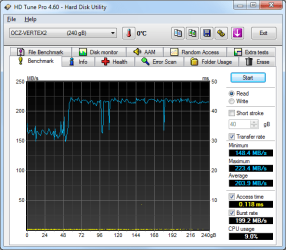
My OCZ Vertex 2 SSD :)

Vertex.png
 

My Computer My Computer

Computer Manufacturer/Model Number
Home Build System
OS
7 Home Premium X64
CPU
Intel Q6600 @ 3.5Ghz
Motherboard
Asus P5Q SE (Intel P45)
Memory
4GB OCZ Gold Series DDR2 @932Mhz
Graphics Card(s)
HD4890 1GB GDDR5
Sound Card
Asus Xonar D1
Monitor(s) Displays
Belinea 0.Display 22" Widescreen
Screen Resolution
1680 x 1050
Hard Drives
60Gb OCZ Vertex 2E Solid State Drive
250Gb Seagate Barracuda (Storage)
500Gb Western Digital Green (Storage)

Both 7200Rpm Sata2.
PSU
OCZ StealthXstream 600W Modular.
Case
Coolermaster 690 (Windows + Interior modded)
Cooling
Tuniq Tower 120 Extreme + 4 120mm case fans.
Keyboard
Microsoft Digital Media Keyboard 3000
Mouse
Logitech G5
Internet Speed
20Mb Virgin Media Unlimited.
Hi Dave ,

The temps look just like before , I always keep an eye on my temps no matter what just of of interest more than anything. Didn't go above 50 on any core.

Didn't really see the point in running prime95 when I know its not stable for more than a few mins anyway lol.

It appears that I cannot seem to overclock at all now , as the system had starting rebooting for no reason just with a 100mhz overclock.

I never touched the Vcore on the old board and had 3.1ghz just fine , I tried upping it to 1.3 with a mild overclock on the new board but it makes no difference.

Current Vcore is 1.264 back with standard settings on everything.

Tried the memory at all sorts of speeds but that makes no difference.

Tried disabling usb things and all power saving things in the bios , no change.

There doesn't seem to be many people on the net with this motherboard and I am struggling when searching for info on it.

I am a little puzzled.

This is very off topic for this thread so perhaps a mod could split it off to the overclocking forum or I may start a new thread later.

Cheers

Paul.

Got to be a setting holding this back.

Did you update drivers and BIOS?

Your right not much info from searching.

Call Asus, see if they have anything about this issue.

Best to start a new thread in the overclocking forum.
 
Last edited:

My Computer My Computer

Computer type
PC/Desktop
Computer Manufacturer/Model Number
76~2.0
OS
Windows 7 Ult x64 - SP1/ Windows 8 Pro x64
CPU
Intel Core i5-3570K 4.6GHz
Motherboard
Gigabyte GA-Z77X UD3H, f18
Memory
8GB (2X4GB) DDR3 1600 Corsair Vengeance CL8 1.5v
Graphics Card(s)
Sapphire HD 7770 Vapor-X OC 1GB DDR5
Sound Card
Onboard VIA VT2021
Monitor(s) Displays
22" LCD Dell
Screen Resolution
1680x1050
Hard Drives
Samsung 840Pro 128GB SSD,
Seagate Barracuda 500GB SATA2 7200rpm 32MB cache, Seagate Barracuda 1TB SATA2 7200rpm 32MB cache,
PSU
Corsair HX650W
Case
Cooler Master Storm Scout
Cooling
Corsair H80 2x12cm Noctua NF P12 , 2x14cm case fans
Keyboard
Logitech Wave
Mouse
CM Sentinel
Internet Speed
Dismal
Antivirus
Avast
Browser
Opera Next
Other Info
Haswell laptop: HP Envy 17t-j, i7-4700MQ, GeForce 740M 2GB DDR3, 17.3" Full HD 1920x1080, 16GB RAM, Samsung 840 Pro 128GB, 1TB Hitachi 7200 HDD,
Desktop: eSATA ports,
External eSATA Seagate 500GB SATA2 7200rpm,
External WD USB 500GB
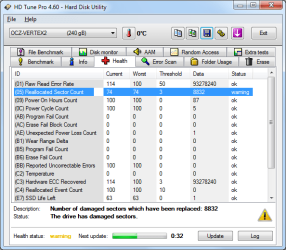
OCZ-Vertex2

I had Win7 installed on a Velociraptor drive with ACHI.
I simply backed it up with the Win7 backup, replaced the Velociraptor with the OCZ Vertex2 straight from the box, then booted to the Microsoft "System Repair" disk I had made in the backup. I just told it to restore everything from the Velociraptor drive to the OCZ drive, and it worked fine. When the system came up it recognized the OCZ drive as an SSD. I just forced the swap area to be on the D drive, and everything seems fine.

I'm a little worried about the SMART "Reallocated Sector Count", but the numbers haven't changed since I installed so I suspect it's OK.

I tried turning off "disk caching". This made the system slow and weird, so I turned it back on. Supposedly this SSD has no internal cache.
 

Attachments

  • 14-September-2010_11-15.png
    14-September-2010_11-15.png
    20.8 KB · Views: 13
  • 14-September-2010_11-16.png
    14-September-2010_11-16.png
    24.8 KB · Views: 10

My Computer My Computer

Computer type
PC/Desktop
Computer Manufacturer/Model Number
homemade
OS
Windows 7 Ultimate 64-bit
CPU
i7 920
Motherboard
Gigabyte X58A-UD3R
Memory
12 Gbyte
Graphics Card(s)
NVIDIA Quadro FX 3800
Sound Card
on motherboard
Monitor(s) Displays
HP LP3065
Screen Resolution
2560x1600
Hard Drives
WDC WD3000HLFS-01G6U0 (Velociraptor 300 GB)
OCZ-Vertex2
ST32000542AS
PSU
Antec 850 Quattro
Case
Antec
Cooling
water-cooled CPU
Keyboard
Northgate Omnikey Ultra
Mouse
Microsoft Wireless laser mouse 5000
Internet Speed
test of comcast cable connection shows 23 Mb/s download
Would you mind let me know what condition the PC shows is good? Thank you very much.
 

My Computer My Computer

OS
windows XP 32bit
Status
Not open for further replies.
Back
Top