Solved USB flash drive SanDisc with files on it asking for format?

AndrejSPB

New member
Local time
12:38 PM
Messages
30
Dear SevenForums Community,
I have a problem with my USB flash drive. It's a SanDisc 16GB flash drive with some of my files I use for School and Home. Luckily it is saved as a backup so this isn't the problem. I am looking for assistance regarding the problem(s) below.

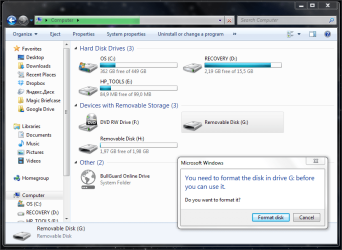
Upon plugging the USB flash drive into my computer, I am welcomed by this message:
attachment.php


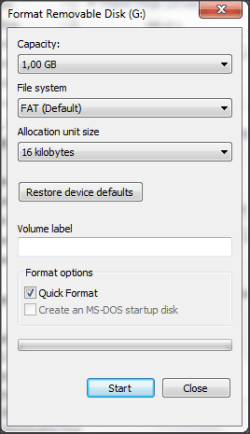
I clicked the format option, and I look at the Capasity in the Format window.. it saying 1GB capacity. There is no other choice.
attachment.php


I tried to check the drive using the chkdsk utility without any good results. :(
attachment.php


Here is a screenshot of Disk Management:
attachment.php


So I am wondering what is the problem and how it can be fixed? I don't really want to trow away this USB flash drive, as I am using it daily for moving my data between home and school.

Thanks for any assistance.
 

Attachments
  • Snap 2012-04-29 at 20.03.54.png
    Snap 2012-04-29 at 20.03.54.png
    51 KB · Views: 8,957
  • Snap 2012-04-29 at 20.04.12.png
    Snap 2012-04-29 at 20.04.12.png
    10.5 KB · Views: 8,895
  • Snap 2012-04-29 at 20.05.07.png
    Snap 2012-04-29 at 20.05.07.png
    36.5 KB · Views: 8,949
  • Snap 2012-04-29 at 20.08.59.png
    Snap 2012-04-29 at 20.08.59.png
    44.9 KB · Views: 8,983

My Computer My Computer

Computer type
PC/Desktop
OS
m

My Computer My Computer

OS
Windows 7 Home Premium 32 bit
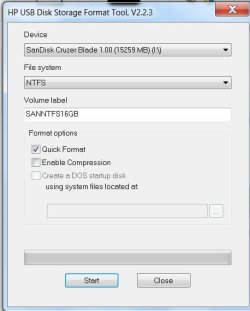
I suggest that you download the HP USB Disk Storage Format tool 2.2.3 from Download HP USB Disk Storage Format Tool 2.2.3 Free - Windows-based Format Utility for HP Drive Key or DiskOnKey USB Device - Softpedia , run it as an administrator and format your entire 16GB with Fat32 or NTFS as you may please. (Caution: Recheck and save any data that you may not want to lose)

View attachment 209561

Hi there, thanks for responding.
When I try to click Start it gives me a error: Device media is write-protected. Hovewer I have none protect switch on my USB Flash Drive, and I don't remmember doing this myself.

So basicaly I cant format without unprotecting it? How would I do that?
 

My Computer My Computer

Computer type
PC/Desktop
OS
m
OK, there are many solutions for formatting a write-protected drive.

Try this utility to low level format your pendrive. HDDGURU: HDD LLF Low Level Format Tool

Please ensure that except for the pendrive, there is no other USB drive connected. You may have to run this utility many times to completely remove the error. Also be patient for the low level format to complete and do not interrupt it halfway through. ( Large HDDs may take hours but since your pendrive is only 16GB it may not be hours but still it may take some time to complete.)

Remove the pendrive and then plug it in again. You have to do a regular format, using the HP Format Tool or even Windows 7 Disk Management.

Let us know the results.
 

My Computer My Computer

OS
Windows 7 Home Premium 32 bit
Hi there
this happens from time to time - especially if the device has been switched around between computers.

What to do.

1) Shut down computer -- complete POWER OFF.
2) ensure your USB drive is removed from the computer.
3) Reboot computer WITHOUT the usb in it.
4) after re-boot insert drive into a DIFFERENT USB slot to the one it was in before.

This should normally work fine.

If the Usb stick STILL gives these messages requiring a re-format try and insert it into another computer.
If the other computer can read it - copy ALL the files to a temporary directory - delete them from the USB and then copy them back.

Now the USB should work properly.

Note these sorts of problems can occur if a usb device is simply unplugged before being removed via the right hand icon safely remove hardware.

With a disk you can get a message "Windows -delayed write failed on device xxx" but a USB won't give you this message even when there is a write pending.

Also go into windows explorers, right mouse click on the disk that the usb stick is shown as , go to properties==>security and check you've got read / write / create access on the drive as well -- security can also get hosed up when switching usb drives between different machines. Some workplaces automatically set No WRITE on some USB devices to prevent data being "removed" from the premises. !!


Cheers
jimbo
 

My Computer My Computer

Computer type
PC/Desktop
Computer Manufacturer/Model Number
Custom built, several laptops HP/ASUS
OS
Linux CENTOS 7 / various Windows OS'es and servers
CPU
Intel i7 Intel i5
Memory
8GB, 16GB
Graphics Card(s)
On Motherboard
Sound Card
Realtek HD audio
Monitor(s) Displays
Apple Cinema display, Samsung LCD
Screen Resolution
1920 X 1080
Hard Drives
4 X 1TB SATA
Mouse
Toshiba wireless laser
Internet Speed
> 20MB up
format the stick as NTFS.
 

My Computer My Computer

Computer Manufacturer/Model Number
Toshiba Satellite S875D-S7239 laptop
OS
MS Windows 7 Ultimate SP1 64-bit
CPU
AMD A10-4600M
Motherboard
AMD Pumori (Socket FT1)
Memory
6.00 GB Dual-Channel DDR3 @ 798MHz (11-11-12-28)
Graphics Card(s)
AMD Radeon HD 7660G
Sound Card
High Definition Audio Device
Monitor(s) Displays
Generic PnP Monitor (1600x900@60Hz)
Screen Resolution
1600x900@60Hz
Hard Drives
SSD 119GB Corsair CSSD-V128GB2 ATA Device
Keyboard
Standard PS/2 Keyboard
Mouse
HP Wireless Optical Mobile Mouse Model FHA-3410
Internet Speed
What the local pub, local coffee shop offers.
Other Info
Optical Drive:MATSHITA BD-CMB UJ160B ATA Device


Also have an Asus ha1002xp netbook with Win 7 Ultimate installed.
format the stick as NTFS.

Hi there
He's trying to get his DATA before doing all this. !!! and currently he can't even ACCESS the usb stick.

Cheers
jimbo
 

My Computer My Computer

Computer type
PC/Desktop
Computer Manufacturer/Model Number
Custom built, several laptops HP/ASUS
OS
Linux CENTOS 7 / various Windows OS'es and servers
CPU
Intel i7 Intel i5
Memory
8GB, 16GB
Graphics Card(s)
On Motherboard
Sound Card
Realtek HD audio
Monitor(s) Displays
Apple Cinema display, Samsung LCD
Screen Resolution
1920 X 1080
Hard Drives
4 X 1TB SATA
Mouse
Toshiba wireless laser
Internet Speed
> 20MB up
In his first post he says:
Code:
Luckily it is saved as a backup so this isn't the problem.
 

My Computer My Computer

Computer Manufacturer/Model Number
Toshiba Satellite S875D-S7239 laptop
OS
MS Windows 7 Ultimate SP1 64-bit
CPU
AMD A10-4600M
Motherboard
AMD Pumori (Socket FT1)
Memory
6.00 GB Dual-Channel DDR3 @ 798MHz (11-11-12-28)
Graphics Card(s)
AMD Radeon HD 7660G
Sound Card
High Definition Audio Device
Monitor(s) Displays
Generic PnP Monitor (1600x900@60Hz)
Screen Resolution
1600x900@60Hz
Hard Drives
SSD 119GB Corsair CSSD-V128GB2 ATA Device
Keyboard
Standard PS/2 Keyboard
Mouse
HP Wireless Optical Mobile Mouse Model FHA-3410
Internet Speed
What the local pub, local coffee shop offers.
Other Info
Optical Drive:MATSHITA BD-CMB UJ160B ATA Device


Also have an Asus ha1002xp netbook with Win 7 Ultimate installed.
OK, there are many solutions for formatting a write-protected drive.

Try this utility to low level format your pendrive. HDDGURU: HDD LLF Low Level Format Tool

Please ensure that except for the pendrive, there is no other USB drive connected. You may have to run this utility many times to completely remove the error. Also be patient for the low level format to complete and do not interrupt it halfway through. ( Large HDDs may take hours but since your pendrive is only 16GB it may not be hours but still it may take some time to complete.)

Remove the pendrive and then plug it in again. You have to do a regular format, using the HP Format Tool or even Windows 7 Disk Management.

Let us know the results.

I used this tool and it took not long before it finished. I removed and plug it in again and I used the standard windows format utility in order to format it.

And I have 15,9 GB back so I can use the Pen drive again! Thank you for all your help. :)
 

My Computer My Computer

Computer type
PC/Desktop
OS
m
Glad that it helped and you got back your pendrive.

The question I wanted to ask, but didn't ask earlier :),( for the first priority was to resolve your problem )

How did you manage to create so many partitions on your pendrive - some with no file system, one Raw and one unallocated? Just curious.:)
 

My Computer My Computer

OS
Windows 7 Home Premium 32 bit
Glad that it helped and you got back your pendrive.

The question I wanted to ask, but didn't ask earlier :),( for the first priority was to resolve your problem )

How did you manage to create so many partitions on your pendrive - some with no file system, one Raw and one unallocated? Just curious.:)

Uh.. I have no idea how that could happen... :confused:
 

My Computer My Computer

Computer type
PC/Desktop
OS
m
Back
Top