Solved external hard drive causing system to freeze on boot and shutdown

durango1

New member
Power User
VIP
Local time
10:35 AM
Messages
119
I have a seagate external drive 1TB, for some reason all of a sudden its causing my system to freeze during shutdown process and also booting. The drive works i can access it but if i keep it pluged in and try to boot i get frozen at the blue hand screen until i unplug it, then PC will boot, its for backups so there should be no conflict with booting...
 

My Computer My Computer

Computer type
PC/Desktop
Computer Manufacturer/Model Number
HP Pav HPE h9-1110t
OS
Windows 7 Professional 64bit
CPU
Core i7
Memory
12GB
Graphics Card(s)
AMD Radeon HD7670 1GB
Hard Drives
160GB Main OS only Solid State
500GB Secondary
160GB Slave SCSI with interface board and cable
1 TB external HD
Cooling
Air
Mouse
Razor Mamba
i was able to get some of what i needed off the drive, but lost most of my backups as the drive kept freezing on me and i had to format the drive. I uninstalled it, and reinstalled it and that at first seemed to do it. But when i just tried to download a backup to the drive filezilla froze up again.

So something is def up with this drive and im not sure what, the smaller files it seems to have no problem with, but anything that is more than 1gb it just stops responding.

Any ideas, this drive is less than 2 years old, i think i got it early last year.
 

My Computer My Computer

Computer type
PC/Desktop
Computer Manufacturer/Model Number
HP Pav HPE h9-1110t
OS
Windows 7 Professional 64bit
CPU
Core i7
Memory
12GB
Graphics Card(s)
AMD Radeon HD7670 1GB
Hard Drives
160GB Main OS only Solid State
500GB Secondary
160GB Slave SCSI with interface board and cable
1 TB external HD
Cooling
Air
Mouse
Razor Mamba
Hi

I would recommend testing your hard drive's health using Seagate Seatool.

Download link : SeaTools for Windows | Seagate

Install and run the tool. You will see both the internal and external disks connected to your system. Select the external HDD for testing and choose "Basic Tests --> Short Generic" option to start the quick diagnostic test. If it passes, select "Basic Tests --> Long Generic" to perform a sector by sector diagnostics.

seatoolsforwindows-1.jpg


Let us know the result with next reply.
 

My Computer My Computer

Computer type
PC/Desktop
OS
Windows 7 Ultimate x64
Thanks, it def has taken a dive. I even tried to use ccleaners disk wipe on it just to test and that stop responding too. Sometimes it works and then it takes a dive and stops responding. I thought maybe it was the cable but no i tried it in different places and same thing.

I did try the seagate tools for windows but it kept doing the stop responding thing too or would just lock up and do nothing. So finally the confirmation was that i found the seagate drive settings download

Seagate Drive Settings | Seagate

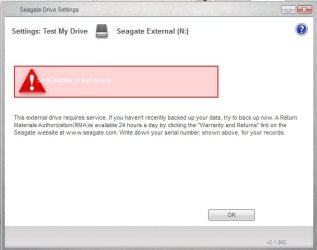
and i was able to get that to work and it has some tests with it also. I ran a test and at first it was checking sectors but then it stoped and i finally got this image attached.

My warranty is up the 31th of this month so i just made it.

So i did an RMA and i chose to have them send me one and then i return this after that. I already have it boxed up and was going to go ahead and send it but i thought maybe they might have a special package they want me to use.

Really sad, that i looked at my purchase date and i got it just last year so its less than a year old. I have an old SCSI drive thats over 10years old and another one even older and they still work. I guess either they dont make them like they used to or i just got a bad egg.

Thanks for the help.. :)
 

Attachments

  • seagatebad.jpg
    seagatebad.jpg
    20.2 KB · Views: 17

My Computer My Computer

Computer type
PC/Desktop
Computer Manufacturer/Model Number
HP Pav HPE h9-1110t
OS
Windows 7 Professional 64bit
CPU
Core i7
Memory
12GB
Graphics Card(s)
AMD Radeon HD7670 1GB
Hard Drives
160GB Main OS only Solid State
500GB Secondary
160GB Slave SCSI with interface board and cable
1 TB external HD
Cooling
Air
Mouse
Razor Mamba
I have an old SCSI drive thats over 10years old and another one even older and they still work. I guess either they dont make them like they used to or i just got a bad egg.


I work as a PC tech over a decade and i can confirm that failure rate of modern hard drives are pretty high when compared to old 10 - 80 GB disks. As you may already know, the smallest storage unit on a HDD is called "Sector". If you take apart an old 80 GB HDD and a modern 500 GB HDD, you will see similar sized two or three magnetic platters. A 80 GB HDD will have approximately 167772160 sectors while a 500 GB HDD will have around 1048576000 sectors. You can see the huge difference - number of sectors increased but the platter size remained same. This increased sector density also increased the chance for developing more bad/weak sectors.
 
Last edited:

My Computer My Computer

Computer type
PC/Desktop
OS
Windows 7 Ultimate x64
Back
Top