Enable test mode to solve USB problems?

I had to check the Mbam tutorial mainly because of your questions.
Step 8 instructs you to clean
Step 9 instructs you to repair
Step 10 instructs you to attach

It might have been a communication breakdown - I said you could skip the VirusTotal step. That might have been interpreted as you could stop at that step.

Read, not skim, Bill
Oh wait - there's that stop sign - - you're really good Crabby, you know that.
Read, not skim, Bill


I had to check my own work to make sure I gave the correct instructions in the tutorial.
It looks as though I need to change the Clean step or add instructions for cases like this one.

I have to revisit the tutorial anyway, Mbam has changed a bit [action dropdown boxes instead of checkboxes] - thanks for bringing these things to my attention.

Step 9 SFC scan, did you run that after the scan? Please do after the scan that is running

Step 10 attach - this is the one that really made me think the tutorial needed attention. I thought I had the location in that step.
I did - phew!
Mbam logs: C:\ProgramData\Malwarebytes\Malwarebytes Anti-Malware\Logs

The logs you attached were in xml, and I understand the difficulty you had with empty text files.


Try this with after the current scan
- quarantine all
go to History, application logs
double click on the most recent log (should be a later time than 14-59-30 | 2:59:30)
click the export button and select .txt
save it to your Downloads folder and name it MbamRootScan.txt

I hope I covered everything,

Bill
.
 
Last edited:

My Computer

Computer type
Laptop
Computer Manufacturer/Model Number
HP Pavilion dv6-6c10us
OS
x64 (6.3.9600) Win8.1 Pro & soon dual boot x64 (6.1.7601) Win7_SP1 HomePrem
CPU
AMD A6-3420M APU with Radeon(tm) HD Graphics
Motherboard
Hewlett-Packard 1805
Memory
6.00 GB
Graphics Card(s)
AMD Radeon(TM) HD 6520G
Sound Card
(1) AMD High Definition Audio Device (2) IDT High Definiti
Monitor(s) Displays
HP W2072a 20" LCD (1600 x 900) @ 60 Hz
Screen Resolution
1366 x 768 x 32 bits (4294967296 colors) @ 60 Hz
Hard Drives
ST640LM0 00 HM641JI SATA Disk Device
Keyboard
Logitech k520 wireless KB
Mouse
Logitech m320 wireless mouse (bundled with KB)
Internet Speed
15/5 | 54 MB Wireless 'n'
Antivirus
Realtime: Defender or Avast | On-demand: Malwarebytes, ESET
Browser
IE 11 on Win8, IE 10 on win 7
Other Info
Media: [Gimp, Audacity, VLC] || Comm: [WEmail 2012, Skype] || Productivity: [OpenOffice,| Textpad] || Utils: [Sysinternals, cCleaner, Speccy, Defraggler]
I ran the scan again after telling the software to do the recommended actions, which I thought were quarantines, but maybe it wiped them out completely because the new scan didn't find any threats. Here is a screenshot.

Gator, I will try to keep my palms off the touchpad. I don't want to disable it because then I will have no mouse.
 

Attachments

  • malwarebytes screen jan 16 no threats.png
    malwarebytes screen jan 16 no threats.png
    119.9 KB · Views: 1

My Computer

Computer type
PC/Desktop
Computer Manufacturer/Model Number
HP Pavilian DV7-7012 notebook
OS
Windows 7 Home Premium 64 bit
CPU
3rd generation Intel Core i7-3610QM Processor
Motherboard
2.30GHz
Memory
8GB DDR3 1600MHz RAM (2 DIMM); 750GB 7200RPM hard drive
Graphics Card(s)
2GB (2048MB) NVIDIA GeForce GT 650M GDDR5 Graphics
Hard Drives
750GB 7200RPM hard drive with HP ProtectSmart Hard Drive Protection
Antivirus
Microsoft
Browser
Firefox, Chrome, Microsoft
I just looked at Malwarebytes again under the history tab and it looks like the former potential threats were quarantined.

I will check back in the morning since everyone will now be at happy hour.
 

My Computer

Computer type
PC/Desktop
Computer Manufacturer/Model Number
HP Pavilian DV7-7012 notebook
OS
Windows 7 Home Premium 64 bit
CPU
3rd generation Intel Core i7-3610QM Processor
Motherboard
2.30GHz
Memory
8GB DDR3 1600MHz RAM (2 DIMM); 750GB 7200RPM hard drive
Graphics Card(s)
2GB (2048MB) NVIDIA GeForce GT 650M GDDR5 Graphics
Hard Drives
750GB 7200RPM hard drive with HP ProtectSmart Hard Drive Protection
Antivirus
Microsoft
Browser
Firefox, Chrome, Microsoft
Thanks Crabby,

The last Mbam screenshot looks clean. I'll finish checking the original log and will post anything that I think needs to be done.

One step forward ... I'll post the information CompGeek wants and then I'm out to Happy Hours. I'll probably fade fast though.

Here ya go Jerry,
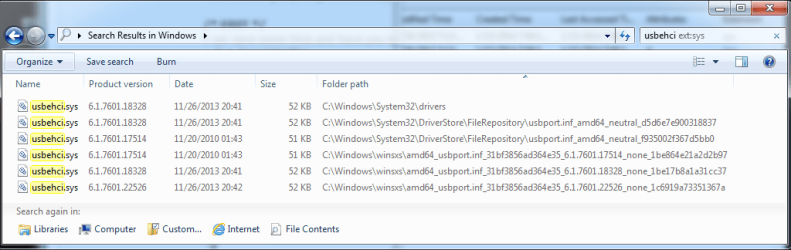
usbehciSlarty.png

I used the Date field instead of Date Created & Date Modified. It saved some room
I also added a column for Version and sorted by Folder path

Reported dates are often confusing, for instance when I had the date fields in your example, the creation was later than the modification.

All Attributes are Archive (A) - no other attribute is set on my Dell for theses files.

Let me know if you need anything else off of this machine and I'll drag it out of the closet again ;)

Bill
.
 

My Computer

Computer type
Laptop
Computer Manufacturer/Model Number
HP Pavilion dv6-6c10us
OS
x64 (6.3.9600) Win8.1 Pro & soon dual boot x64 (6.1.7601) Win7_SP1 HomePrem
CPU
AMD A6-3420M APU with Radeon(tm) HD Graphics
Motherboard
Hewlett-Packard 1805
Memory
6.00 GB
Graphics Card(s)
AMD Radeon(TM) HD 6520G
Sound Card
(1) AMD High Definition Audio Device (2) IDT High Definiti
Monitor(s) Displays
HP W2072a 20" LCD (1600 x 900) @ 60 Hz
Screen Resolution
1366 x 768 x 32 bits (4294967296 colors) @ 60 Hz
Hard Drives
ST640LM0 00 HM641JI SATA Disk Device
Keyboard
Logitech k520 wireless KB
Mouse
Logitech m320 wireless mouse (bundled with KB)
Internet Speed
15/5 | 54 MB Wireless 'n'
Antivirus
Realtime: Defender or Avast | On-demand: Malwarebytes, ESET
Browser
IE 11 on Win8, IE 10 on win 7
Other Info
Media: [Gimp, Audacity, VLC] || Comm: [WEmail 2012, Skype] || Productivity: [OpenOffice,| Textpad] || Utils: [Sysinternals, cCleaner, Speccy, Defraggler]
@Crabby, after skimming (yeah, I know, I'll read it later) the original Mbam log, there is only one thing I really want to check.

Please post the TDSSkiller log - I know you said it was clean. The one thing Mbam reported that I want to check is a fairly generic name. The one bad threat would have been detected and remedied by TDSSkiller, the other versions are just PUPs and Mbam remedied that one. Where there's one there's usually more.

At this point the machine is looking a lot better re: malware.

Here's where you should find the log I want to see.

The log file is placed on the System Drive (normally C:\) with the file naming convention:

TDSSKiller.Maj#. Min#. Bld#.Rev#_MM.DD.YYYY_HH.MM.SS_log.txt

Example:
C:\TDSSKiller.3.0.0.17_03.15.2014_12.03.49_log.txt

The numbers will be different but the prefix (TDSSKiller), suffix (_log) and extension (txt) should be the same.

Thanks,

Bill
.
 

My Computer

Computer type
Laptop
Computer Manufacturer/Model Number
HP Pavilion dv6-6c10us
OS
x64 (6.3.9600) Win8.1 Pro & soon dual boot x64 (6.1.7601) Win7_SP1 HomePrem
CPU
AMD A6-3420M APU with Radeon(tm) HD Graphics
Motherboard
Hewlett-Packard 1805
Memory
6.00 GB
Graphics Card(s)
AMD Radeon(TM) HD 6520G
Sound Card
(1) AMD High Definition Audio Device (2) IDT High Definiti
Monitor(s) Displays
HP W2072a 20" LCD (1600 x 900) @ 60 Hz
Screen Resolution
1366 x 768 x 32 bits (4294967296 colors) @ 60 Hz
Hard Drives
ST640LM0 00 HM641JI SATA Disk Device
Keyboard
Logitech k520 wireless KB
Mouse
Logitech m320 wireless mouse (bundled with KB)
Internet Speed
15/5 | 54 MB Wireless 'n'
Antivirus
Realtime: Defender or Avast | On-demand: Malwarebytes, ESET
Browser
IE 11 on Win8, IE 10 on win 7
Other Info
Media: [Gimp, Audacity, VLC] || Comm: [WEmail 2012, Skype] || Productivity: [OpenOffice,| Textpad] || Utils: [Sysinternals, cCleaner, Speccy, Defraggler]
Here are the TDSSKiller logs. I ran it twice, before and after disabling system restore/hybernate.
 

Attachments

My Computer

Computer type
PC/Desktop
Computer Manufacturer/Model Number
HP Pavilian DV7-7012 notebook
OS
Windows 7 Home Premium 64 bit
CPU
3rd generation Intel Core i7-3610QM Processor
Motherboard
2.30GHz
Memory
8GB DDR3 1600MHz RAM (2 DIMM); 750GB 7200RPM hard drive
Graphics Card(s)
2GB (2048MB) NVIDIA GeForce GT 650M GDDR5 Graphics
Hard Drives
750GB 7200RPM hard drive with HP ProtectSmart Hard Drive Protection
Antivirus
Microsoft
Browser
Firefox, Chrome, Microsoft
One step forward ... I'll post the information CompGeek wants and then I'm out to Happy Hours. I'll probably fade fast though.

Here ya go Jerry,
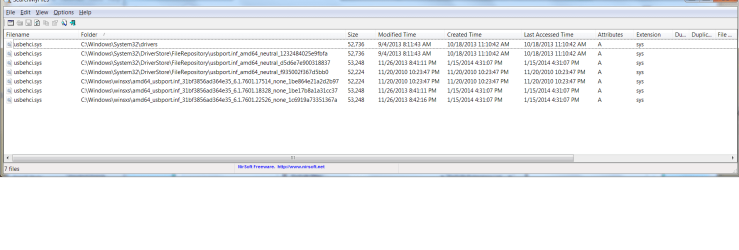
I used the Date field instead of Date Created & Date Modified. It saved some room
I also added a column for Version and sorted by Folder path

Reported dates are often confusing, for instance when I had the date fields in your example, the creation was later than the modification.
Thanks for the snapshot Slartybart! These snapshots help me see the DriverStore folders on your computer and Crabby's computer. (@Crabby - Could you also provide a snapshot per my post #190)

Windows DriverStore
Starting with Vista, Windows introduced the "DriverStore". When a driver is submitted for installation, it must first be "staged". "Staging" means the driver files are submitted to Windows for inspection. Windows checks that the files in the driver package meets digital signature and all its other driver spec requirements. IF it does, then AND ONLY then, the driver package is loaded into the DriverStore. The "package" is the set of files that make up the driver. So, note each driverstore folder contains a driver "package". Windows is supposed to protect files in the DriverStore from being tampered.

Your computer may have more then one "instance" of a hardware device. For example, Crabby has TWO USB 2.0 controllers. When the first hardware instance is installed, it only installs if its driver files are found in the DriverStore. Installation copies the files needed from the store and they're placed in their proper run-time location (e.g. they may get copied into C:\Windows\system32\drivers or other locations)

Slarty, your snapshot shows you have two different versions of the USB 2.0 driver in your store. (Also note the DriverStore naming convention for folders also tells you the architecture that driver is for. amd64 for your case.) If you look at the run-time file version of the file in C:\Windows\system32\drivers you see the run-time version equals the latest of the versions found in the store - which is good and what I would expect.

Next steps:
> Slarty could you run the script i posted in #114 and attach the file output
> Crabby could you also post the screen shot. I'd like to see how your DriverStore is organized

Then i can go on and explain more
 

My Computer

Computer type
PC/Desktop
Computer Manufacturer/Model Number
Dell Optiplex 360 and Optiplex 755
OS
Desk 1: Win 7 Pro x32; Desk 2: Windows 10 x64
Hard Drives
500GB Crucial SSD in both Desktops
Other Info
Buffalo 6TB NAS, Raid 1
Here is the search my files screenshot.
 

Attachments

  • screen shot of search my files jan. 16.png
    screen shot of search my files jan. 16.png
    98.4 KB · Views: 5

My Computer

Computer type
PC/Desktop
Computer Manufacturer/Model Number
HP Pavilian DV7-7012 notebook
OS
Windows 7 Home Premium 64 bit
CPU
3rd generation Intel Core i7-3610QM Processor
Motherboard
2.30GHz
Memory
8GB DDR3 1600MHz RAM (2 DIMM); 750GB 7200RPM hard drive
Graphics Card(s)
2GB (2048MB) NVIDIA GeForce GT 650M GDDR5 Graphics
Hard Drives
750GB 7200RPM hard drive with HP ProtectSmart Hard Drive Protection
Antivirus
Microsoft
Browser
Firefox, Chrome, Microsoft
.....
Then i can go on and explain more

Don't explain for my benefit, it detracts from what I thought you wanted to do - the security catalog.
I mentioned that I thought I saw something about repairing/rebuilding it.

Catalogs screwed (again) [FIXED] - Sysinternals Forums - Page 1
Solution
1. Stop Cryptographic Services (cryptsvc) by running "net stop cryptsvc".
2. Delete or rename the C:\Windows\System32\catroot2 folder.
3. Start cryptsvc by running "net start cryptsvc".
4. C:\Windows\System32\catroot2 will be recreated. If it is not, restart the computer.
5. Wait for all the catalog files from C:\Windows\System32\catroot to be imported into the catroot2 database. This may take up to an hour, so be patient.​

And this is where I thought you were heading (I found a reference, I'm not sure if it the reference I saw before, but it fits the bill, er Jerry :))

This is a discussion, not a task to be completed.

Give CompGeek a chance to say "Yeah, that's what I was going to do" or "No don't do that!"

DO NOT hit enter Crabby
 

My Computer

Computer type
Laptop
Computer Manufacturer/Model Number
HP Pavilion dv6-6c10us
OS
x64 (6.3.9600) Win8.1 Pro & soon dual boot x64 (6.1.7601) Win7_SP1 HomePrem
CPU
AMD A6-3420M APU with Radeon(tm) HD Graphics
Motherboard
Hewlett-Packard 1805
Memory
6.00 GB
Graphics Card(s)
AMD Radeon(TM) HD 6520G
Sound Card
(1) AMD High Definition Audio Device (2) IDT High Definiti
Monitor(s) Displays
HP W2072a 20" LCD (1600 x 900) @ 60 Hz
Screen Resolution
1366 x 768 x 32 bits (4294967296 colors) @ 60 Hz
Hard Drives
ST640LM0 00 HM641JI SATA Disk Device
Keyboard
Logitech k520 wireless KB
Mouse
Logitech m320 wireless mouse (bundled with KB)
Internet Speed
15/5 | 54 MB Wireless 'n'
Antivirus
Realtime: Defender or Avast | On-demand: Malwarebytes, ESET
Browser
IE 11 on Win8, IE 10 on win 7
Other Info
Media: [Gimp, Audacity, VLC] || Comm: [WEmail 2012, Skype] || Productivity: [OpenOffice,| Textpad] || Utils: [Sysinternals, cCleaner, Speccy, Defraggler]
Time for a recap.

The Issue: Three USB 3.0 ports, one USB 2.0 port on the machine. None work

Device Manager:
USB 2.0 devices report code 52 under Universal Serial Bus category
USB 3.0 devices report code 28 (no driver) under Unknown devices
Installing the chipset driver for the USB 3.0 device from HP downloads moves it out of the unknown category and into the Universal Serial Bus category but reports code 52
Windows cannot verify the digital signature for the drivers required for this device. A recent hardware or software change might have installed a file that is signed incorrectly or damaged, or that might be malicious software from an unknown source. (Code 52)

The hardware tested good (it worked) using an Ubuntu boot.

ComputerGeek suggested fixing the signatures either on the individual drivers or on a global scale.
Malware scans to date do not indicate anything serious.

Other related tasks (not necessarily in this order):
completed: Clean startup
completed: Disable hibernation and System Protection to avoid resurrecting the issue
completed: Windows Update changed to manual to avoid thrashing and control when updates are installed
completed: Disable Device Update to avoid battle with automatic updating of a device
completed: create Repair disc
completed: BIOS flashed to correct version F.0A
completed: C:\SwSetup renamed to move the HP install path out of the way
completed: System File Checker - mapi hash mismatch, fixed by NoelDP (unrelated to the USB issue)

Other things considered:
Clean Install: ruled out for various reasons.
Repair install: still considered, but have not prepared
:ar: System Drivers are not affected by a Repair install

Observations:
HP Recovery partition is visible - unusual for an HP
HP unpack folder, C:\SwSetp, had an odd tree structure (see above)
The touchpad update from WU breaks the touchpad - this is not that uncommon, so the update is hidden
Windows is up-to-date

What bugs me:
The code 52 indicates an unsigned driver or malware. Malware scans look good and the USB 3.0 driver has been freshly reinstalled (uninstall in DevMgr removing software). It's possible, but unlikely, that the HP drivers are bad (unsigned). This points more to what ComputerGeek is thinking - the store is corrupt.

There are probably things I missed, but this provides everyone with the same information I have in one tidy package. If I got something wrong writing it from memory - let me know and I'll correct it - thanks.

What's left (not necessarily in this order)
  • Create install media - just in case we need it Done
  • Disable Driver Signature Enforcement Done - this solved the USB 2.0 ports issue but not the USB 3.0 issue
  • Repair/ rebuild the catroot2 store
  • Determine if the individual driver signature for the affected drivers is the culprit.
  • Determine if another driver is causing the issue (ComputerGeek commented that this is a possibility and CrabbyRightNow indicated that the NVidia driver was updated (WU) around the time this started)
  • Continue malware scans
  • Apply the HP QFE
  • Repair install
    :ar: System Drivers are not affected by a Repair install
There is order in the Universe and in trouble shooting computer issues :geek:

Bill
.
 
Last edited:

My Computer

Computer type
Laptop
Computer Manufacturer/Model Number
HP Pavilion dv6-6c10us
OS
x64 (6.3.9600) Win8.1 Pro & soon dual boot x64 (6.1.7601) Win7_SP1 HomePrem
CPU
AMD A6-3420M APU with Radeon(tm) HD Graphics
Motherboard
Hewlett-Packard 1805
Memory
6.00 GB
Graphics Card(s)
AMD Radeon(TM) HD 6520G
Sound Card
(1) AMD High Definition Audio Device (2) IDT High Definiti
Monitor(s) Displays
HP W2072a 20" LCD (1600 x 900) @ 60 Hz
Screen Resolution
1366 x 768 x 32 bits (4294967296 colors) @ 60 Hz
Hard Drives
ST640LM0 00 HM641JI SATA Disk Device
Keyboard
Logitech k520 wireless KB
Mouse
Logitech m320 wireless mouse (bundled with KB)
Internet Speed
15/5 | 54 MB Wireless 'n'
Antivirus
Realtime: Defender or Avast | On-demand: Malwarebytes, ESET
Browser
IE 11 on Win8, IE 10 on win 7
Other Info
Media: [Gimp, Audacity, VLC] || Comm: [WEmail 2012, Skype] || Productivity: [OpenOffice,| Textpad] || Utils: [Sysinternals, cCleaner, Speccy, Defraggler]
Sheila (aka Crabby),

Create install media
  • Download the Windows 7 USB/DVD download tool
    Select [Run] on the download action bar to install the utility

  • Download Windows 7 Home Premium x64 SP1 U (media refresh) from the official Microsoft source
    The download action bar for the ISO is presented at the bottom of your browser
    Select [Save] on the download action bar
    the default save location is your Downloads folder
    You have to use the tool above to create the install media. Some people think they can just copy it to a disc - you can't.

  • Run the Windows 7 USB/DVD Download tool to create a DVD with Windows 7 SP1 install on it.
    It's fairly straight forward:
    Tell it where the ISO is. example: C;\Users\Dad\Downloads\X17-58997.iso
    Tell it what type of media you want to create: select DVD
    Label the disc: Windows 7 SP1 U x64 (Home Premium)

  • Put the disc in a safe place for now, you might need it for a later step
Let me know when you have the disc created or if something isn't clear.

Hit the enter key when ever you're ready.

Bill
.
 

My Computer

Computer type
Laptop
Computer Manufacturer/Model Number
HP Pavilion dv6-6c10us
OS
x64 (6.3.9600) Win8.1 Pro & soon dual boot x64 (6.1.7601) Win7_SP1 HomePrem
CPU
AMD A6-3420M APU with Radeon(tm) HD Graphics
Motherboard
Hewlett-Packard 1805
Memory
6.00 GB
Graphics Card(s)
AMD Radeon(TM) HD 6520G
Sound Card
(1) AMD High Definition Audio Device (2) IDT High Definiti
Monitor(s) Displays
HP W2072a 20" LCD (1600 x 900) @ 60 Hz
Screen Resolution
1366 x 768 x 32 bits (4294967296 colors) @ 60 Hz
Hard Drives
ST640LM0 00 HM641JI SATA Disk Device
Keyboard
Logitech k520 wireless KB
Mouse
Logitech m320 wireless mouse (bundled with KB)
Internet Speed
15/5 | 54 MB Wireless 'n'
Antivirus
Realtime: Defender or Avast | On-demand: Malwarebytes, ESET
Browser
IE 11 on Win8, IE 10 on win 7
Other Info
Media: [Gimp, Audacity, VLC] || Comm: [WEmail 2012, Skype] || Productivity: [OpenOffice,| Textpad] || Utils: [Sysinternals, cCleaner, Speccy, Defraggler]
The download is taking a very long time. I probably won't have it on disk until later tonight. I have a rather slow DSL connection.
 

My Computer

Computer type
PC/Desktop
Computer Manufacturer/Model Number
HP Pavilian DV7-7012 notebook
OS
Windows 7 Home Premium 64 bit
CPU
3rd generation Intel Core i7-3610QM Processor
Motherboard
2.30GHz
Memory
8GB DDR3 1600MHz RAM (2 DIMM); 750GB 7200RPM hard drive
Graphics Card(s)
2GB (2048MB) NVIDIA GeForce GT 650M GDDR5 Graphics
Hard Drives
750GB 7200RPM hard drive with HP ProtectSmart Hard Drive Protection
Antivirus
Microsoft
Browser
Firefox, Chrome, Microsoft
I found Crabby is running a more recent USB driver version then Slartybart. Though, that wouldn't be the cause of the driver signing problem. (But explains why my attempt to compare results between the two machines was so different)

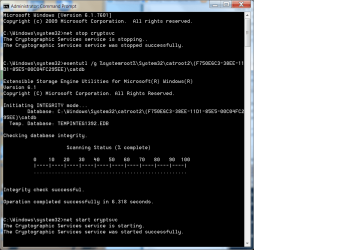
Tip: Crabby, (see my snap shot below) In case you aren't already aware - you can copy/paste between a browser window and a command prompt window by right clicking the title bar of the command prompt window, select Edit. You'll get Copy/Paste options. It can save time/error so you don't need to manually type in loooong commands like the 2nd one below :)

  1. Click Start, point to All Programs, and then click Accessories.
  2. Right-click Command Prompt, and then click Run as administrator.
  3. If the User Account Control dialog box appears, confirm that the action it displays is what you want, and then click Continue.
  4. In the command prompt window, first type (or copy/paste) the command below to stop Cryptographic Services, and then press ENTER
    Code:
    net stop cryptsvc
  5. Type (or copy/paste), and then press ENTER
    Code:
    esentutl /g %systemroot%\System32\catroot2\{F750E6C3-38EE-11D1-85E5-00C04FC295EE}\catdb
If the integrity check on the security catalog database is successful, Integrity check successful will be displayed in the command prompt window.
Type command below to re-start Cryptographic Services, and then press ENTER
Code:
net start cryptsvc
 

Attachments

  • 2015-01-17_165953.jpg
    2015-01-17_165953.jpg
    73.5 KB · Views: 36

My Computer

Computer type
PC/Desktop
Computer Manufacturer/Model Number
Dell Optiplex 360 and Optiplex 755
OS
Desk 1: Win 7 Pro x32; Desk 2: Windows 10 x64
Hard Drives
500GB Crucial SSD in both Desktops
Other Info
Buffalo 6TB NAS, Raid 1
Bill, it downloaded and I have created the disk. Awaiting next instructions.
Went to see the movie "American Sniper" today. Very intense.
 
Last edited:

My Computer

Computer type
PC/Desktop
Computer Manufacturer/Model Number
HP Pavilian DV7-7012 notebook
OS
Windows 7 Home Premium 64 bit
CPU
3rd generation Intel Core i7-3610QM Processor
Motherboard
2.30GHz
Memory
8GB DDR3 1600MHz RAM (2 DIMM); 750GB 7200RPM hard drive
Graphics Card(s)
2GB (2048MB) NVIDIA GeForce GT 650M GDDR5 Graphics
Hard Drives
750GB 7200RPM hard drive with HP ProtectSmart Hard Drive Protection
Antivirus
Microsoft
Browser
Firefox, Chrome, Microsoft
I didn't know about the edit function. Good to know.
Here is the screenshot.
 

My Computer

Computer type
PC/Desktop
Computer Manufacturer/Model Number
HP Pavilian DV7-7012 notebook
OS
Windows 7 Home Premium 64 bit
CPU
3rd generation Intel Core i7-3610QM Processor
Motherboard
2.30GHz
Memory
8GB DDR3 1600MHz RAM (2 DIMM); 750GB 7200RPM hard drive
Graphics Card(s)
2GB (2048MB) NVIDIA GeForce GT 650M GDDR5 Graphics
Hard Drives
750GB 7200RPM hard drive with HP ProtectSmart Hard Drive Protection
Antivirus
Microsoft
Browser
Firefox, Chrome, Microsoft
Forgot to upload. Here it is.
 

Attachments

  • cryptographic services screen shot Jan. 17.png
    cryptographic services screen shot Jan. 17.png
    126.9 KB · Views: 2

My Computer

Computer type
PC/Desktop
Computer Manufacturer/Model Number
HP Pavilian DV7-7012 notebook
OS
Windows 7 Home Premium 64 bit
CPU
3rd generation Intel Core i7-3610QM Processor
Motherboard
2.30GHz
Memory
8GB DDR3 1600MHz RAM (2 DIMM); 750GB 7200RPM hard drive
Graphics Card(s)
2GB (2048MB) NVIDIA GeForce GT 650M GDDR5 Graphics
Hard Drives
750GB 7200RPM hard drive with HP ProtectSmart Hard Drive Protection
Antivirus
Microsoft
Browser
Firefox, Chrome, Microsoft
Now we're talkin'

Shiela has an install disk if it is needed.

If you feel up to it, please run steps 2, 4, & 7 in this guide:
How to easily clean an infected computer (Malware Removal Guide)

You've already executed the other scanners and do not need to run them again
(SKIP step 6: RogueKiller. It has shown some issues on some machines. It's a good tool, but I'd rather be available when you run it. Just in case your is one of those machines)

I have the identical instructions, but can't lay my fingers on them at the moment.

There is one caveat: post any logs here. The good folks over at Malwaretips won't have a clue as to what you have already done.
Thanks

Jerry is verifying the integrity of security catalog (which looks good if I read it correctly)
-> these are commands I don't know Jerry, thanks

There seems to be a lot of newer things. I suspect the tech shop, but have no evidence, other than Sheila's reluctance to flash BIOS.

Since Sheila doesn't have install discs for her applications (correct me if I'm wrong on that) I have to rule out a Repair install. That would essentially make Windows blind to the applications. The applications would still be on the disk, but Windows wouldn't know about them.

I have to rule out a Repair Install since it will not replace the System drivers
   Information
This will show you how to do a repair install (aka: in-place upgrade install) to fix your currently installed Windows 7 and preserve your user accounts, data, programs, and system drivers.
I have to head out in just a few minutes.

I'll check back in the morning.

Bill
.
 
Last edited:

My Computer

Computer type
Laptop
Computer Manufacturer/Model Number
HP Pavilion dv6-6c10us
OS
x64 (6.3.9600) Win8.1 Pro & soon dual boot x64 (6.1.7601) Win7_SP1 HomePrem
CPU
AMD A6-3420M APU with Radeon(tm) HD Graphics
Motherboard
Hewlett-Packard 1805
Memory
6.00 GB
Graphics Card(s)
AMD Radeon(TM) HD 6520G
Sound Card
(1) AMD High Definition Audio Device (2) IDT High Definiti
Monitor(s) Displays
HP W2072a 20" LCD (1600 x 900) @ 60 Hz
Screen Resolution
1366 x 768 x 32 bits (4294967296 colors) @ 60 Hz
Hard Drives
ST640LM0 00 HM641JI SATA Disk Device
Keyboard
Logitech k520 wireless KB
Mouse
Logitech m320 wireless mouse (bundled with KB)
Internet Speed
15/5 | 54 MB Wireless 'n'
Antivirus
Realtime: Defender or Avast | On-demand: Malwarebytes, ESET
Browser
IE 11 on Win8, IE 10 on win 7
Other Info
Media: [Gimp, Audacity, VLC] || Comm: [WEmail 2012, Skype] || Productivity: [OpenOffice,| Textpad] || Utils: [Sysinternals, cCleaner, Speccy, Defraggler]
Since Sheila doesn't have install discs for her applications (correct me if I'm wrong on that) I have to rule out a Repair install.
Bill, you might double check with the OS experts on the forum, but I'm pretty sure (98%) that a Windows repair install doesn't affect installed apps. (It resets Windows options to defaults and replaces critical Windows OS files with original from repair disc)

Sheila, your security catalog data base looks OK.

Next thing I found interesting. Your sigcheck output file shows you're running USB 2.0 driver v6.1.7601.18251. I found this thread Windows 7 only gives me active USB ports when the DISABLE DRIVER SIGNATURE ENFORCEMENT is selected during system boot. (Someone with same problem running same driver version). I'm not sure what bearing those fixes might have on USB 3.0 as well (since they're new drivers), but one thing at a time.

Try Windows KB Update for Windows 7 for x64-based Systems (KB2923545) that helped one person. It's is a year old now and Windows might say it no longer applies, but give a try. If it fails, I can walk you through next steps to try

Code:
c:\windows\system32\drivers\usbehci.sys:
	Verified:	Unsigned
	Link date:	7:11 AM 9/4/2013
	Publisher:	Microsoft Corporation
	Description:	EHCI eUSB Miniport Driver
	Product:	Microsoft® Windows® Operating System
	Prod version:	6.1.7601.18251
	File version:	6.1.7601.18251 (win7sp1_gdr.130903-1532)
	MachineType:	64-bit
	Binary Version:	6.1.7601.18251

/* EDIT */
p.s. Thanks for the American Sniper review. I've wanted to see it. Glad to hear you give it an enthusiastic thumbs up!@
 

My Computer

Computer type
PC/Desktop
Computer Manufacturer/Model Number
Dell Optiplex 360 and Optiplex 755
OS
Desk 1: Win 7 Pro x32; Desk 2: Windows 10 x64
Hard Drives
500GB Crucial SSD in both Desktops
Other Info
Buffalo 6TB NAS, Raid 1
I'll pick this up in the morning. I wasn't sure what you wanted me to do, ComputerGeek. Just the Windows update? Does that update work with Windows7 Home Premium edition?
 

My Computer

Computer type
PC/Desktop
Computer Manufacturer/Model Number
HP Pavilian DV7-7012 notebook
OS
Windows 7 Home Premium 64 bit
CPU
3rd generation Intel Core i7-3610QM Processor
Motherboard
2.30GHz
Memory
8GB DDR3 1600MHz RAM (2 DIMM); 750GB 7200RPM hard drive
Graphics Card(s)
2GB (2048MB) NVIDIA GeForce GT 650M GDDR5 Graphics
Hard Drives
750GB 7200RPM hard drive with HP ProtectSmart Hard Drive Protection
Antivirus
Microsoft
Browser
Firefox, Chrome, Microsoft

My Computer

Computer type
PC/Desktop
Computer Manufacturer/Model Number
Dell Optiplex 360 and Optiplex 755
OS
Desk 1: Win 7 Pro x32; Desk 2: Windows 10 x64
Hard Drives
500GB Crucial SSD in both Desktops
Other Info
Buffalo 6TB NAS, Raid 1
Back
Top