Enable test mode to solve USB problems?

Here is DMV log zipped.
 

Attachments

My Computer

Computer type
PC/Desktop
Computer Manufacturer/Model Number
HP Pavilian DV7-7012 notebook
OS
Windows 7 Home Premium 64 bit
CPU
3rd generation Intel Core i7-3610QM Processor
Motherboard
2.30GHz
Memory
8GB DDR3 1600MHz RAM (2 DIMM); 750GB 7200RPM hard drive
Graphics Card(s)
2GB (2048MB) NVIDIA GeForce GT 650M GDDR5 Graphics
Hard Drives
750GB 7200RPM hard drive with HP ProtectSmart Hard Drive Protection
Antivirus
Microsoft
Browser
Firefox, Chrome, Microsoft
This is from a link ComputerGeek posted. Would something along these lines be worth a try?

trans.gif


This issue was fixed on my PC as follows.
1) Taking ownership of the above usb*.sys files in the drivers folder
2) renaming them to usb*.sysold
3) Using Device Manager to uninstall all USB devices with the yellow warning ! next to them
4) Doing a Scan for Hardware changes via the Device Manager toolbar and then waiting a few moments whilst the USB devices are re-installed with signed drivers.
Hope this helps you....
usb drivers files in my drivers folder after the above process:
12/02/2013 04:12 19,968 usb8023.sys
21/11/2010 03:24 32,896 USBCAMD2.sys
27/11/2013 01:41 99,840 usbccgp.sys
12/07/2013 10:41 100,864 usbcir.sys
27/11/2013 01:41 7,808 usbd.sys
27/11/2013 01:41 53,248 usbehci.sys
25/03/2011 03:29 52,736 usbehci.sysold
27/11/2013 01:41 343,040 usbhub.sys
25/03/2011 03:29 343,040 usbhub.sysold
25/03/2011 03:29 25,600 usbohci.sys
27/11/2013 01:41 325,120 usbport.sys
25/03/2011 03:29 325,120 usbport.sysold
14/07/2009 00:38 25,088 usbprint.sysold
11/03/2011 04:37 91,648 USBSTOR.SYS
25/03/2011 03:29 30,720 usbuhci.sys
21/11/2010 03:23 184,960 usbvideo.sys
19 File(s) 2,783,104 bytes
The .sysold files are the ones I renamed, I think also renamed the usbccgp.sys - but accidentally deleted it after the rename..
 

My Computer

Computer type
PC/Desktop
Computer Manufacturer/Model Number
HP Pavilian DV7-7012 notebook
OS
Windows 7 Home Premium 64 bit
CPU
3rd generation Intel Core i7-3610QM Processor
Motherboard
2.30GHz
Memory
8GB DDR3 1600MHz RAM (2 DIMM); 750GB 7200RPM hard drive
Graphics Card(s)
2GB (2048MB) NVIDIA GeForce GT 650M GDDR5 Graphics
Hard Drives
750GB 7200RPM hard drive with HP ProtectSmart Hard Drive Protection
Antivirus
Microsoft
Browser
Firefox, Chrome, Microsoft
Yes. Something along those line. But wait till i can walk you through the process (I'm still away from home)
 

My Computer

Computer type
PC/Desktop
Computer Manufacturer/Model Number
Dell Optiplex 360 and Optiplex 755
OS
Desk 1: Win 7 Pro x32; Desk 2: Windows 10 x64
Hard Drives
500GB Crucial SSD in both Desktops
Other Info
Buffalo 6TB NAS, Raid 1
Ok.
 

My Computer

Computer type
PC/Desktop
Computer Manufacturer/Model Number
HP Pavilian DV7-7012 notebook
OS
Windows 7 Home Premium 64 bit
CPU
3rd generation Intel Core i7-3610QM Processor
Motherboard
2.30GHz
Memory
8GB DDR3 1600MHz RAM (2 DIMM); 750GB 7200RPM hard drive
Graphics Card(s)
2GB (2048MB) NVIDIA GeForce GT 650M GDDR5 Graphics
Hard Drives
750GB 7200RPM hard drive with HP ProtectSmart Hard Drive Protection
Antivirus
Microsoft
Browser
Firefox, Chrome, Microsoft
I still have USB2. USB3s still don't work. Don't know why they worked last night before I plugged mouse into USB2. A clue?
As to your question: could you be mistaken?? Since you didn't have the USB3.0 driver installed, I don't see how USB 3.0 could have possibly worked. :confused: Unless, in fact, the computer port can connect to USB 2.0?? Otherwise, IDK
In any case, moving on.

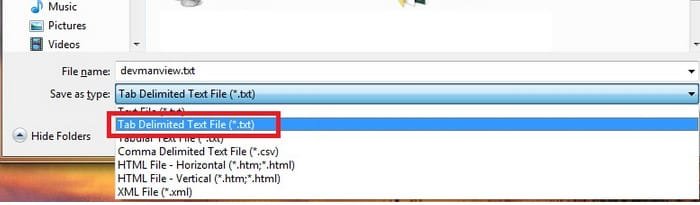
1) Could redo the DevManView report? You saved it as regular .txt. Place save it as Tab Delimited Text (see snapshot below)

2) So i'm clear, what's the current state of things? (don't change anything. just let me know current status)
> Is signature enforcement still DISABLED?
> You have two controller's labeled "Enhanced PCI to USB Controllers". Currently, neither one has the yellow device error icon showing in Device Manager?

3. Follow these steps
  • I attached a NEW sigtest script. Download and save to Desktop. Right click and must Run As Administrtor. Attach output file C:\Newsigtest.txt
  • Copy the folder below to your dekstop (note you have multiple folders starting usbport.inf. This one should have the most recent date)
    Code:
    C:\Windows\System32\DriverStore\FileRepository\usbport.inf_amd64_neutral_1232484025e9fbfa
  • Zip the folder up and attach to your next post
 

Attachments

  • 2015-01-18_194302.jpg
    2015-01-18_194302.jpg
    37.7 KB · Views: 31
  • NEWSigtest.bat
    NEWSigtest.bat
    822 bytes · Views: 3

My Computer

Computer type
PC/Desktop
Computer Manufacturer/Model Number
Dell Optiplex 360 and Optiplex 755
OS
Desk 1: Win 7 Pro x32; Desk 2: Windows 10 x64
Hard Drives
500GB Crucial SSD in both Desktops
Other Info
Buffalo 6TB NAS, Raid 1
Here is the DMV log again comma delimited.
Current state of things: signature enforcement still disabled, USB2 works, USB3s don't work,enhanced PCI to USB controllers do not have a yellow error icon, universal serial bus controller shows up under "other devices" with yellow error icon.

Next I will do sigtest.
 

Attachments

My Computer

Computer type
PC/Desktop
Computer Manufacturer/Model Number
HP Pavilian DV7-7012 notebook
OS
Windows 7 Home Premium 64 bit
CPU
3rd generation Intel Core i7-3610QM Processor
Motherboard
2.30GHz
Memory
8GB DDR3 1600MHz RAM (2 DIMM); 750GB 7200RPM hard drive
Graphics Card(s)
2GB (2048MB) NVIDIA GeForce GT 650M GDDR5 Graphics
Hard Drives
750GB 7200RPM hard drive with HP ProtectSmart Hard Drive Protection
Antivirus
Microsoft
Browser
Firefox, Chrome, Microsoft
New sigtest file
 

Attachments

My Computer

Computer type
PC/Desktop
Computer Manufacturer/Model Number
HP Pavilian DV7-7012 notebook
OS
Windows 7 Home Premium 64 bit
CPU
3rd generation Intel Core i7-3610QM Processor
Motherboard
2.30GHz
Memory
8GB DDR3 1600MHz RAM (2 DIMM); 750GB 7200RPM hard drive
Graphics Card(s)
2GB (2048MB) NVIDIA GeForce GT 650M GDDR5 Graphics
Hard Drives
750GB 7200RPM hard drive with HP ProtectSmart Hard Drive Protection
Antivirus
Microsoft
Browser
Firefox, Chrome, Microsoft
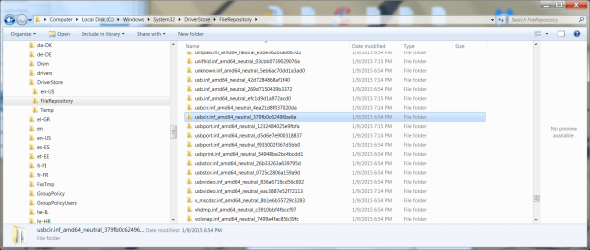
I'm attaching a screen shot of file repository. Looks like there are three folders that begin usbport.inf_amd64_neutral. The newest one begins with d5d It was created 2-22-2014. The one that begins 1232 was created 11-12-2013. The one beginning f93 was created 11-20-2010.
Do you want the newest one dated 2-22-2014?
 

Attachments

  • FileRepository jan 18.png
    FileRepository jan 18.png
    268.2 KB · Views: 3

My Computer

Computer type
PC/Desktop
Computer Manufacturer/Model Number
HP Pavilian DV7-7012 notebook
OS
Windows 7 Home Premium 64 bit
CPU
3rd generation Intel Core i7-3610QM Processor
Motherboard
2.30GHz
Memory
8GB DDR3 1600MHz RAM (2 DIMM); 750GB 7200RPM hard drive
Graphics Card(s)
2GB (2048MB) NVIDIA GeForce GT 650M GDDR5 Graphics
Hard Drives
750GB 7200RPM hard drive with HP ProtectSmart Hard Drive Protection
Antivirus
Microsoft
Browser
Firefox, Chrome, Microsoft
Hmmmm... Can you zip up all 3 of those folders starting usbport.inf?

From what i looked up online folder usbport.inf_amd64_neutral_1232484025e9fbfa contains the USB 2.0 file versions currently installed on your machine. The other folders are prior versions of that driver. but May as well give me all 3 folders. Then i can see it all for myself to double check

(fyi.To anyone reading the thread in the future: The intent is to verify that the installed files (as enumerated in my batch file) match the set of files for the driver package Windows has saved in the DriverStore. Any mis-match in the set of installed files would cause the digital signature to break
 
Last edited:

My Computer

Computer type
PC/Desktop
Computer Manufacturer/Model Number
Dell Optiplex 360 and Optiplex 755
OS
Desk 1: Win 7 Pro x32; Desk 2: Windows 10 x64
Hard Drives
500GB Crucial SSD in both Desktops
Other Info
Buffalo 6TB NAS, Raid 1
Here they are.
 

Attachments

My Computer

Computer type
PC/Desktop
Computer Manufacturer/Model Number
HP Pavilian DV7-7012 notebook
OS
Windows 7 Home Premium 64 bit
CPU
3rd generation Intel Core i7-3610QM Processor
Motherboard
2.30GHz
Memory
8GB DDR3 1600MHz RAM (2 DIMM); 750GB 7200RPM hard drive
Graphics Card(s)
2GB (2048MB) NVIDIA GeForce GT 650M GDDR5 Graphics
Hard Drives
750GB 7200RPM hard drive with HP ProtectSmart Hard Drive Protection
Antivirus
Microsoft
Browser
Firefox, Chrome, Microsoft
I need a portable drive to take back and forth from Michigan to Florida.
Did you really mean 2 gigabytes? I have close to 500 GB on my hard drive right now that I need to back up. I take a lot of photos and videos. I need at least a terabyte.
I am sure he meant 2TB

Opps, of course I meant TB - what a maroon I can be :)

The desktop versions of external drives are also portable - the main purposes are different.

A slim/portable drive is usually carried around wherever you go. It is storage for devices (laptops / game machines) that have no internal space for another drive.

A desktop version usually sits on your desk and is used for backup and cold storage (files that aren't needed all the time, but you don't want to look in a backup for them). This, of course, can be used for live data too, but that's a tricky data schema.

I think the desktop drives are a bit more reliable, only because of the form factor (bigger means more air, not only for cooling, but for the heads. Finally, the more you transport a drive, the more likely an error (bumps and bruises).

So if you're only going to transport the drive between MI and FL, then a desktop is what I suggest. If you want to carry the drive with you when you paint, then the slim/portable does the trick.

The best of both is to use the space on your laptop while you're out and about, and then copy ('backup') the new stuff over to the external drive on your desk when you get home. (every once in a while, you'll have to manage the data on your laptop - keep only what you want to have readily available). It sounds like a lot of work, but once you get a routine, it's not that bad.

Bill
.
 

My Computer

Computer type
Laptop
Computer Manufacturer/Model Number
HP Pavilion dv6-6c10us
OS
x64 (6.3.9600) Win8.1 Pro & soon dual boot x64 (6.1.7601) Win7_SP1 HomePrem
CPU
AMD A6-3420M APU with Radeon(tm) HD Graphics
Motherboard
Hewlett-Packard 1805
Memory
6.00 GB
Graphics Card(s)
AMD Radeon(TM) HD 6520G
Sound Card
(1) AMD High Definition Audio Device (2) IDT High Definiti
Monitor(s) Displays
HP W2072a 20" LCD (1600 x 900) @ 60 Hz
Screen Resolution
1366 x 768 x 32 bits (4294967296 colors) @ 60 Hz
Hard Drives
ST640LM0 00 HM641JI SATA Disk Device
Keyboard
Logitech k520 wireless KB
Mouse
Logitech m320 wireless mouse (bundled with KB)
Internet Speed
15/5 | 54 MB Wireless 'n'
Antivirus
Realtime: Defender or Avast | On-demand: Malwarebytes, ESET
Browser
IE 11 on Win8, IE 10 on win 7
Other Info
Media: [Gimp, Audacity, VLC] || Comm: [WEmail 2012, Skype] || Productivity: [OpenOffice,| Textpad] || Utils: [Sysinternals, cCleaner, Speccy, Defraggler]
I still have USB2. USB3s still don't work. Don't know why they worked last night before I plugged mouse into USB2. A clue?
I'm catching up - darn ... the re-install of USB 3.0 driver failed.

I was curious about your comment (the mouse worked on USB3.0) - is it a USB 3.0 mouse?

Clearly the ports are not working, but if the mouse isn't 3.0, I'm not sure it will work on a 3.0 port.

A 3.0 device will work on a 2.0 port (backward compatible).
reading, reading, reading....

Bill
 
Last edited:

My Computer

Computer type
Laptop
Computer Manufacturer/Model Number
HP Pavilion dv6-6c10us
OS
x64 (6.3.9600) Win8.1 Pro & soon dual boot x64 (6.1.7601) Win7_SP1 HomePrem
CPU
AMD A6-3420M APU with Radeon(tm) HD Graphics
Motherboard
Hewlett-Packard 1805
Memory
6.00 GB
Graphics Card(s)
AMD Radeon(TM) HD 6520G
Sound Card
(1) AMD High Definition Audio Device (2) IDT High Definiti
Monitor(s) Displays
HP W2072a 20" LCD (1600 x 900) @ 60 Hz
Screen Resolution
1366 x 768 x 32 bits (4294967296 colors) @ 60 Hz
Hard Drives
ST640LM0 00 HM641JI SATA Disk Device
Keyboard
Logitech k520 wireless KB
Mouse
Logitech m320 wireless mouse (bundled with KB)
Internet Speed
15/5 | 54 MB Wireless 'n'
Antivirus
Realtime: Defender or Avast | On-demand: Malwarebytes, ESET
Browser
IE 11 on Win8, IE 10 on win 7
Other Info
Media: [Gimp, Audacity, VLC] || Comm: [WEmail 2012, Skype] || Productivity: [OpenOffice,| Textpad] || Utils: [Sysinternals, cCleaner, Speccy, Defraggler]
This is from a link ComputerGeek posted. Would something along these lines be worth a try?
.....
The .sysold files are the ones I renamed, I think also renamed the usbccgp.sys - but accidentally deleted it after the rename..
If it's a permissions issue, it's better to check before rename. Right click the file(s) and look on the security tab /advanced button and see who the owner is and who has permissions. You might find that you don't have to make any changes.

.....
(fyi.To anyone reading the thread in the future: The intent is to verify that the installed files (as enumerated in my batch file) match the set of files for the driver package Windows has saved in the DriverStore. Any mis-match in the set of installed files would cause the digital signature to break
I'm still catching up, but have a question. Is the install failure (code 52) - in other words, is the 3.0 install issue a signature issue, or is it something else. The event viewer would probably tell us something about the error.

Let me take a look at all the data recently posted and then I'll play catchup again.

Bill
.
 

My Computer

Computer type
Laptop
Computer Manufacturer/Model Number
HP Pavilion dv6-6c10us
OS
x64 (6.3.9600) Win8.1 Pro & soon dual boot x64 (6.1.7601) Win7_SP1 HomePrem
CPU
AMD A6-3420M APU with Radeon(tm) HD Graphics
Motherboard
Hewlett-Packard 1805
Memory
6.00 GB
Graphics Card(s)
AMD Radeon(TM) HD 6520G
Sound Card
(1) AMD High Definition Audio Device (2) IDT High Definiti
Monitor(s) Displays
HP W2072a 20" LCD (1600 x 900) @ 60 Hz
Screen Resolution
1366 x 768 x 32 bits (4294967296 colors) @ 60 Hz
Hard Drives
ST640LM0 00 HM641JI SATA Disk Device
Keyboard
Logitech k520 wireless KB
Mouse
Logitech m320 wireless mouse (bundled with KB)
Internet Speed
15/5 | 54 MB Wireless 'n'
Antivirus
Realtime: Defender or Avast | On-demand: Malwarebytes, ESET
Browser
IE 11 on Win8, IE 10 on win 7
Other Info
Media: [Gimp, Audacity, VLC] || Comm: [WEmail 2012, Skype] || Productivity: [OpenOffice,| Textpad] || Utils: [Sysinternals, cCleaner, Speccy, Defraggler]
In post# 239: The device error is only on the USB 3.0 device. I believe it will show (code 28) which means device driver not installed. Could you check that in DevMgr? Double click the problem device and look at the general tab.

346853d1421613277-enable-test-mode-solve-usb-problems-device-not-succ.-installed-jan-17.png


Shows that a restart is required - have you restarted the machine?

Bill
.
 

My Computer

Computer type
Laptop
Computer Manufacturer/Model Number
HP Pavilion dv6-6c10us
OS
x64 (6.3.9600) Win8.1 Pro & soon dual boot x64 (6.1.7601) Win7_SP1 HomePrem
CPU
AMD A6-3420M APU with Radeon(tm) HD Graphics
Motherboard
Hewlett-Packard 1805
Memory
6.00 GB
Graphics Card(s)
AMD Radeon(TM) HD 6520G
Sound Card
(1) AMD High Definition Audio Device (2) IDT High Definiti
Monitor(s) Displays
HP W2072a 20" LCD (1600 x 900) @ 60 Hz
Screen Resolution
1366 x 768 x 32 bits (4294967296 colors) @ 60 Hz
Hard Drives
ST640LM0 00 HM641JI SATA Disk Device
Keyboard
Logitech k520 wireless KB
Mouse
Logitech m320 wireless mouse (bundled with KB)
Internet Speed
15/5 | 54 MB Wireless 'n'
Antivirus
Realtime: Defender or Avast | On-demand: Malwarebytes, ESET
Browser
IE 11 on Win8, IE 10 on win 7
Other Info
Media: [Gimp, Audacity, VLC] || Comm: [WEmail 2012, Skype] || Productivity: [OpenOffice,| Textpad] || Utils: [Sysinternals, cCleaner, Speccy, Defraggler]
just an image tip:
Open Paint
click the blue file menu, select properties
change both width and height to a smaller value (40)
press [OK]
Ctrl+S to save (I don't know if this is necessary, but please do it in case it is)
name=x
close Paint

The next time you paste something into Paint, you won't have all of the extra white space.

Bill
.
 

My Computer

Computer type
Laptop
Computer Manufacturer/Model Number
HP Pavilion dv6-6c10us
OS
x64 (6.3.9600) Win8.1 Pro & soon dual boot x64 (6.1.7601) Win7_SP1 HomePrem
CPU
AMD A6-3420M APU with Radeon(tm) HD Graphics
Motherboard
Hewlett-Packard 1805
Memory
6.00 GB
Graphics Card(s)
AMD Radeon(TM) HD 6520G
Sound Card
(1) AMD High Definition Audio Device (2) IDT High Definiti
Monitor(s) Displays
HP W2072a 20" LCD (1600 x 900) @ 60 Hz
Screen Resolution
1366 x 768 x 32 bits (4294967296 colors) @ 60 Hz
Hard Drives
ST640LM0 00 HM641JI SATA Disk Device
Keyboard
Logitech k520 wireless KB
Mouse
Logitech m320 wireless mouse (bundled with KB)
Internet Speed
15/5 | 54 MB Wireless 'n'
Antivirus
Realtime: Defender or Avast | On-demand: Malwarebytes, ESET
Browser
IE 11 on Win8, IE 10 on win 7
Other Info
Media: [Gimp, Audacity, VLC] || Comm: [WEmail 2012, Skype] || Productivity: [OpenOffice,| Textpad] || Utils: [Sysinternals, cCleaner, Speccy, Defraggler]
Scalpel!

The Controller - no driver,
the HUB is unplugged??

Please merge this file into the registry. It adds an environment variable to your profile so you can see 'ghost' devices in DevMgr.

Download HKCUenv.reg and double click to merge it
View attachment HKCUenv.reg

Here's what is in the .reg file
Code:
Windows Registry Editor Version 5.00

[HKEY_CURRENT_USER\Environment]
"devmgr_show_nonpresent_devices"="1"

Once the environment variable is set,
open DevMgr
select View - Show Hidden devices

look for a greyed out (nonpresent) device for the HUB (probably under other devices, but possibly under Universal Serial Bus)
and post a screen shot, then you can uninstall the ghost hub (if it's there).

+edit
I don't know if Disable Driver Signature Enforcement is a per boot setting. so you might check that it is still disabled before trying to re-install the USB 3.0 driver
see post#229

Let me know where you found the driver (SwSetup or Downloads) or if you downloaded it again.

IF the scalpel approach to cleaning up ghost entries didn't help use the Hatchet
Run drive cleanup: see post# 22

and try the USB 3.0 install (keeping the Device Signature Enforcement caveat above in mind

Jerry, I know you're probably going to point out the unsigned driver - hence my question about disabling the enforcement being a per boot setting​
-edit

Thanks,

Bill
.
 
Last edited:

My Computer

Computer type
Laptop
Computer Manufacturer/Model Number
HP Pavilion dv6-6c10us
OS
x64 (6.3.9600) Win8.1 Pro & soon dual boot x64 (6.1.7601) Win7_SP1 HomePrem
CPU
AMD A6-3420M APU with Radeon(tm) HD Graphics
Motherboard
Hewlett-Packard 1805
Memory
6.00 GB
Graphics Card(s)
AMD Radeon(TM) HD 6520G
Sound Card
(1) AMD High Definition Audio Device (2) IDT High Definiti
Monitor(s) Displays
HP W2072a 20" LCD (1600 x 900) @ 60 Hz
Screen Resolution
1366 x 768 x 32 bits (4294967296 colors) @ 60 Hz
Hard Drives
ST640LM0 00 HM641JI SATA Disk Device
Keyboard
Logitech k520 wireless KB
Mouse
Logitech m320 wireless mouse (bundled with KB)
Internet Speed
15/5 | 54 MB Wireless 'n'
Antivirus
Realtime: Defender or Avast | On-demand: Malwarebytes, ESET
Browser
IE 11 on Win8, IE 10 on win 7
Other Info
Media: [Gimp, Audacity, VLC] || Comm: [WEmail 2012, Skype] || Productivity: [OpenOffice,| Textpad] || Utils: [Sysinternals, cCleaner, Speccy, Defraggler]
Take no action yet-until I see that the other normal channels have been tried
Information only at this point

There is the "the heck with the HP installer, use DevMgr to install the driver from the unpacked source" approach you have not tried.

Here's a USB only csv file of DevMenView
View attachment DMV_Sheila(onlyUSB).zip

The current USB 3.0 driver on the machine is v 1.0.0.199

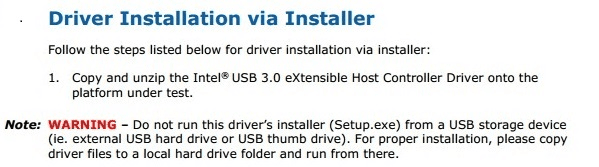
I came across an advisory on HP which talks about installing from external devices and recommends installing from the HDD. That's what Sheila has always done, so this advisory is not applicable to the issue.
DESCRIPTION

The Intel USB 3.0 driver does not re-install from an external USB device. Device Manager will display the USB 3.0 driver as an Unknown Device.
Figure 1: Driver Installation via Installer:
HPusb30 advisory.png
This is, in my opinion, utter nonsense. HP service paqs, expand into the Swsetup folder (normally on C:\), so it would already be unzipped and on the hard drive. The install is initiated from the unpacked location. Maybe there's something in the upper installer that fails when the USB device is updated, but the rest .....

Try a normal install, then if the device still doesn't function, try an install from C:\SwSetup\sp56724
HP's high level installer might be causing the problem, not the driver

The USB 3.0 device is not working, so it's worth a shot to try v 1.0.3.214

I'm aware of the model differences in both the driver and the advisory, I'm also aware of how poorly HP keeps it's information updated.


I'm still digging through the DMV.
 
Last edited:

My Computer

Computer type
Laptop
Computer Manufacturer/Model Number
HP Pavilion dv6-6c10us
OS
x64 (6.3.9600) Win8.1 Pro & soon dual boot x64 (6.1.7601) Win7_SP1 HomePrem
CPU
AMD A6-3420M APU with Radeon(tm) HD Graphics
Motherboard
Hewlett-Packard 1805
Memory
6.00 GB
Graphics Card(s)
AMD Radeon(TM) HD 6520G
Sound Card
(1) AMD High Definition Audio Device (2) IDT High Definiti
Monitor(s) Displays
HP W2072a 20" LCD (1600 x 900) @ 60 Hz
Screen Resolution
1366 x 768 x 32 bits (4294967296 colors) @ 60 Hz
Hard Drives
ST640LM0 00 HM641JI SATA Disk Device
Keyboard
Logitech k520 wireless KB
Mouse
Logitech m320 wireless mouse (bundled with KB)
Internet Speed
15/5 | 54 MB Wireless 'n'
Antivirus
Realtime: Defender or Avast | On-demand: Malwarebytes, ESET
Browser
IE 11 on Win8, IE 10 on win 7
Other Info
Media: [Gimp, Audacity, VLC] || Comm: [WEmail 2012, Skype] || Productivity: [OpenOffice,| Textpad] || Utils: [Sysinternals, cCleaner, Speccy, Defraggler]
Another hold off for later post: I don't want to lose the information

Intel released two USB 3.0 chipset drivers (216 and 220 chipset)
You have an Intel 216 chipset on your machine.

Here's the USB 3.0 driver for the 216 chipset from Intel
USB 3.0 Driver: Intel® USB 3.0 eXtensible Host Controller Driver for Intel® 7 Series/C216 Chipset Family

Intel said:
Filee name: Intel(R)_USB_3.0_eXtensible_Host_Controller_Driver.zip
Version: 1.0.10.255 (Latest)
Date: 02/03/2014
Size: 5.22 MB
Language: English
Operating Systems: Windows 7 *, Windows Server 2008 R2*
 

My Computer

Computer type
Laptop
Computer Manufacturer/Model Number
HP Pavilion dv6-6c10us
OS
x64 (6.3.9600) Win8.1 Pro & soon dual boot x64 (6.1.7601) Win7_SP1 HomePrem
CPU
AMD A6-3420M APU with Radeon(tm) HD Graphics
Motherboard
Hewlett-Packard 1805
Memory
6.00 GB
Graphics Card(s)
AMD Radeon(TM) HD 6520G
Sound Card
(1) AMD High Definition Audio Device (2) IDT High Definiti
Monitor(s) Displays
HP W2072a 20" LCD (1600 x 900) @ 60 Hz
Screen Resolution
1366 x 768 x 32 bits (4294967296 colors) @ 60 Hz
Hard Drives
ST640LM0 00 HM641JI SATA Disk Device
Keyboard
Logitech k520 wireless KB
Mouse
Logitech m320 wireless mouse (bundled with KB)
Internet Speed
15/5 | 54 MB Wireless 'n'
Antivirus
Realtime: Defender or Avast | On-demand: Malwarebytes, ESET
Browser
IE 11 on Win8, IE 10 on win 7
Other Info
Media: [Gimp, Audacity, VLC] || Comm: [WEmail 2012, Skype] || Productivity: [OpenOffice,| Textpad] || Utils: [Sysinternals, cCleaner, Speccy, Defraggler]
I still have USB2. USB3s still don't work. Don't know why they worked last night before I plugged mouse into USB2. A clue?
I'm catching up - darn ... the re-install of USB 3.0 driver failed.

I was curious about your comment (the mouse worked on USB3.0) - is it a USB 3.0 mouse?

Clearly the ports are not working, but if the mouse isn't 3.0, I'm not sure it will work on a 3.0 port.

A 3.0 device will work on a 2.0 port (backward compatible).

reading, reading, reading....

Bill
My mouse worked on one of the USB3 ports. Then I
plugged it into my USB2 port and it worked. Then I plugged it back into the USB3 port
and it did not work. Then I plugged it back into my USB2 port and it worked. Now it only works on the USB2 port works (with driver signing off on boot up). Nothing works in the USB3 ports.
 

My Computer

Computer type
PC/Desktop
Computer Manufacturer/Model Number
HP Pavilian DV7-7012 notebook
OS
Windows 7 Home Premium 64 bit
CPU
3rd generation Intel Core i7-3610QM Processor
Motherboard
2.30GHz
Memory
8GB DDR3 1600MHz RAM (2 DIMM); 750GB 7200RPM hard drive
Graphics Card(s)
2GB (2048MB) NVIDIA GeForce GT 650M GDDR5 Graphics
Hard Drives
750GB 7200RPM hard drive with HP ProtectSmart Hard Drive Protection
Antivirus
Microsoft
Browser
Firefox, Chrome, Microsoft

My Computer

Computer type
PC/Desktop
Computer Manufacturer/Model Number
HP Pavilian DV7-7012 notebook
OS
Windows 7 Home Premium 64 bit
CPU
3rd generation Intel Core i7-3610QM Processor
Motherboard
2.30GHz
Memory
8GB DDR3 1600MHz RAM (2 DIMM); 750GB 7200RPM hard drive
Graphics Card(s)
2GB (2048MB) NVIDIA GeForce GT 650M GDDR5 Graphics
Hard Drives
750GB 7200RPM hard drive with HP ProtectSmart Hard Drive Protection
Antivirus
Microsoft
Browser
Firefox, Chrome, Microsoft
Back
Top