
Booting HD through USB to SATA Adapter

dw85745

New member
Member
VIP
Local time
5:17 PM
Messages
199
Can't get new drive on External USB to Sata adapter to boot

I just did a clone of my hard drive (250GB) to a new hard drive (500GB) using Clonezilla.

The dirve appears to have copied correctly except for signature conflict since I now have
two HDs with the same signature.

I took the 250 drive offline (physically) and attempted to boot the 500GB drive using the
external USB to SATA connector.

Window 7 logo came up, then gave me choice to "Start Normally" or "Repair"
Start Normally showed Windows Icon and then threw me back to BIOS.
"Repair" locks up (freezes) as doesn't recognize my keyboard.

Putting the 250 drive back, system boots as before.

QUESTIONS:
1) With all this new "Secure Boot" and UEFI is their anything I need to do differently -- BIOS setting since drives are Not the same size?
2) Any idea what's up?

THanks
David
 

My Computer My Computer

Computer type
PC/Desktop
Computer Manufacturer/Model Number
build -
OS
Win 7 Pro x32
CPU
Intel I5-4690K
Motherboard
ASUS H-97Plus
Memory
8 GB
Graphics Card(s)
On Board
Sound Card
On Board
Other Info
ASUS MOBO Issues never resolved even by ASUS:
1) MOBO will NOT boot from other than the Default HDD drive.
2) MOBO will NOT boot Most DOS based CDs
If that is a W7 system, it should boot. I cloned my system the other day (with Macrium) and that booted immediately from my external drive.

A UEFI system is another matter though. With UEFI and on the high seas you never know what is going to happen, LOL.
 

My Computer My Computer

Computer Manufacturer/Model Number
HP, Dell, Gateway, Toshiba - 4 laptops and 2 desktops
OS
Vista, Windows7, Mint Mate, Zorin, Windows 8
CPU
from 1.6GHz Duo to i7
Monitor(s) Displays
2x HP w2207
Hard Drives
5x HDD, 7x SSD, 12x Externals
Keyboard
with trackball - no mices
Mouse
Trackball mice
Internet Speed
DSL 6000
whs:

Based on my internet searchesit appears lot of problems cloning hard drives.
Whether this is do to Windows 7 and greater or the new UEFI standard is unknown.

Still trying to get my arms around UEFI, Secure Boot, and CSM -- what setting affect what -- and when/if it applies to what OS.
My understanding so far -- if wrong please correct:

1) The difference in the old legacy BIOS and UEFI is that a UEFI has a lookup table
such that any hardware that is attached to the motherboard must have a signature that
resides in the table. I'm also believe this table can be revised (updated) but who does this and
how it happens is a BIG question mark. For example if your system is never connected to the
Internet, how can anything be updated?

2) UEFI does NOT apply to Window 7 and the old legacy BIOS is applicable.

3) THe previous statement (#2) is contradicted by my logic in that the UEFI (and legacy BIOS) resides on the motherboard, and the OS should not even come into play until the UEFI (old legacy BIOS) hands off to the OS

============================================

Regarding cloning I've read the following:
1) External USB must have the Original drive and the NEW drive must be attached to the motherboard
otherwise will clone but will Not Boot.
2) If will Not Boot, try and fix the MBR using a series of RUN commands. This seems to be iffy at best.

WOULD be GREAT if the forum could have a sticky regarding cloning hard drives, what works and what doesn't.
 

My Computer My Computer

Computer type
PC/Desktop
Computer Manufacturer/Model Number
build -
OS
Win 7 Pro x32
CPU
Intel I5-4690K
Motherboard
ASUS H-97Plus
Memory
8 GB
Graphics Card(s)
On Board
Sound Card
On Board
Other Info
ASUS MOBO Issues never resolved even by ASUS:
1) MOBO will NOT boot from other than the Default HDD drive.
2) MOBO will NOT boot Most DOS based CDs
Regarding cloning I've read the following:
1) External USB must have the Original drive and the NEW drive must be attached to the motherboard
otherwise will clone but will Not Boot.
2) If will Not Boot, try and fix the MBR using a series of RUN commands. This seems to be iffy at best.

ad1) That is a good possibility. I clone via eSata and that is attached to the Sata bus. I should try USB once and see what happens.

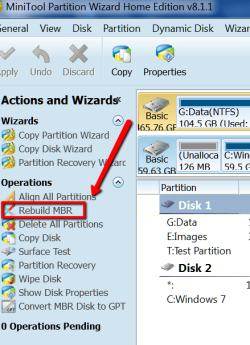
ad2) You can use Partition Wizard to fix the MBR.
 

Attachments

  • 2015-01-16_1210.png
    2015-01-16_1210.png
    30.9 KB · Views: 10

My Computer My Computer

Computer Manufacturer/Model Number
HP, Dell, Gateway, Toshiba - 4 laptops and 2 desktops
OS
Vista, Windows7, Mint Mate, Zorin, Windows 8
CPU
from 1.6GHz Duo to i7
Monitor(s) Displays
2x HP w2207
Hard Drives
5x HDD, 7x SSD, 12x Externals
Keyboard
with trackball - no mices
Mouse
Trackball mice
Internet Speed
DSL 6000
whs:

FWIW:
I used Clonezilla to clone to an external drive through USB (Drive is SATA). Cloned worked.
I could NOT get the drive to boot through USB.
However attaching the drive to the motherboard, the drive booted without a problem.

Checking on booting through USB I did find this on Microsoft's website
Beginning with Windows 7, the DeviceOverrides registry key specifies that one or more removable device capability overrides exist in the system. For more information about the removable device capability, see Overview of the Removable Device Capability.

Haven't had time to check it out, and particularly don't like modifying the registry if I can help it, but will post this thread once I research it.

=========QUESTION =============================

In looking at the BIOS boot menu on this new motherboard (ASUS H97 Plus), I saw that the same drive appears multiple times.
The Boot list showed as:
1) UEFI (NTFS) WDC WD5000AAKX-22ERMAD
2) UEFI (NTFS) WDC WD5000AAKX-22ERMAD
3) WDC WD5000AAKX-22ERMAD

Any idea why it shows up three times -- How am I supposed to know which one to choose to make it the boot drive?

========== QUESTION =====================================

Do you like Partition Wizard and had any problems with the free version (e.g. corruption)?
Do you prefer it over DiskPart?
 

My Computer My Computer

Computer type
PC/Desktop
Computer Manufacturer/Model Number
build -
OS
Win 7 Pro x32
CPU
Intel I5-4690K
Motherboard
ASUS H-97Plus
Memory
8 GB
Graphics Card(s)
On Board
Sound Card
On Board
Other Info
ASUS MOBO Issues never resolved even by ASUS:
1) MOBO will NOT boot from other than the Default HDD drive.
2) MOBO will NOT boot Most DOS based CDs
I can answer the last question - Yes I like Partition Wizard. I work a lot with it. Only once I made a little mistake and I lost all partitions on my disk. Fortunately I had images and it was easy to repair. That was not PW's fault, it was my stupidity.

The question regarding the 3 entries in the BIOS I cannot answer. That looks strange to me too. I have 2 Asus systems. They have strange BIOS setups. I just had to send one back to them to reflash everything - BIOS and the OS. Can you imagine that the C partition was bitlocker encrypted. You could not do a thing with it. And the BIOS would not allow anything but C to boot from.
 
Last edited:

My Computer My Computer

Computer Manufacturer/Model Number
HP, Dell, Gateway, Toshiba - 4 laptops and 2 desktops
OS
Vista, Windows7, Mint Mate, Zorin, Windows 8
CPU
from 1.6GHz Duo to i7
Monitor(s) Displays
2x HP w2207
Hard Drives
5x HDD, 7x SSD, 12x Externals
Keyboard
with trackball - no mices
Mouse
Trackball mice
Internet Speed
DSL 6000
If my MOBO had not burned up - literally - and I wasn't under the gun to get up and going, I "might NOT" of chosen ASUS. Hindsight being 20-20 I would not chose them again.

My biggest complaint is trying to get hold of someone at ASUS to ask a question. I've tried email - no luck, called and after a long wait reached a first tier person who did NOT know anything, was transferred to 2nd tier and after 1/2 hour hung up.

FYI, I did have a lengthy discussion with American Megatrends. Turns out they sell a generic BIOS to the MOBO manufacturers, who then modify the BIOS to their liking. So the BIOS is ASUS,
IMO someone must of had a nightmare the night before they designed it. I don't like their GUI, especially 1st page (to much info on one page and unorganized).

I don't know about your BIOS, but my "Secure Boot" is grayed out and cannot be toggled.

When I was trying to get my printer online, I finally ended up contacting INTEL because of the chipset. They wanted me to install older drivers and if that did not work the final option was to reflash the BIOS with an older BIOS version. I said NO WAY, because I could see the flash going wrong, and not being able to contact ASUS I'd be SOL.

So that's my story and I'm sticking to it!!!
 

My Computer My Computer

Computer type
PC/Desktop
Computer Manufacturer/Model Number
build -
OS
Win 7 Pro x32
CPU
Intel I5-4690K
Motherboard
ASUS H-97Plus
Memory
8 GB
Graphics Card(s)
On Board
Sound Card
On Board
Other Info
ASUS MOBO Issues never resolved even by ASUS:
1) MOBO will NOT boot from other than the Default HDD drive.
2) MOBO will NOT boot Most DOS based CDs
I had no trouble talking to Asus. As you said, their first level support is useless. But they quickly switched me to the supervisors. And those guys knew things. Maybe they are more careful when I tell them that I am a Microsoft MVP and I don't want to listen to bullshit. LOL
 

My Computer My Computer

Computer Manufacturer/Model Number
HP, Dell, Gateway, Toshiba - 4 laptops and 2 desktops
OS
Vista, Windows7, Mint Mate, Zorin, Windows 8
CPU
from 1.6GHz Duo to i7
Monitor(s) Displays
2x HP w2207
Hard Drives
5x HDD, 7x SSD, 12x Externals
Keyboard
with trackball - no mices
Mouse
Trackball mice
Internet Speed
DSL 6000
Back
Top