External backup hard drive, should it be MBR or GPT?

jasonsmith

New member
Local time
8:10 AM
Messages
18
On a computer using Windows 7 64 bit. When using external hard drives for data backup. Is it better to format them for MBR or GPT?

I know MBR is old. And I believe the GPT has redundant partition tables. Though have read of some people having trouble getting data off of drives with GPT as the partitions are "protected".

I thought of going with GPT as it has redundant partition tables, whereas MBR only has a single partition table that if it gets corrupted. That can/will screw the whole drive up and the data on it.

I only use these hard drives for data backup.
 

My Computer My Computer

At a glance

.
Computer type
PC/Desktop
OS
.

My Computer My Computer

At a glance

Windows 10 Pro x64Intel Core i7 6700KGSkill TridentZ RGB 16GB 3600 16-16-16-36EVGA GTX 980 Ti SC x2
Computer type
PC/Desktop
Computer Manufacturer/Model Number
Skylake Special #666
OS
Windows 10 Pro x64
CPU
Intel Core i7 6700K
Motherboard
Asus Sabertooth Z170 Mark 1
Memory
GSkill TridentZ RGB 16GB 3600 16-16-16-36
Graphics Card(s)
EVGA GTX 980 Ti SC x2
Sound Card
Realtek High Definition
Monitor(s) Displays
AOC G2460PG
Screen Resolution
1920 x 1080 144Hz
Hard Drives
Samsung 860 Pro 256GB, Seagate Barracuda 4TB x2
PSU
EVGA 1000 P2, EVGA White Custom Braided Cables
Case
Corsair Vengeance C70 Gunmetal Black
Cooling
Corsair H100i v2, Corsair ML120 x2, Thermal Grizzly Kryonaut
Keyboard
Logitech G910 Orion Spectrum
Mouse
Logitech G700s
Internet Speed
Verizon Fios Quantum Gateway 75/75
Antivirus
Windows Defender, Malwarebytes Free 3.8.3
Browser
Chrome
Other Info
Corsair SP120 x4, LG Blu-ray Drive, Durabrand HT-395 100 Watt Dolby Digital Amp, Corsair H2100 Wireless 7.1 Headset
I have researched. And like in your links. Regarding MBR vs. GPT, it just talks about the internal hard drive that runs the OS. I don't see much if any discussion on what you should use on an external hard drive that just stores data.

Only thing I've seen is that Windows 7 can read off of GPT, just that if you want to run the OS off of GPT, then your motherboard has to support it.

Was seeing if there was a consensus on what is better to go with for an external hard drive that is used for data backup. I'd be using Windows 7 to open the external hard drive.
 

My Computer My Computer

At a glance

.
Computer type
PC/Desktop
OS
.
Like the articles say, the drive has to be GPT if it`s over 2 TB for windows to use all of it, if you want more then 4 partitions on the drive etc.

Other then that, I personally see no advantage, all my storage drives are MBR.

Member kbrady1979 has a lot of very large drives, (5 TB) perhaps you could get good advice from him :)
 

My Computer My Computer

At a glance

Windows 10 Pro x64Intel Core i7 6700KGSkill TridentZ RGB 16GB 3600 16-16-16-36EVGA GTX 980 Ti SC x2
Computer type
PC/Desktop
Computer Manufacturer/Model Number
Skylake Special #666
OS
Windows 10 Pro x64
CPU
Intel Core i7 6700K
Motherboard
Asus Sabertooth Z170 Mark 1
Memory
GSkill TridentZ RGB 16GB 3600 16-16-16-36
Graphics Card(s)
EVGA GTX 980 Ti SC x2
Sound Card
Realtek High Definition
Monitor(s) Displays
AOC G2460PG
Screen Resolution
1920 x 1080 144Hz
Hard Drives
Samsung 860 Pro 256GB, Seagate Barracuda 4TB x2
PSU
EVGA 1000 P2, EVGA White Custom Braided Cables
Case
Corsair Vengeance C70 Gunmetal Black
Cooling
Corsair H100i v2, Corsair ML120 x2, Thermal Grizzly Kryonaut
Keyboard
Logitech G910 Orion Spectrum
Mouse
Logitech G700s
Internet Speed
Verizon Fios Quantum Gateway 75/75
Antivirus
Windows Defender, Malwarebytes Free 3.8.3
Browser
Chrome
Other Info
Corsair SP120 x4, LG Blu-ray Drive, Durabrand HT-395 100 Watt Dolby Digital Amp, Corsair H2100 Wireless 7.1 Headset
Looks like GPT is safer from boot corruption compared to MBR. Also viruses/malware can get into the MBR and not sure how well anti-virus and anti-malware scans this area.

I believe starting with Windows 8, the internal hard drives have to be configured to GPT.
 

My Computer My Computer

At a glance

.
Computer type
PC/Desktop
OS
.
There are 2 main reasons to have a GPT drive:

1. The drive is larger than 2.2GB
2. You want to have more than 4 primary partitions.

All the rest is neither here not there. For a Windows 7 system, I would go with MBR for a 2TB or smaller drive.
 

My Computer My Computer

At a glance

Vista, Windows7, Mint Mate, Zorin, Windows 8from 1.6GHz Duo to i7
Computer Manufacturer/Model Number
HP, Dell, Gateway, Toshiba - 4 laptops and 2 desktops
OS
Vista, Windows7, Mint Mate, Zorin, Windows 8
CPU
from 1.6GHz Duo to i7
Monitor(s) Displays
2x HP w2207
Hard Drives
5x HDD, 7x SSD, 12x Externals
Keyboard
with trackball - no mices
Mouse
Trackball mice
Internet Speed
DSL 6000
I believe starting with Windows 8, the internal hard drives have to be configured to GPT.

I was not aware of this.

Can anyone confirm GPT is required on a small boot drive for Win 8 and later?
 

My Computer My Computer

At a glance

Windows 7 Home Premium SP1, 64-bitIntel Skylake i5-6600K, not overclocked8 GB HyperX DDR4-2666 (2 x 4 GB)none; graphics are integrated on CPU
Computer type
PC/Desktop
Computer Manufacturer/Model Number
Ignatz Special; 4 speed manual gearbox; factory air conditioning; one of one
OS
Windows 7 Home Premium SP1, 64-bit
CPU
Intel Skylake i5-6600K, not overclocked
Motherboard
AsRock Z170M Extreme 4, micro ATX
Memory
8 GB HyperX DDR4-2666 (2 x 4 GB)
Graphics Card(s)
none; graphics are integrated on CPU
Sound Card
onboard: Realtek ALC1150; external: USB Behringer UF0-202
Monitor(s) Displays
Dell S2340M 23 inch IPS
Screen Resolution
1600 x 900
Hard Drives
System: Crucial MX100 series SSD, 128 GB;
Data: Samsung Spinpoint 103SJ, 1 TB;
Backup: WD Caviar Green WD30EZRX-00D8PB0, 3 TB
PSU
Rosewill SilentNight 500 watt fanless, semi-modular
Case
Antec Solo II
Cooling
Noctua NH-U12S; Noctua F12 intake, Noctua S12A exhaust
Keyboard
Microsoft 200 6JH-00001 USB
Mouse
Dell or Microsoft optical wired; USB
Antivirus
Microsoft Security Essentials and Malwarebytes Premium
Browser
Pale Moon
Other Info
All fans PWM; speeds at idle: CPU circa 500 rpm; intake circa 600 rpm; exhaust circa 600 rpm; CPU temps 27 idle and 47 C load in a warm room (27 C/81 F) when running Intel Extreme Tuning Utility stress test.
I don't think that is a requirement. I have all different cases:

1. only 1 active C partition in VMware Player and that is an MBR partition
2. only 2 partitions with 32bit - C (active) and Recovery in GPT
3. 6 primary partitions in GPT with an EFI (active) partition in Fat32

It looks like a normal 8.1 installation will come in GPT, but 8.1 can also run in MBR.
 
Last edited:

My Computer My Computer

At a glance

Vista, Windows7, Mint Mate, Zorin, Windows 8from 1.6GHz Duo to i7
Computer Manufacturer/Model Number
HP, Dell, Gateway, Toshiba - 4 laptops and 2 desktops
OS
Vista, Windows7, Mint Mate, Zorin, Windows 8
CPU
from 1.6GHz Duo to i7
Monitor(s) Displays
2x HP w2207
Hard Drives
5x HDD, 7x SSD, 12x Externals
Keyboard
with trackball - no mices
Mouse
Trackball mice
Internet Speed
DSL 6000
No, it is not required.

8, 8.1, 10 all run from a MBR partitioned drive just fine.

It all depends on what bios you want to use.
 

My Computer My Computer

At a glance

Windows 10 Pro x64Intel Core i7 6700KGSkill TridentZ RGB 16GB 3600 16-16-16-36EVGA GTX 980 Ti SC x2
Computer type
PC/Desktop
Computer Manufacturer/Model Number
Skylake Special #666
OS
Windows 10 Pro x64
CPU
Intel Core i7 6700K
Motherboard
Asus Sabertooth Z170 Mark 1
Memory
GSkill TridentZ RGB 16GB 3600 16-16-16-36
Graphics Card(s)
EVGA GTX 980 Ti SC x2
Sound Card
Realtek High Definition
Monitor(s) Displays
AOC G2460PG
Screen Resolution
1920 x 1080 144Hz
Hard Drives
Samsung 860 Pro 256GB, Seagate Barracuda 4TB x2
PSU
EVGA 1000 P2, EVGA White Custom Braided Cables
Case
Corsair Vengeance C70 Gunmetal Black
Cooling
Corsair H100i v2, Corsair ML120 x2, Thermal Grizzly Kryonaut
Keyboard
Logitech G910 Orion Spectrum
Mouse
Logitech G700s
Internet Speed
Verizon Fios Quantum Gateway 75/75
Antivirus
Windows Defender, Malwarebytes Free 3.8.3
Browser
Chrome
Other Info
Corsair SP120 x4, LG Blu-ray Drive, Durabrand HT-395 100 Watt Dolby Digital Amp, Corsair H2100 Wireless 7.1 Headset
Now you are opening another bag of worms - UEFI. There you probably need GPT.
 

My Computer My Computer

At a glance

Vista, Windows7, Mint Mate, Zorin, Windows 8from 1.6GHz Duo to i7
Computer Manufacturer/Model Number
HP, Dell, Gateway, Toshiba - 4 laptops and 2 desktops
OS
Vista, Windows7, Mint Mate, Zorin, Windows 8
CPU
from 1.6GHz Duo to i7
Monitor(s) Displays
2x HP w2207
Hard Drives
5x HDD, 7x SSD, 12x Externals
Keyboard
with trackball - no mices
Mouse
Trackball mice
Internet Speed
DSL 6000
With MBR, don't you have more risk of a virus getting in the MBR section and sitting there forever compared to GPT? Not sure how well anti-virus scans the MBR section of an external hard drive. I don't believe software that wipes the entire drive touches the MBR section.

I had read GPT eliminates the risk that you have with a virus getting in and replacing the MBR avoiding detection.

I would DOD wipe and slow format hard drives thinking it was wiping the entire disk removing any and all viruses that may be there. Then I learned that it may not be touching the MBR where a virus can hide undetected and reinfect.

That's when I learned of the GPT and thought that may be a safer option to use for external hard drive since I don't need to boot from it. I don't believe you have an MBR to worry about getting infected sitting there with GPT.
 

My Computer My Computer

At a glance

.
Computer type
PC/Desktop
OS
.
Now you are opening another bag of worms - UEFI. There you probably need GPT.

Exactly.

Wolfgang: If you were building a PC from the ground up tomorrow and using a smallish SSD for the OS and programs and HDDs for storage, would you use GPT or MBR for the boot drive? Assume you have a motherboard that supports UEFI.

As I understand it, you can use MBR partitions on the boot drive and still have the UEFI "look". You just wouldn't have UEFI boot.

I'm going to face this in 6 months or so and am trying to find out if there is some strong over-riding advantage to GPT and UEFI on a boot SSD drive. I'll use GPT on my large storage drives of course.

So far, it appears that UEFI has some so-called advantages, but I'm perfectly comfortable with BIOS and MBR and I'm not clear on how problem-free UEFI is---the last thing I want is problems or compatibility issues.

Nor am I clear on how avoiding an MBR boot disk might affect certain programs---such as Macrium or other backup apps.
 

My Computer My Computer

At a glance

Windows 7 Home Premium SP1, 64-bitIntel Skylake i5-6600K, not overclocked8 GB HyperX DDR4-2666 (2 x 4 GB)none; graphics are integrated on CPU
Computer type
PC/Desktop
Computer Manufacturer/Model Number
Ignatz Special; 4 speed manual gearbox; factory air conditioning; one of one
OS
Windows 7 Home Premium SP1, 64-bit
CPU
Intel Skylake i5-6600K, not overclocked
Motherboard
AsRock Z170M Extreme 4, micro ATX
Memory
8 GB HyperX DDR4-2666 (2 x 4 GB)
Graphics Card(s)
none; graphics are integrated on CPU
Sound Card
onboard: Realtek ALC1150; external: USB Behringer UF0-202
Monitor(s) Displays
Dell S2340M 23 inch IPS
Screen Resolution
1600 x 900
Hard Drives
System: Crucial MX100 series SSD, 128 GB;
Data: Samsung Spinpoint 103SJ, 1 TB;
Backup: WD Caviar Green WD30EZRX-00D8PB0, 3 TB
PSU
Rosewill SilentNight 500 watt fanless, semi-modular
Case
Antec Solo II
Cooling
Noctua NH-U12S; Noctua F12 intake, Noctua S12A exhaust
Keyboard
Microsoft 200 6JH-00001 USB
Mouse
Dell or Microsoft optical wired; USB
Antivirus
Microsoft Security Essentials and Malwarebytes Premium
Browser
Pale Moon
Other Info
All fans PWM; speeds at idle: CPU circa 500 rpm; intake circa 600 rpm; exhaust circa 600 rpm; CPU temps 27 idle and 47 C load in a warm room (27 C/81 F) when running Intel Extreme Tuning Utility stress test.
With MBR, don't you have more risk of a virus getting in the MBR section and sitting there forever compared to GPT? ......

.......That's when I learned of the GPT and thought that may be a safer option to use for external hard drive since I don't need to boot from it. I don't believe you have an MBR to worry about getting infected sitting there with GPT.

Ah............! Your conceptions are baseless.

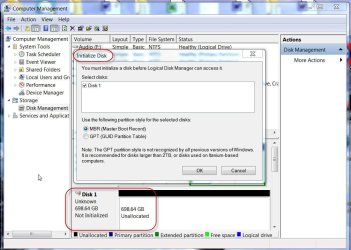
Even non-bootable GPT drives - internal or external - will have a Protective MBR at sector 0. And if this protective MBR gets corrupted by any means, you will lose access to your GPT drive and Windows will ask you to initialise and format it .:)

Here goes my 750GB Seagate GPT External drive with two partitions each holding some 3.5 GB of data.I zeroed this sector 0 - that is corrupted it. Access lost.

A15-03-2015 11-32-11.jpg

Windows Disk Management is asking me to initialise it. Should I?

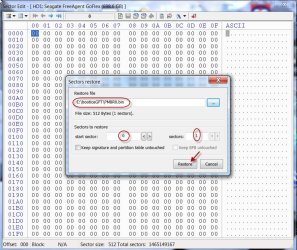
Nope, I won't, for I have a copy of sector 0, PMBR0.bin backed up and I will simply restore Sector 0 with it.

15-03-2015 11-48-06.jpg

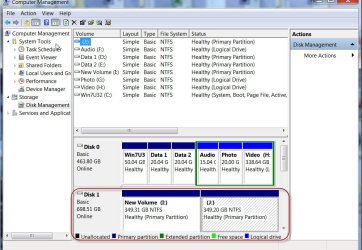
Hoila .... I am back in business.

15-03-2015 11-57-30.jpg

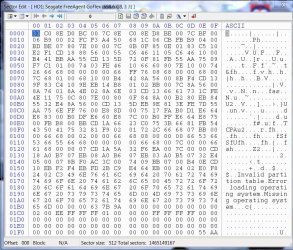
The restored Protective MBR at sector 0:

Restored 0.jpg

The moral of the story is, if you have diligently backed up the GPT structure data of your drive and if your drive is afflicted with corrupted structure (partition related) you should be able to restore the drive easily. Even if not - meaning that it may not exclusively be a partition related problem - restoring the GPT structure can greatly ease any data recovery attempt.

In the case of MBR disks, one will need to backup only sector 0, the MBR sector. That also contains the partition table. Restoring Sector 0 will instantly resolve the issue of " My drive has suddenly turned RAW" in most cases.

In the case of GPT drives, if one has four partitions as seen by bootice, save Sector 0 ( the protective MBR), sector 1 ( the GPT Header) sector 2 ( GPT partition table of first four partitions), sector n( the last sector of the drive where the backup of GPT Header resides) and sector n-32 ( where the backup of sector 2, the first four partition table resides)
 
Last edited:

My Computer My Computer

At a glance

Windows 7 Home Premium 32 bit
OS
Windows 7 Home Premium 32 bit
Nor am I clear on how avoiding an MBR boot disk might affect certain programs---such as Macrium or other backup apps.
Macrium works on UEFI systems. I have already done images and restored them.
 

My Computer My Computer

At a glance

Vista, Windows7, Mint Mate, Zorin, Windows 8from 1.6GHz Duo to i7
Computer Manufacturer/Model Number
HP, Dell, Gateway, Toshiba - 4 laptops and 2 desktops
OS
Vista, Windows7, Mint Mate, Zorin, Windows 8
CPU
from 1.6GHz Duo to i7
Monitor(s) Displays
2x HP w2207
Hard Drives
5x HDD, 7x SSD, 12x Externals
Keyboard
with trackball - no mices
Mouse
Trackball mice
Internet Speed
DSL 6000
Nor am I clear on how avoiding an MBR boot disk might affect certain programs---such as Macrium or other backup apps.
Macrium works on UEFI systems. I have already done images and restored them.

:ditto:
 

My Computer My Computer

At a glance

Win 7 Ultimate 64 bitIntel i7-3930KKingston HyperX Genesis 32GB Kit (8x4GB Modul...MSI R7850 Twin Frozr 2GD5/OC Radeon HD 7850 2...
Computer type
PC/Desktop
Computer Manufacturer/Model Number
Custom Build
OS
Win 7 Ultimate 64 bit
CPU
Intel i7-3930K
Motherboard
ASUS P9X79 WS
Memory
Kingston HyperX Genesis 32GB Kit (8x4GB Modules) 1600MHz DDR
Graphics Card(s)
MSI R7850 Twin Frozr 2GD5/OC Radeon HD 7850 2GB 256-bit GDDR
Sound Card
Asus Xonar Essence STX
Monitor(s) Displays
3x Asus VG248QE 24", Vizio 32" TV
Screen Resolution
1920 x 1080, ?
Hard Drives
Samsung 128GB 840 Pro SSD (1),
Samsung 4TB 850 EVO SSDs (4)
Samsung 4TB 850 EVO SSDs (16) external backup drives used in 2.5" hot swap bays in the computer.
PSU
Corsair HX750w
Case
Antec Two Hundred v2 (modified)
Cooling
Cooler Master GeminII S524 120mm (fan replaced with a 140mm)
Keyboard
Logitech G510s
Mouse
Logitech M525 (two in use)
Internet Speed
=< 32Mbps down, 8Mbps up
Antivirus
AVAST!, MBAM, SAS, Spybot S&D (all but MBAM free) Glary Util
Browser
IE11
Other Info
LSI 9211-8i HBA card (8 SATA III ports), 2.5" & 3.5" Hot Swap Bays, HooToo HT-CR001 PCI-E to USB 3.0 Internal Hub + 6 Slot Card Reader, and LG Model CH12LS28 BD-ROM Optical Drive. Also, ScanSnap S1500 ADF duplexing scanner, Canon 9000F flat bed scanner, Corsair SP2500 2.1 speakers, Samsung CLP 415nw laser color printer, Cyberpower PP2200SW UPS
I see no reason not to use GPT on newly formatted external hard drives for data storage unless you need to use to the same external hard drive on a computer that uses an older version Windows than Vista (XP and older).
 

My Computer My Computer

At a glance

Windows 7 ProfessionalIntel Core i7-2670QMSamsung 8GBNVIDIA GT 555M
OS
Windows 7 Professional
CPU
Intel Core i7-2670QM
Memory
Samsung 8GB
Graphics Card(s)
NVIDIA GT 555M
Hard Drives
Intel 525 120GB | HGST Travelstar 1TB
Mouse
CM Storm Xornet | Microsoft Sculpt Comfort
Internet Speed
25 Mbps | 600 Kbps
Other Info
Centrino 6205 | Seagate Backup Plus 1TB
Sorry guys for adding to an old thread but I had a similar problem. My Window XP needed rebuilding so I needed to backup all files before as Windows XP formats the drive before installing.

I bought a Seagate expansion 2TB drive from Curry's

https://www.currys.co.uk/gbuk/compu...ernal-hard-drive-2-tb-black-10127631-pdt.html

My Windows XP was causing problems so I plugged the drive into my Windows 7 laptop to format the drive. I plugged it into Windows XP and the USB icon showed in the task bar but the drive wouldn't autorun. I checked My Computer and the drive wasn't listed.

I Goggled this problem and another forum I use had the same question.

I tried Disk Management showed the drive as GTP. I did a screendump an saved the picture for reference. I plugged the drive in the next day and Disk Management didn't show GPT so I did another screendump.

I decided to remove all files I need to my Windows 7 there was enough free space.

I ran cmd diskpart, list disk, select disk 1

clean, create primary partition, select partition 1, active

I tried format fs=ntfs quick but that didn't do anything

I went back to Disk Management and that showed the drive unallocated. I right-click on the drive which brought up add new hardware. Then is showed format the drive. This time it showed format GTP or format MBR. I formatted it MBR.

Its strange that the normal Windows 7 format doesn't show format GTP or MBR when you format 2TB drives.

Anyway I plugged it into Windows XP and the drive shows. So my problem is now solved.
 

My Computer My Computer

At a glance

Windows 7 Professional 32bit SP1, Windows 10 ...Intel Pentium B970 @ 2.30GHz, DELL DELL Intel...8GBNVIDIA GeForce MX230 (Dell)
Computer type
Laptop
Computer Manufacturer/Model Number
Samsung won't charge Now Dell Inspiron 17 3793
OS
Windows 7 Professional 32bit SP1, Windows 10 Home 64-bit at the moment
CPU
Intel Pentium B970 @ 2.30GHz, DELL DELL Intel 3793 Core i5 1
Motherboard
DELL 0C9WH2
Memory
8GB
Graphics Card(s)
NVIDIA GeForce MX230 (Dell)
Sound Card
Realtek High Definition Audio
Monitor(s) Displays
17.3" HD+ LED Display
Screen Resolution
1920x1040
Hard Drives
99GB (RAID SHIT SSD), Seagate 1TB SATA III DATA

Seagate ST1000LM048-2E7172 (SATA III)
Mouse
USB remote
Antivirus
Avast Free Antivirus 20.10.2442
Browser
Internet Explorer 11, FireFox
Other Info
DELL shit Its the worst laptop design ever made the laptop battery is inbuilt who the hell makes a laptop battery inbuilt DELL shit does, can't wait until the 1TB HDD is replaced and RAID shit is removed
For a Windows 7 system, I would go with MBR for a 2TB or smaller drive.

Agreed. MBR has been around for a long time. You are keeping things simple when you stay with the older technology. But this applies only if your drive is 2TB or smaller.
 

My Computer My Computer

At a glance

Linux Mint 18.2 xfce 64-bit (VMWare host) / W...Haswell4 GB
Computer type
PC/Desktop
Computer Manufacturer/Model Number
Dell
OS
Linux Mint 18.2 xfce 64-bit (VMWare host) / Windows 8.1 Pro 32-bit (VMWare guest)
CPU
Haswell
Memory
4 GB
Monitor(s) Displays
Acer 23"
Screen Resolution
1920 x 1080
Hard Drives
Two hard drives, 1TB each: One for Linux, one for my data.
Keyboard
IBM Model M
Antivirus
Sophos (Linux), Trend Micro (Windows)
Browser
Firefox, Opera
Other Info
I use Samba to share my data drive with the other computers at my house and with my guest session in VMWare Workstation Player.
Back
Top