WD Hard 1TB detect and show up but only as a Shortcut

omidmkh622

New member
Local time
12:47 AM
Messages
39
Hello,

My WD Hard 1TB detect and show up but only as a Shortcut
I tried Chkdsk /f /r, it took 24 Hours and some changes happend but hard didn't fix.

When I open hard's drive this error comes:
H:/ is not accessible. The parameter is incorrect.

+When Hard is connected and I open Diskmanagement, that can not load and holds on Connecting to virtual disk sevices.
+When Hard is not connected and I open Diskmanagement then connect hard:
Some times hang up and won't work,
and Some times it show up as a full Primary Partition and can not see any other information or change any thing.
For example if i want to see Properties, shows me this error:
The operation failed to complete because the Disk Management console view is not up-to-date....

I hope you guys can help me :(
 

My Computer My Computer

At a glance

Windows 7 Ultimate x64
Computer type
Laptop
Computer Manufacturer/Model Number
Dell Studio
OS
Windows 7 Ultimate x64
Hi omidmkh622,

Welcome onboard.

I guess your external HDD is afflicted with the Shortcut virus.

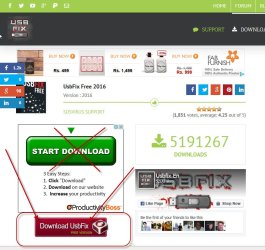
Download and intstall USB Fix free from Download UsbFix Free 2016 - Official Web site

30-01-2016 18-23-42.jpg

Read the tutorial on Clean here. UsbFix tutorial : Clean option

Run the clean option as per the tutorial.

Note: After launching USBFix, plugin your external drives but do not open. Choose Clean option.
 

My Computer My Computer

At a glance

Windows 7 Home Premium 32 bit
OS
Windows 7 Home Premium 32 bit
Hi, Thanks for your help, but USBfix doesn't work for me. it completes 7% then holds and hang up and Not Responding .
it holds on this step: Disk Information
 

My Computer My Computer

At a glance

Windows 7 Ultimate x64
Computer type
Laptop
Computer Manufacturer/Model Number
Dell Studio
OS
Windows 7 Ultimate x64
Some body help! my life is on this hard :(
 

My Computer My Computer

At a glance

Windows 7 Ultimate x64
Computer type
Laptop
Computer Manufacturer/Model Number
Dell Studio
OS
Windows 7 Ultimate x64
I have seen your post. I was in a dilemma whether to go hunting for shortcut virus or get on to the data recovery process ( I am still :D ) . I was waiting to see if someone else can come up with some suggestion to deal with the problem. The process in any case is going to be slow. So be patient. While I don't want to be harsh, I cannot but comment if your data is so valuable you can't live without it, you must have had a backup of it elsewhere. That could have reduced much tension and heartburn in an event like this.
For the time being, give full details of your 1TB WD external drive.

Model No: ??? Read the label on the drive and post.

Model Name: My Book/ Elements/ Passport/ Passport Ultra or whatever

Download, install and run Western Digital Data Lifeguard Diagnostic for Windows from Software and Firmware Downloads | WD Support

Read the instructions therein without fail.

Run as administrator. Does it recognise your WD external drive? Yes/No

If it is recognised run the Quick Test and Extended Test as per the instructions and post the results with screenshots. ( DO NOT RUN " Write Zeros". You will lose all data in the drive.)

Also note the time it takes to run the Quick and Extended Tests and mention in your post.
 

My Computer My Computer

At a glance

Windows 7 Home Premium 32 bit
OS
Windows 7 Home Premium 32 bit
Small suggestion but I don't want to get in the way.

Try the external drive on another computer.
This should isolate whether it's the drive or the computer it is connected to. I'm presuming it's a usb connected hard drive having the proper power supplied to it.

I'm back to watching.
 

My Computer My Computer

At a glance

Windows 10 Pro. 64/ version 1709 Windows 7 Pr...Intel i7-6800K @ 4.3Corsair Platinum 16 gig @2400EVGA GTX 1070 OC
Computer type
PC/Desktop
Computer Manufacturer/Model Number
Home made Desktop
OS
Windows 10 Pro. 64/ version 1709 Windows 7 Pro/64
CPU
Intel i7-6800K @ 4.3
Motherboard
ASUS X-99 Deluxe II
Memory
Corsair Platinum 16 gig @2400
Graphics Card(s)
EVGA GTX 1070 OC
Monitor(s) Displays
Asus 27" LED LCD/VE278Q
Screen Resolution
1920-1080 or 1280-720 HDMI
Hard Drives
INTEL SSD 730-240 Gb Sata 3.0/
PSU
EVGA Platium 1200W
Case
Phanteks Luxe Tempered Glass 8 fans/ one radiator
Cooling
XSPC/ Water Cooled CPU
Keyboard
Das 4 Professional
Mouse
Logitech M705/MX Anywhere 2-S
Internet Speed
100 mbits
Antivirus
Microsoft Security Essentials/ Malwarebytes Premium 3.0/ SAS
Browser
I.E. 11 default/Firefox/ ISP Time Warner Cable/Spectrum
Other Info
LG BluRay Burner/
Sound system-KLipsch-THX/
Icy Dock ssd Hot Swap bays.
That is indeed a good suggestion.

Try it on another working PC. Are you able to access the drive? Does the external drive still appear as a shortcut in My Computer and struggles to show up in Windows Disk Management?
 

My Computer My Computer

At a glance

Windows 7 Home Premium 32 bit
OS
Windows 7 Home Premium 32 bit
Important Note: While plugging in the external drive on the other PC, keep the Shift key pressed for a while so that any "autorun" initiated by the shortcut virus ( if there is one) does not run.
 

My Computer My Computer

At a glance

Windows 7 Home Premium 32 bit
OS
Windows 7 Home Premium 32 bit
jumanji thank you for supporting me and you're right.

My Hard is: WD Element 10B8 and I don't know what's my model number :D

I tried WD Data Lifeguard. when hard is conneted it doesn't work :\
 

My Computer My Computer

At a glance

Windows 7 Ultimate x64
Computer type
Laptop
Computer Manufacturer/Model Number
Dell Studio
OS
Windows 7 Ultimate x64
Yes guys. I tried with another PC. it's the same :\
 

My Computer My Computer

At a glance

Windows 7 Ultimate x64
Computer type
Laptop
Computer Manufacturer/Model Number
Dell Studio
OS
Windows 7 Ultimate x64
jumanji I kept Shift Key and connected Hard, Nothing diffrent happend
 

My Computer My Computer

At a glance

Windows 7 Ultimate x64
Computer type
Laptop
Computer Manufacturer/Model Number
Dell Studio
OS
Windows 7 Ultimate x64
jumanji I kept Shift Key and connect Hard, Nothing diffrent happend
 

My Computer My Computer

At a glance

Windows 7 Ultimate x64
Computer type
Laptop
Computer Manufacturer/Model Number
Dell Studio
OS
Windows 7 Ultimate x64
1. Please post a screenshot of your external drive showing as a shortcut.

2. Data Lifeguard Diagnostic for Windows: Plugin your WD external drive. Are you rightclicking on the WinDlg.exe file, and running as administrator? What happens? Post a screenshot of the main screen that appears.

Screenshots:

Using Snipping Tool: How to Use the Snipping Tool in Vista

Upload to sevenforums: http://www.sevenforums.com/tutorials/9733-screenshots-files-upload-post-seven-forums.html

Take your time. I am retiring for the day now and see the screenshots tomorrow morning or whenever you post on your tomorrow.
 

My Computer My Computer

At a glance

Windows 7 Home Premium 32 bit
OS
Windows 7 Home Premium 32 bit
I'm sorry about my Amateur work :\

I upload two screen shots;
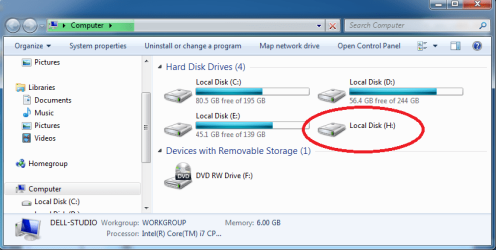
first is showing Hard drive show up as Shortcut

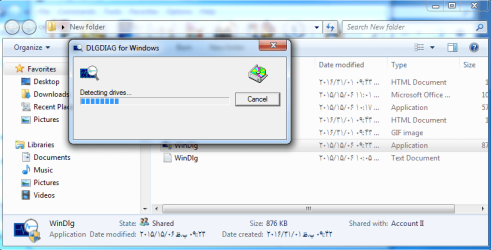
second is showing WD Data Lifegaurd: I pluged in my Hard - Run as Admin - Deceting Drivers...completes then disappears and nothing happens until I disconnect hard then program starts :|
 

Attachments

  • Untitled.png
    Untitled.png
    30.4 KB · Views: 4
  • ff.png
    ff.png
    42.3 KB · Views: 3

My Computer My Computer

At a glance

Windows 7 Ultimate x64
Computer type
Laptop
Computer Manufacturer/Model Number
Dell Studio
OS
Windows 7 Ultimate x64
Hmmm.....that's not a shortcut. That's how any HDD appears in My Computer. So there is no shortcut virus. Your external drive also has a drive letter H: However it does not show the bar showing used and free space. In defining your problem you should have only stated that my drive appears with a drive letter but I am unable to access it.You sent me on a wild goose chase.:)

As for the DLG diagnostics your screen shows it is detecting the drives. What happens then? Did it detect the drive and did you get on to the Main Screen showing the detected drives?
 

My Computer My Computer

At a glance

Windows 7 Home Premium 32 bit
OS
Windows 7 Home Premium 32 bit
just wanted to say hello jumanji :D. he is a star.
 

My Computer My Computer

At a glance

Windows 7 Home Premium 64biti7 4790k processorPatriot 16gbEVGA GeForce GTX 980 Ti FTW
Computer type
PC/Desktop
Computer Manufacturer/Model Number
Custom Build (First built from scratch in 2010 by someone else.. then I rebuilt it in 2015).
OS
Windows 7 Home Premium 64bit
CPU
i7 4790k processor
Motherboard
Z97 Sabertooth Mark 1
Memory
Patriot 16gb
Graphics Card(s)
EVGA GeForce GTX 980 Ti FTW
Monitor(s) Displays
19" Monitor
Screen Resolution
1920 x 1080
Hard Drives
Samsung 850 Evo 120gb ssd
PSU
Corsair Cx600
Case
Haf 922
Cooling
Hydro Series H60 High Performance 120 mm
Keyboard
Microsoft
Mouse
Logitech
Browser
Firefox 37.0.4
Other Info
*Computer Manufacturer/Model Number: HP 15-d002tx Notebook* /

OS: Windows 7 Home Premium 64-bit / CPU: Intel Core i3-3110M / Memory: DDR3 4GB / Graphics Card: Intel HD Graphics 4000, GeForce 820M / Keyboard: Microsoft / Browser: Firefox 37.0

My Computer My Computer

At a glance

Windows 10 Pro. 64/ version 1709 Windows 7 Pr...Intel i7-6800K @ 4.3Corsair Platinum 16 gig @2400EVGA GTX 1070 OC
Computer type
PC/Desktop
Computer Manufacturer/Model Number
Home made Desktop
OS
Windows 10 Pro. 64/ version 1709 Windows 7 Pro/64
CPU
Intel i7-6800K @ 4.3
Motherboard
ASUS X-99 Deluxe II
Memory
Corsair Platinum 16 gig @2400
Graphics Card(s)
EVGA GTX 1070 OC
Monitor(s) Displays
Asus 27" LED LCD/VE278Q
Screen Resolution
1920-1080 or 1280-720 HDMI
Hard Drives
INTEL SSD 730-240 Gb Sata 3.0/
PSU
EVGA Platium 1200W
Case
Phanteks Luxe Tempered Glass 8 fans/ one radiator
Cooling
XSPC/ Water Cooled CPU
Keyboard
Das 4 Professional
Mouse
Logitech M705/MX Anywhere 2-S
Internet Speed
100 mbits
Antivirus
Microsoft Security Essentials/ Malwarebytes Premium 3.0/ SAS
Browser
I.E. 11 default/Firefox/ ISP Time Warner Cable/Spectrum
Other Info
LG BluRay Burner/
Sound system-KLipsch-THX/
Icy Dock ssd Hot Swap bays.
jumanji Sorry! I thought that's a shortcut:shock::huh:
Dude I told you :\ Deceting Drivers completes then disappears and nothing happens until I disconnect hard then program starts :|
As a result; WD DLG can not detect my hard .
 

My Computer My Computer

At a glance

Windows 7 Ultimate x64
Computer type
Laptop
Computer Manufacturer/Model Number
Dell Studio
OS
Windows 7 Ultimate x64
First off my name is not Dude.
Please call me Layback Bear or Jack.

If I understand you correctly you can't run Disk Management with the external hard drive hooked up.
Is that correct?

You can't post one of these.
From my system.

Capture.PNGDisk management today.PNG
 

My Computer My Computer

At a glance

Windows 10 Pro. 64/ version 1709 Windows 7 Pr...Intel i7-6800K @ 4.3Corsair Platinum 16 gig @2400EVGA GTX 1070 OC
Computer type
PC/Desktop
Computer Manufacturer/Model Number
Home made Desktop
OS
Windows 10 Pro. 64/ version 1709 Windows 7 Pro/64
CPU
Intel i7-6800K @ 4.3
Motherboard
ASUS X-99 Deluxe II
Memory
Corsair Platinum 16 gig @2400
Graphics Card(s)
EVGA GTX 1070 OC
Monitor(s) Displays
Asus 27" LED LCD/VE278Q
Screen Resolution
1920-1080 or 1280-720 HDMI
Hard Drives
INTEL SSD 730-240 Gb Sata 3.0/
PSU
EVGA Platium 1200W
Case
Phanteks Luxe Tempered Glass 8 fans/ one radiator
Cooling
XSPC/ Water Cooled CPU
Keyboard
Das 4 Professional
Mouse
Logitech M705/MX Anywhere 2-S
Internet Speed
100 mbits
Antivirus
Microsoft Security Essentials/ Malwarebytes Premium 3.0/ SAS
Browser
I.E. 11 default/Firefox/ ISP Time Warner Cable/Spectrum
Other Info
LG BluRay Burner/
Sound system-KLipsch-THX/
Icy Dock ssd Hot Swap bays.
Dear Jack, I didn't call you dude. I called jumanji dude.
Excuse me both of you.

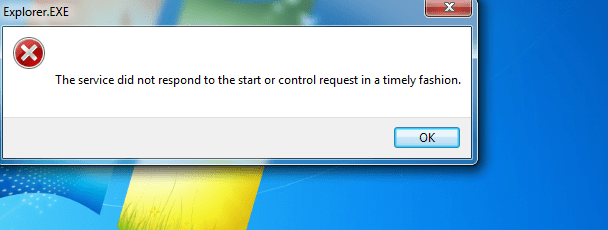
Recently I connected hard and tried to open Manage or DiskMgmt. but that gave me this error:
 

Attachments

  • gg.png
    gg.png
    24.8 KB · Views: 22

My Computer My Computer

At a glance

Windows 7 Ultimate x64
Computer type
Laptop
Computer Manufacturer/Model Number
Dell Studio
OS
Windows 7 Ultimate x64
Back
Top