WD Hard 1TB detect and show up but only as a Shortcut

oh god :( now what should I do?
 

My Computer My Computer

At a glance

Windows 7 Ultimate x64
Computer type
Laptop
Computer Manufacturer/Model Number
Dell Studio
OS
Windows 7 Ultimate x64
Miracle man, where are you? :'((((
 

My Computer My Computer

At a glance

Windows 7 Ultimate x64
Computer type
Laptop
Computer Manufacturer/Model Number
Dell Studio
OS
Windows 7 Ultimate x64
do you want to send it to data rescue? I know some very inexpensive data recovery company, probably just less than 150 bucks.
 

My Computer My Computer

At a glance

W10
Computer type
PC/Desktop
OS
W10
New Things...

When I Fill all of my USB Ports HDD can be recognized.
Hard Drive can recognize in DiskManagement, WD Data Lifegaurd, and any where :)
But Drive Icon doesn't show up in My Computer anymore.

Now what guys? :D
 

My Computer My Computer

At a glance

Windows 7 Ultimate x64
Computer type
Laptop
Computer Manufacturer/Model Number
Dell Studio
OS
Windows 7 Ultimate x64
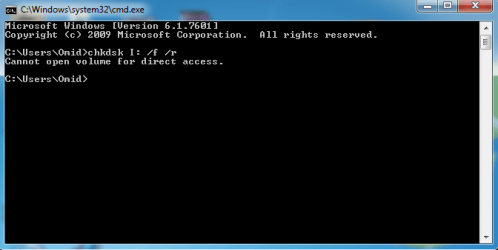
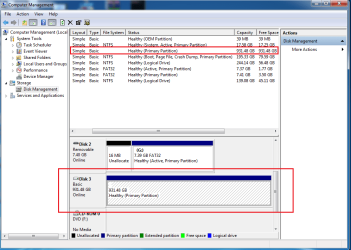
ScreenShots:
 

Attachments

  • Untitled.png
    Untitled.png
    10.9 KB · Views: 16
  • dskmgmt.png
    dskmgmt.png
    33.7 KB · Views: 1
  • windgl.png
    windgl.png
    33.5 KB · Views: 16

My Computer My Computer

At a glance

Windows 7 Ultimate x64
Computer type
Laptop
Computer Manufacturer/Model Number
Dell Studio
OS
Windows 7 Ultimate x64
Note: I must fill all of my USB Ports to Hard Drive be recognized like this.
I mean when other USB Ports are empty HDD acts as same mode.
 

My Computer My Computer

At a glance

Windows 7 Ultimate x64
Computer type
Laptop
Computer Manufacturer/Model Number
Dell Studio
OS
Windows 7 Ultimate x64
I am still skeptical. In my opinion the HDD inside the enclosure is dead beyond recovery - most possible reason too many bad sectors.

In the Windows Disk Management screenshot you posted, your WD Elements HDD has no drive letter. Shows no file system. Without the drive letter, on which drive are you running the checkdisk ckdsk I: /f /r? Which is drive I:???? Also in the list of WDM it shows Capacity 931.48 GB and Free space 931.48GB. What does it signify? It signifies that the actual HDD inside the enclosure is not being read at all.

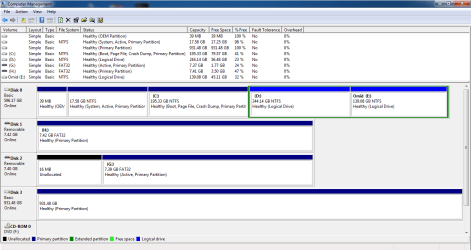
However I am just curious. Just fill up all the USB ports including the WD 1TB external as you said and post a full,untruncated screenshot of Windows Disk Management showing all the drives plugged into the USB ports.Let me see all the drives connected in the USB ports in the Windows Disk Management.

Follow the guidelines in this tutorial to post the full, untruncated screenshot of Windows Disk Management http://www.sevenforums.com/tutorials/274797-disk-management-post-screen-capture-image.html In particular you should hide the Console Tree and Action Pane and also adjust the seperators so that no information is lost.

A sample screenshot:

12-02-2016 17-49-05.jpg
 

My Computer My Computer

At a glance

Windows 7 Home Premium 32 bit
OS
Windows 7 Home Premium 32 bit
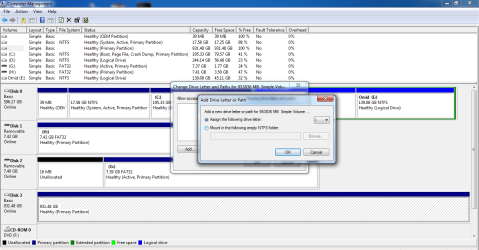
I went to"Change Drive Letter and Paths / Add /" and saw it's "I".

Here you are, a good screenshot.
 

Attachments

  • i.png
    i.png
    46.3 KB · Views: 1
  • dff.png
    dff.png
    30.4 KB · Views: 2

My Computer My Computer

At a glance

Windows 7 Ultimate x64
Computer type
Laptop
Computer Manufacturer/Model Number
Dell Studio
OS
Windows 7 Ultimate x64
There is no indication that the drive letter has been taken by it. If taken it should appear as ( I: ) in WDM like it appears as ( G: ) ( H: ) on other drives. ( When you click on "OK" that drive letter should appear on the drive within a second. Looks like it did not happen.)

Please wait for CKWD, the WD man here on the Quick Test error message. ( I have already sent a PM to him)
 

My Computer My Computer

At a glance

Windows 7 Home Premium 32 bit
OS
Windows 7 Home Premium 32 bit
All right. thanks for information :)

But wait for who/what?? I didn't get :|
 

My Computer My Computer

At a glance

Windows 7 Ultimate x64
Computer type
Laptop
Computer Manufacturer/Model Number
Dell Studio
OS
Windows 7 Ultimate x64
CKWD is one of our forum members. He works for WD and so may know better about WD drives. Usually he does not come in weekends. Anyway my PM ( Private Message) should have reached him. You may have to wait for him to respond when he is free.
 
Last edited:

My Computer My Computer

At a glance

Windows 7 Home Premium 32 bit
OS
Windows 7 Home Premium 32 bit
Ok Thanks a lot Jumanji <3;)
 

My Computer My Computer

At a glance

Windows 7 Ultimate x64
Computer type
Laptop
Computer Manufacturer/Model Number
Dell Studio
OS
Windows 7 Ultimate x64
Somebody please tell me what should I do?? :|
 

My Computer My Computer

At a glance

Windows 7 Ultimate x64
Computer type
Laptop
Computer Manufacturer/Model Number
Dell Studio
OS
Windows 7 Ultimate x64
But wait for who/what?? I didn't get :|

For me. :)

Hello!

Thank you Jumanji for the PM. :)

I know I'm a bit late here on the thread, but I haven't been here that much lately. That will be changed. :)

I see this is an unpleasant and a bit odd issue, and I don't think what I have to say on it is much better, unfortunately. :/

The Status code = 07 from the WD DLG software means a “read element failure”. Quick test usually runs for a couple of minutes or a bit more but it looks like there are damaged sectors that cannot be read from the system, it could be a whole section from the disk. The test has stopped, restarted a few times (which implies it perhaps got stuck for a brief moment), couldn't get pass that damaged section of the drive and eventually failed to finish. That is why other softwares used on the drive would have also gotten stuck or become unresponsive. :/

Basically, this means the drive is too damage to function properly. I saw you need the data from the drive, I suppose you didn't manage to retrieve it? :/

My best advice here would be to stop using any other software on that drive as it has read errors, not hardware ones (that we know of), so it is possible to actually damage it more. :/

You could contact professional data recovery services, WD has partners, and if the warranty for the drive applies – try to RMA it.

WD Data recovery partners:
Support Answers

WD Warranty check:
Support Answers

WD Warranty Policy:
Support Answers

Best of luck!

CK_WD
 

My Computer My Computer

At a glance

Windows 7 Home Premium x64
Computer type
PC/Desktop
OS
Windows 7 Home Premium x64
Back
Top