WD Hard 1TB detect and show up but only as a Shortcut

Yes. I'm not stupid :\
 

My Computer My Computer

At a glance

Windows 7 Ultimate x64
Computer type
Laptop
Computer Manufacturer/Model Number
Dell Studio
OS
Windows 7 Ultimate x64
I know.Yet I wanted to confirm you are not :).

OK, this is my last arrow in my quiver.

Download Getdataback simple free version and install it. https://www.runtime.org/data-recovery-software.htm

Plugin your external drive and then run it.

Does it show your external drive? If it does, scan it to see whether it shows all your files.

If it does not show your external drive, then I am afraid no other data recovery program will see it to be able to recover the data. Most probably the internal bridge and drive controller in the enclosure has failed and you may have to seek Professional Data recovery service who may change the bridge circuit and recover the data.

The fact that your drive was seen as H: gave me some hope but that is belied unfortunately.
 

My Computer My Computer

At a glance

Windows 7 Home Premium 32 bit
OS
Windows 7 Home Premium 32 bit
This program can scan my hard . But when I click on anything in program it goes to "Not Responding" :|
 

My Computer My Computer

At a glance

Windows 7 Ultimate x64
Computer type
Laptop
Computer Manufacturer/Model Number
Dell Studio
OS
Windows 7 Ultimate x64
Sorry, I do not understand what you have said.

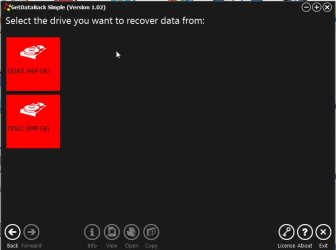
When you run the program it will immediately start scanning for the drives to identify those and then present a screen showing the detected drives like the one below.

02-02-2016 18-18-37.jpg

In the above screenshot it found my two drives in a split second and presented the above picture. The first drive is my 500GB system drive and the second one is my 750GB external drive. ( There was a text message "Found drive1 .....,Found drive 2. ....... but it flew so fast I couldn't capture it.)

Did it find your two drives and present a picture like the one above? If you got it post a screenshot.

If you do not get this picture it means it failed to detect and identify your external drive.
 

My Computer My Computer

At a glance

Windows 7 Home Premium 32 bit
OS
Windows 7 Home Premium 32 bit
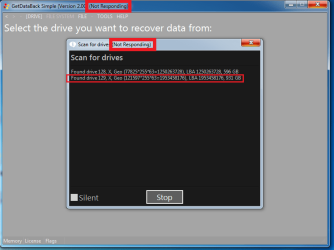
I don't know how to describe it; This is what is happening in GetDataBack;
 

Attachments

  • gdbf.png
    gdbf.png
    18.9 KB · Views: 1

My Computer My Computer

At a glance

Windows 7 Ultimate x64
Computer type
Laptop
Computer Manufacturer/Model Number
Dell Studio
OS
Windows 7 Ultimate x64
could it be the power problem?
 

My Computer My Computer

At a glance

W10
Computer type
PC/Desktop
OS
W10
Maybe
 

My Computer My Computer

At a glance

Windows 7 Ultimate x64
Computer type
Laptop
Computer Manufacturer/Model Number
Dell Studio
OS
Windows 7 Ultimate x64
Did you hear a clicking sound from WD drive? is it 3.5" or 2.5"?
 

My Computer My Computer

At a glance

W10
Computer type
PC/Desktop
OS
W10
Some times I hear it. But I always hear it when I disconnect hard .
 

My Computer My Computer

At a glance

Windows 7 Ultimate x64
Computer type
Laptop
Computer Manufacturer/Model Number
Dell Studio
OS
Windows 7 Ultimate x64
OK, it did find the drive, it could also read the capacity as 931GB but some problem with that external is stalling further progress. That means I have to continue this job and try other data recovery procedures :D. You did a good job in posting that picture. You are no longer stupid :).

Can you repeat this process on some other working PC preferably on a desktop PC? That is install and run Getdataback with the external drive connected and check whether the same thing happens? That should also tell us whether your laptop has insufficient power on its USB port.
 

My Computer My Computer

At a glance

Windows 7 Home Premium 32 bit
OS
Windows 7 Home Premium 32 bit

My Computer My Computer

At a glance

W10
Computer type
PC/Desktop
OS
W10
Handy Dandy tools. Especially if you have a laptop running external anything.

PortaPow USB Power Monitor Version 2 (Multimeter / DC Ammeter for Solar Panels, Mains Chargers, etc) - - Amazon.com

Amazon.com: DROK® LCD USB Digital Multimeter DC 4.5-5.7V 0-3A Voltage Current Power Multi Meter Panel Gauge Voltmeter Ammeter Volt Amp Watt 3in1 Detector Power Monitor for Battery Capacity Charging Testing: Industrial & Scientific


Kyutae I do agree with you. Just because a external should work with 5 volts doesn't mean it does. That is why I recommend external drives with it own power source other than just a USB connection.
 

My Computer My Computer

At a glance

Windows 10 Pro. 64/ version 1709 Windows 7 Pr...Intel i7-6800K @ 4.3Corsair Platinum 16 gig @2400EVGA GTX 1070 OC
Computer type
PC/Desktop
Computer Manufacturer/Model Number
Home made Desktop
OS
Windows 10 Pro. 64/ version 1709 Windows 7 Pro/64
CPU
Intel i7-6800K @ 4.3
Motherboard
ASUS X-99 Deluxe II
Memory
Corsair Platinum 16 gig @2400
Graphics Card(s)
EVGA GTX 1070 OC
Monitor(s) Displays
Asus 27" LED LCD/VE278Q
Screen Resolution
1920-1080 or 1280-720 HDMI
Hard Drives
INTEL SSD 730-240 Gb Sata 3.0/
PSU
EVGA Platium 1200W
Case
Phanteks Luxe Tempered Glass 8 fans/ one radiator
Cooling
XSPC/ Water Cooled CPU
Keyboard
Das 4 Professional
Mouse
Logitech M705/MX Anywhere 2-S
Internet Speed
100 mbits
Antivirus
Microsoft Security Essentials/ Malwarebytes Premium 3.0/ SAS
Browser
I.E. 11 default/Firefox/ ISP Time Warner Cable/Spectrum
Other Info
LG BluRay Burner/
Sound system-KLipsch-THX/
Icy Dock ssd Hot Swap bays.
Ok I'm back.
No changes happend. I tried the process again with another PC.
Now what?? Hammer? :D
 

My Computer My Computer

At a glance

Windows 7 Ultimate x64
Computer type
Laptop
Computer Manufacturer/Model Number
Dell Studio
OS
Windows 7 Ultimate x64
Some guy told your frameware damaged.
 

My Computer My Computer

At a glance

Windows 7 Ultimate x64
Computer type
Laptop
Computer Manufacturer/Model Number
Dell Studio
OS
Windows 7 Ultimate x64
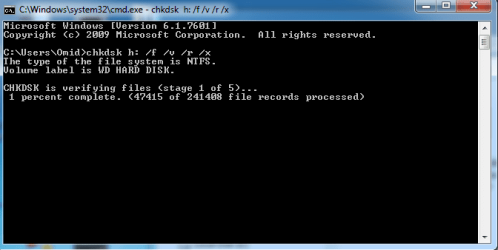
Miiiiiracle! CheckDisk started
 

Attachments

  • chl.png
    chl.png
    12 KB · Views: 21

My Computer My Computer

At a glance

Windows 7 Ultimate x64
Computer type
Laptop
Computer Manufacturer/Model Number
Dell Studio
OS
Windows 7 Ultimate x64
That is good news. I was really wondering why checkdisk did not run in the first instance.

I think you are in the habit of connecting the external drive after starting the program. Many programs will not detect the drive if you connect it after starting the program. Always plugin your drive before starting any program - even checkdisk.

Now do not interrupt check disk. Let it run.

Post the screenshot after it completes it.

After taking the screenshot, close the command Window and then Reboot your PC.
 

My Computer My Computer

At a glance

Windows 7 Home Premium 32 bit
OS
Windows 7 Home Premium 32 bit
All right. Thank You for support ;)
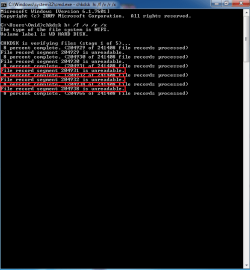
do you know what are these files?
 

Attachments

  • ff.png
    ff.png
    10.3 KB · Views: 1

My Computer My Computer

At a glance

Windows 7 Ultimate x64
Computer type
Laptop
Computer Manufacturer/Model Number
Dell Studio
OS
Windows 7 Ultimate x64
May be some corrupt bad sectors unreadable. Let us wait and see the final message which I wanted the screenshot. It shall show how many bad sectors were encountered. ( Files in bad sectors are already lost.)
If indeed there are too many bad sectors, you must copy whatever files are good and then clone the drive and attempt bad sector recovery on the cloned drive.. Anyway all this thinking is premature. Let us see how things unfurl. Man proposes but God disposes :D.
 

My Computer My Computer

At a glance

Windows 7 Home Premium 32 bit
OS
Windows 7 Home Premium 32 bit
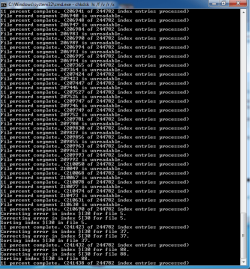
After 23 hours check disk stopped and doesn't continue -_- somebody help
 

Attachments

  • cmddd.png
    cmddd.png
    15.8 KB · Views: 2

My Computer My Computer

At a glance

Windows 7 Ultimate x64
Computer type
Laptop
Computer Manufacturer/Model Number
Dell Studio
OS
Windows 7 Ultimate x64
I would give up on your HDD as irrecoverably gone bad. I have no clues and directions now. GetDataback Simple was the last stop.That checkdisk started running gave a glimmer of hope and that has fizzled out now.You have to wait for a miracle man now.
 

My Computer My Computer

At a glance

Windows 7 Home Premium 32 bit
OS
Windows 7 Home Premium 32 bit
Back
Top