Solved i7 3517U won't turbo boost past 1.9GHz

paparazzo79

New member
Member
Local time
1:25 AM
Messages
95
I have this laptop where I installed Windows 7 over Windows 10.
In windows 10 CPU regulary did turbo boost to it's specification freq but not on Windows 7.
How could I resolve this?
I changed power managment ,different profiles, no luck.
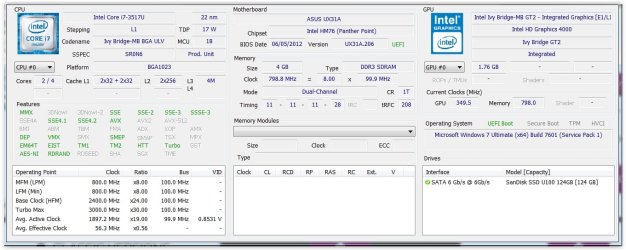
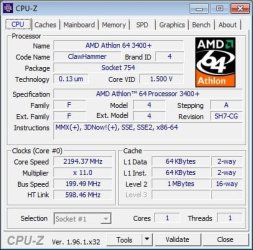
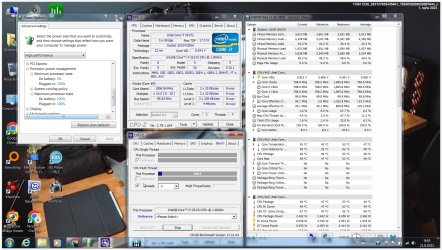
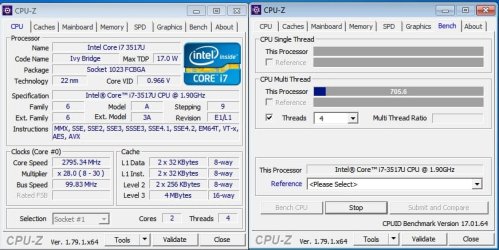
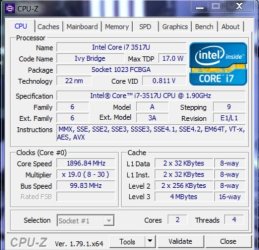
Max Freq is as shown on pic.
I see others had issue as well:
i7 3517U Turbo boost is not activating - Intel Communities


Attachments
  • 3517u.jpg
    3517u.jpg
    52.2 KB · Views: 11

My Computer My Computer

At a glance

Windows 7 Ultimate 32bitamd athlon 64 3600+ X2Ati Radeon 3650 HD
OS
Windows 7 Ultimate 32bit
CPU
amd athlon 64 3600+ X2
Motherboard
Biostar NF520-TE
Graphics Card(s)
Ati Radeon 3650 HD
Monitor(s) Displays
Philips 227EL
Please edit your profile with ALL your hardware specs. It will help us to help you. Fill in on the System two.
System Info - See Your System Specs


A i7 3517U is a third gen CPU. It was made for win 7.

Did you install all drivers, specially chipset?
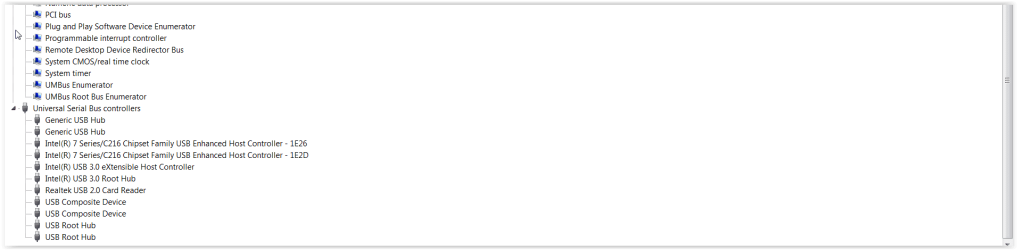
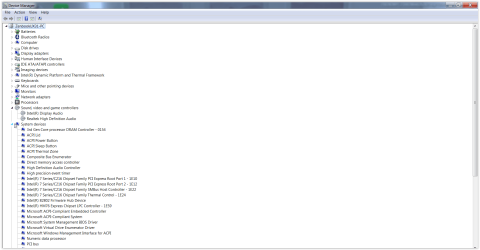
Open device manager. Is there any yellow alert of missing driver?
 
Last edited:

My Computers My Computers

  • At a glance

    Windows 7 HP 64i5 6600K - 800MHz to 4200MHz4+4G GSkill DDR4 3000IG - Intel 530
    Computer type
    PC/Desktop
    Computer Manufacturer/Model Number
    custom build
    OS
    Windows 7 HP 64
    CPU
    i5 6600K - 800MHz to 4200MHz
    Motherboard
    GA-Z170-HD3P
    Memory
    4+4G GSkill DDR4 3000
    Graphics Card(s)
    IG - Intel 530
    Monitor(s) Displays
    Samsung 226BW
    Screen Resolution
    1680x1050
    Hard Drives
    (1) -1 SM951 – 128GB M.2 AHCI PCIe SSD drive for Windows 7 and Lubuntu
    (2) -1 WD SATA 3 - 1T for Data
    (3) -1 WD SATA 3 - 1T for backup
    PSU
    Thermaltake 450W TR2 gold
    Keyboard
    Old and good Chicony mechanical keyboard
    Mouse
    Logitech mX performance - 9 buttons (had to disable some)
    Internet Speed
    500Mb/s
    Browser
    Firefox 64
    Other Info
    TinyWall firewall
  • At a glance

    Windows 7 Proi7-4500U 800MHz to 3.0GHz(4+4)G DDR3 1600IG intel 4400 + NVIDIA GeForce GT 745M
    Computer type
    Laptop
    System Manufacturer/Model Number
    Asus Q550LF
    OS
    Windows 7 Pro
    CPU
    i7-4500U 800MHz to 3.0GHz
    Motherboard
    Asus Q550LF
    Memory
    (4+4)G DDR3 1600
    Graphics Card(s)
    IG intel 4400 + NVIDIA GeForce GT 745M
    Sound Card
    Realtek
    Monitor(s) Displays
    LG Display LP156WF4-SPH1
    Screen Resolution
    1920 x 1080
    Hard Drives
    BX500 120G SSD for Windows and programs +
    1T HDD for data
    Internet Speed
    500 Mb/s
    Browser
    Firefox
    Other Info
    TinyWall firewall
Please edit your profile with ALL your hardware specs. It will help us to help you. Fill in on the System two.
System Info - See Your System Specs


A i7 3517U is a third gen CPU. It was made for win 7.

Did you installed all drivers, specially chipset?
Open device manager. Is there any yellow alert of missing driver?
I installed IO Driver Booster and updated drvers via that software.
I could not install chipset drivers from website due to some error, can't remember now which exactly.
The laptop is Zenbook UX31A.


Attachments

  • Screen Shot 08-20-22 at 06.10 PM 001.PNG
    Screen Shot 08-20-22 at 06.10 PM 001.PNG
    19 KB · Views: 1
  • Screen Shot 08-20-22 at 06.10 PM.PNG
    Screen Shot 08-20-22 at 06.10 PM.PNG
    54.7 KB · Views: 2
  • Screen Shot 08-20-22 at 06.15 PM.JPG
    Screen Shot 08-20-22 at 06.15 PM.JPG
    107.1 KB · Views: 2
  • Screen Shot 08-20-22 at 06.26 PM.JPG
    Screen Shot 08-20-22 at 06.26 PM.JPG
    194.5 KB · Views: 0
Last edited:

My Computer My Computer

At a glance

Windows 7 Ultimate 32bitamd athlon 64 3600+ X2Ati Radeon 3650 HD
OS
Windows 7 Ultimate 32bit
CPU
amd athlon 64 3600+ X2
Motherboard
Biostar NF520-TE
Graphics Card(s)
Ati Radeon 3650 HD
Monitor(s) Displays
Philips 227EL
You really should obtain the needed device drivers from the support site for your ASUS Zenbook UX31A laptop.

Using a third party tool, such as IObit Driver Booster, is a good way to obtain outdated or incorrect device drivers and wind up with some devices not working.

That is probably why you are seeing error messages.
 

My Computer My Computer

At a glance

Windows 7 Professional SP1 64-bitIntel Core i7-4790 3.60 GHz32 GB DDR3-1600 MHzIntegrated Intel HD Graphics 4600
Computer type
PC/Desktop
Computer Manufacturer/Model Number
Dell OptiPlex 9020
OS
Windows 7 Professional SP1 64-bit
CPU
Intel Core i7-4790 3.60 GHz
Memory
32 GB DDR3-1600 MHz
Graphics Card(s)
Integrated Intel HD Graphics 4600
Monitor(s) Displays
Viewsonic 32" LCD
Hard Drives
Kingston SATA 3 240 GB SSD
Internet Speed
Spectrum Internet 1000 Mbps
You really should obtain the needed device drivers from the support site for your ASUS Zenbook UX31A laptop.

Using a third party tool, such as IObit Driver Booster, is a good way to obtain outdated or incorrect device drivers and wind up with some devices not working.

That is probably why you are seeing error messages.
I couldn't install that particular driver for chipset due to error warning...I forgot what it said...
Can I somehow delete all the chipset drivers mace with IObit, and simulate error code?
Besides I got a lot of exclamation warnings in device manager so I thought it is a good way to use IObit....
and installed all the drivers..
 

My Computer My Computer

At a glance

Windows 7 Ultimate 32bitamd athlon 64 3600+ X2Ati Radeon 3650 HD
OS
Windows 7 Ultimate 32bit
CPU
amd athlon 64 3600+ X2
Motherboard
Biostar NF520-TE
Graphics Card(s)
Ati Radeon 3650 HD
Monitor(s) Displays
Philips 227EL
I couldn't install that particular driver for chipset due to error warning...I forgot what it said...
Can I somehow delete all the chipset drivers mace with IObit, and simulate error code?
Besides I got a lot of exclamation warnings in device manager so I thought it is a good way to use IObit....
and installed all the drivers..
Did you try the drivers from ASUS?

ASUS Zenbook UX31A
ASUS Zenbook UX31A - Support

i7 3517U
Max Turbo Frequency 3.00 GHz
Processor Base Frequency 1.90 GHz

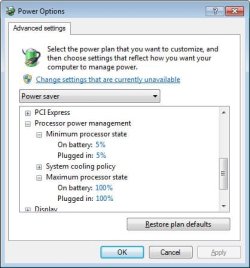
What are the minimum and maximum processor states for your CPU? The maximum should be 100%.

For my old laptop with Windows 7 The processor varies from ~800MHz to ~2200MHz.
 

Attachments

  • 2022-08-20 18_16_41-Power Options.jpg
    2022-08-20 18_16_41-Power Options.jpg
    29.4 KB · Views: 10
  • 2022-08-20 16_21_09-CPU-Z.jpg
    2022-08-20 16_21_09-CPU-Z.jpg
    38.2 KB · Views: 9
  • 2022-08-20 16_21_05-CPU-Z.jpg
    2022-08-20 16_21_05-CPU-Z.jpg
    38.1 KB · Views: 8

My Computers My Computers

  • At a glance

    Windows 7 Professional 64bit / Windows 10 Hom...AMD FX-8350GSKILL Ripjaw-X PC3 12800 12GB (2x4GB, 2x2GB)ASUS ENGTX560 DCII OC/2DI/1GD5 1GB
    Computer type
    PC/Desktop
    Computer Manufacturer/Model Number
    Custom build
    OS
    Windows 7 Professional 64bit / Windows 10 Home 64bit
    CPU
    AMD FX-8350
    Motherboard
    Gigabyte GA-990FXA-UD3 (AM3+) Rev. 4.0
    Memory
    GSKILL Ripjaw-X PC3 12800 12GB (2x4GB, 2x2GB)
    Graphics Card(s)
    ASUS ENGTX560 DCII OC/2DI/1GD5 1GB
    Sound Card
    Integrated
    Monitor(s) Displays
    Asus VE228H (21.5-in)
    Screen Resolution
    1920x1080 60Hz
    Hard Drives
    SAMSUNG 870 EVO 1TB (2.5" SATA SSD)
    SAMSUNG 870 EVO 500GB (2.5" SATA SSD)
    PSU
    Antec TruePower (new) TP-650 (650 watts)
    Case
    Antec Three Hundred
    Cooling
    AMD stock (plan to upgrade to Cooler Master Hyper 212 EVO)
    Keyboard
    Logitech K540 (wireless)
    Mouse
    Logitech M310 (wireless)
    Internet Speed
    Comcast Gigabit X2 Internet (2100Mbps down / 300Mbps up)
    Browser
    Firefox, Edge, Chrome
    Other Info
    Optical drive: ASUS DRW-24B3ST/BLK/G (Black) (24X)
    External hard drives: 2TB & 6TB
    Internet Gateway: Comcast XB8
  • Computer type
    PC/Desktop
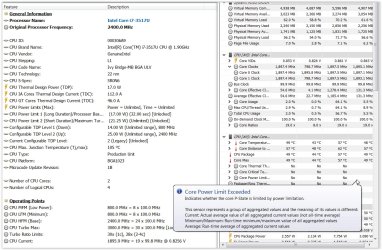
Stuck at 1.9GHz and that is it's maximum.
Like the CPU is somehow limited and does not want to boost.
I mean I could solve this by installing Windows 10 but this laptop barely worked with W10,not much RAM and CPU is weak.
I had W10 so I switched to W7.

- - - Updated - - -

is there a way to remove all the drivers from system without need of formatting and reinstall OS?

- - - Updated - - -

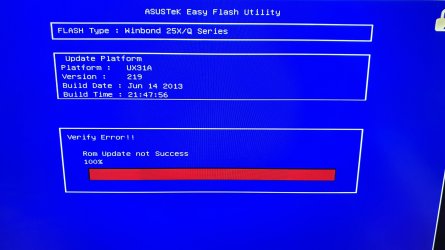
OK I tried to flash the BIOS...got an error message then it scared the sh..t out of me...
(pic below).
I rebooted the PC but it was in a boot loop until somehow I managed to enter the BIOS and load setup defaults.
Could not load up Windows 7 so I had to format the drive and reinstall Windows 7.
Now I'm at bare Windows 7 (luckly,probably had luck not damaging BIOS chip).
What do you want me to check/do now guys?
Windows 7 is loaded without any driver installed now.


- - - Updated - - -

Yep, managed to install W7 again and this time passed installation of IMEI drivers (chipset) and CPU boosts normally.
Thank you guys.

- - - Updated - - -

But now I got following error...
Could it be the issue of a corrupted BIOS flash?
 

Attachments

  • Screen Shot 08-21-22 at 08.44 AM.JPG
    Screen Shot 08-21-22 at 08.44 AM.JPG
    310.3 KB · Views: 1
  • bios.jpg
    bios.jpg
    532.4 KB · Views: 1
  • turbo boost.jpg
    turbo boost.jpg
    65.4 KB · Views: 0
  • Screen Shot 08-21-22 at 12.47 PM.JPG
    Screen Shot 08-21-22 at 12.47 PM.JPG
    52.2 KB · Views: 1

My Computer My Computer

At a glance

Windows 7 Ultimate 32bitamd athlon 64 3600+ X2Ati Radeon 3650 HD
OS
Windows 7 Ultimate 32bit
CPU
amd athlon 64 3600+ X2
Motherboard
Biostar NF520-TE
Graphics Card(s)
Ati Radeon 3650 HD
Monitor(s) Displays
Philips 227EL
Need Intel MEI
Intel(R) Management Engine (Intel(R) ME) Consumer Driver for Legacy Intel(R) NUC Products


Notes

Kernel-Mode Driver Framework 1.11 (KB 2685811) must first be installed if you are using Windows 7.
If the Intel ME driver hasn't been successfully installed, you may see an error on a "PCI Simple Communications Controller" in Device Manager.


PS.: You have many unknown devices that also needs a driver for them.

You should always update your BIOS from BIOS. Avoid updating under Windows.

- - - Updated - - -

I have an Asus Q550LF laptop and everything works fine.

What is the model of your Asus laptop?
 

My Computers My Computers

  • At a glance

    Windows 7 HP 64i5 6600K - 800MHz to 4200MHz4+4G GSkill DDR4 3000IG - Intel 530
    Computer type
    PC/Desktop
    Computer Manufacturer/Model Number
    custom build
    OS
    Windows 7 HP 64
    CPU
    i5 6600K - 800MHz to 4200MHz
    Motherboard
    GA-Z170-HD3P
    Memory
    4+4G GSkill DDR4 3000
    Graphics Card(s)
    IG - Intel 530
    Monitor(s) Displays
    Samsung 226BW
    Screen Resolution
    1680x1050
    Hard Drives
    (1) -1 SM951 – 128GB M.2 AHCI PCIe SSD drive for Windows 7 and Lubuntu
    (2) -1 WD SATA 3 - 1T for Data
    (3) -1 WD SATA 3 - 1T for backup
    PSU
    Thermaltake 450W TR2 gold
    Keyboard
    Old and good Chicony mechanical keyboard
    Mouse
    Logitech mX performance - 9 buttons (had to disable some)
    Internet Speed
    500Mb/s
    Browser
    Firefox 64
    Other Info
    TinyWall firewall
  • At a glance

    Windows 7 Proi7-4500U 800MHz to 3.0GHz(4+4)G DDR3 1600IG intel 4400 + NVIDIA GeForce GT 745M
    Computer type
    Laptop
    System Manufacturer/Model Number
    Asus Q550LF
    OS
    Windows 7 Pro
    CPU
    i7-4500U 800MHz to 3.0GHz
    Motherboard
    Asus Q550LF
    Memory
    (4+4)G DDR3 1600
    Graphics Card(s)
    IG intel 4400 + NVIDIA GeForce GT 745M
    Sound Card
    Realtek
    Monitor(s) Displays
    LG Display LP156WF4-SPH1
    Screen Resolution
    1920 x 1080
    Hard Drives
    BX500 120G SSD for Windows and programs +
    1T HDD for data
    Internet Speed
    500 Mb/s
    Browser
    Firefox
    Other Info
    TinyWall firewall
Need Intel MEI
Intel(R) Management Engine (Intel(R) ME) Consumer Driver for Legacy Intel(R) NUC Products


Notes

Kernel-Mode Driver Framework 1.11 (KB 2685811) must first be installed if you are using Windows 7.
If the Intel ME driver hasn't been successfully installed, you may see an error on a "PCI Simple Communications Controller" in Device Manager.


PS.: You have many unknown devices that also needs a driver for them.

You should always update your BIOS from BIOS. Avoid updating under Windows.

- - - Updated - - -

I have an Asus Q550LF laptop and everything works fine.

What is the model of your Asus laptop?

I am suprised about that, since I installed all the drivers from support website...for this model Zenbook UX31A.
How is that possible?
So what now?
 
Last edited:

My Computer My Computer

At a glance

Windows 7 Ultimate 32bitamd athlon 64 3600+ X2Ati Radeon 3650 HD
OS
Windows 7 Ultimate 32bit
CPU
amd athlon 64 3600+ X2
Motherboard
Biostar NF520-TE
Graphics Card(s)
Ati Radeon 3650 HD
Monitor(s) Displays
Philips 227EL
Did you install IME?

What about the other missing drivers?
Please post a whole window of Device Manager image.
 

My Computers My Computers

  • At a glance

    Windows 7 HP 64i5 6600K - 800MHz to 4200MHz4+4G GSkill DDR4 3000IG - Intel 530
    Computer type
    PC/Desktop
    Computer Manufacturer/Model Number
    custom build
    OS
    Windows 7 HP 64
    CPU
    i5 6600K - 800MHz to 4200MHz
    Motherboard
    GA-Z170-HD3P
    Memory
    4+4G GSkill DDR4 3000
    Graphics Card(s)
    IG - Intel 530
    Monitor(s) Displays
    Samsung 226BW
    Screen Resolution
    1680x1050
    Hard Drives
    (1) -1 SM951 – 128GB M.2 AHCI PCIe SSD drive for Windows 7 and Lubuntu
    (2) -1 WD SATA 3 - 1T for Data
    (3) -1 WD SATA 3 - 1T for backup
    PSU
    Thermaltake 450W TR2 gold
    Keyboard
    Old and good Chicony mechanical keyboard
    Mouse
    Logitech mX performance - 9 buttons (had to disable some)
    Internet Speed
    500Mb/s
    Browser
    Firefox 64
    Other Info
    TinyWall firewall
  • At a glance

    Windows 7 Proi7-4500U 800MHz to 3.0GHz(4+4)G DDR3 1600IG intel 4400 + NVIDIA GeForce GT 745M
    Computer type
    Laptop
    System Manufacturer/Model Number
    Asus Q550LF
    OS
    Windows 7 Pro
    CPU
    i7-4500U 800MHz to 3.0GHz
    Motherboard
    Asus Q550LF
    Memory
    (4+4)G DDR3 1600
    Graphics Card(s)
    IG intel 4400 + NVIDIA GeForce GT 745M
    Sound Card
    Realtek
    Monitor(s) Displays
    LG Display LP156WF4-SPH1
    Screen Resolution
    1920 x 1080
    Hard Drives
    BX500 120G SSD for Windows and programs +
    1T HDD for data
    Internet Speed
    500 Mb/s
    Browser
    Firefox
    Other Info
    TinyWall firewall
I screwed up pretty bad laptop.
I thought I will solve the issue by updating BIOS which at the end stopped for unknown reason to me.
I think I wrote here or somewhere else that due to hardware failure now I have exclamation mark (in device manager under IMEI) at least so where told.
I did manage to solve the issue by clean install W7 again and install chipset driver as first.
 

My Computer My Computer

At a glance

Windows 7 Ultimate 32bitamd athlon 64 3600+ X2Ati Radeon 3650 HD
OS
Windows 7 Ultimate 32bit
CPU
amd athlon 64 3600+ X2
Motherboard
Biostar NF520-TE
Graphics Card(s)
Ati Radeon 3650 HD
Monitor(s) Displays
Philips 227EL
Back
Top