Can't repair Microsoft Word; a required OSETUP.DLL cannot be loaded.

Cinnamint

New member
Local time
11:06 AM
Messages
5
Hello everyone,

I'm having an issue where Microsoft Word won't launch. For a split second I see the loading circle and then nothing. This happens both when clicking on the program itself and when double clicking documents. I get no error messages. All other Microsoft Office Home and Student (32bit) programs launch without a hitch.

When attempting to uninstall or change the program to run a repair, I get a message stating:

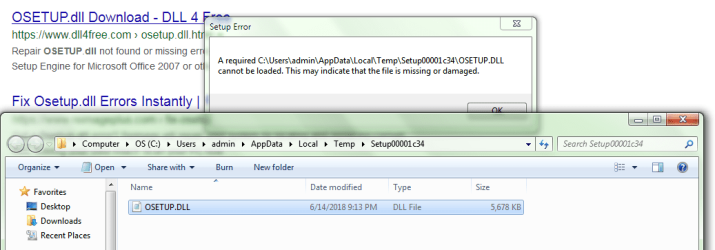
A required C:\Users\admin\AppData\Local\Temp\Setup00001c34\OSETUP.DLL cannot be loaded. This may indicate that the file is missing or damaged.

(The Setup folder number varies.)

When attempting to install:

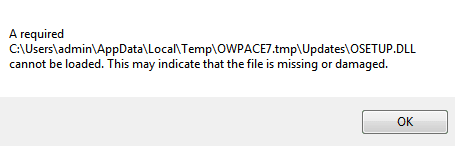
A required C:\Users\admin\AppData\Local\Temp\OWPACE7.tmp\Updates\OSETUP.DLL cannot be loaded. This may indicate that the file is missing or damaged.

This is the second time I've had this issue in the past month. The first time I had let a friend of mine clean up a program from off my computer and he deleted the registry keys in association with it. I then proceeded to install a program called Dayon!. I tend to keep my User Account Control messages turned off since I have a game that always prompts me. Installing Dayon! triggered an Action Center message stating that in order to turn on my User Account Control I would have to restart the computer. I thought it odd but just manually turned it back off again.

It wasn't until a few days later I discovered that Word wouldn't launch. After trying multiple things that failed, I did a system restore. Word didn't work right away but I was able to run a repair finally and all was well. I assumed something had gone wrong during the registry cleanup.

About a week ago I went to use Dayon! and realized it was no longer on my system. Duh to me, as I had forgotten that the system restore took me back before I installed it. So I installed it again (same User Account Control nonsense). I also installed Jitsi (which I have installed 2 or 3 other times in the past and have had no known issues from it). I had Word open earlier that day and the next day when I went to use it, same problem; it no longer launches. Unfortunately I don't have a system restore early enough to undo it this time.

(Note: My friend also keeps User Account Control off and installed Dayon! on his Win10 but he has not had any issues and did not get the same User Account Control thing I did. I also installed Dayon! on my Win8.1 which has User Account Control on. I did not have the same problem on that laptop either and all Microsoft Office 2013 programs launch fine on it including Word.)

Things I tried to do to fix Word:

  • Uninstall Dayon! (just in case)
  • Uninstall/Change Microsoft Office - Error message noted above.
  • Download and Install Microsoft Office - Error message noted above.
  • Download and replace file version 14.0.4755.1000 of osetup.dll that goes in the All Users file path.
  • Download and replace file version 14.0.7211.5000 of osetup.dll that goes in Office Setup Controller.
  • Run Windows Update (which included some updates for Microsoft Office).
  • Download kb4022208 but: "The update is already installed on this system." Was worth a shot.
  • Run sfc scannow (last ditch effort).
  • Various other odd & ends and ritualistic combinations of things.
After spending nearly a week on this I'm at wits end. I'd like to avoid having to reinstall Windows 7 if at all possible since I'm lazy and have way too many programs I'd have to get again (some older versions I'd have to hunt down too). I keep thinking there has to be a way to fix this. Any and all help would be deeply appreciated. Also, I apologize for the length of this post. I just wanted to provide as much information as possible.

Thanks again!
 

Attachments

  • Uninstall Repair Error.PNG
    Uninstall Repair Error.PNG
    36.2 KB · Views: 1
  • Installation Error.PNG
    Installation Error.PNG
    2.6 KB · Views: 24

My Computer My Computer

At a glance

Windows 7 Home Premium 64bitIntel Core i3-2310M @2.10GHz6GB RamIntel Graphics HD 3000
Computer type
Laptop
Computer Manufacturer/Model Number
Asus
OS
Windows 7 Home Premium 64bit
CPU
Intel Core i3-2310M @2.10GHz
Motherboard
U56E
Memory
6GB Ram
Graphics Card(s)
Intel Graphics HD 3000
Antivirus
Kaspersky Total Security
Browser
Firefox
Welcome to the forum. As the file is there what AV have you got some block access to temp folders failing that what are the permissions on that folder
 

My Computer My Computer

At a glance

win 8 32 bit
Computer type
PC/Desktop
OS
win 8 32 bit
Welcome to the forum. As the file is there what AV have you got some block access to temp folders failing that what are the permissions on that folder

Thank you and thank you for the reply!

My AV is Kaspersky Total Security. I checked through my detailed reports and settings for file but I haven't found anything in connection with this. I don't believe it's blocking anything but I can't say I'm 100% sure.

I wasn't sure which folder you were speaking about, but I did check permissions on the Setup folder that is created when attempting to uninstall/change Microsoft Office. I honestly don't know much about permissions as it's something I've never messed with but everything seems to be in order?
 

Attachments

  • Setup Permissions.PNG
    Setup Permissions.PNG
    17.6 KB · Views: 21

My Computer My Computer

At a glance

Windows 7 Home Premium 64bitIntel Core i3-2310M @2.10GHz6GB RamIntel Graphics HD 3000
Computer type
Laptop
Computer Manufacturer/Model Number
Asus
OS
Windows 7 Home Premium 64bit
CPU
Intel Core i3-2310M @2.10GHz
Motherboard
U56E
Memory
6GB Ram
Graphics Card(s)
Intel Graphics HD 3000
Antivirus
Kaspersky Total Security
Browser
Firefox
Its the folder were the file you need to check permission is that file on the install disk try copying it over the old one in case it's corrupted
 

My Computer My Computer

At a glance

win 8 32 bit
Computer type
PC/Desktop
OS
win 8 32 bit
I tried replacing the OSETUP.DLL file but it didn't fix anything. I went ahead and took the time to replace these files too:

  • Replaced all files in C:\MSOCache\All Users\{90140000-003D-0000-0000-0000000FF1CE}-C
  • Replaced osetupui.dll file in C:\Program Files (x86)\Common Files\microsoft shared\OFFICE14\Office Setup Controller\Office.en-us
  • Replaced OSETUP.dll file in C:\Program Files (x86)\Common Files\microsoft shared\OFFICE14\Office Setup Controller
  • Replaced ose.exe file in C:\Program Files (x86)\Common Files\microsoft shared\Source Engine
Word still won't launch and I'm still getting the same error messages.

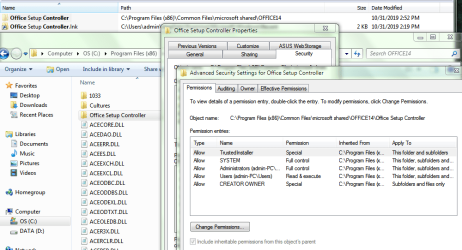
I also took a look at the permissions on that folder. Everything looks fine.
 

Attachments

  • Office Setup Controller Permissions.PNG
    Office Setup Controller Permissions.PNG
    51.7 KB · Views: 0

My Computer My Computer

At a glance

Windows 7 Home Premium 64bitIntel Core i3-2310M @2.10GHz6GB RamIntel Graphics HD 3000
Computer type
Laptop
Computer Manufacturer/Model Number
Asus
OS
Windows 7 Home Premium 64bit
CPU
Intel Core i3-2310M @2.10GHz
Motherboard
U56E
Memory
6GB Ram
Graphics Card(s)
Intel Graphics HD 3000
Antivirus
Kaspersky Total Security
Browser
Firefox
If you don't replace dll files properly you may have security issues with TrustedInstaller
Bill
 

My Computer My Computer

At a glance

Win 10 x64, Linux Lite, Win 7 x64, BlackArch,...
Computer type
PC/Desktop
Computer Manufacturer/Model Number
HP Desktop & Compaq Laptop
OS
Win 10 x64, Linux Lite, Win 7 x64, BlackArch, & Kali
Hard Drives
Samsung 850 Pro 256Gb,
Hitachi HDD 1Tb,
Crucial MX SSD 250Gb
Segate 3Tb USB 3.0 Ext. Backup HDD
Internet Speed
150Mbps dn, 20Mbps up
Antivirus
Avast Free, Malwarebytes Anti-Exploit & Anti-Ransomware
Browser
Firefox, Chrome, Opera, & VPN
Hi

sounds like one of the registry keys is borked, permissions wise, are you getting an error code 1406 in the installer log.

Roy
 

My Computer My Computer

At a glance

W7 home premium 32bit/W7HP 64bit/w10 tp insid...E5300 dual core3gbNvidia Geforce 7100 Nforce 630i
Computer type
PC/Desktop
Computer Manufacturer/Model Number
medionl/Aspire 6930G/acer x55a
OS
W7 home premium 32bit/W7HP 64bit/w10 tp insider ring
CPU
E5300 dual core
Motherboard
medion MS7366
Memory
3gb
Graphics Card(s)
Nvidia Geforce 7100 Nforce 630i
Monitor(s) Displays
avixc
Internet Speed
n (isp resticted to 72)
Antivirus
mse/pands
Browser
palemoon
Other Info
Belkin Fd7050 n USB using Railink RT2870 drivers, more upto date
Thanks for the replies.

I made sure to always put the original dll files back after trying to replace them. With the originals or replacements, I get the same errors.

I was leaning towards my registry keys being the source of this. I've booted in Safe Mode and tried uninstalling/changing Office but I still get the same errors noted above. I used Microsoft Support and Recovery Assistant to uninstall Office which worked but trying to install Office again got me the same installation error I note in my original post.

Anyway, I didn't think of checking logs. I sniffed them out and here's a copy of the log when I try to uninstall/change. Error code is the same for when I try to install as well. Seems like it's a file not found error? (Not sure if there is another log I should be finding other than this one):


PERF: TickCount=89762 Name=OBootStrapper::Run Description=Begin function
Operating System version: 6.1.7601 Service Pack 1. Platform ID: 2
Running 32-bit setup on a 64-bit operating system.
Command line: "C:\Program Files (x86)\Common Files\Microsoft Shared\OFFICE14\Office Setup Controller\setup.exe" /modify SINGLEIMAGE /dll OSETUP.DLL
Parsing command line.
Modify requested for product: SINGLEIMAGE
Using setup controller dll at location [C:\Users\admin\AppData\Local\Temp\Setup00000720\OSETUP.DLL].
Verify file signature in "C:\Program Files (x86)\Common Files\Microsoft Shared\OFFICE14\Office Setup Controller\setup.exe"
C:\Program Files (x86)\Common Files\Microsoft Shared\OFFICE14\Office Setup Controller\setup.exe is trusted.
Verify file signature in "C:\Users\admin\AppData\Local\Temp\Setup00000720\OSETUP.DLL"
C:\Users\admin\AppData\Local\Temp\Setup00000720\OSETUP.DLL is trusted.
Error: Failed to load DLL: C:\Users\admin\AppData\Local\Temp\Setup00000720\OSETUP.DLL ErrorCode: 2(0x2).

A required C:\Users\admin\AppData\Local\Temp\Setup00000720\OSETUP.DLL cannot be loaded. This may indicate that the file is missing or damaged.
 

My Computer My Computer

At a glance

Windows 7 Home Premium 64bitIntel Core i3-2310M @2.10GHz6GB RamIntel Graphics HD 3000
Computer type
Laptop
Computer Manufacturer/Model Number
Asus
OS
Windows 7 Home Premium 64bit
CPU
Intel Core i3-2310M @2.10GHz
Motherboard
U56E
Memory
6GB Ram
Graphics Card(s)
Intel Graphics HD 3000
Antivirus
Kaspersky Total Security
Browser
Firefox
I'd like to avoid having to reinstall Windows 7 if at all possible since I'm lazy and have way too many programs I'd have to get again (some older versions I'd have to hunt down too). I keep thinking there has to be a way to fix this. Any and all help would be deeply appreciated.

Repair Install/In Place Upgrade

I'm finishing up on one right now, couple hours.

Bill
 

My Computer My Computer

At a glance

Win 10 x64, Linux Lite, Win 7 x64, BlackArch,...
Computer type
PC/Desktop
Computer Manufacturer/Model Number
HP Desktop & Compaq Laptop
OS
Win 10 x64, Linux Lite, Win 7 x64, BlackArch, & Kali
Hard Drives
Samsung 850 Pro 256Gb,
Hitachi HDD 1Tb,
Crucial MX SSD 250Gb
Segate 3Tb USB 3.0 Ext. Backup HDD
Internet Speed
150Mbps dn, 20Mbps up
Antivirus
Avast Free, Malwarebytes Anti-Exploit & Anti-Ransomware
Browser
Firefox, Chrome, Opera, & VPN
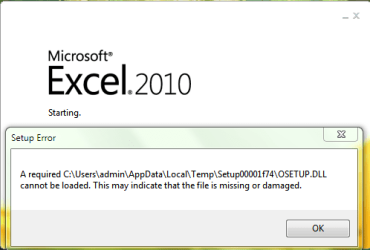
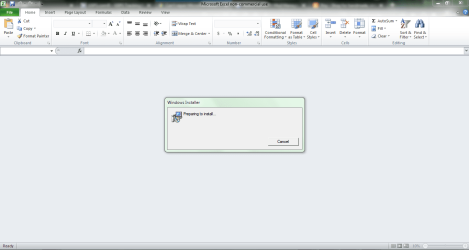
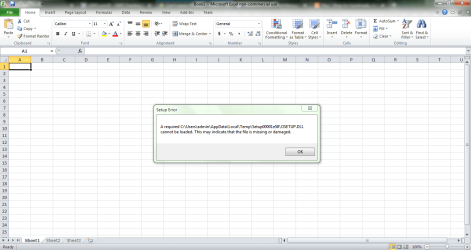
Thanks for the info Snick. When I have free time from work and family, I'll take a shot at it. Will have to download Win7 as it came preinstalled and I was only given a set of recovery discs. I haven't had any luck at manually repairing it so far and now the other Office programs are having problems. Unlike Word which doesn't do anything when attempting to launch it, Excel and OneNote actually attempt to launch but give me the error during startup. Then when it opens, I can't click on anything and it brings up an installer window before failing that and closing with one last error. Not sure if all my meddling caused this or there is a bigger issue at play. I'm worried it's the latter so a repair is probably just what the doctor ordered.


My only question as far as repairing goes is: Should I uninstall Office prior to running repair or just leave it? I imagine uninstalling it would be better since repair doesn't mess with programs? I have no other issues with my Windows (that I know of) so my only reason for repairing Windows would be just for Office. And if I do repair, I think I heard that it does affect drivers. I have some drivers setup for gaming purposes so that's something I'll have to keep in mind.


Thanks for all the help
 

Attachments

  • Excel.PNG
    Excel.PNG
    10.5 KB · Views: 10
  • Excel2.PNG
    Excel2.PNG
    35.6 KB · Views: 0
  • Excel3.PNG
    Excel3.PNG
    45.4 KB · Views: 1

My Computer My Computer

At a glance

Windows 7 Home Premium 64bitIntel Core i3-2310M @2.10GHz6GB RamIntel Graphics HD 3000
Computer type
Laptop
Computer Manufacturer/Model Number
Asus
OS
Windows 7 Home Premium 64bit
CPU
Intel Core i3-2310M @2.10GHz
Motherboard
U56E
Memory
6GB Ram
Graphics Card(s)
Intel Graphics HD 3000
Antivirus
Kaspersky Total Security
Browser
Firefox
What do you mean running repair?

Repair Install? If YES, you MUST SAVE/have your product keys, for Windows OS and for Microsoft Office, & other Microsoft Products that were installed that have keys.

You can use a few different tools Magic Jellybean or BelArc Advisor are excellent and free for locating those keys. The keys are hexadecimal, hidden and you can't copy & paste them.
 

My Computer My Computer

At a glance

Win 10 x64, Linux Lite, Win 7 x64, BlackArch,...
Computer type
PC/Desktop
Computer Manufacturer/Model Number
HP Desktop & Compaq Laptop
OS
Win 10 x64, Linux Lite, Win 7 x64, BlackArch, & Kali
Hard Drives
Samsung 850 Pro 256Gb,
Hitachi HDD 1Tb,
Crucial MX SSD 250Gb
Segate 3Tb USB 3.0 Ext. Backup HDD
Internet Speed
150Mbps dn, 20Mbps up
Antivirus
Avast Free, Malwarebytes Anti-Exploit & Anti-Ransomware
Browser
Firefox, Chrome, Opera, & VPN
Back
Top