Best Win Media Player alternative?

redtuiop

New member
Local time
3:45 AM
Messages
92
Location
Belfast, N. Ireland UK
I'm on the hunt for a decent comparable, as easy to use, media player as WMP as it's long been frustrating me. I have about 7 or 8 playlists I use regularly and only about 5 folders it has to pull songs from, but while there's no great issue with songs I've had for a long time, WMP routinely never updates itself to add in new ones unless I actively open the song & stick it into a playlist that way.

In other words it doesn't appear to watch the so-called watch folders!!

So ideally I'd like another one that has playlists & DOES update its library regularly plus is easy to navigate & view items etc.

So far I've tried Real Player & VLC as well as another freebie but none of them really appealed. Ideally it would be great if I could also import my WMP playlists. Again, I appreciate VLC can do much of that but I just don't like the interface & the way it works. However, if the concensus is that it's the best fit for the job then I'll just have to maybe figure out a way to work it, but figured it worth checking before I made that assumption. Thanks.
 

My Computer My Computer

At a glance

Win 7 64bit SP2?Intel G2030 3GHz4 GbOnBoard
Computer type
PC/Desktop
Computer Manufacturer/Model Number
Generic
OS
Win 7 64bit SP2?
CPU
Intel G2030 3GHz
Motherboard
Gigabyte Motherboard GA-H61M
Memory
4 Gb
Graphics Card(s)
OnBoard
Sound Card
OnBoard
Monitor(s) Displays
BenQ GL2250
Screen Resolution
1920 x 1080
Hard Drives
3 x SATA (500, 1000, 2000)
PSU
460W Coolermaster
Case
Coolermaster
Cooling
3 x Fans
Keyboard
Microsoft Ergonomic 4000
Mouse
Kensington Trackball
Internet Speed
100 Gb
If you want real time playlist monitoring/ updating then PotPlayer does just that. However since it has many more options than VLC installation and configuration is an issue. I use the 64 bit version of PotPlayer with MadVR and only ever use VLC when I using another video manager app that requires VLC.

If you want to try PotPlayer let us know. There are a few things you need to know when getting started.
 

My Computer My Computer

At a glance

Microsoft Windows 7 Home Premium 64-bit 7601 ...AMD C-60 APU with Radeon(tm) HD Graphics4.00 GBAMD Radeon HD 6290 Graphics
Computer type
Laptop
Computer Manufacturer/Model Number
ASUS
OS
Microsoft Windows 7 Home Premium 64-bit 7601 Multiprocessor Free Service Pack 1
CPU
AMD C-60 APU with Radeon(tm) HD Graphics
Motherboard
ASUSTeK COMPUTER INC. X501U
Memory
4.00 GB
Graphics Card(s)
AMD Radeon HD 6290 Graphics
Sound Card
(1) AMD High Definition Audio Device (2) Realtek High Defi
Screen Resolution
1366 x 768 x 32 bits (4294967296 colors) @ 60 Hz
Hard Drives
Hitachi HTS545050A7E380 SATA Disk Device
Antivirus
Comodo CIS & FW, SecureAplus App Whitelisting, Threatfire
Browser
Cyberfox 64bit, Opera 64bit, Airfox
Other Info
Spy-The-Spy, HitmanPro.Alert, Norton Connect Safe, MJRegWatcher, BitDefender TrafficLight, Voodoo Shield, Zemana AntiMalware
Hi Callender - thanks for that suggestion. Given how I'm awash with some other program configs that are a hassle, I don't have a problem considering another. So, please, fire away with any help you can provide. Will come back to you to let you know the outcome :)
 

My Computer My Computer

At a glance

Win 7 64bit SP2?Intel G2030 3GHz4 GbOnBoard
Computer type
PC/Desktop
Computer Manufacturer/Model Number
Generic
OS
Win 7 64bit SP2?
CPU
Intel G2030 3GHz
Motherboard
Gigabyte Motherboard GA-H61M
Memory
4 Gb
Graphics Card(s)
OnBoard
Sound Card
OnBoard
Monitor(s) Displays
BenQ GL2250
Screen Resolution
1920 x 1080
Hard Drives
3 x SATA (500, 1000, 2000)
PSU
460W Coolermaster
Case
Coolermaster
Cooling
3 x Fans
Keyboard
Microsoft Ergonomic 4000
Mouse
Kensington Trackball
Internet Speed
100 Gb
Okay well the first thing is your system is 32bit. I had hoped to provide a settings.ini file that you could use but my PotPlayer is 64bit version. Anyway if you get it installed you could zip and upload the Potplayer .ini file as it might be quicker to modify that instead of going through all the settings.

You need the English version. If you download PotPlayer from the manufacture's site you get Korean languge and although it can be switched to English you have to work out what the menus mean.

Download English version here:

Download Potplayer - FileHippo.com

When you run the installer at the last step it will offer to install additional codecs. Just install them.

Also grab a copy of MadVR (zip) but just unzip it for now and don't try running it.

madVR

I will try taking a few screenshots for initial settings and post them soon.
 

My Computer My Computer

At a glance

Microsoft Windows 7 Home Premium 64-bit 7601 ...AMD C-60 APU with Radeon(tm) HD Graphics4.00 GBAMD Radeon HD 6290 Graphics
Computer type
Laptop
Computer Manufacturer/Model Number
ASUS
OS
Microsoft Windows 7 Home Premium 64-bit 7601 Multiprocessor Free Service Pack 1
CPU
AMD C-60 APU with Radeon(tm) HD Graphics
Motherboard
ASUSTeK COMPUTER INC. X501U
Memory
4.00 GB
Graphics Card(s)
AMD Radeon HD 6290 Graphics
Sound Card
(1) AMD High Definition Audio Device (2) Realtek High Defi
Screen Resolution
1366 x 768 x 32 bits (4294967296 colors) @ 60 Hz
Hard Drives
Hitachi HTS545050A7E380 SATA Disk Device
Antivirus
Comodo CIS & FW, SecureAplus App Whitelisting, Threatfire
Browser
Cyberfox 64bit, Opera 64bit, Airfox
Other Info
Spy-The-Spy, HitmanPro.Alert, Norton Connect Safe, MJRegWatcher, BitDefender TrafficLight, Voodoo Shield, Zemana AntiMalware
RE: MadVR. Once Potplayer is installed and you've unzipped MadVR navigate to the MadVR folder and run install.bat - right click and run as administator.

Once that's finished run madHcCtrl.exe. You will see an icon in the system tray. Click it and choose Edit MadVR settings.

Suggest leaving everything on default except:

Processing> Image Enhancements> Luma Sharpen. Try setting at around .67

Rendering> General Settings> Disable Windowed Overlay Mode. Not used in Windows 7 and causes problems if enabled.

Exit MadVR via system tray.

Launch PotPlayer

Right click drop down arrow or right click play area for settings. Go to "Preferences"

Here are screenshots that hopefully you can follow:

PotPlayer Preferences:

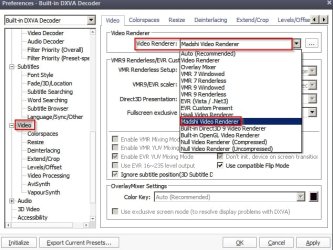
Set this one to MadVR (Madshi)
Preferences - MadVR.jpg

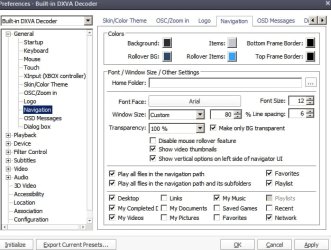
Choose available directories for playlists:
Preferences - Navigation.jpg

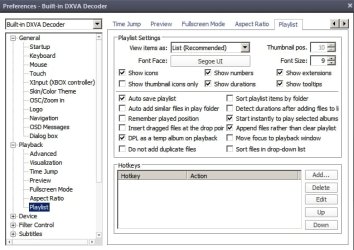
Choose autosave playlists
Preferences - Playlist.jpg

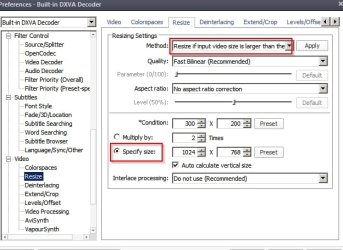
Choose to auto resize large or HD videos for smoother playback (if you want to)
Preferences - Resize.jpg

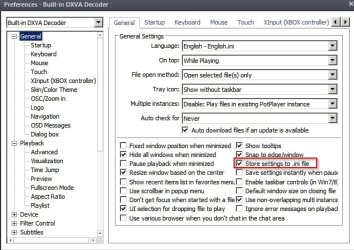
Make sure settings are saved to .ini file
Preferences - Save Settings.jpg

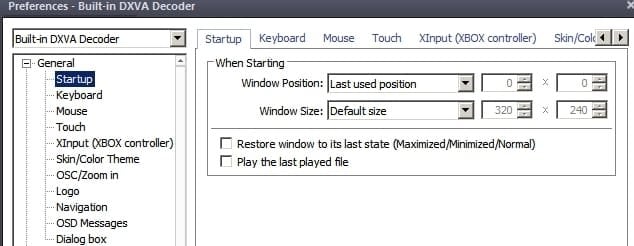
Leave this one as it is:
Preferences - Startup.jpg

Apply these for borderless playback window with mouse hover activated controls:
Preferences - Window.jpg

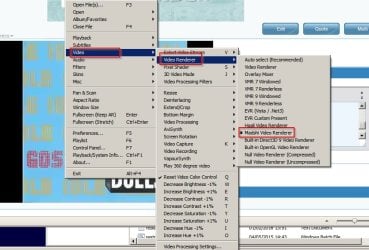
Now play a video and right click the playback window. Make sure Video Renderer selected is Madshi.
Do the same for all types of video file. You only need to play one of each )flv. mp4 and so on) and check the setting.
Video Renderer.jpg

Now for the important part - playlists:
Playlists.jpg

Right click the arrow to the right-centre of the playback widow. this opens/ closes the playlists window.

You can add or remove playlists and files based on their phsical location. Choose what to include.

EDIT: You can add multiple playlists using the tabs at the top of the playlist window.

Now if you add a video to a directory or delete it or move it somewhere else the playlist will update instantly.

Any questions and I will do my best to answer. I'm not expert on some of the more advanced settings but there's a guide here:

PotPlayer - PotPlayer installation, configuration and optimization wiki
 
Last edited:

My Computer My Computer

At a glance

Microsoft Windows 7 Home Premium 64-bit 7601 ...AMD C-60 APU with Radeon(tm) HD Graphics4.00 GBAMD Radeon HD 6290 Graphics
Computer type
Laptop
Computer Manufacturer/Model Number
ASUS
OS
Microsoft Windows 7 Home Premium 64-bit 7601 Multiprocessor Free Service Pack 1
CPU
AMD C-60 APU with Radeon(tm) HD Graphics
Motherboard
ASUSTeK COMPUTER INC. X501U
Memory
4.00 GB
Graphics Card(s)
AMD Radeon HD 6290 Graphics
Sound Card
(1) AMD High Definition Audio Device (2) Realtek High Defi
Screen Resolution
1366 x 768 x 32 bits (4294967296 colors) @ 60 Hz
Hard Drives
Hitachi HTS545050A7E380 SATA Disk Device
Antivirus
Comodo CIS & FW, SecureAplus App Whitelisting, Threatfire
Browser
Cyberfox 64bit, Opera 64bit, Airfox
Other Info
Spy-The-Spy, HitmanPro.Alert, Norton Connect Safe, MJRegWatcher, BitDefender TrafficLight, Voodoo Shield, Zemana AntiMalware
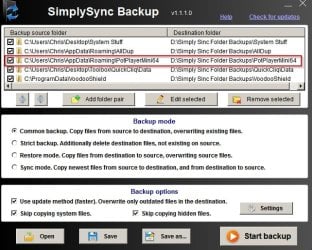
One more thing. You Potplayer .ini file needs to be backed up. It sometimes gets overwritten when installing a new version.

SimplySync Backup.jpg

You find it in %USERPROFILE%\AppData\Roaming in the PotPlayer folder.
 

My Computer My Computer

At a glance

Microsoft Windows 7 Home Premium 64-bit 7601 ...AMD C-60 APU with Radeon(tm) HD Graphics4.00 GBAMD Radeon HD 6290 Graphics
Computer type
Laptop
Computer Manufacturer/Model Number
ASUS
OS
Microsoft Windows 7 Home Premium 64-bit 7601 Multiprocessor Free Service Pack 1
CPU
AMD C-60 APU with Radeon(tm) HD Graphics
Motherboard
ASUSTeK COMPUTER INC. X501U
Memory
4.00 GB
Graphics Card(s)
AMD Radeon HD 6290 Graphics
Sound Card
(1) AMD High Definition Audio Device (2) Realtek High Defi
Screen Resolution
1366 x 768 x 32 bits (4294967296 colors) @ 60 Hz
Hard Drives
Hitachi HTS545050A7E380 SATA Disk Device
Antivirus
Comodo CIS & FW, SecureAplus App Whitelisting, Threatfire
Browser
Cyberfox 64bit, Opera 64bit, Airfox
Other Info
Spy-The-Spy, HitmanPro.Alert, Norton Connect Safe, MJRegWatcher, BitDefender TrafficLight, Voodoo Shield, Zemana AntiMalware
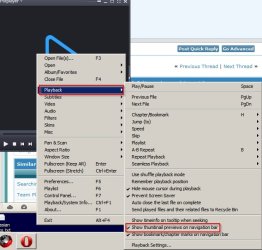
One more I forgot about. Enable this setting to show thumbnail previews on the timeline when hovering over it with your mouse.

Timeline.jpg
 

My Computer My Computer

At a glance

Microsoft Windows 7 Home Premium 64-bit 7601 ...AMD C-60 APU with Radeon(tm) HD Graphics4.00 GBAMD Radeon HD 6290 Graphics
Computer type
Laptop
Computer Manufacturer/Model Number
ASUS
OS
Microsoft Windows 7 Home Premium 64-bit 7601 Multiprocessor Free Service Pack 1
CPU
AMD C-60 APU with Radeon(tm) HD Graphics
Motherboard
ASUSTeK COMPUTER INC. X501U
Memory
4.00 GB
Graphics Card(s)
AMD Radeon HD 6290 Graphics
Sound Card
(1) AMD High Definition Audio Device (2) Realtek High Defi
Screen Resolution
1366 x 768 x 32 bits (4294967296 colors) @ 60 Hz
Hard Drives
Hitachi HTS545050A7E380 SATA Disk Device
Antivirus
Comodo CIS & FW, SecureAplus App Whitelisting, Threatfire
Browser
Cyberfox 64bit, Opera 64bit, Airfox
Other Info
Spy-The-Spy, HitmanPro.Alert, Norton Connect Safe, MJRegWatcher, BitDefender TrafficLight, Voodoo Shield, Zemana AntiMalware
Oh my word - having done some walkthroughs myself in the past I know how much work you've put into that lot - THANK YOU so much. I've not yet had a chance to work through it all - might be midweek before I do get it under way but will see where I get to with it & what it's like - hopefully a winner after all your hard work :).

PS - I'm glad you pointed out my system is only 32Bit - I'd previously had it as 64 then stupidly didn't check which disk I'd pulled when reinstalling recently but might yet revert back to it as nearly all my programs are for 64.
 

My Computer My Computer

At a glance

Win 7 64bit SP2?Intel G2030 3GHz4 GbOnBoard
Computer type
PC/Desktop
Computer Manufacturer/Model Number
Generic
OS
Win 7 64bit SP2?
CPU
Intel G2030 3GHz
Motherboard
Gigabyte Motherboard GA-H61M
Memory
4 Gb
Graphics Card(s)
OnBoard
Sound Card
OnBoard
Monitor(s) Displays
BenQ GL2250
Screen Resolution
1920 x 1080
Hard Drives
3 x SATA (500, 1000, 2000)
PSU
460W Coolermaster
Case
Coolermaster
Cooling
3 x Fans
Keyboard
Microsoft Ergonomic 4000
Mouse
Kensington Trackball
Internet Speed
100 Gb
No problem. PotPlayer should work okay with the default settings but it can be so much better if you tweak it a bit.
 

My Computer My Computer

At a glance

Microsoft Windows 7 Home Premium 64-bit 7601 ...AMD C-60 APU with Radeon(tm) HD Graphics4.00 GBAMD Radeon HD 6290 Graphics
Computer type
Laptop
Computer Manufacturer/Model Number
ASUS
OS
Microsoft Windows 7 Home Premium 64-bit 7601 Multiprocessor Free Service Pack 1
CPU
AMD C-60 APU with Radeon(tm) HD Graphics
Motherboard
ASUSTeK COMPUTER INC. X501U
Memory
4.00 GB
Graphics Card(s)
AMD Radeon HD 6290 Graphics
Sound Card
(1) AMD High Definition Audio Device (2) Realtek High Defi
Screen Resolution
1366 x 768 x 32 bits (4294967296 colors) @ 60 Hz
Hard Drives
Hitachi HTS545050A7E380 SATA Disk Device
Antivirus
Comodo CIS & FW, SecureAplus App Whitelisting, Threatfire
Browser
Cyberfox 64bit, Opera 64bit, Airfox
Other Info
Spy-The-Spy, HitmanPro.Alert, Norton Connect Safe, MJRegWatcher, BitDefender TrafficLight, Voodoo Shield, Zemana AntiMalware
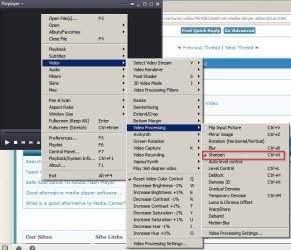
Sorry but one more setting I forgot to mention:

Video - Sharpen.jpg
 

My Computer My Computer

At a glance

Microsoft Windows 7 Home Premium 64-bit 7601 ...AMD C-60 APU with Radeon(tm) HD Graphics4.00 GBAMD Radeon HD 6290 Graphics
Computer type
Laptop
Computer Manufacturer/Model Number
ASUS
OS
Microsoft Windows 7 Home Premium 64-bit 7601 Multiprocessor Free Service Pack 1
CPU
AMD C-60 APU with Radeon(tm) HD Graphics
Motherboard
ASUSTeK COMPUTER INC. X501U
Memory
4.00 GB
Graphics Card(s)
AMD Radeon HD 6290 Graphics
Sound Card
(1) AMD High Definition Audio Device (2) Realtek High Defi
Screen Resolution
1366 x 768 x 32 bits (4294967296 colors) @ 60 Hz
Hard Drives
Hitachi HTS545050A7E380 SATA Disk Device
Antivirus
Comodo CIS & FW, SecureAplus App Whitelisting, Threatfire
Browser
Cyberfox 64bit, Opera 64bit, Airfox
Other Info
Spy-The-Spy, HitmanPro.Alert, Norton Connect Safe, MJRegWatcher, BitDefender TrafficLight, Voodoo Shield, Zemana AntiMalware
Thanks for that Gustavo - I do use VLC but not so keen on the interface at times, so will check out your other suggestions shortly. Much appreciated. :)
 

My Computer My Computer

At a glance

Win 7 64bit SP2?Intel G2030 3GHz4 GbOnBoard
Computer type
PC/Desktop
Computer Manufacturer/Model Number
Generic
OS
Win 7 64bit SP2?
CPU
Intel G2030 3GHz
Motherboard
Gigabyte Motherboard GA-H61M
Memory
4 Gb
Graphics Card(s)
OnBoard
Sound Card
OnBoard
Monitor(s) Displays
BenQ GL2250
Screen Resolution
1920 x 1080
Hard Drives
3 x SATA (500, 1000, 2000)
PSU
460W Coolermaster
Case
Coolermaster
Cooling
3 x Fans
Keyboard
Microsoft Ergonomic 4000
Mouse
Kensington Trackball
Internet Speed
100 Gb
Back
Top