
Fresh Win7 install, can't connect to internet.

Jaegur

New member
Local time
6:41 AM
Messages
1
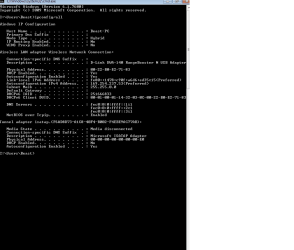
So, I'm having that issue to where I can't connect, something to do with my IP configuration. I am connecting through a D-Link usb modem to a wireless router, which is the same setup my wife is using on her desktop to connect to the same router/modem.

Here is a screenshot of my ipconfig:

I saw that gateway is blank, not sure if that matters or not, but possibly it does.. x.x Help?
 

Attachments
  • config.png
    config.png
    12.9 KB · Views: 98

My Computer My Computer

At a glance

Win7 Home Premium 64
OS
Win7 Home Premium 64
a 169.x.x.x address shows it cant reach the DHCP server, be it a problem with the adaptor or a problem with the modem.

Have you reinstalled the drivers ? Go onto the manufacturer web site and check for the network drivers. Incorrect drivers can cause the adaptor to perform problems.
 

My Computer My Computer

At a glance

Windows 7 Professional 32 bitAMD Phenom X4 2.6 GHz - Black EditionCorsair Dominator 4 GB (x2 2gb) - 1066 MhzBFG OCX 260 - 896 MB GDDR3
Computer Manufacturer/Model Number
My own build
OS
Windows 7 Professional 32 bit
CPU
AMD Phenom X4 2.6 GHz - Black Edition
Motherboard
Asus
Memory
Corsair Dominator 4 GB (x2 2gb) - 1066 Mhz
Graphics Card(s)
BFG OCX 260 - 896 MB GDDR3
Sound Card
N/A
Monitor(s) Displays
22" Samsung
Hard Drives
2 x250 GB - 7200 RPM - 32Bit buffer (maxtor)
Both running in raid 0
PSU
Antec 700w modular PSU
Case
Antec 300
Cooling
Coolermaster Hyper TX3 CPU Cooler
Does your routers SSID show up in the list of available networks? Is the router using encryption, WEP or WPA,etc? If it is make sure you are using the right password and encryption type. Using AES when the router is set to TKIP or vice versa can mess things up. Are you using the bundled D-Link program to connect or letting windows do that? The reason I ask that last question is if you run the setup program on the CD that came with that adapter, it will install a D-Link wireless network management program and disable the built in windows program. I've tried the D-Link program and found it doesn't work very well. If you only installed the drivers from say windows update the built in Windows Wireless Management program remains intact. As mentioned your ipconfig screen indicates that the adapter couldn't get an IP address from the router via DHCP.
 

My Computer My Computer

At a glance

Windows 10 Education 64 bitAMD Phenom II X4 980 Black Edition Deneb 3.7GHz8GB 4GBx2 Kingston PC10600 DDR3 1333 MemoryZotac NVIDIA Geforce GT640 2 Gig DDR3 PCIe
Computer type
PC/Desktop
Computer Manufacturer/Model Number
Home Built
OS
Windows 10 Education 64 bit
CPU
AMD Phenom II X4 980 Black Edition Deneb 3.7GHz
Motherboard
Asus M4N68T-M V2 µATX Motherboard
Memory
8GB 4GBx2 Kingston PC10600 DDR3 1333 Memory
Graphics Card(s)
Zotac NVIDIA Geforce GT640 2 Gig DDR3 PCIe
Sound Card
VIA VT1708s High Definition Audio 8-channel Onboard
Monitor(s) Displays
22" LG E2242 1080p and 2 19" I-INC AG191D
Screen Resolution
1280x1024 - 1920x1080 - 1280x1024
Hard Drives
Crucial M100 256 GB SSD and 500 GB WD Blue SATA
PSU
Thermaltake TR 620
Case
Power Up Black ATX Mid-Tower Case
Cooling
Stock heatsink and fan
Keyboard
Logitech Wireless K350 Wave
Mouse
Logitech Wireless M570 Trackman Wheel
Internet Speed
80 Mbps Down 30 Mbps Up
Antivirus
Windows Defender
Browser
Internet Explorer 11
Other Info
HP DVD1040e Lightscribe - External USB2
I also am using the D-link DWA140 which works extremely well for me but it required me to set it up a certain way. You don't want to use the drivers on the CD or the wireless software on the CD for that matter because it only seems to cause problems.

After unplugging the DWA140 you will want to uninstall the drivers from device manager>network adaptors, and also uninstall the D-link wireless connection utility from the machine using add-remove programs.

Shut down the machine and plug in the DWA140, reboot and let Windows 7 install it's own drivers. After that set up the wireless profile using the Windows 7 "manual wireless setup" located in the network and sharing center.

It will work best using WPA2 security and AES encryption only, don't use the mixed settings. Be sure and set your router to use WPA2 with AES "Only" not mixed, and also choose wireless N only or wireless N and G only depending the other hardware in your system. After that you should be able to see your SSID and connect to it. Your router may also require a firmware update to work correctly with Windows 7.

Good luck and let us know if you have any problems.
 

My Computer My Computer

At a glance

Windows 7 Ult, Windows 8.1 Pro,Q9650-4.275GHz, E8600 4.5GHz, E6750-3.8GHzG.Skill PC2 9600 1200Mhz 5 5 5 15 2TGTX480
Computer type
PC/Desktop
Computer Manufacturer/Model Number
Home built
OS
Windows 7 Ult, Windows 8.1 Pro,
CPU
Q9650-4.275GHz, E8600 4.5GHz, E6750-3.8GHz
Motherboard
Evga 780i FTW
Memory
G.Skill PC2 9600 1200Mhz 5 5 5 15 2T
Graphics Card(s)
GTX480
Sound Card
Asus Xonar D2
Monitor(s) Displays
HannsG
Screen Resolution
1680X1050
Hard Drives
GSkill Phoenix Pro 120GB SSD
PSU
ThermalTake Toughpower 1000Watt modular
Case
ThermalTake XaserV
Cooling
Xigmatek S1283
Keyboard
Logitech G15
Mouse
Logitech G9
Internet Speed
T1
You can also download the latest drivers from D-Link. After you unzip the file you should see a setup.exe file and a drivers folder. If you manually update the driver you can use the Browse my computer for a driver option and point it to the correct folder in the drivers folder. Thats the way I did it, I just deleted the setup.exe file and saved the rest to a USB thumbdrive.
 

My Computer My Computer

At a glance

Windows 10 Education 64 bitAMD Phenom II X4 980 Black Edition Deneb 3.7GHz8GB 4GBx2 Kingston PC10600 DDR3 1333 MemoryZotac NVIDIA Geforce GT640 2 Gig DDR3 PCIe
Computer type
PC/Desktop
Computer Manufacturer/Model Number
Home Built
OS
Windows 10 Education 64 bit
CPU
AMD Phenom II X4 980 Black Edition Deneb 3.7GHz
Motherboard
Asus M4N68T-M V2 µATX Motherboard
Memory
8GB 4GBx2 Kingston PC10600 DDR3 1333 Memory
Graphics Card(s)
Zotac NVIDIA Geforce GT640 2 Gig DDR3 PCIe
Sound Card
VIA VT1708s High Definition Audio 8-channel Onboard
Monitor(s) Displays
22" LG E2242 1080p and 2 19" I-INC AG191D
Screen Resolution
1280x1024 - 1920x1080 - 1280x1024
Hard Drives
Crucial M100 256 GB SSD and 500 GB WD Blue SATA
PSU
Thermaltake TR 620
Case
Power Up Black ATX Mid-Tower Case
Cooling
Stock heatsink and fan
Keyboard
Logitech Wireless K350 Wave
Mouse
Logitech Wireless M570 Trackman Wheel
Internet Speed
80 Mbps Down 30 Mbps Up
Antivirus
Windows Defender
Browser
Internet Explorer 11
Other Info
HP DVD1040e Lightscribe - External USB2
Back
Top