
Solved Can connect from Mac to Windows 7 PC but NOT from Windows 7 to Mac.

GARoss

New member
Power User
VIP
Local time
12:37 PM
Messages
359
Location
Michigan - USA
I having a similar issue to this thread (http://www.sevenforums.com/network-sharing/194516-file-sharing-works-pc-pc-b-but-not-vice-versa.html) but have Windows 7-64bit & Mac 10.7 (Lion). I have connected in the past but as of a month or so ago I haven't been able to. Possibly a Windows or Mac update has changed things(?). :confused:

From Mac I can connect to Windows 7 PC but NOT from Windows 7 to Mac so I'm assuming this is a Windows issue. I got my Mac's computer name & password, then typed these into the "Enter Network Account", which appears when I select the Mac, but it fails.

Need some help as I'm not sure how to troubleshoot this. :(
 

My Computer My Computer

At a glance

Windows 7 64-bitIntel Core i5-2500K 3300 Mhz16Gb Patriot PC3-12800 1600 MhzEVGA GeForce GTX 560 Ti (Fermi)
Computer type
PC/Desktop
Computer Manufacturer/Model Number
Custom built 2011
OS
Windows 7 64-bit
CPU
Intel Core i5-2500K 3300 Mhz
Motherboard
Gigabyte P67A-UD3-B3
Memory
16Gb Patriot PC3-12800 1600 Mhz
Graphics Card(s)
EVGA GeForce GTX 560 Ti (Fermi)
Sound Card
On Motherboard
Monitor(s) Displays
Dell U2412M & NEC EA232WMi
Screen Resolution
DELL 1920x1200 - NEC 1920x1080
Hard Drives
Crucial 128 Gb SSD
Hitachi Deskstar 2Tb 7200 RPM 32MB Cache
Seagate Barracuda 500Gb 7200 RPM
Hitachi GST Deskstar 1.5TB 7200 RPM 64MB Cache
PSU
Seasonic M1211-620 Bronze
Case
Antec Solo
Cooling
Tuniq Tower 120 Extreme Rev 1
Keyboard
Apple
Mouse
Microsoft
Internet Speed
5mbs
Other Info
Sunbeam PL-RS-3 Rheosmart 3 Fan Controller 3.5" Bay 3 Channel 30W Fan Controller Panel
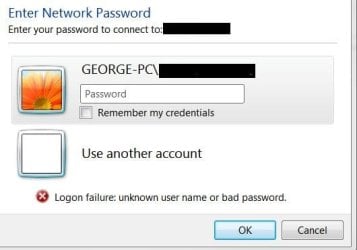
As I said, up till about a month ago I wasn't having problems but now I am.

This is where I'm having problems (see photo). When I pick the Mac icon in Computer, a security window pops open. I'm using my Windows 7 name \ Mac name, then my password for my Mac. This worked before but not now. No matter what I try I cannot connect to my Mac.
 

Attachments

  • Capture2.JPG
    Capture2.JPG
    28.7 KB · Views: 21

My Computer My Computer

At a glance

Windows 7 64-bitIntel Core i5-2500K 3300 Mhz16Gb Patriot PC3-12800 1600 MhzEVGA GeForce GTX 560 Ti (Fermi)
Computer type
PC/Desktop
Computer Manufacturer/Model Number
Custom built 2011
OS
Windows 7 64-bit
CPU
Intel Core i5-2500K 3300 Mhz
Motherboard
Gigabyte P67A-UD3-B3
Memory
16Gb Patriot PC3-12800 1600 Mhz
Graphics Card(s)
EVGA GeForce GTX 560 Ti (Fermi)
Sound Card
On Motherboard
Monitor(s) Displays
Dell U2412M & NEC EA232WMi
Screen Resolution
DELL 1920x1200 - NEC 1920x1080
Hard Drives
Crucial 128 Gb SSD
Hitachi Deskstar 2Tb 7200 RPM 32MB Cache
Seagate Barracuda 500Gb 7200 RPM
Hitachi GST Deskstar 1.5TB 7200 RPM 64MB Cache
PSU
Seasonic M1211-620 Bronze
Case
Antec Solo
Cooling
Tuniq Tower 120 Extreme Rev 1
Keyboard
Apple
Mouse
Microsoft
Internet Speed
5mbs
Other Info
Sunbeam PL-RS-3 Rheosmart 3 Fan Controller 3.5" Bay 3 Channel 30W Fan Controller Panel

My Computer My Computer

At a glance

Windows 7 64-bitIntel Core i5-2500K 3300 Mhz16Gb Patriot PC3-12800 1600 MhzEVGA GeForce GTX 560 Ti (Fermi)
Computer type
PC/Desktop
Computer Manufacturer/Model Number
Custom built 2011
OS
Windows 7 64-bit
CPU
Intel Core i5-2500K 3300 Mhz
Motherboard
Gigabyte P67A-UD3-B3
Memory
16Gb Patriot PC3-12800 1600 Mhz
Graphics Card(s)
EVGA GeForce GTX 560 Ti (Fermi)
Sound Card
On Motherboard
Monitor(s) Displays
Dell U2412M & NEC EA232WMi
Screen Resolution
DELL 1920x1200 - NEC 1920x1080
Hard Drives
Crucial 128 Gb SSD
Hitachi Deskstar 2Tb 7200 RPM 32MB Cache
Seagate Barracuda 500Gb 7200 RPM
Hitachi GST Deskstar 1.5TB 7200 RPM 64MB Cache
PSU
Seasonic M1211-620 Bronze
Case
Antec Solo
Cooling
Tuniq Tower 120 Extreme Rev 1
Keyboard
Apple
Mouse
Microsoft
Internet Speed
5mbs
Other Info
Sunbeam PL-RS-3 Rheosmart 3 Fan Controller 3.5" Bay 3 Channel 30W Fan Controller Panel
Odd thing here is it took a call to Apple Care (I purchased a 3 year warranty called Apple Care) to resolve this. They provided this site (File Sharing Mac OS X Lion and PC Windows 7 | Mac OS X) & also a suggestion from a similar post on this site (http://www.sevenforums.com/network-sharing/194516-file-sharing-works-pc-pc-b-but-not-vice-versa.html).

I believe the issue was what I was using for my Mac computer's name & also a change found in the TrickyWays.com | Windows, Mac OS X, iPhone, iPad, Android, Windows Phone 7, PSP, Office, Vista, Windows 7, Snow Leopard, Tips and Tricks, Tutorials, Guides articular. On Mac Preferences/Sharing then File Sharing/Options there was an unchecked box. Both need to checked.

As I mentioned before, I was able to connect prior to Mac 10.7 (Lion) by using the computer name listed in Mac preferences. After the install of 10.7, sharing from Win7 to Mac stopped. From Mac to Win7, however, still worked.

I guess in desperation I used my full name (first & last without space or .) & password & it worked.

Hope this helps some other lost souls!:D
 

My Computer My Computer

At a glance

Windows 7 64-bitIntel Core i5-2500K 3300 Mhz16Gb Patriot PC3-12800 1600 MhzEVGA GeForce GTX 560 Ti (Fermi)
Computer type
PC/Desktop
Computer Manufacturer/Model Number
Custom built 2011
OS
Windows 7 64-bit
CPU
Intel Core i5-2500K 3300 Mhz
Motherboard
Gigabyte P67A-UD3-B3
Memory
16Gb Patriot PC3-12800 1600 Mhz
Graphics Card(s)
EVGA GeForce GTX 560 Ti (Fermi)
Sound Card
On Motherboard
Monitor(s) Displays
Dell U2412M & NEC EA232WMi
Screen Resolution
DELL 1920x1200 - NEC 1920x1080
Hard Drives
Crucial 128 Gb SSD
Hitachi Deskstar 2Tb 7200 RPM 32MB Cache
Seagate Barracuda 500Gb 7200 RPM
Hitachi GST Deskstar 1.5TB 7200 RPM 64MB Cache
PSU
Seasonic M1211-620 Bronze
Case
Antec Solo
Cooling
Tuniq Tower 120 Extreme Rev 1
Keyboard
Apple
Mouse
Microsoft
Internet Speed
5mbs
Other Info
Sunbeam PL-RS-3 Rheosmart 3 Fan Controller 3.5" Bay 3 Channel 30W Fan Controller Panel
Back
Top