Solved Promblem with Atheros AR9285 wireless Network Adapter-Says Identifying

bizzeb

Banned
Local time
10:26 AM
Messages
37
I have a 2nd pc (netbook) Asus windows 7 32bit. When I pull up Network connections to view the to connections listed- Local Area & Wireless Network - When you click connect, it continuously says identifying. ON BOTH connections when you try connecting with both. I went to device manager and they are both there being still installed as will as the few hidden items such as the MiniPorts(IP, IPv2, & etc.). I need help fixing this issue to actually be able to connect to a network properly without is saying identifying. You cannot troubleshoot the issue as it is not finding a problem with the adapters. Please help.

When I did another troubleshooting just now, it says "Problem with wireless adapter or access point - Detected - With a caution sign. I do not have a way to reinstall a new driver on that pc. Please help. Thanks so much in advance.
 
Last edited by a moderator:

My Computer My Computer

At a glance

Windows 7 Home Premium x64Intel Core i3
Computer Manufacturer/Model Number
Gigabyte Tech. Co. Model-H55M-S2H
OS
Windows 7 Home Premium x64
CPU
Intel Core i3
I have a 2nd pc (netbook) Asus windows 7 32bit. When I pull up Network connections to view the to connections listed- Local Area & Wireless Network - When you click connect, it continuously says identifying. ON BOTH connections when you try connecting with both. I went to device manager and they are both there being still installed as will as the few hidden items such as the MiniPorts(IP, IPv2, & etc.). I need help fixing this issue to actually be able to connect to a network properly without is saying identifying. You cannot troubleshoot the issue as it is not finding a problem with the adapters. Please help.

Hi bizzeb, Have you visited the Asus website? reinstall the network adaptors ,also check with a virus scanner to make sure you are infection free If you would be so kind and give us a little more info on the netbook we may be able to help you further :)
 

My Computer My Computer

At a glance

win 7 ultimate32bit, Win8.1pro wmc 32bitamd phenom x4 9600corsair twinxs 2x2gb2x nvidia 1gb 8500gt
Computer type
PC/Desktop
Computer Manufacturer/Model Number
self build
OS
win 7 ultimate32bit, Win8.1pro wmc 32bit
CPU
amd phenom x4 9600
Motherboard
asus m2n32-sli deluxe
Memory
corsair twinxs 2x2gb
Graphics Card(s)
2x nvidia 1gb 8500gt
Sound Card
onboard
Monitor(s) Displays
23" PB Viseo 233d
Screen Resolution
1920x1080
Hard Drives
maxtor sata 500gb
maxtor sata 320gb
fujitsu sata200gb
PSU
oryxx tornado 750w
Case
thermaltake xaser lll
Cooling
artic freezer64 pro + 7 case fans
As for me trying to access the website to get the drivers, i wont be able to on that pc. Unless i saved them on another pc to put on cd and reinstall that way if possible. Right? It is virus check and cleaned now.

OS- Microsoft Windows 7 Starter
Version- 6.1.7600
System Manufacturer- ASUSTeK Computer INC.
System Model- 1005PE
System Type- x86-based PC
Processor- Intel Atom CPU N450
BIOS Version- American Megatrends Inc. 0706
SMBIOS Version- 2.6

Unsure what to do at this point being this is the first time I have looked into this. Thanks for any help.
 

My Computer My Computer

At a glance

Windows 7 Home Premium x64Intel Core i3
Computer Manufacturer/Model Number
Gigabyte Tech. Co. Model-H55M-S2H
OS
Windows 7 Home Premium x64
CPU
Intel Core i3
Hi bizzeb, Here is the link for the drivers ASUSTeK Computer Inc. -Support- Drivers and Download Eee PC 1005PE If possible download them to a USB pendrive so much easier than downloading and burning to a CD, There are 4 different network adaptors available 1 for LAN , 1 for 3G and 2 for wireless I would download all 4 and reinstall them all ;)
 

My Computer My Computer

At a glance

win 7 ultimate32bit, Win8.1pro wmc 32bitamd phenom x4 9600corsair twinxs 2x2gb2x nvidia 1gb 8500gt
Computer type
PC/Desktop
Computer Manufacturer/Model Number
self build
OS
win 7 ultimate32bit, Win8.1pro wmc 32bit
CPU
amd phenom x4 9600
Motherboard
asus m2n32-sli deluxe
Memory
corsair twinxs 2x2gb
Graphics Card(s)
2x nvidia 1gb 8500gt
Sound Card
onboard
Monitor(s) Displays
23" PB Viseo 233d
Screen Resolution
1920x1080
Hard Drives
maxtor sata 500gb
maxtor sata 320gb
fujitsu sata200gb
PSU
oryxx tornado 750w
Case
thermaltake xaser lll
Cooling
artic freezer64 pro + 7 case fans
Thanks for this. I will give it a try. I will let you know what happens. Thanks
 

My Computer My Computer

At a glance

Windows 7 Home Premium x64Intel Core i3
Computer Manufacturer/Model Number
Gigabyte Tech. Co. Model-H55M-S2H
OS
Windows 7 Home Premium x64
CPU
Intel Core i3
Which one should i download- global DML - global - china - P2P ?????? Does it matter for each one on that page? Also when I started to try to download the global DML link, it was only allowing me to RUN the download on my pc. I DO NOT WANT TO DOWNLOAD it to this PC and it mess this PC up. This is my main PC and don't want to have a problem with this also. I was hoping there was a SAVE button to the attachment. Any advice?
 

My Computer My Computer

At a glance

Windows 7 Home Premium x64Intel Core i3
Computer Manufacturer/Model Number
Gigabyte Tech. Co. Model-H55M-S2H
OS
Windows 7 Home Premium x64
CPU
Intel Core i3
bizzeb, Use the Global link ,you can download to your PC , it will only download to the desktop as a self extracting .exe file ,then copy it over to a USB pendrive :)
 

My Computer My Computer

At a glance

win 7 ultimate32bit, Win8.1pro wmc 32bitamd phenom x4 9600corsair twinxs 2x2gb2x nvidia 1gb 8500gt
Computer type
PC/Desktop
Computer Manufacturer/Model Number
self build
OS
win 7 ultimate32bit, Win8.1pro wmc 32bit
CPU
amd phenom x4 9600
Motherboard
asus m2n32-sli deluxe
Memory
corsair twinxs 2x2gb
Graphics Card(s)
2x nvidia 1gb 8500gt
Sound Card
onboard
Monitor(s) Displays
23" PB Viseo 233d
Screen Resolution
1920x1080
Hard Drives
maxtor sata 500gb
maxtor sata 320gb
fujitsu sata200gb
PSU
oryxx tornado 750w
Case
thermaltake xaser lll
Cooling
artic freezer64 pro + 7 case fans
Okay I Did a reinstall & setup.exe for all 4. Restarted the pc, and checked to see if they fixed the problem and No. DANG. I am lost in the step process now. So confused from here.
 

My Computer My Computer

At a glance

Windows 7 Home Premium x64Intel Core i3
Computer Manufacturer/Model Number
Gigabyte Tech. Co. Model-H55M-S2H
OS
Windows 7 Home Premium x64
CPU
Intel Core i3
I uninstalled all DRIVERS and resintalled them. Nothing worked still. I am worried if I will need to buy a new pc. I have a windows 7 starter disc but this is to do a clean reinstall, right? I will loose alot of things unless i save them right? I want to make sure the disc will put back windows on. Unsure on how to fix this as a clean reinstall is the last resort. Thanks for any help given.
 

My Computer My Computer

At a glance

Windows 7 Home Premium x64Intel Core i3
Computer Manufacturer/Model Number
Gigabyte Tech. Co. Model-H55M-S2H
OS
Windows 7 Home Premium x64
CPU
Intel Core i3
Hi bizzeb,

If I may jump in and add something to pebbly's great suggestions, let's see what's going on with your computer.

What type of Security or Firewall Software are you using?

Also, can we try updating your Atheros driver 'again' from the Atheros Site, it won't hurt at all. After you have downloaded the Atheros AR9285 driver, pls extract it and manually install and locate the .sys file.


  1. Open Device Manager by clicking the Start button
    4f6cbd09-148c-4dd8-b1f2-48f232a2fd33_818.jpg
    , clicking Control Panel, clicking System and Security, and then, under System, clicking Device Manager.*
    18abb370-ac1e-4b6b-b663-e028a75bf05b_48.jpg
    If you're prompted for an administrator password or confirmation, type the password or provide confirmation.
  2. Double-click Network Adapters, right-click your adapter, and then click Properties.
  3. Click the Driver tab, and then click Update Driver.
ipconfig /all output might be helpful.
Click on the Windows orb :orb: type cmd, right click on cmd see at the top, and click on Run as Administrator. From the command prompt (black screen), Copy and Paste these ipconfig /all >c:\ipconfig.txt . You will find the output in your Local Disk 'C'. You may you a USB flash drive to transfer the file from the working computer to yours.

Please post an update to report your progress.
 

My Computer My Computer

At a glance

Win7 & Win8 64bitIntel i5
Computer Manufacturer/Model Number
Lenovo Desktop/Samsung Laptop
OS
Win7 & Win8 64bit
CPU
Intel i5
Internet Speed
Charter-20 Mbps
Antivirus
Avast
Browser
FF, IE9 and Chrome
I am glad you got in touch with me 2xg. I was hoping you would as you have dealt with this situation before. I will get back to you soon to let you know what i have done. Thanks
 

My Computer My Computer

At a glance

Windows 7 Home Premium x64Intel Core i3
Computer Manufacturer/Model Number
Gigabyte Tech. Co. Model-H55M-S2H
OS
Windows 7 Home Premium x64
CPU
Intel Core i3
No problem bizzeb, I would help whenever I can.
Also, I have this bad habit of updating my Post for maybe 100x, pls. make sure to check on my Post and hit the refresh button. :D
I am glad you got in touch with me 2xg. I was hoping you would as you have dealt with this situation before. I will get back to you soon to let you know what i have done. Thanks
 

My Computer My Computer

At a glance

Win7 & Win8 64bitIntel i5
Computer Manufacturer/Model Number
Lenovo Desktop/Samsung Laptop
OS
Win7 & Win8 64bit
CPU
Intel i5
Internet Speed
Charter-20 Mbps
Antivirus
Avast
Browser
FF, IE9 and Chrome
This is the Info for the computer as you asked for 2xg. I updated the drivers via what was on the computer and it said that the drivers are all up to date. But info is below. Also, the step by step procedure you do to help out one how to access things for (me, & people), is great. Thanks

Windows IP Configuration

Host Name . . . . . . . . . . . . : Lorrie-PC
Primary Dns Suffix . . . . . . . :
Node Type . . . . . . . . . . . . : Hybrid
IP Routing Enabled. . . . . . . . : No
WINS Proxy Enabled. . . . . . . . : No

Wireless LAN adapter Wireless Network Connection 2:

Media State . . . . . . . . . . . : Media disconnected
Connection-specific DNS Suffix . :
Description . . . . . . . . . . . : Microsoft Virtual WiFi Miniport Adapter
Physical Address. . . . . . . . . : 06-25-D3-F6-30-E6
DHCP Enabled. . . . . . . . . . . : Yes
Autoconfiguration Enabled . . . . : Yes

Wireless LAN adapter Wireless Network Connection:

Connection-specific DNS Suffix . :
Description . . . . . . . . . . . : Atheros AR9285 Wireless Network Adapter
Physical Address. . . . . . . . . : 00-25-D3-F6-30-E6
DHCP Enabled. . . . . . . . . . . : Yes
Autoconfiguration Enabled . . . . : Yes
Link-local IPv6 Address . . . . . : fe80::bda3:854:6b60:f206%30(Preferred)
Autoconfiguration IPv4 Address. . : 169.254.242.6(Preferred)
Subnet Mask . . . . . . . . . . . : 255.255.0.0
Default Gateway . . . . . . . . . :
DNS Servers . . . . . . . . . . . : fec0:0:0:ffff::1%1
fec0:0:0:ffff::2%1
fec0:0:0:ffff::3%1
NetBIOS over Tcpip. . . . . . . . : Disabled

Ethernet adapter Local Area Connection:

Media State . . . . . . . . . . . : Media disconnected
Connection-specific DNS Suffix . :
Description . . . . . . . . . . . : Atheros AR8132 PCI-E Fast Ethernet Controller (NDIS 6.20)
Physical Address. . . . . . . . . : E0-CB-4E-A6-2A-F5
DHCP Enabled. . . . . . . . . . . : Yes
Autoconfiguration Enabled . . . . : Yes

Tunnel adapter isatap.{A903B51A-5513-46DE-98C6-AD5DCE9AB55D}:

Media State . . . . . . . . . . . : Media disconnected
Connection-specific DNS Suffix . :
Description . . . . . . . . . . . : Microsoft ISATAP Adapter
Physical Address. . . . . . . . . : 00-00-00-00-00-00-00-E0
DHCP Enabled. . . . . . . . . . . : No
Autoconfiguration Enabled . . . . : Yes

Tunnel adapter Local Area Connection* 17:

Media State . . . . . . . . . . . : Media disconnected
Connection-specific DNS Suffix . :
Description . . . . . . . . . . . : Microsoft ISATAP Adapter #2
Physical Address. . . . . . . . . : 00-00-00-00-00-00-00-E0
DHCP Enabled. . . . . . . . . . . : No
Autoconfiguration Enabled . . . . : Yes

Tunnel adapter Local Area Connection* 22:

Media State . . . . . . . . . . . : Media disconnected
Connection-specific DNS Suffix . :
Description . . . . . . . . . . . : Teredo Tunneling Pseudo-Interface
Physical Address. . . . . . . . . : 00-00-00-00-00-00-00-E0
DHCP Enabled. . . . . . . . . . . : No
Autoconfiguration Enabled . . . . : Yes
 

My Computer My Computer

At a glance

Windows 7 Home Premium x64Intel Core i3
Computer Manufacturer/Model Number
Gigabyte Tech. Co. Model-H55M-S2H
OS
Windows 7 Home Premium x64
CPU
Intel Core i3
How about the Security or Firewall Software installed?

Your computer might still be infected if it's stuck on Identifying. Let's hope not.

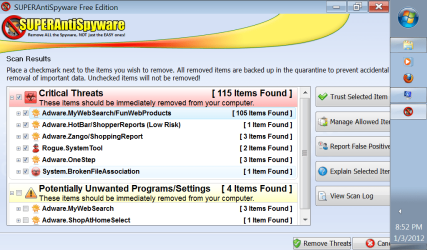
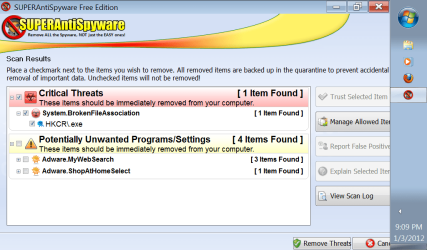
Try running Free SuperAntiSpyware, see if it helps. No need to post the logs.

Check all your Network Services as well, see if they are all on Started mode including their Dependencies, check the Dependency Tab for that.
Click on start and type services.msc press enter. On Dependency Tab, check the Dependecies make sure that they are also Started.

• COM+ Event System (for WZC issues)
• Computer Browser
• DHCP Client
• DNS Client
• Network Connections
• Network Location Awareness
• Remote Procedure Call (RPC)
• Server
• TCP/IP Netbios helper
• WLAN AutoConfig (for Vista and Windows 7 only)
• Workstation

Is the wired connection also affected?

Is there another computer from your network that you can do another ipconfig /all. Let's try assigning Static IP Address to your computer. Do you know how to do this or you'll need a guide?
 

My Computer My Computer

At a glance

Win7 & Win8 64bitIntel i5
Computer Manufacturer/Model Number
Lenovo Desktop/Samsung Laptop
OS
Win7 & Win8 64bit
CPU
Intel i5
Internet Speed
Charter-20 Mbps
Antivirus
Avast
Browser
FF, IE9 and Chrome
More Info listed for you 2xg....

OS Name- Microsoft Windows 7 Starter
Version- 6.1.7600 Build 7600
Other OS Description- Not Available
OS Manufacturer- Microsoft Corporation
System Name- LORRIE-PC
System Manufacturer- ASUSTeK Computer INC.
System Model- 1005PE
System Type- X86-based PC
Processor- Intel(R) Atom(TM) CPU N450 @ 1.66GHz, 1667 Mhz, 1 Core(s), 2 Logical Processor(s)
BIOS Version/Date- American Megatrends Inc. 0706, 1/4/2010
SMBIOS Version 2.6
Windows Directory C:\windows
System Directory C:\windows\system32
Boot Device \Device\HarddiskVolume1
Locale- United States
Hardware Abstraction Layer Version = "6.1.7600.16385"
User Name Lorrie-PC\Lorrie
Time Zone Eastern Standard Time
Installed Physical Memory (RAM) 1.00 GB
Total Physical Memory 0.99 GB
Available Physical Memory 415 MB
Total Virtual Memory 1.99 GB
Available Virtual Memory 1.22 GB
Page File Space 1.00 GB
Page File C:\pagefile.sys
 

My Computer My Computer

At a glance

Windows 7 Home Premium x64Intel Core i3
Computer Manufacturer/Model Number
Gigabyte Tech. Co. Model-H55M-S2H
OS
Windows 7 Home Premium x64
CPU
Intel Core i3
Yes = Started No = Not started and up for deletion it says when you try to start it
• COM+ Event System (for WZC issues) -- YES
• Computer Browser -- NO
• DHCP Client -- NO
• DNS Client -- NO
• Network Connections --Yes
• Network Location Awareness --Yes
• Remote Procedure Call (RPC) --Yes -- but RPC Locator is a NO
• Server -- YES
• TCP/IP Netbios helper -- Yes
• WLAN AutoConfig (for Vista and Windows 7 only)--Yes
• Workstation--Yes

And yes both wired and wireless says Identifying... And I may need a step by step to assist in the IP thing if you dont mind.
 

My Computer My Computer

At a glance

Windows 7 Home Premium x64Intel Core i3
Computer Manufacturer/Model Number
Gigabyte Tech. Co. Model-H55M-S2H
OS
Windows 7 Home Premium x64
CPU
Intel Core i3
All the Network Services that are not Started need to be Started. Double click each Service and try to Start it. Check the Dependency Tab and make sure that each Service is also Started.
No point of doing the Fixed IP assignment if those Network Services are not Started bec. it is not going to work.

If none of those Services won't Start, I might have to refer you to one of our Security Experts I have a feeling that your computer is still infected, not unless you prefer to do a Clean install of your computer. :D
 

My Computer My Computer

At a glance

Win7 & Win8 64bitIntel i5
Computer Manufacturer/Model Number
Lenovo Desktop/Samsung Laptop
OS
Win7 & Win8 64bit
CPU
Intel i5
Internet Speed
Charter-20 Mbps
Antivirus
Avast
Browser
FF, IE9 and Chrome
I just added the 2 pics i took of the before removal & 2nd scan after it was done.
 

Attachments

  • blaines pc spyware.png
    blaines pc spyware.png
    56.1 KB · Views: 68
  • blaines 2nd pic.png
    blaines 2nd pic.png
    46.8 KB · Views: 54

My Computer My Computer

At a glance

Windows 7 Home Premium x64Intel Core i3
Computer Manufacturer/Model Number
Gigabyte Tech. Co. Model-H55M-S2H
OS
Windows 7 Home Premium x64
CPU
Intel Core i3
This is an example of what it shows for each one when I try to start it.

Yes = Started
No = Not started and up for deletion it says when you try to start it

• COM+ Event System (for WZC issues) -- YES
• Computer Browser -- NO
• DHCP Client -- NO
• DNS Client -- NO
• Network Connections --Yes
• Network Location Awareness --Yes
• Remote Procedure Call (RPC) --Yes -- but RPC Locator is a NO
• Server -- YES
• TCP/IP Netbios helper -- Yes
• WLAN AutoConfig (for Vista and Windows 7 only)--Yes
• Workstation--Yes
 

Attachments

  • pc error.png
    pc error.png
    30.7 KB · Views: 53

My Computer My Computer

At a glance

Windows 7 Home Premium x64Intel Core i3
Computer Manufacturer/Model Number
Gigabyte Tech. Co. Model-H55M-S2H
OS
Windows 7 Home Premium x64
CPU
Intel Core i3
Lets try to reset the TCP/IP and Winsock, see if it helps and it might magically Start those Services.

Click on Start=> All Programs => Accessories and right click on Command Prompt, select "Run as Administrator" to open a command prompt.
Reset IPv4 TCP/IP stack to installation defaults. netsh int ipv4 reset reset.log press enter
Reset IPv6 TCP/IP stack to installation defaults. netsh int ipv6 reset reset.log press enter
Reset WINSOCK entries to installation defaults: netsh winsock reset catalog press enter

Restart the computer after and test your connection after, also see of those Network Services would start.
 

My Computer My Computer

At a glance

Win7 & Win8 64bitIntel i5
Computer Manufacturer/Model Number
Lenovo Desktop/Samsung Laptop
OS
Win7 & Win8 64bit
CPU
Intel i5
Internet Speed
Charter-20 Mbps
Antivirus
Avast
Browser
FF, IE9 and Chrome
Back
Top