
Unidentified Network issue in Windows 7 x64 - AGAIN

Alex Neverhood

New member
Local time
5:41 AM
Messages
16
This problem is driving me insane, I swear. I'd fixed it once, but now its back to haunt me and I have no idea what causes it. It's just so random.

I've posted a thread about it here before, but had managed to fix the problem. What I did to get rid of it was:
1. Set "Speed & Duplex" in my adapter properties to a fixed speed (in my case it was 10 Mbit Half-Duplex, the others didn't work).
2. Changed network speed (WAN port speed) in my router from 10/100 Mbit Auto to fixed "100 Mbit".

That seemed to have done the trick and everything worked for 2 weeks. Today I go out for lunch for 30 minutes and when I come back the connection is gone. I reset the adapter - nothing. I've tried all the regular stuff again, reinstalled the drivers etc., reset the router/laptop but it still can't find the network.

It's a disaster as this is my work laptop and I have to be online all the time. What on Earth could've happened while I was out? The laptop was locked (and I always have it locked whenever I leave it) so it's absolutely impossible that somebody had messed with my settings.

I've checked - the router & adapter settings are still the same but for some reason the settings that had worked for 2 weeks don't work now anymore. I'm going mad.

The problem persists in safe mode and I've tried every Speed&Duplex setting now - nothing works anymore. The adapter doesn't seem to be absolutely dead as it recognises the cable, but still can't get on the network.

Please help me.

Here is a full list of my adapter settings. Any idea what may have caused it to die during sleep in locked mode?
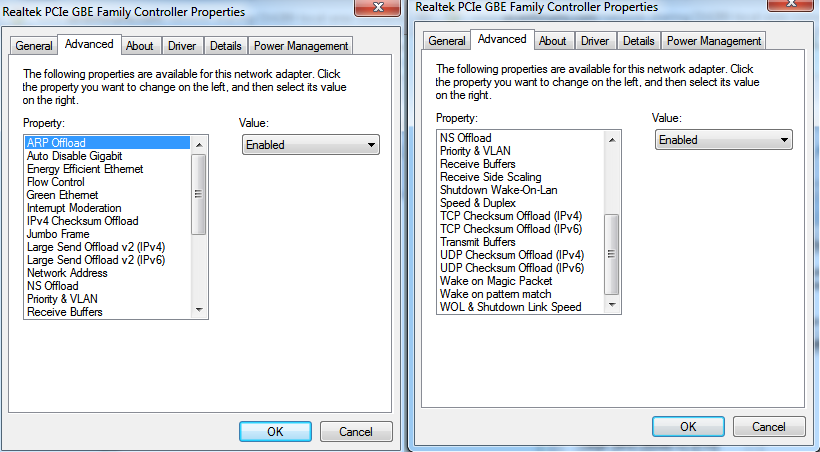
DrbAV.png
 

My Computer My Computer

OS
Windows 7
Hello,

Can you do an 'ipconfig /all' please.

Do you have the latest installed drivers? Has Windows updated the drivers whilst you where out?


Dave
 

My Computer My Computer

Computer type
PC/Desktop
Computer Manufacturer/Model Number
Custom
OS
Windows 7 Ultimate x64
CPU
Intel Core i7 2600K (O/C 4.7GHz)
Motherboard
Asus ROG Maximus IV Extreme-Z - Intel Z68 Chipset
Memory
8GB Corsair Vengeance LP, DDR3, 1600Mhz
Graphics Card(s)
Nvidia GTX 460 Graphics Card
Sound Card
Onboard
Monitor(s) Displays
Dell E228WFP
Hard Drives
2 x 500GB Samsung SpinPoint Drives (1 for OS, 1 for Data and Apps)
PSU
CoolerMaster 1000W
Case
CoolerMaster HAF
Cooling
Air
Internet Speed
Fibre - 60MB Down, 30MB Up
Antivirus
ESET NOD32 Antivirus
No, I just checked - the latest update was on March the 2nd. I have the latest drivers available on the Realtek website. My Nvidia and internal controller drivers are also up to date.

What kills me is that I've had this problem already and had gotten rid of it once. And now it's back even though nothing has changed. Usually with issues like this there at least some sort of logic, but this problem just seems to come and go randomly. The fix I'd used for it last time doesn't seem to work anymore and I don't get it how this can be possible.

Here is my ipconfig /all:
Microsoft Windows [Version 6.1.7601]
Copyright (c) 2009 Microsoft Corporation. All rights reserved.

C:\Users\Alex>ipconfig/all

Windows IP Configuration

Host Name . . . . . . . . . . . . : Alex-PC
Primary Dns Suffix . . . . . . . :
Node Type . . . . . . . . . . . . : Hybrid
IP Routing Enabled. . . . . . . . : No
WINS Proxy Enabled. . . . . . . . : No

Ethernet adapter Local Area Connection:

Connection-specific DNS Suffix . :
Description . . . . . . . . . . . : Realtek PCIe GBE Family Controller
Physical Address. . . . . . . . . : E8-11-32-C0-99-CB
DHCP Enabled. . . . . . . . . . . : Yes
Autoconfiguration Enabled . . . . : Yes
Link-local IPv6 Address . . . . . : fe80::1408:4d8:e88a:288a%27(Preferred)
Autoconfiguration IPv4 Address. . : 169.254.40.138(Preferred)
Subnet Mask . . . . . . . . . . . : 255.255.0.0
Default Gateway . . . . . . . . . :
DHCPv6 IAID . . . . . . . . . . . : 468193586
DHCPv6 Client DUID. . . . . . . . : 00-01-00-01-16-CE-75-AF-E8-11-32-C0-99-CB

DNS Servers . . . . . . . . . . . : fec0:0:0:ffff::1%1
fec0:0:0:ffff::2%1
fec0:0:0:ffff::3%1
NetBIOS over Tcpip. . . . . . . . : Enabled

Tunnel adapter Teredo Tunneling Pseudo-Interface:

Media State . . . . . . . . . . . : Media disconnected
Connection-specific DNS Suffix . :
Description . . . . . . . . . . . : Teredo Tunneling Pseudo-Interface
Physical Address. . . . . . . . . : 00-00-00-00-00-00-00-E0
DHCP Enabled. . . . . . . . . . . : No
Autoconfiguration Enabled . . . . : Yes

Tunnel adapter isatap.{2A09569C-B7C4-4D53-A23F-7A7C3CE754CC}:

Media State . . . . . . . . . . . : Media disconnected
Connection-specific DNS Suffix . :
Description . . . . . . . . . . . : Microsoft ISATAP Adapter #3
Physical Address. . . . . . . . . : 00-00-00-00-00-00-00-E0
DHCP Enabled. . . . . . . . . . . : No
Autoconfiguration Enabled . . . . : Yes
 

My Computer My Computer

OS
Windows 7
Here are my adapter settings:

ARP Offload - Enabled
Auto Disable Gigabit - Disabled
Energy Efficient Ethernet - Enabled
Flow Control - Enabled
Green Ethernet - Enabled
Interrupt Moderation - Enabled
IPv4 Checksum Offload - Rx & Tx Enabled
Jumbo Frame - Disabled
Large Send Offload v2 (IPv4) - Enabled
Large Send Offload v2 (IPv6) - Enabled
Network Address - Not Present
NS Offload - Enabled
Priority & VLAN - Priority & VLAN Enabled
Receive Buffers - 512
Receive Side Scaling - Enabled
Shutdown Wake On Lan - Enabled
Speed & Duplex - 10 Mbit Half Duplex
TCP Checksum Offload (IPv4) - Rx & Tx Enabled
TCP Checksum Offload (IPv6) - Rx & Tx Enabled
Transmit Buffers - 128
UDP Checksum Offload (IPv4) - Rx & Tx Enabled
TCP Checksum Offload (IPv6) - Rx & Tx Enabled
Wake on Magic packet - Enabled
Wake on pattern match - Enabled
WOL & Shutdown Link Speed - 10 Mbps First

I've tried various combinations, but this is how they normally look - the default settings that I'm back to now. The only thing different is Speed & Duplex setting (used to be Auto-Negotiation). Right now I can change it to anything and the network is still unrecognised.

I have tried enabling/disabling the device, removing it from the system completely (with the driver) and installing from scratch - the problem still remains.
 

My Computer My Computer

OS
Windows 7
You're getting an IP address in the 169.254.x.x APIPA block. This means the network connection isn't getting as far as getting an address from your LAN's DHCP server. In this case, "unidentified network" is a symptom of DHCP failure rather than the reason your network connection won't work.

DHCP working OK for other computers on the network?

What happens if you assign your computer a static IP address?

Have you tried using a different cable to connect your system to a different port on your router (or switch)?

The fact that it worked when you forced speed to 10mbit suggests a problem with your cabling, NIC, or the port on your router/switch.
 

My Computer My Computer

OS
Win7Ultimate x64 + x32, Win7Pro x64, XP x32, Win 2003, Ubuntu and OpenIndiana
Everything else is working fine in the network. We've never had a problem like that in about 2 years that we've had this router. Normally when someone new comes to the office (business trip, meeting etc.) they just plug their computer to the socket and connect immediately. I may recall a couple times people had to reset their laptops to get connection, but that's it.

I'm not sure how to assign a static IP. Do you mean setting a Network Address in adapter properties? I've tried that (seen suggestions online), but no success. I've tried using a different cable, no luck either.
 

My Computer My Computer

OS
Windows 7
How to assign a static IP:
How to Assign a Static IP Address in XP, Vista, or Windows 7 - How-To Geek

How many devices are connected to your network? Check your routers DHCP scope to see if you are giving the correct amount of addresses out.

Change the Speed and Duplex to Auto again - You shouldnt have to change this really. When did the problem start again? Was it after or before the 2nd March? - If it was after you may want to roll back the driver.


Dave
 

My Computer My Computer

Computer type
PC/Desktop
Computer Manufacturer/Model Number
Custom
OS
Windows 7 Ultimate x64
CPU
Intel Core i7 2600K (O/C 4.7GHz)
Motherboard
Asus ROG Maximus IV Extreme-Z - Intel Z68 Chipset
Memory
8GB Corsair Vengeance LP, DDR3, 1600Mhz
Graphics Card(s)
Nvidia GTX 460 Graphics Card
Sound Card
Onboard
Monitor(s) Displays
Dell E228WFP
Hard Drives
2 x 500GB Samsung SpinPoint Drives (1 for OS, 1 for Data and Apps)
PSU
CoolerMaster 1000W
Case
CoolerMaster HAF
Cooling
Air
Internet Speed
Fibre - 60MB Down, 30MB Up
Antivirus
ESET NOD32 Antivirus
So now I've been playing around with settings again (I've been doing it for the last 2 days whenever I have a free moment at work).

1. I went to Power Management and disabled the "Allow the computer to turn off this device to save power" thingy.
2. I have disabled QoS Packet Scheduler, Kaspersky Anti-Virus NDIS Filter and TCP/IPv6.

And it found a network. And lost it 5 minutes later. Here is my ipconfig/all after it connected.
The thing is - it had lost the network right after I'd plugged the laptop into the power outlet. It might be a coincidence, but last time the network died it was also somehow related to power management - I went out to lunch, locked the laptop, it went to sleep and when I woke it up - the network was gone.

Can anybody see any pattern here? Maybe suggest some adapter settings that might be screwing things up?
I don't need any power management optimisations TBH - 90% of the time my laptop is not working on battery supply. I'd be fine with disabling all of them.

Here is the ipconfig/all from when it got the network:
Microsoft Windows [Version 6.1.7601]
Copyright (c) 2009 Microsoft Corporation. All rights reserved.

C:\Users\Alex>ipconfig/all

Windows IP Configuration

Host Name . . . . . . . . . . . . : Alex-PC
Primary Dns Suffix . . . . . . . :
Node Type . . . . . . . . . . . . : Hybrid
IP Routing Enabled. . . . . . . . : No
WINS Proxy Enabled. . . . . . . . : No

Ethernet adapter Local Area Connection:

Connection-specific DNS Suffix . :
Description . . . . . . . . . . . : Realtek PCIe GBE Family Controller
Physical Address. . . . . . . . . : E8-11-32-C0-99-CB
DHCP Enabled. . . . . . . . . . . : Yes
Autoconfiguration Enabled . . . . : Yes
IPv4 Address. . . . . . . . . . . : 192.168.0.103(Preferred)
Subnet Mask . . . . . . . . . . . : 255.255.255.0
Lease Obtained. . . . . . . . . . : 7 марта 2012 г. 14:01:51
Lease Expires . . . . . . . . . . : 14 марта 2012 г. 14:01:50
Default Gateway . . . . . . . . . : 192.168.0.1
DHCP Server . . . . . . . . . . . : 192.168.0.1
DNS Servers . . . . . . . . . . . : 192.168.0.1
NetBIOS over Tcpip. . . . . . . . : Enabled

Wireless LAN adapter Wireless Network Connection 3:

Media State . . . . . . . . . . . : Media disconnected
Connection-specific DNS Suffix . :
Description . . . . . . . . . . . : Microsoft Virtual WiFi Miniport Adapter #
2
Physical Address. . . . . . . . . : DC-A9-71-1E-50-2E
DHCP Enabled. . . . . . . . . . . : Yes
Autoconfiguration Enabled . . . . : Yes

Wireless LAN adapter Wireless Network Connection 2:

Media State . . . . . . . . . . . : Media disconnected
Connection-specific DNS Suffix . :
Description . . . . . . . . . . . : Microsoft Virtual WiFi Miniport Adapter
Physical Address. . . . . . . . . : DC-A9-71-1E-50-2E
DHCP Enabled. . . . . . . . . . . : Yes
Autoconfiguration Enabled . . . . : Yes

Wireless LAN adapter Wireless Network Connection:

Media State . . . . . . . . . . . : Media disconnected
Connection-specific DNS Suffix . : Dlink
Description . . . . . . . . . . . : Intel(R) Centrino(R) Wireless-N 130
Physical Address. . . . . . . . . : DC-A9-71-1E-50-2D
DHCP Enabled. . . . . . . . . . . : Yes
Autoconfiguration Enabled . . . . : Yes

Tunnel adapter isatap.{20768159-9323-42DC-9B54-C0DA83476810}:

Media State . . . . . . . . . . . : Media disconnected
Connection-specific DNS Suffix . :
Description . . . . . . . . . . . : Microsoft ISATAP Adapter
Physical Address. . . . . . . . . : 00-00-00-00-00-00-00-E0
DHCP Enabled. . . . . . . . . . . : No
Autoconfiguration Enabled . . . . : Yes

Tunnel adapter Teredo Tunneling Pseudo-Interface:

Connection-specific DNS Suffix . :
Description . . . . . . . . . . . : Teredo Tunneling Pseudo-Interface
Physical Address. . . . . . . . . : 00-00-00-00-00-00-00-E0
DHCP Enabled. . . . . . . . . . . : No
Autoconfiguration Enabled . . . . : Yes
IPv6 Address. . . . . . . . . . . : 2001:0:4137:9e76:24ee:f5dd:a42c:82fd(Pref
erred)
Link-local IPv6 Address . . . . . : fe80::24ee:f5dd:a42c:82fd%13(Preferred)
Default Gateway . . . . . . . . . : ::
NetBIOS over Tcpip. . . . . . . . : Disabled

Tunnel adapter isatap.Dlink:

Media State . . . . . . . . . . . : Media disconnected
Connection-specific DNS Suffix . :
Description . . . . . . . . . . . : Microsoft ISATAP Adapter #2
Physical Address. . . . . . . . . : 00-00-00-00-00-00-00-E0
DHCP Enabled. . . . . . . . . . . : No
Autoconfiguration Enabled . . . . : Yes

Tunnel adapter isatap.{2A09569C-B7C4-4D53-A23F-7A7C3CE754CC}:

Media State . . . . . . . . . . . : Media disconnected
Connection-specific DNS Suffix . :
Description . . . . . . . . . . . : Microsoft ISATAP Adapter #3
Physical Address. . . . . . . . . : 00-00-00-00-00-00-00-E0
DHCP Enabled. . . . . . . . . . . : No
Autoconfiguration Enabled . . . . : Yes

Tunnel adapter isatap.{F6DE66B8-01C3-4A50-B33B-4BA90D52E91A}:

Media State . . . . . . . . . . . : Media disconnected
Connection-specific DNS Suffix . :
Description . . . . . . . . . . . : Microsoft ISATAP Adapter #4
Physical Address. . . . . . . . . : 00-00-00-00-00-00-00-E0
DHCP Enabled. . . . . . . . . . . : No
Autoconfiguration Enabled . . . . : Yes

It's back to Unidentified network now and doing the same thing doesn't help at all. I'm even more confused now. The right solution seems to always be just inches away. I can't figure out any pattern for this.
 

My Computer My Computer

OS
Windows 7
Bumping for help.

1. The static IP trick didn't help.
2. I got more hints to this problem being power-related now. I've just seen the following happen: I came to work, plugged in the LAN cable, laptop found the network, laptop lost the network in a while. I disabled the adapter, unplugged the power cable, enabled the adapter and it found the network again. The same thing didn't work while the power cable had been plugged.

I have disabled Green Ethernet and Energy Efficient Ethernet in the adapter settings, but the problem still remains when the laptop is plugged in. What else can be the issue here?
 

My Computer My Computer

OS
Windows 7
"When did the problem start again? Was it after or before the 2nd March?"

From my previous post.


Dave
 

My Computer My Computer

Computer type
PC/Desktop
Computer Manufacturer/Model Number
Custom
OS
Windows 7 Ultimate x64
CPU
Intel Core i7 2600K (O/C 4.7GHz)
Motherboard
Asus ROG Maximus IV Extreme-Z - Intel Z68 Chipset
Memory
8GB Corsair Vengeance LP, DDR3, 1600Mhz
Graphics Card(s)
Nvidia GTX 460 Graphics Card
Sound Card
Onboard
Monitor(s) Displays
Dell E228WFP
Hard Drives
2 x 500GB Samsung SpinPoint Drives (1 for OS, 1 for Data and Apps)
PSU
CoolerMaster 1000W
Case
CoolerMaster HAF
Cooling
Air
Internet Speed
Fibre - 60MB Down, 30MB Up
Antivirus
ESET NOD32 Antivirus
It was way after the 2nd of March. I've also checked what updates were unstalled on the 2nd of March - nothing hardware-related at all, just Windows Defender stuff.

The first time it lost the network after 2 weeks was on the 7th of March.
 

My Computer My Computer

OS
Windows 7
Just to get this out of the way - I've just updated the router firmware. It didn't change anything. Every other computer in the office, be it old or new, still works. My laptop shows unidentified network.

Can this be a hardware issue? How does it determine that the cable is plugged and why am I able to manage device settings and reset it then? It's so weird. The power cable socket is right next to the LAN port on the laptop - can this mean anything?

It's so weird. I've had this problem from day one, but I don't understand how the Speed & Duplex setting change could've fixed it once and then couldn't do it for the second time around. It's the same system, the same device, the same driver, the same network. Nothing at all changed, yet everything seems to be different now except for the problem itself.
 

My Computer My Computer

OS
Windows 7
You should run this tunnel adaptor remover first. Too many of these indicates a driver problem and it will also ruin your connection if there are too many of those tunnel adaptors. This problem happens all the time. Click and save the zip file, then run the zip file and reboot.

Just use Tunnel Adapter – Microsoft 6to4 adapter Remover
http://www.sordum.com/deneme/6to4/do...to4remover.zip
 

My Computer My Computer

Computer type
PC/Desktop
Computer Manufacturer/Model Number
Home built
OS
Windows 7 Ult, Windows 8.1 Pro,
CPU
Q9650-4.275GHz, E8600 4.5GHz, E6750-3.8GHz
Motherboard
Evga 780i FTW
Memory
G.Skill PC2 9600 1200Mhz 5 5 5 15 2T
Graphics Card(s)
GTX480
Sound Card
Asus Xonar D2
Monitor(s) Displays
HannsG
Screen Resolution
1680X1050
Hard Drives
GSkill Phoenix Pro 120GB SSD
PSU
ThermalTake Toughpower 1000Watt modular
Case
ThermalTake XaserV
Cooling
Xigmatek S1283
Keyboard
Logitech G15
Mouse
Logitech G9
Internet Speed
T1
You should run this tunnel adaptor remover first. Too many of these indicates a driver problem and it will also ruin your connection if there are too many of those tunnel adaptors. This problem happens all the time. Click and save the zip file, then run the zip file and reboot.

Just use Tunnel Adapter – Microsoft 6to4 adapter Remover
http://www.sordum.com/deneme/6to4/do...to4remover.zip
Here is what I did:

1. I'm now working on my old laptop. So I took my new one and turned it on. It recognised the network.
2. I'm surprised, of course, so I decide to check for how long it will stay this way. I log in to my second Skype account (I have one just for work) and make a video call to my work account. I go back to my desk and work while checking the small video screen to see when it will be gone. It seems to be stable.
3. I go back to the new laptop and then I have a thought. I pull the power plug out and the connection drops immediately. When I try to diagnose it, it goes back to the unidentified network shit.
4. So now that I'm back to my problem, I run the tunnel adaptor remover. The x64 version doesn't work for me for some reason, saying I have an unsupported system (though I have x64 Win7 Enterprise). i386 works fine though.
5. Nothing happens afterwards.

But here is what I've discovered while I've been doing all this. The following procedure helps to get the connection up and running.

1. Laptop is plugged and is not using bettery.
2. The network drops and goes to unidentified network.
3. I disable the PCIe adaptor.
4. I unplug the power cable.
5. I enable the adaptor and it find the network immediately.

Unfortunately, as soon as I plug the power cable back again, the connection drops again almost immediately and I'm back to unidentified network again. Is this crazy or what?

I'm growing more convinced that this might be a hardware issue. The power socked is right next to the LAN port on the laptop. Can this have some sort of negative influence over the LAN connection?

Please tell me if anyone has any ideas about what might this be. The part that confuses me is that I've had the unidentified network issue from the start and still managed to get it working for 2 weeks with the speed & duplex trick. Maybe that's just a weird coincidence and there was a driver/network problem, but also a hardware problem. Lucky me.
 

My Computer My Computer

OS
Windows 7
I've done this about a dozen times now and I guess it's official, the problem is - the laptop can't get the network identified when it is plugged. I've done quite a number of scenarios in the last 30 minutes.

1. Laptop working off the battery, power cord plugged in = network lost in 1-2 minutes tops, inidentified network after diagnosing connection.
2. The laptop has no problem finding the network as long as the power cord isn't plugged. If you plug it right after the network is recognised - the network will be gone.

It is possible that the opposite will be true - if the network is dropped while it works off the battery, it will easily recognise the network when plugged in. But so far I didn't have a chance to test this - it didn't drop the network while working off the battery yet.
 

My Computer My Computer

OS
Windows 7
I've done this about a dozen times now and I guess it's official, the problem is - the laptop can't get the network identified when it is plugged. I've done quite a number of scenarios in the last 30 minutes.

1. Laptop working off the battery, power cord plugged in = network lost in 1-2 minutes tops, inidentified network after diagnosing connection.
2. The laptop has no problem finding the network as long as the power cord isn't plugged. If you plug it right after the network is recognised - the network will be gone.

It is possible that the opposite will be true - if the network is dropped while it works off the battery, it will easily recognise the network when plugged in. But so far I didn't have a chance to test this - it didn't drop the network while working off the battery yet.

Battery problems aside, it's not going to work correctly with all those extra tunnel adaptors.
The fact that you have all those tunnel adaptors indicates that you have a driver problem with your network adaptor. Have you tried to update the driver yet?

If you want to get rid of those rogue tunnel adaptor entries then go to device manager, go to view at the top of the page and then select "show hidden devices". Then go to "Network adaptors" and just delete all the extra tunnel adaptors you see there, windows will create a new one automatically. After that check your ipconfig /all to see if they all have been deleted.

If they all don't show up you can change a registry setting to make them all show up "backup the registry first". You should have a nice clean ipconfig after that.
smile.gif


Registry Settings, navigate too the following key.
System Key: [HKEY_LOCAL_MACHINE\SYSTE\CurrentControlSet\Control \Session Manager\Environment]
Value Name: DEVMGR_SHOW_NONPRESENT_DEVICES
Data Type: REG_SZ (String Value)
Value Data: (1 = show all hidden devices)
 
Last edited:

My Computer My Computer

Computer type
PC/Desktop
Computer Manufacturer/Model Number
Home built
OS
Windows 7 Ult, Windows 8.1 Pro,
CPU
Q9650-4.275GHz, E8600 4.5GHz, E6750-3.8GHz
Motherboard
Evga 780i FTW
Memory
G.Skill PC2 9600 1200Mhz 5 5 5 15 2T
Graphics Card(s)
GTX480
Sound Card
Asus Xonar D2
Monitor(s) Displays
HannsG
Screen Resolution
1680X1050
Hard Drives
GSkill Phoenix Pro 120GB SSD
PSU
ThermalTake Toughpower 1000Watt modular
Case
ThermalTake XaserV
Cooling
Xigmatek S1283
Keyboard
Logitech G15
Mouse
Logitech G9
Internet Speed
T1
Battery problems aside, it's not going to work correctly with all those extra tunnel adaptors.
The fact that you have all those tunnel adaptors indicates that you have a driver problem with your network adaptor. Have you tried to update the driver yet?

If you want to get rid of those rogue tunnel adaptor entries then go to device manager, go to view at the top of the page and then select "show hidden devices". Then go to "Network adaptors" and just delete all the extra tunnel adaptors you see there, windows will create a new one automatically. After that check your ipconfig /all to see if they all have been deleted.

If they all don't show up you can change a registry setting to make them all show up "backup the registry first". You should have a nice clean ipconfig after that.
smile.gif


Registry Settings, navigate too the following key.
System Key: [HKEY_LOCAL_MACHINE\SYSTE\CurrentControlSet\Control \Session Manager\Environment]
Value Name: DEVMGR_SHOW_NONPRESENT_DEVICES
Data Type: REG_SZ (String Value)
Value Data: (1 = show all hidden devices)
I just did that, thanks. There was only one tunnel thingy there btw.

The power issue is still here. I wonder what that may be - a BIOS issue, a driver issue or just a plain hardware-related problem.
 

My Computer My Computer

OS
Windows 7
Battery problems aside, it's not going to work correctly with all those extra tunnel adaptors.
The fact that you have all those tunnel adaptors indicates that you have a driver problem with your network adaptor. Have you tried to update the driver yet?

If you want to get rid of those rogue tunnel adaptor entries then go to device manager, go to view at the top of the page and then select "show hidden devices". Then go to "Network adaptors" and just delete all the extra tunnel adaptors you see there, windows will create a new one automatically. After that check your ipconfig /all to see if they all have been deleted.

If they all don't show up you can change a registry setting to make them all show up "backup the registry first". You should have a nice clean ipconfig after that.
smile.gif


Registry Settings, navigate too the following key.
System Key: [HKEY_LOCAL_MACHINE\SYSTE\CurrentControlSet\Control \Session Manager\Environment]
Value Name: DEVMGR_SHOW_NONPRESENT_DEVICES
Data Type: REG_SZ (String Value)
Value Data: (1 = show all hidden devices)
I just did that, thanks. There was only one tunnel thingy there btw.

The power issue is still here. I wonder what that may be - a BIOS issue, a driver issue or just a plain hardware-related problem.

According to your ipconfig there was way more than one extra tunnel adaptor.

You still aren't picking up the default gateway from your router but unless all those extra adaptors are all gone you won't have much luck with this connection.
 

My Computer My Computer

Computer type
PC/Desktop
Computer Manufacturer/Model Number
Home built
OS
Windows 7 Ult, Windows 8.1 Pro,
CPU
Q9650-4.275GHz, E8600 4.5GHz, E6750-3.8GHz
Motherboard
Evga 780i FTW
Memory
G.Skill PC2 9600 1200Mhz 5 5 5 15 2T
Graphics Card(s)
GTX480
Sound Card
Asus Xonar D2
Monitor(s) Displays
HannsG
Screen Resolution
1680X1050
Hard Drives
GSkill Phoenix Pro 120GB SSD
PSU
ThermalTake Toughpower 1000Watt modular
Case
ThermalTake XaserV
Cooling
Xigmatek S1283
Keyboard
Logitech G15
Mouse
Logitech G9
Internet Speed
T1
Back
Top