
Solved DNS Server - use any one that "ranks" higher?

Internet is solid today.

Last night, TW Technician came out and swapped out the modem. He said the modem was old and the physical setting of some kind (stepping down and stepping it up) might have been the culprit.

I will report back in tomorrow and see if all the ordeal was physical modem.
 

My Computer My Computer

At a glance

Windows 7 Professional 64bit2.20GHz24GB RAMIntel HD Graphics; NVIDIA Quador 1000M
OS
Windows 7 Professional 64bit
CPU
2.20GHz
Motherboard
Whatever came with Lenovo w520 in 2011
Memory
24GB RAM
Graphics Card(s)
Intel HD Graphics; NVIDIA Quador 1000M
Monitor(s) Displays
HP 24" at work and ASUS 32" at home
Screen Resolution
Depends but Laptop is 1600x900
Hard Drives
SAMSUNG SSD 830 Series: 256GB for C, 128 for D in HHD Slot
Mouse
Different mouse for different desks
Internet Speed
10+MB Down. 2MG Up.
Another day of undisturbed internet connectivity since the swapping of the modem. I will return after the weekend to post.
 

My Computer My Computer

At a glance

Windows 7 Professional 64bit2.20GHz24GB RAMIntel HD Graphics; NVIDIA Quador 1000M
OS
Windows 7 Professional 64bit
CPU
2.20GHz
Motherboard
Whatever came with Lenovo w520 in 2011
Memory
24GB RAM
Graphics Card(s)
Intel HD Graphics; NVIDIA Quador 1000M
Monitor(s) Displays
HP 24" at work and ASUS 32" at home
Screen Resolution
Depends but Laptop is 1600x900
Hard Drives
SAMSUNG SSD 830 Series: 256GB for C, 128 for D in HHD Slot
Mouse
Different mouse for different desks
Internet Speed
10+MB Down. 2MG Up.
It's looking promising :) I am almost certain that swapping out the modem has done the trick

Josh :)
 

My Computer My Computer

At a glance

Windows 7 Professional x64 SP1 ; Windows Serv...Intel Core i5 2400 @ 3.10GHz8.0GB DDR3 @ 665MHz (2GBx4)AMD Radeon HD 6870
Computer type
PC/Desktop
Computer Manufacturer/Model Number
Custom Built
OS
Windows 7 Professional x64 SP1 ; Windows Server 2012 R2 Standard
CPU
Intel Core i5 2400 @ 3.10GHz
Motherboard
Foxconn H67MP-S/-V/H67MP
Memory
8.0GB DDR3 @ 665MHz (2GBx4)
Graphics Card(s)
AMD Radeon HD 6870
Sound Card
Realtek High Definition Audio
Monitor(s) Displays
AOC 2243W & SMB1930NW
Screen Resolution
1440x900 & 1920x1080
Hard Drives
977GB Seagate ST31000524AS ATA Drive (SATA)
250GB WD iSCSI attached Drive
PSU
750W Gaming PSU
Case
Novatech Night
Cooling
Fan
Keyboard
Dell Standard PS/2 Keyboard
Mouse
R.A.T 07 Gaming Mouse
Internet Speed
Download: 10 Mbps Ping: 30ms Upload: 0.81 Mbps
Browser
Google Chrome
Other Info
Optiarc DVD RW AD-5260S ATA Device
It's looking promising :) I am almost certain that swapping out the modem has done the trick
Josh :)

Thanks, Josh (and other forum members)!

I will keep you guys posted on its performance.
What do you think of this? Should I be concerned about these higher response times?
ConstantPing.png
 

My Computer My Computer

At a glance

Windows 7 Professional 64bit2.20GHz24GB RAMIntel HD Graphics; NVIDIA Quador 1000M
OS
Windows 7 Professional 64bit
CPU
2.20GHz
Motherboard
Whatever came with Lenovo w520 in 2011
Memory
24GB RAM
Graphics Card(s)
Intel HD Graphics; NVIDIA Quador 1000M
Monitor(s) Displays
HP 24" at work and ASUS 32" at home
Screen Resolution
Depends but Laptop is 1600x900
Hard Drives
SAMSUNG SSD 830 Series: 256GB for C, 128 for D in HHD Slot
Mouse
Different mouse for different desks
Internet Speed
10+MB Down. 2MG Up.
Since you recently changed the modem I personally wouldn't as it can take some time for the other side to settle down. Keep monitoring it and if it hasn't settled down after a week or so then I would begin to do some troubleshooting. Just a quick question, do the high ping times affect other devices on the network?

Josh :)
 

My Computer My Computer

At a glance

Windows 7 Professional x64 SP1 ; Windows Serv...Intel Core i5 2400 @ 3.10GHz8.0GB DDR3 @ 665MHz (2GBx4)AMD Radeon HD 6870
Computer type
PC/Desktop
Computer Manufacturer/Model Number
Custom Built
OS
Windows 7 Professional x64 SP1 ; Windows Server 2012 R2 Standard
CPU
Intel Core i5 2400 @ 3.10GHz
Motherboard
Foxconn H67MP-S/-V/H67MP
Memory
8.0GB DDR3 @ 665MHz (2GBx4)
Graphics Card(s)
AMD Radeon HD 6870
Sound Card
Realtek High Definition Audio
Monitor(s) Displays
AOC 2243W & SMB1930NW
Screen Resolution
1440x900 & 1920x1080
Hard Drives
977GB Seagate ST31000524AS ATA Drive (SATA)
250GB WD iSCSI attached Drive
PSU
750W Gaming PSU
Case
Novatech Night
Cooling
Fan
Keyboard
Dell Standard PS/2 Keyboard
Mouse
R.A.T 07 Gaming Mouse
Internet Speed
Download: 10 Mbps Ping: 30ms Upload: 0.81 Mbps
Browser
Google Chrome
Other Info
Optiarc DVD RW AD-5260S ATA Device
Pings are good for determining connectivity. Ping may not always be a good indicator of network performance. I've read in several places (but have no way top verify) that ping traffic is given a relatively low priority on a network. If there is a lot of other traffic following the same path, ping times may slow.

You might want to get a second "ping opinion". Do a tracert to google.com and take note of the first IP outside of your network (For you, that will probably be the 3 or 4th hop). Constantly ping that IP also. The ping to Google might show a few higher spots, but the ping to equipment closer to your network might not show any change.
 

My Computer My Computer

At a glance

W7 Pro SP1 64biti78GBIntel HD Graphics
Computer type
Laptop
Computer Manufacturer/Model Number
Employer provided Dell Latitude
OS
W7 Pro SP1 64bit
CPU
i7
Memory
8GB
Graphics Card(s)
Intel HD Graphics
Hard Drives
crappy SSD
Antivirus
Employer mandated Symantec Endpoint Protection
Browser
Pale Moon 64bit, IE11 64bit & Chrome 64bit
Pings are good for determining connectivity. Ping may not always be a good indicator of network performance. I've read in several places (but have no way top verify) that ping traffic is given a relatively low priority on a network. If there is a lot of other traffic following the same path, ping times may slow.

You might want to get a second "ping opinion". Do a tracert to google.com and take note of the first IP outside of your network (For you, that will probably be the 3 or 4th hop). Constantly ping that IP also. The ping to Google might show a few higher spots, but the ping to equipment closer to your network might not show any change.

How do you do a "tracert?"

This is a good thread for me. I've picked up some good information.

Regards
 

My Computer My Computer

At a glance

Windows 7 Professional x64 SP1Intel i7-980x @ 3.6GHzCorsair 12GB DDR3 RAM (3x4GB)EVGA NVIDIA GeForce GTX 760 SC
Computer type
PC/Desktop
Computer Manufacturer/Model Number
Custom Build
OS
Windows 7 Professional x64 SP1
CPU
Intel i7-980x @ 3.6GHz
Motherboard
Intel DX58SO
Memory
Corsair 12GB DDR3 RAM (3x4GB)
Graphics Card(s)
EVGA NVIDIA GeForce GTX 760 SC
Sound Card
Intel High Definition 7.1 Audio Subsystem - Realtek ALC889
Monitor(s) Displays
Dual Display - LG Electronics Flatron L227WTG
Screen Resolution
1680 x 1050 60Hz 32-bit
Hard Drives
2 Seagate Constellation ST1000NM0033 1TB SATA 6Gb/s HDDs configured as Intel SATA Array 0, RST RAID 1, Vol. 0 (C:\) & Vol. 1 (D:\), & 2 Seagate Barracuda ST500DM002 500GB SATA 6Gb/s HDDs configured as Intel SATA Array 1 RST RAID 1, Vol. 0 (E:\)
PSU
Corsair HX850W
Case
Antec P182
Cooling
Stock Intel i7-980x Cooling Solution + 4 120mm Case Fans
Keyboard
Microsoft Wireless Multimedia Keyboard 1.1
Mouse
Microsoft Standard Wireless Optical Mouse
Internet Speed
DSL - 3.0 Mb/s download 768 Kb/s upload
Antivirus
ESET Smart Security 12, Defender & SuperAntiSpyware Pro
Browser
Firefox Quantum 64-bit
Other Info
Optical Drives: Pioneer DVR-216R & TSSTcorp SH-S223Q, Anker USB 3.0 PCI-E Card, Hauppauge WinTV-HVR 2250 Dual TV Tuner Board for Windows Media Center, Bose Companion 3 Series II multimedia speaker system, APC Smart-UPS SMT1500
Pings are good for determining connectivity. Ping may not always be a good indicator of network performance. I've read in several places (but have no way top verify) that ping traffic is given a relatively low priority on a network. If there is a lot of other traffic following the same path, ping times may slow.

You might want to get a second "ping opinion". Do a tracert to google.com and take note of the first IP outside of your network (For you, that will probably be the 3 or 4th hop). Constantly ping that IP also. The ping to Google might show a few higher spots, but the ping to equipment closer to your network might not show any change.

How do you do a "tracert?"

This is a good thread for me. I've picked up some good information.

Regards

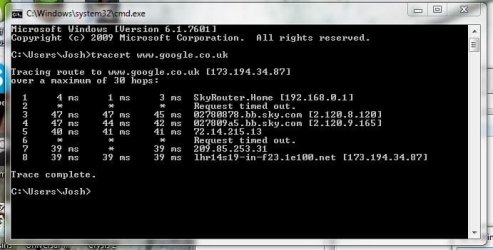
Open a command prompt and type:

Code:
tracert www.google.com

Then just change google for any other website or IP address :)

For example, here's mine to google

trace.JPG

The request time outs are simply routers that do not respond to ICMP messages and do not indicate any fault on your end ;)

Josh :)
 

My Computer My Computer

At a glance

Windows 7 Professional x64 SP1 ; Windows Serv...Intel Core i5 2400 @ 3.10GHz8.0GB DDR3 @ 665MHz (2GBx4)AMD Radeon HD 6870
Computer type
PC/Desktop
Computer Manufacturer/Model Number
Custom Built
OS
Windows 7 Professional x64 SP1 ; Windows Server 2012 R2 Standard
CPU
Intel Core i5 2400 @ 3.10GHz
Motherboard
Foxconn H67MP-S/-V/H67MP
Memory
8.0GB DDR3 @ 665MHz (2GBx4)
Graphics Card(s)
AMD Radeon HD 6870
Sound Card
Realtek High Definition Audio
Monitor(s) Displays
AOC 2243W & SMB1930NW
Screen Resolution
1440x900 & 1920x1080
Hard Drives
977GB Seagate ST31000524AS ATA Drive (SATA)
250GB WD iSCSI attached Drive
PSU
750W Gaming PSU
Case
Novatech Night
Cooling
Fan
Keyboard
Dell Standard PS/2 Keyboard
Mouse
R.A.T 07 Gaming Mouse
Internet Speed
Download: 10 Mbps Ping: 30ms Upload: 0.81 Mbps
Browser
Google Chrome
Other Info
Optiarc DVD RW AD-5260S ATA Device
Back
Top