How to turn on WiFi adapter from command line / How to turn on hotspot

Anakunda

New member
Member
Local time
3:42 AM
Messages
92
Hi

I have configured ad-hoc network for internet sharing from my PC. Normally I start it by
netsh wlan start hostednetwork
As I noticed the hotspot is automatically turned off when I turn off WiFi adapter. So I have two questions:

How do I turn on WiFi by command line, so that I can control it from various commandline scripts?
How do I configure the script for WiFi for autostarting hotspot whenever WiFi is turned on?

netsh wlan ...
 

My Computer My Computer

At a glance

Windows 7 x64Yes it has oneYes it has oneYes it has one
Computer Manufacturer/Model Number
Yes
OS
Windows 7 x64
CPU
Yes it has one
Motherboard
Yes it has one
Memory
Yes it has one
Graphics Card(s)
Yes it has one
Sound Card
Yes it has one
Monitor(s) Displays
Yes it has one
Hard Drives
Yes it has one
Hi

I have configured ad-hoc network for internet sharing from my PC. Normally I start it by
netsh wlan start hostednetwork
As I noticed the hotspot is automatically turned off when I turn off WiFi adapter. So I have two questions:

How do I turn on WiFi by command line, so that I can control it from various commandline scripts?
How do I configure the script for WiFi for autostarting hotspot whenever WiFi is turned on?

netsh wlan ...

Ad-Hoc requires that you restart the session each time.

Connectify pro has an auto start option that does this but it's a paid version, connectify lite is free but I'm not sure if has auto start.

Download - Connectify
 

My Computer My Computer

At a glance

Windows 7 Ult, Windows 8.1 Pro,Q9650-4.275GHz, E8600 4.5GHz, E6750-3.8GHzG.Skill PC2 9600 1200Mhz 5 5 5 15 2TGTX480
Computer type
PC/Desktop
Computer Manufacturer/Model Number
Home built
OS
Windows 7 Ult, Windows 8.1 Pro,
CPU
Q9650-4.275GHz, E8600 4.5GHz, E6750-3.8GHz
Motherboard
Evga 780i FTW
Memory
G.Skill PC2 9600 1200Mhz 5 5 5 15 2T
Graphics Card(s)
GTX480
Sound Card
Asus Xonar D2
Monitor(s) Displays
HannsG
Screen Resolution
1680X1050
Hard Drives
GSkill Phoenix Pro 120GB SSD
PSU
ThermalTake Toughpower 1000Watt modular
Case
ThermalTake XaserV
Cooling
Xigmatek S1283
Keyboard
Logitech G15
Mouse
Logitech G9
Internet Speed
T1
Connectify pro has an auto start option that does this but it's a paid version, connectify lite is free but I'm not sure if has auto start.

Download - Connectify

Unfortunatelly I don't have any good experience with Connectify,
1.it still refuses leaked key
2.actually it won't too autostart hotspot once WiFi is lost.
At best I'd like to avoid any 3rd party software.
There's some scripting on netsh wlan dump, what about using this?
 

My Computer My Computer

At a glance

Windows 7 x64Yes it has oneYes it has oneYes it has one
Computer Manufacturer/Model Number
Yes
OS
Windows 7 x64
CPU
Yes it has one
Motherboard
Yes it has one
Memory
Yes it has one
Graphics Card(s)
Yes it has one
Sound Card
Yes it has one
Monitor(s) Displays
Yes it has one
Hard Drives
Yes it has one

My Computer My Computer

At a glance

Windows 7 Professional x64 SP1Intel® Pentium® 4 @ 2.26 GHz, Intel Core i7-2...512MB Dual channel DDR SDRAM @ 400MHz 2.5-3-3...Intel 82865G, Nvidia GeForce 520M Graphics
Computer type
Laptop
Computer Manufacturer/Model Number
Dell Optiplex SX270, Lenovo Z470
OS
Windows 7 Professional x64 SP1
CPU
Intel® Pentium® 4 @ 2.26 GHz, Intel Core i7-2670QM @ 2.20 GH
Motherboard
Dell, Lenovo
Memory
512MB Dual channel DDR SDRAM @ 400MHz 2.5-3-3-7, 8 GB DDR3
Graphics Card(s)
Intel 82865G, Nvidia GeForce 520M Graphics
Sound Card
SoundMax Integrated Audio, Integrated HD Audio
Monitor(s) Displays
LG W1952
Screen Resolution
1440x900, 1366 x 768
Hard Drives
40 GB 2.5" IDE 4200 RPM HDD, 500 GB 5400 RPM Sata 1.5 + 32 GB SSD
PSU
Dell 145 Watt, Lenovo 120 Watt Power Adapter
Case
Optiplex SX270 Small Form Factor, Laptop
Cooling
Dell Proprietary Air Cooling, Stock laptop cooling
Keyboard
Dell SK-8125 USB Keyboard
Mouse
Dell PS/2 2 button ball mouse with wheel scroll
Internet Speed
300 Mbit down / 20 Mbps up Time Warner Cable
Antivirus
MSE, Malwarebytes Scanner
Browser
Internet (Aizawa) Explorer 11
Other Info
Running Windows Server 2012 Datacenter on a virtual machine to run Metro Apps.
That's good info about wireless net sharing but still no see how to either start the adapter from command line or at least run this starting hosted network command unattended each time when Wi-Fi adapter is started (whichever method), a kind of assigning custom command to this event.
 

My Computer My Computer

At a glance

Windows 7 x64Yes it has oneYes it has oneYes it has one
Computer Manufacturer/Model Number
Yes
OS
Windows 7 x64
CPU
Yes it has one
Motherboard
Yes it has one
Memory
Yes it has one
Graphics Card(s)
Yes it has one
Sound Card
Yes it has one
Monitor(s) Displays
Yes it has one
Hard Drives
Yes it has one
I'm not sure what you mean by starting an adapter....

You can enable/disable an adapter via command line and netsh.
Is that what you want?
 

My Computer My Computer

At a glance

W7 Pro SP1 64biti78GBIntel HD Graphics
Computer type
Laptop
Computer Manufacturer/Model Number
Employer provided Dell Latitude
OS
W7 Pro SP1 64bit
CPU
i7
Memory
8GB
Graphics Card(s)
Intel HD Graphics
Hard Drives
crappy SSD
Antivirus
Employer mandated Symantec Endpoint Protection
Browser
Pale Moon 64bit, IE11 64bit & Chrome 64bit
I'm not sure if enable/disable adapter is the same as turn it on/off such as pressing FN+F2, I don;t want to disable the driver fully.
 

My Computer My Computer

At a glance

Windows 7 x64Yes it has oneYes it has oneYes it has one
Computer Manufacturer/Model Number
Yes
OS
Windows 7 x64
CPU
Yes it has one
Motherboard
Yes it has one
Memory
Yes it has one
Graphics Card(s)
Yes it has one
Sound Card
Yes it has one
Monitor(s) Displays
Yes it has one
Hard Drives
Yes it has one
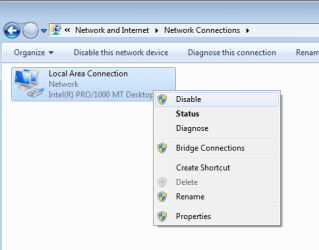
It just disables the adapter. It does the same thing that would happen if you right clicked on an adapter and selected Disable or Enable from the context menu:

netsh.png

For the adapter shown above, this code would disable/enable it:

Code:
netsh interface set interface name="Local Area Connection" disable
Code:
netsh interface set interface name="Local Area Connection" enable
For your usage:
Replace Local Area Connection with the name of your adapter.
(Maybe Wireless Network Connection.)
 
Last edited:

My Computer My Computer

At a glance

W7 Pro SP1 64biti78GBIntel HD Graphics
Computer type
Laptop
Computer Manufacturer/Model Number
Employer provided Dell Latitude
OS
W7 Pro SP1 64bit
CPU
i7
Memory
8GB
Graphics Card(s)
Intel HD Graphics
Hard Drives
crappy SSD
Antivirus
Employer mandated Symantec Endpoint Protection
Browser
Pale Moon 64bit, IE11 64bit & Chrome 64bit
i hav hcl note book win 7 32 bit showing wifi symbol but not on (a cross symbol ) how to turn on wifi
 

My Computer My Computer

At a glance

win 7 home
Computer type
Laptop
Computer Manufacturer/Model Number
thoshiba
OS
win 7 home
Back
Top