OK. I'm trying to switch from wireless to a faster(?) ethernet cable based internet access.
I use a Dell Optiplex 755, 32 bit OS, Windows 7. I'm the utilizing Comcast high speed internet supplier, a LinkSys E4200 wireless router, a LinkSys WUMC710 (wireless-ac universal media connector; with promises faster connections/speeds) with ethernet cable OUT to the ONLY ethernet port/card supplied [Network Connector (RJ-45)] on the rear of the small form factor tower. when I run the PC with USB wireless (Linksys AE2500) it works fine, but, I hope for an improvement with the LinkSys WUMC710 inserted in the chain.
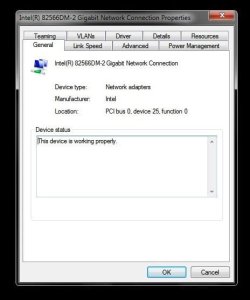
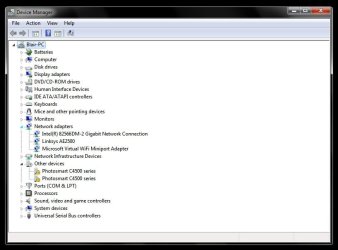
the Network Adapter (found in Device Manager) is the Intel(R) 82566DM-2 Gigabit Network Connection. This DOES NOT work with the ethernet cable connection (error 651, WAN Miniport problem). even when I uninstall this driver, it reinstalls upon Windows 7 restart, which is contrary to some of the suggested fix posts I've found in on-line forums dealing with these types of issues.
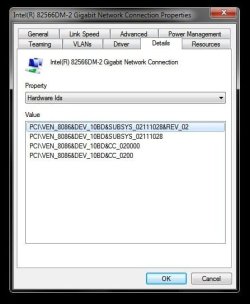
I'm thinking it may be a missing driver for the ethernet port/Network Connector (RJ-45), but, I am neither a hardware, nor IT tech. therefor I have no idea what driver I would SPECIFCICALLY require ofr this port(?), nor can I discern the particular ethernet card that came factory installed on this machine. I have consulted the Dell site and, lo & behold, they don't endorse using Windows 7 on the Optiplex 755, so the only driver updates/downloads are listed for endorsed OS's XP & Vista. so no answers there. I'm also keenly aware that my guesstimate could be completely, horribly wrong.
anyone have any suggestions? a workaround or a classic fix for this? it "feels" as though mine may be a simple problem that I've just never run into before.
Thank You in advance.
I use a Dell Optiplex 755, 32 bit OS, Windows 7. I'm the utilizing Comcast high speed internet supplier, a LinkSys E4200 wireless router, a LinkSys WUMC710 (wireless-ac universal media connector; with promises faster connections/speeds) with ethernet cable OUT to the ONLY ethernet port/card supplied [Network Connector (RJ-45)] on the rear of the small form factor tower. when I run the PC with USB wireless (Linksys AE2500) it works fine, but, I hope for an improvement with the LinkSys WUMC710 inserted in the chain.
the Network Adapter (found in Device Manager) is the Intel(R) 82566DM-2 Gigabit Network Connection. This DOES NOT work with the ethernet cable connection (error 651, WAN Miniport problem). even when I uninstall this driver, it reinstalls upon Windows 7 restart, which is contrary to some of the suggested fix posts I've found in on-line forums dealing with these types of issues.
I'm thinking it may be a missing driver for the ethernet port/Network Connector (RJ-45), but, I am neither a hardware, nor IT tech. therefor I have no idea what driver I would SPECIFCICALLY require ofr this port(?), nor can I discern the particular ethernet card that came factory installed on this machine. I have consulted the Dell site and, lo & behold, they don't endorse using Windows 7 on the Optiplex 755, so the only driver updates/downloads are listed for endorsed OS's XP & Vista. so no answers there. I'm also keenly aware that my guesstimate could be completely, horribly wrong.
anyone have any suggestions? a workaround or a classic fix for this? it "feels" as though mine may be a simple problem that I've just never run into before.
Thank You in advance.
My Computer
At a glance
Windows 7 Ultimate x32Intel(R) Core (TM)2 Duo CPU E6550 @ 2.33 GHz ...(RAM) 2.00 GB
- Computer type
- PC/Desktop
- Computer Manufacturer/Model Number
- Dell
- OS
- Windows 7 Ultimate x32
- CPU
- Intel(R) Core (TM)2 Duo CPU E6550 @ 2.33 GHz 2.33GHz
- Memory
- (RAM) 2.00 GB
- Hard Drives
- WDC WD800JD-75MSA3ATA Device
- Antivirus
- Avast
- Browser
- IE, Chrome, StartPage