USB internet connection works, Ethernet internet connection does not

blairk

New member
Local time
9:01 PM
Messages
6
OK. I'm trying to switch from wireless to a faster(?) ethernet cable based internet access.
I use a Dell Optiplex 755, 32 bit OS, Windows 7. I'm the utilizing Comcast high speed internet supplier, a LinkSys E4200 wireless router, a LinkSys WUMC710 (wireless-ac universal media connector; with promises faster connections/speeds) with ethernet cable OUT to the ONLY ethernet port/card supplied [Network Connector (RJ-45)] on the rear of the small form factor tower. when I run the PC with USB wireless (Linksys AE2500) it works fine, but, I hope for an improvement with the LinkSys WUMC710 inserted in the chain.
the Network Adapter (found in Device Manager) is the Intel(R) 82566DM-2 Gigabit Network Connection. This DOES NOT work with the ethernet cable connection (error 651, WAN Miniport problem). even when I uninstall this driver, it reinstalls upon Windows 7 restart, which is contrary to some of the suggested fix posts I've found in on-line forums dealing with these types of issues.

I'm thinking it may be a missing driver for the ethernet port/Network Connector (RJ-45), but, I am neither a hardware, nor IT tech. therefor I have no idea what driver I would SPECIFCICALLY require ofr this port(?), nor can I discern the particular ethernet card that came factory installed on this machine. I have consulted the Dell site and, lo & behold, they don't endorse using Windows 7 on the Optiplex 755, so the only driver updates/downloads are listed for endorsed OS's XP & Vista. so no answers there. I'm also keenly aware that my guesstimate could be completely, horribly wrong.

anyone have any suggestions? a workaround or a classic fix for this? it "feels" as though mine may be a simple problem that I've just never run into before.
Thank You in advance.
 

My Computer My Computer

At a glance

Windows 7 Ultimate x32Intel(R) Core (TM)2 Duo CPU E6550 @ 2.33 GHz ...(RAM) 2.00 GB
Computer type
PC/Desktop
Computer Manufacturer/Model Number
Dell
OS
Windows 7 Ultimate x32
CPU
Intel(R) Core (TM)2 Duo CPU E6550 @ 2.33 GHz 2.33GHz
Memory
(RAM) 2.00 GB
Hard Drives
WDC WD800JD-75MSA3ATA Device
Antivirus
Avast
Browser
IE, Chrome, StartPage
Let's start with some basic information:

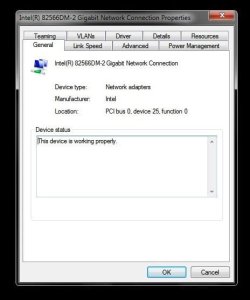
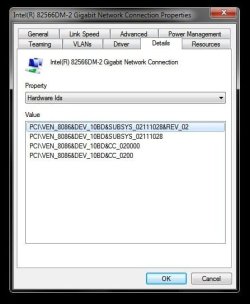
Please post two Device Manager screen shots for your Ethernet device

Double Click the device to open the properties page
1) General tab: shows the status
2) Details tab: Hardware Ids
>> scroll down to Hardware Ids on the Property drop down box

Please see http://www.sevenforums.com/tutorials/9733-screenshots-files-upload-post-seven-forums.html for the preferred method of posting files and images on Sevenforums

Thanks
 

My Computer My Computer

At a glance

x64 (6.3.9600) Win8.1 Pro & soon dual boot x6...AMD A6-3420M APU with Radeon(tm) HD Graphics6.00 GBAMD Radeon(TM) HD 6520G
Computer type
Laptop
Computer Manufacturer/Model Number
HP Pavilion dv6-6c10us
OS
x64 (6.3.9600) Win8.1 Pro & soon dual boot x64 (6.1.7601) Win7_SP1 HomePrem
CPU
AMD A6-3420M APU with Radeon(tm) HD Graphics
Motherboard
Hewlett-Packard 1805
Memory
6.00 GB
Graphics Card(s)
AMD Radeon(TM) HD 6520G
Sound Card
(1) AMD High Definition Audio Device (2) IDT High Definiti
Monitor(s) Displays
HP W2072a 20" LCD (1600 x 900) @ 60 Hz
Screen Resolution
1366 x 768 x 32 bits (4294967296 colors) @ 60 Hz
Hard Drives
ST640LM0 00 HM641JI SATA Disk Device
Keyboard
Logitech k520 wireless KB
Mouse
Logitech m320 wireless mouse (bundled with KB)
Internet Speed
15/5 | 54 MB Wireless 'n'
Antivirus
Realtime: Defender or Avast | On-demand: Malwarebytes, ESET
Browser
IE 11 on Win8, IE 10 on win 7
Other Info
Media: [Gimp, Audacity, VLC] || Comm: [WEmail 2012, Skype] || Productivity: [OpenOffice,| Textpad] || Utils: [Sysinternals, cCleaner, Speccy, Defraggler]
s-shot1.jpg

s-shot2.jpg
 

My Computer My Computer

At a glance

Windows 7 Ultimate x32Intel(R) Core (TM)2 Duo CPU E6550 @ 2.33 GHz ...(RAM) 2.00 GB
Computer type
PC/Desktop
Computer Manufacturer/Model Number
Dell
OS
Windows 7 Ultimate x32
CPU
Intel(R) Core (TM)2 Duo CPU E6550 @ 2.33 GHz 2.33GHz
Memory
(RAM) 2.00 GB
Hard Drives
WDC WD800JD-75MSA3ATA Device
Antivirus
Avast
Browser
IE, Chrome, StartPage
Update your network adapter

File name: PROWin32.exe
Version: 18.8.1
Date: 01/13/2014
Status: Latest
Size: 20.52 MB
Language: English
Operating Systems: Windows 7 *, Windows 7 (32-bit)*
Download and install this driver from Intel.

Network Adapter Download - choose ProWin32.exe

Then follow this tutorial to download and run the SevenForums Diagnostic tool
:ar: http://www.sevenforums.com/tutorials/92394-sf-diagnostic-tool-using-troubleshooting.html
>> ignore the BSOD reference in the tutorial, it also helps diagnosing any system issue
>> it collects a lot of system information so I don't have to ask you a lot of questions

When the SF diag is finished, attach the zipped output to a post per the instrutions in the tutorial.

Thanks
 

My Computer My Computer

At a glance

x64 (6.3.9600) Win8.1 Pro & soon dual boot x6...AMD A6-3420M APU with Radeon(tm) HD Graphics6.00 GBAMD Radeon(TM) HD 6520G
Computer type
Laptop
Computer Manufacturer/Model Number
HP Pavilion dv6-6c10us
OS
x64 (6.3.9600) Win8.1 Pro & soon dual boot x64 (6.1.7601) Win7_SP1 HomePrem
CPU
AMD A6-3420M APU with Radeon(tm) HD Graphics
Motherboard
Hewlett-Packard 1805
Memory
6.00 GB
Graphics Card(s)
AMD Radeon(TM) HD 6520G
Sound Card
(1) AMD High Definition Audio Device (2) IDT High Definiti
Monitor(s) Displays
HP W2072a 20" LCD (1600 x 900) @ 60 Hz
Screen Resolution
1366 x 768 x 32 bits (4294967296 colors) @ 60 Hz
Hard Drives
ST640LM0 00 HM641JI SATA Disk Device
Keyboard
Logitech k520 wireless KB
Mouse
Logitech m320 wireless mouse (bundled with KB)
Internet Speed
15/5 | 54 MB Wireless 'n'
Antivirus
Realtime: Defender or Avast | On-demand: Malwarebytes, ESET
Browser
IE 11 on Win8, IE 10 on win 7
Other Info
Media: [Gimp, Audacity, VLC] || Comm: [WEmail 2012, Skype] || Productivity: [OpenOffice,| Textpad] || Utils: [Sysinternals, cCleaner, Speccy, Defraggler]
I've downloaded that file - ProWin32.exe - pretty sure that I ran it as well. see View attachment blairk.zip attached info &
THANK YOU.
 

My Computer My Computer

At a glance

Windows 7 Ultimate x32Intel(R) Core (TM)2 Duo CPU E6550 @ 2.33 GHz ...(RAM) 2.00 GB
Computer type
PC/Desktop
Computer Manufacturer/Model Number
Dell
OS
Windows 7 Ultimate x32
CPU
Intel(R) Core (TM)2 Duo CPU E6550 @ 2.33 GHz 2.33GHz
Memory
(RAM) 2.00 GB
Hard Drives
WDC WD800JD-75MSA3ATA Device
Antivirus
Avast
Browser
IE, Chrome, StartPage
correction. I wasn't sure whether I should run the prowin32 exe file. not that steady on some of the choices offered. but I do have it.
 

My Computer My Computer

At a glance

Windows 7 Ultimate x32Intel(R) Core (TM)2 Duo CPU E6550 @ 2.33 GHz ...(RAM) 2.00 GB
Computer type
PC/Desktop
Computer Manufacturer/Model Number
Dell
OS
Windows 7 Ultimate x32
CPU
Intel(R) Core (TM)2 Duo CPU E6550 @ 2.33 GHz 2.33GHz
Memory
(RAM) 2.00 GB
Hard Drives
WDC WD800JD-75MSA3ATA Device
Antivirus
Avast
Browser
IE, Chrome, StartPage
Ok, sure go ahead and install prowin32

Then post another Device manger screen shot, this time show the dirver tab.
I'm looking for the version this time - it should match the info in post 4.
 

My Computer My Computer

At a glance

x64 (6.3.9600) Win8.1 Pro & soon dual boot x6...AMD A6-3420M APU with Radeon(tm) HD Graphics6.00 GBAMD Radeon(TM) HD 6520G
Computer type
Laptop
Computer Manufacturer/Model Number
HP Pavilion dv6-6c10us
OS
x64 (6.3.9600) Win8.1 Pro & soon dual boot x64 (6.1.7601) Win7_SP1 HomePrem
CPU
AMD A6-3420M APU with Radeon(tm) HD Graphics
Motherboard
Hewlett-Packard 1805
Memory
6.00 GB
Graphics Card(s)
AMD Radeon(TM) HD 6520G
Sound Card
(1) AMD High Definition Audio Device (2) IDT High Definiti
Monitor(s) Displays
HP W2072a 20" LCD (1600 x 900) @ 60 Hz
Screen Resolution
1366 x 768 x 32 bits (4294967296 colors) @ 60 Hz
Hard Drives
ST640LM0 00 HM641JI SATA Disk Device
Keyboard
Logitech k520 wireless KB
Mouse
Logitech m320 wireless mouse (bundled with KB)
Internet Speed
15/5 | 54 MB Wireless 'n'
Antivirus
Realtime: Defender or Avast | On-demand: Malwarebytes, ESET
Browser
IE 11 on Win8, IE 10 on win 7
Other Info
Media: [Gimp, Audacity, VLC] || Comm: [WEmail 2012, Skype] || Productivity: [OpenOffice,| Textpad] || Utils: [Sysinternals, cCleaner, Speccy, Defraggler]
Thanks for the SF diag reports, it looks as though Grab All doesn't Grab All.

Could you run the SF Diagnostics tool again, this time click MGSDIAG instead of Grab all.

I think the tool tells you where the file is and what to do with it, but if not you can always look 6->8 of the tutorial (post # 4)

Thanks
 

My Computer My Computer

At a glance

x64 (6.3.9600) Win8.1 Pro & soon dual boot x6...AMD A6-3420M APU with Radeon(tm) HD Graphics6.00 GBAMD Radeon(TM) HD 6520G
Computer type
Laptop
Computer Manufacturer/Model Number
HP Pavilion dv6-6c10us
OS
x64 (6.3.9600) Win8.1 Pro & soon dual boot x64 (6.1.7601) Win7_SP1 HomePrem
CPU
AMD A6-3420M APU with Radeon(tm) HD Graphics
Motherboard
Hewlett-Packard 1805
Memory
6.00 GB
Graphics Card(s)
AMD Radeon(TM) HD 6520G
Sound Card
(1) AMD High Definition Audio Device (2) IDT High Definiti
Monitor(s) Displays
HP W2072a 20" LCD (1600 x 900) @ 60 Hz
Screen Resolution
1366 x 768 x 32 bits (4294967296 colors) @ 60 Hz
Hard Drives
ST640LM0 00 HM641JI SATA Disk Device
Keyboard
Logitech k520 wireless KB
Mouse
Logitech m320 wireless mouse (bundled with KB)
Internet Speed
15/5 | 54 MB Wireless 'n'
Antivirus
Realtime: Defender or Avast | On-demand: Malwarebytes, ESET
Browser
IE 11 on Win8, IE 10 on win 7
Other Info
Media: [Gimp, Audacity, VLC] || Comm: [WEmail 2012, Skype] || Productivity: [OpenOffice,| Textpad] || Utils: [Sysinternals, cCleaner, Speccy, Defraggler]
I think you should find the Dell support page for the LAN driver, per Intel:
Intel said:
Generic Drivers
The software drivers provided on this page are generic versions and can be used for general purposes. However, computer original equipment manufacturers (OEMs) may have altered the features, incorporated customizations, or made other changes to the software or software packaging they provide. To avoid any potential installation incompatibilities on your OEM system, Intel recommends that you check with your OEM and use the software provided via your system manufacturer. Intel or the computer original equipment manufacturer (OEM) may not provide technical support for some or all issues that could arise from the usage of this generic version of software drivers.

Have you tried Ethernet direct to the LinkSys E4200 wireless router?
 

My Computer My Computer

At a glance

Windows 7 Ultimate X64 SP1Intel i5-2550K, Differing ~4.4-4.8GHz No buil...16GB G.Skill Sniper 1866MHz @ 2133MHz 2x8GBASUS GTX650TIB-DC2OC-2GD5, (650TI Boost)
Computer type
PC/Desktop
Computer Manufacturer/Model Number
Home Built Desktop By DataTech
OS
Windows 7 Ultimate X64 SP1
CPU
Intel i5-2550K, Differing ~4.4-4.8GHz No built in GPU
Motherboard
ASUS P8Z68-V PRO/GEN3
Memory
16GB G.Skill Sniper 1866MHz @ 2133MHz 2x8GB
Graphics Card(s)
ASUS GTX650TIB-DC2OC-2GD5, (650TI Boost)
Sound Card
Onboard Realtek 5-1
Monitor(s) Displays
Samsung P2570HD
Screen Resolution
1920x1080
Hard Drives
Samsung 840 Pro 256GB SSD for OS, 500GB Seagate Constellation (Enterprise drive) for Data
PSU
Corsair HX650W
Case
Inwin Dragon Rider
Cooling
Hyper 212 EVO w/two Noctua fans, push-pull, @1300 RPM
Keyboard
E-Z Eyes, bright yellow keys with large characters
Mouse
steelseries SENSEI Laser Pro Gaming
Internet Speed
48-51Mbs Mbs down, 11 Mbs up Xfinity Cable
Antivirus
Norton Internet Security 2013
Browser
IE 10, Opera, Pale Moon if needed
Other Info
4 case fans, LG BluRay-RE, ASUS DVD-RW, Mr. Fusion power supply, 1.21 gigawatts.
do you mean as in to test the ethernet hubs on the LinkSys E4200? I use the E2400 as my router/line-in hubs, that's it. the E2400/Comcast Line-In are not in close proximity to my oprimary pc ... hence going wireless.
as far as Intel/Dell is concerned. I'm pretty sure that I DL'd the ProWin32.exe file from Intel. of course,, Dell doesn't recommend/endorse running Windows 7 on the Optiplex 755. they list XP or Vista only as the OS and I'm not really sure which OS is closer or more comparable/compatible to 7. my guess would be Vista ...(?)

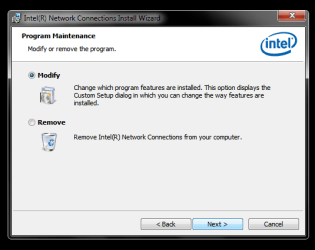
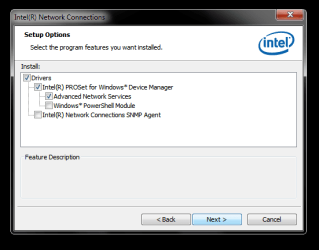
at any rate, I'm attaching a few more screen shots concerning the ProWin32 execute.
I would guess that I would choose 'modify' ONLY (fig 1) and keep the choices as they are already presented (fig 2) before committing to the installation. but again ... do not know.
it's a quandry. your thoughts?
AGAIN MANY, MANY THANKS!

fig 1.png

fig 2.png
 

My Computer My Computer

At a glance

Windows 7 Ultimate x32Intel(R) Core (TM)2 Duo CPU E6550 @ 2.33 GHz ...(RAM) 2.00 GB
Computer type
PC/Desktop
Computer Manufacturer/Model Number
Dell
OS
Windows 7 Ultimate x32
CPU
Intel(R) Core (TM)2 Duo CPU E6550 @ 2.33 GHz 2.33GHz
Memory
(RAM) 2.00 GB
Hard Drives
WDC WD800JD-75MSA3ATA Device
Antivirus
Avast
Browser
IE, Chrome, StartPage
Perhaps I should take another look at what you want to accomplish.

What I think I know:
You want to use Ethernet instead of wireless for faster connections.
Wireless works
Ethernet returns error 651, WAN miniport

Devices:
Comcast ???? cable modem
Linksys E4200 Wireless router
Linksys WUMC710 (Wireless-ac universal media connector) A replacement for the E4200?
>> Cabled to Dell

PC
Linksys AE2500 USB Network Adapter (Dual Band N)
Intel(R) 82566DM-2 Gigabit Network Connection (NIC adapter download link)


Ok, if I got all of that right, there are some things you should know.

The faster speeds expected from the LinkSys WUMC710 refers to wireless - it is the latest 802.11 protocol (AC). Your Linksys AE2500 USB adapter is 802.11 protocol (N), so you're only going to get N speeds using wireless.

Both routers have 4 ports (Gigabit Ethernet) so there's no improvement on Ethernet.


Before moving forward, let's catch up.
You have the prowin32 exe from the Intel download page, but have not installed it.
>> you have some questions about the way to install it (modify or remove options)
>> which features to install (you show what is on the system now)
--> that was brilliant, there's a record of how it was.
--> could you also post the version of the current Intel Network Connection? Thanks

Britton30 pointed out the OEM disclaimer on the Intel site and suggested getting the driver from Dell.
>> Dell only offers XP and Vista drivers
>> Vista would be closest to Win7
Britton30 also suggested connecting the PC to the E4200.
>> Excellent suggestion
>> I'd like to know if blairk has tried a direct cable to the Comcast cable modem
>> before testing a device that will be replaced.
>> I undestand your thinking Gary - does Ethernet work with the other router?

>> I might be confused which is why there are question marks in Comcast ???? cable modem.
>> I don't think it's the E4200, I just don't know

Everything else should be put on the back burner for the moment.

I want to look up the WAN miniport error - it might be an easy thing to fix, or it might be a lot of trouble. These miniports don't have a driver, they're services.
Installing the Intel NIC driver might fix that, but wait - let me see what I can find.

So, I've painted the questions for you blairk in red.
If you could review my "What I think I know" and point out anything I got wrong, I'd appreciate it.
I also requested another SF diag report in post# 8 - please also do that while I'm researching error 651, WAN miniport

I'm not sure anything I had planned (update the Intel driver) will change, but I'm learning to slow down.
 
Last edited:

My Computer My Computer

At a glance

x64 (6.3.9600) Win8.1 Pro & soon dual boot x6...AMD A6-3420M APU with Radeon(tm) HD Graphics6.00 GBAMD Radeon(TM) HD 6520G
Computer type
Laptop
Computer Manufacturer/Model Number
HP Pavilion dv6-6c10us
OS
x64 (6.3.9600) Win8.1 Pro & soon dual boot x64 (6.1.7601) Win7_SP1 HomePrem
CPU
AMD A6-3420M APU with Radeon(tm) HD Graphics
Motherboard
Hewlett-Packard 1805
Memory
6.00 GB
Graphics Card(s)
AMD Radeon(TM) HD 6520G
Sound Card
(1) AMD High Definition Audio Device (2) IDT High Definiti
Monitor(s) Displays
HP W2072a 20" LCD (1600 x 900) @ 60 Hz
Screen Resolution
1366 x 768 x 32 bits (4294967296 colors) @ 60 Hz
Hard Drives
ST640LM0 00 HM641JI SATA Disk Device
Keyboard
Logitech k520 wireless KB
Mouse
Logitech m320 wireless mouse (bundled with KB)
Internet Speed
15/5 | 54 MB Wireless 'n'
Antivirus
Realtime: Defender or Avast | On-demand: Malwarebytes, ESET
Browser
IE 11 on Win8, IE 10 on win 7
Other Info
Media: [Gimp, Audacity, VLC] || Comm: [WEmail 2012, Skype] || Productivity: [OpenOffice,| Textpad] || Utils: [Sysinternals, cCleaner, Speccy, Defraggler]
Hmmm, WAN miniport error 651 is related to PPOE. This is odd to see with Comcast, unless you are a DSL subcriber. Are you connecting to Comcast via DSL (over a phone line) or through a coax cable to a wall jack?

Also please post your IP configuration info:

Open an http://www.sevenforums.com/tutorials/783-elevated-command-prompt.html
   Tip
Standard keyboard shortcuts for Copy (Ctrl-C) and Paste (Ctrl-V) shortcuts do not work in Command Prompt.

Enabling the Quick Edit Mode in Command Prompt makes Copy and Paste operations easier.
See step 4 in http://www.sevenforums.com/tutorials/21874-command-prompt-copy-clipboard.html to enable it.

Copy in Command Prompt: hightlight the text you want to copy, then press ENTER.
Paste in Command Prompt: right click with your mouse.


In the command prompt window type
ipconfig /all > c:\IPblairk.txt
exit

Attach the IPout.txt file to a post.

Thanks
 

My Computer My Computer

At a glance

x64 (6.3.9600) Win8.1 Pro & soon dual boot x6...AMD A6-3420M APU with Radeon(tm) HD Graphics6.00 GBAMD Radeon(TM) HD 6520G
Computer type
Laptop
Computer Manufacturer/Model Number
HP Pavilion dv6-6c10us
OS
x64 (6.3.9600) Win8.1 Pro & soon dual boot x64 (6.1.7601) Win7_SP1 HomePrem
CPU
AMD A6-3420M APU with Radeon(tm) HD Graphics
Motherboard
Hewlett-Packard 1805
Memory
6.00 GB
Graphics Card(s)
AMD Radeon(TM) HD 6520G
Sound Card
(1) AMD High Definition Audio Device (2) IDT High Definiti
Monitor(s) Displays
HP W2072a 20" LCD (1600 x 900) @ 60 Hz
Screen Resolution
1366 x 768 x 32 bits (4294967296 colors) @ 60 Hz
Hard Drives
ST640LM0 00 HM641JI SATA Disk Device
Keyboard
Logitech k520 wireless KB
Mouse
Logitech m320 wireless mouse (bundled with KB)
Internet Speed
15/5 | 54 MB Wireless 'n'
Antivirus
Realtime: Defender or Avast | On-demand: Malwarebytes, ESET
Browser
IE 11 on Win8, IE 10 on win 7
Other Info
Media: [Gimp, Audacity, VLC] || Comm: [WEmail 2012, Skype] || Productivity: [OpenOffice,| Textpad] || Utils: [Sysinternals, cCleaner, Speccy, Defraggler]
blairk: This post is just a note to myself and will be deleted after I read your answers.
>> You don't have to do anything in this post.

Note to self: raspppoe
 

My Computer My Computer

At a glance

x64 (6.3.9600) Win8.1 Pro & soon dual boot x6...AMD A6-3420M APU with Radeon(tm) HD Graphics6.00 GBAMD Radeon(TM) HD 6520G
Computer type
Laptop
Computer Manufacturer/Model Number
HP Pavilion dv6-6c10us
OS
x64 (6.3.9600) Win8.1 Pro & soon dual boot x64 (6.1.7601) Win7_SP1 HomePrem
CPU
AMD A6-3420M APU with Radeon(tm) HD Graphics
Motherboard
Hewlett-Packard 1805
Memory
6.00 GB
Graphics Card(s)
AMD Radeon(TM) HD 6520G
Sound Card
(1) AMD High Definition Audio Device (2) IDT High Definiti
Monitor(s) Displays
HP W2072a 20" LCD (1600 x 900) @ 60 Hz
Screen Resolution
1366 x 768 x 32 bits (4294967296 colors) @ 60 Hz
Hard Drives
ST640LM0 00 HM641JI SATA Disk Device
Keyboard
Logitech k520 wireless KB
Mouse
Logitech m320 wireless mouse (bundled with KB)
Internet Speed
15/5 | 54 MB Wireless 'n'
Antivirus
Realtime: Defender or Avast | On-demand: Malwarebytes, ESET
Browser
IE 11 on Win8, IE 10 on win 7
Other Info
Media: [Gimp, Audacity, VLC] || Comm: [WEmail 2012, Skype] || Productivity: [OpenOffice,| Textpad] || Utils: [Sysinternals, cCleaner, Speccy, Defraggler]
you asked:
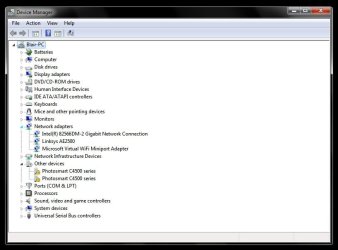
"could you also post the version of the current Intel Network Connection?" SEE ATTACHED FILE devmgr-fig 4
"Britton30 also suggested connecting the PC to the E4200." NO. it is being used as a wireless router from the Comcast HS Co-Ax digital cable in, signal relayed (wirelessly upstairs) to the WUMC710 (used as a signal amplifier/enhancer) and then the WUMC710 is cabled to the Dell.
"I'd like to know if blairk has tried a direct cable to the Comcast cable modem" NO. the co-ax cable into the house is located downstairs from my work space/pc.
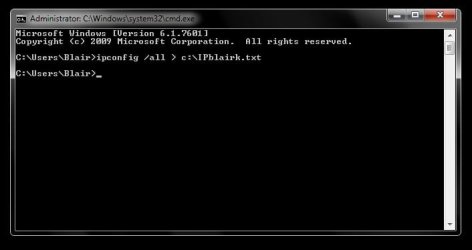
I also tried to collect the command prompt info no luck . see attached cmd-fig3.jpg
also attached (zip) the info you requested from the MGADiag ... I hope it is the info you need.
Thank YOU!!

cmd-fig 3.jpg

devmgr-fig 4.jpg

View attachment blairk-2.zip
 

My Computer My Computer

At a glance

Windows 7 Ultimate x32Intel(R) Core (TM)2 Duo CPU E6550 @ 2.33 GHz ...(RAM) 2.00 GB
Computer type
PC/Desktop
Computer Manufacturer/Model Number
Dell
OS
Windows 7 Ultimate x32
CPU
Intel(R) Core (TM)2 Duo CPU E6550 @ 2.33 GHz 2.33GHz
Memory
(RAM) 2.00 GB
Hard Drives
WDC WD800JD-75MSA3ATA Device
Antivirus
Avast
Browser
IE, Chrome, StartPage
Ok, thanks. devmgr-4 doesn't show me the version of the Intel NIC driver.
In devmgr, double click Intel Network Connection, select properties, then driver tab
- that should show the driver version. post a screen shot of the driver tab

Hmmm,

Alright, I need a diagram of how you have the network.

Comcast coax goes to what?
from there it goes to the E4200
the WUMC710 is upstairs acting as a repeater
and the Dell connects to the WUMC710 across ethernet


If I got THAT right, then it would be difficult to connect to either the Comcast box or the E4200
Ok, this is going to take longer than I first thought - more pieces.

but it sounds as though it's a simple matter to reconfigure the two wireless devices.

Did the Dell use to talk directly to the E4200 Using the Linksys USB adapter?

About the ipconfig file - look on C:\ for IPblairk.txt
Attach that file to a post.

I'll look at it when I get back - have to run out for a bit.

Thansk blairk
 

My Computer My Computer

At a glance

x64 (6.3.9600) Win8.1 Pro & soon dual boot x6...AMD A6-3420M APU with Radeon(tm) HD Graphics6.00 GBAMD Radeon(TM) HD 6520G
Computer type
Laptop
Computer Manufacturer/Model Number
HP Pavilion dv6-6c10us
OS
x64 (6.3.9600) Win8.1 Pro & soon dual boot x64 (6.1.7601) Win7_SP1 HomePrem
CPU
AMD A6-3420M APU with Radeon(tm) HD Graphics
Motherboard
Hewlett-Packard 1805
Memory
6.00 GB
Graphics Card(s)
AMD Radeon(TM) HD 6520G
Sound Card
(1) AMD High Definition Audio Device (2) IDT High Definiti
Monitor(s) Displays
HP W2072a 20" LCD (1600 x 900) @ 60 Hz
Screen Resolution
1366 x 768 x 32 bits (4294967296 colors) @ 60 Hz
Hard Drives
ST640LM0 00 HM641JI SATA Disk Device
Keyboard
Logitech k520 wireless KB
Mouse
Logitech m320 wireless mouse (bundled with KB)
Internet Speed
15/5 | 54 MB Wireless 'n'
Antivirus
Realtime: Defender or Avast | On-demand: Malwarebytes, ESET
Browser
IE 11 on Win8, IE 10 on win 7
Other Info
Media: [Gimp, Audacity, VLC] || Comm: [WEmail 2012, Skype] || Productivity: [OpenOffice,| Textpad] || Utils: [Sysinternals, cCleaner, Speccy, Defraggler]
Back
Top