No internet when router is connected " Default gateway not available"

meiiyeiinz

New member
Local time
5:52 AM
Messages
24
No internet when router is connected " Default gateway not available"

I've got a new cheap router and my internet is not working when I connect the router into the modem. it giving me an issue saying " default gateway is not available" but if I use modem to pc (w/o router" it works fine. here's the details of the problem

Issues found
The default gateway is not availableThe default gateway is not available
The default gateway is a device that connects a local network or computer to the Internet. A broadband modem or router is usually the default gateway. Not fixed Not Fixed
Investigate router or broadband modem issues Failed
Reset the "Local Area Connection" adapter Completed


Issues found Detection details

6 The default gateway is not available Not fixed Not Fixed

The default gateway is a device that connects a local network or computer to the Internet. A broadband modem or router is usually the default gateway.
Investigate router or broadband modem issues Failed

If you're connected to a hotspot or domain network, contact the network administrator. Otherwise: 1. Unplug or turn off the device. 2. After all the lights on the device are off, wait at least 10 seconds. 3. Turn the device on or plug it back into the power outlet. To restart a router or modem that has a built-in battery, press and quickly release the Reset button.
Reset the "Local Area Connection" adapter Completed

This can sometimes resolve an intermittent problem.
InformationalNetwork Diagnostics Log
File Name: 50794F01-E703-46BA-B08A-65C91F17059D.Repair.1.etl


Detection details Expand

InformationalDiagnostics Information (Network Adapter)
Details about network adapter diagnosis:

Network adapter Local Area Connection driver information:

Description . . . . . . . . . . : Realtek PCIe GBE Family Controller
Manufacturer . . . . . . . . . : Realtek
Provider . . . . . . . . . . . : Realtek
Version . . . . . . . . . . . : 7.46.610.2011
Inf File Name . . . . . . . . . : C:\Windows\INF\oem20.inf
Inf File Date . . . . . . . . . : Tuesday, July 19, 2011 11:05:48 AM
Section Name . . . . . . . . . : RTL8168E.ndi
Hardware ID . . . . . . . . . . : pci\ven_10ec&dev_8168&rev_06
Instance Status Flags . . . . . : 0x180200a
Device Manager Status Code . . : 0
IfType . . . . . . . . . . . . : 6
Physical Media Type . . . . . . : 14


InformationalNetwork Diagnostics Log
File Name: 50794F01-E703-46BA-B08A-65C91F17059D.Diagnose.0.etl

InformationalOther Networking Configuration and Logs
File Name: NetworkConfiguration.cab

Collection information
Computer Name: WORKSTATION
Windows Version: 6.1
Architecture: amd64
Time: Saturday, May 23, 2015 2:30:41 AM

Publisher details Expand

Windows Network Diagnostics
Detects problems with network connectivity.
Package Version: 1.0
Publisher: Microsoft Windows


Please anyone can help me solve this issue? I've tried. renewing ipconfig but it doesn't work and check my device manager. please help me and excuse my bad english. Thanks in advanced!
 

My Computer My Computer

Computer type
PC/Desktop
OS
windows 7 Ultimate x32
Make sure ethernet cable from modem comes into router WAN port.
Router DHCP working?

When pc is connected to router run ipconfig -all from cmd and check ip address.
 

My Computer My Computer

Computer type
PC/Desktop
Computer Manufacturer/Model Number
Custom Build
OS
Windows 7 Ultimate x64 SP1
CPU
AMD Phenom 2 1090T
Motherboard
Gigabyte GA-890FXA-UD5
Memory
2x8GB Kingston HyperX Fury Black 1600Mhz Unganged
Graphics Card(s)
MSI GTX 970 Gaming 4G
Sound Card
Realtek On-Board HD 7.1 Audio / Logitech G35
Monitor(s) Displays
3xAcer GD245HQ
Screen Resolution
1920x1080
Hard Drives
Samsung 850 Pro 512GB SSD - OS /
WD Caviar Black SATA 3 - 1 TBx2 - Dynamic RAID 0 /
WD Caviar Green SATA 2 - 640GBx2 - Dynamic RAID 0 /
WD Caviar Green SATA 2 - 640GB - Internal Backup /
Seagate Barracude SATA 3 - 3TB - External Backup/ Sync
PSU
HighPower 1000W
Case
Cooler Master HAF 932
Cooling
Noctua NH-D14
Keyboard
Logitech G19
Mouse
Logitech G500
Internet Speed
100/4 Mbit Cable (100GB quota)
Antivirus
ZoneAlarm Extreme Security / MBAM Pro / MBAE Free / SAS Free
Browser
IE 11 - Firefox - Chrome
Other Info
Logitech F710/ G27/ G940/ Z5500 // TrackIR 5 // Nvidia 3D Surround Vision
Make sure ethernet cable from modem comes into router WAN port.
Router DHCP working?

When pc is connected to router run ipconfig -all from cmd and check ip address.


here's what I've got sir.


C:\Users\_r3v>ipconfig -all

Windows IP Configuration

Host Name . . . . . . . . . . . . : workstation
Primary Dns Suffix . . . . . . . :
Node Type . . . . . . . . . . . . : Hybrid
IP Routing Enabled. . . . . . . . : No
WINS Proxy Enabled. . . . . . . . : No
DNS Suffix Search List. . . . . . : domain.name

Ethernet adapter Local Area Connection:

Connection-specific DNS Suffix . : domain.name
Description . . . . . . . . . . . : Realtek PCIe GBE Family Controller
Physical Address. . . . . . . . . : 14-DA-E9-6E-5A-F8
DHCP Enabled. . . . . . . . . . . : Yes
Autoconfiguration Enabled . . . . : Yes
Link-local IPv6 Address . . . . . : fe80::95a5:c0f3:4f00:5461%10(Preferred)
IPv4 Address. . . . . . . . . . . : 192.168.1.2(Preferred)
Subnet Mask . . . . . . . . . . . : 255.255.255.0
Lease Obtained. . . . . . . . . . : Saturday, May 23, 2015 5:08:15 AM
Lease Expires . . . . . . . . . . : Saturday, May 23, 2015 7:08:15 AM
Default Gateway . . . . . . . . . : 192.168.1.254
DHCP Server . . . . . . . . . . . : 192.168.1.1
DHCPv6 IAID . . . . . . . . . . . : 236247785
DHCPv6 Client DUID. . . . . . . . : 00-01-00-01-1B-F8-B5-1D-14-DA-E9-6E-5A-F8

DNS Servers . . . . . . . . . . . : 192.168.1.254
NetBIOS over Tcpip. . . . . . . . : Enabled

Tunnel adapter Teredo Tunneling Pseudo-Interface:

Media State . . . . . . . . . . . : Media disconnected
Connection-specific DNS Suffix . :
Description . . . . . . . . . . . : Teredo Tunneling Pseudo-Interface
Physical Address. . . . . . . . . : 00-00-00-00-00-00-00-E0
DHCP Enabled. . . . . . . . . . . : No
Autoconfiguration Enabled . . . . : Yes

Tunnel adapter isatap.{451233BB-FAA8-44CD-99DC-8E1111ABEAFB}:

Media State . . . . . . . . . . . : Media disconnected
Connection-specific DNS Suffix . :
Description . . . . . . . . . . . : Microsoft ISATAP Adapter
Physical Address. . . . . . . . . : 00-00-00-00-00-00-00-E0
DHCP Enabled. . . . . . . . . . . : No
Autoconfiguration Enabled . . . . : Yes

Tunnel adapter isatap.domain.name:

Media State . . . . . . . . . . . : Media disconnected
Connection-specific DNS Suffix . :
Description . . . . . . . . . . . : Microsoft ISATAP Adapter #2
Physical Address. . . . . . . . . : 00-00-00-00-00-00-00-E0
DHCP Enabled. . . . . . . . . . . : No
Autoconfiguration Enabled . . . . : Yes

Tunnel adapter Reusable ISATAP Interface {16525878-A3BB-4FBB-8D2E-80D77B9EE7A9}:


Media State . . . . . . . . . . . : Media disconnected
Connection-specific DNS Suffix . : domain.name
Description . . . . . . . . . . . : Microsoft ISATAP Adapter #3
Physical Address. . . . . . . . . : 00-00-00-00-00-00-00-E0
DHCP Enabled. . . . . . . . . . . : No
Autoconfiguration Enabled . . . . : Yes
 

My Computer My Computer

Computer type
PC/Desktop
OS
windows 7 Ultimate x32
Update

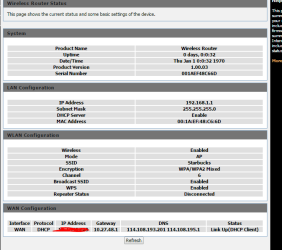
so now I've fixed the problem and here's what the new problem is. in my desktop the internet is now working but for the wireless device I can;t browse the internet. what's wrong with this? and into the router setting. I can't see my device into "active wireless client table"
 

My Computer My Computer

Computer type
PC/Desktop
OS
windows 7 Ultimate x32

My Computer My Computer

Computer type
PC/Desktop
Computer Manufacturer/Model Number
Custom Build
OS
Windows 7 Ultimate x64 SP1
CPU
AMD Phenom 2 1090T
Motherboard
Gigabyte GA-890FXA-UD5
Memory
2x8GB Kingston HyperX Fury Black 1600Mhz Unganged
Graphics Card(s)
MSI GTX 970 Gaming 4G
Sound Card
Realtek On-Board HD 7.1 Audio / Logitech G35
Monitor(s) Displays
3xAcer GD245HQ
Screen Resolution
1920x1080
Hard Drives
Samsung 850 Pro 512GB SSD - OS /
WD Caviar Black SATA 3 - 1 TBx2 - Dynamic RAID 0 /
WD Caviar Green SATA 2 - 640GBx2 - Dynamic RAID 0 /
WD Caviar Green SATA 2 - 640GB - Internal Backup /
Seagate Barracude SATA 3 - 3TB - External Backup/ Sync
PSU
HighPower 1000W
Case
Cooler Master HAF 932
Cooling
Noctua NH-D14
Keyboard
Logitech G19
Mouse
Logitech G500
Internet Speed
100/4 Mbit Cable (100GB quota)
Antivirus
ZoneAlarm Extreme Security / MBAM Pro / MBAE Free / SAS Free
Browser
IE 11 - Firefox - Chrome
Other Info
Logitech F710/ G27/ G940/ Z5500 // TrackIR 5 // Nvidia 3D Surround Vision
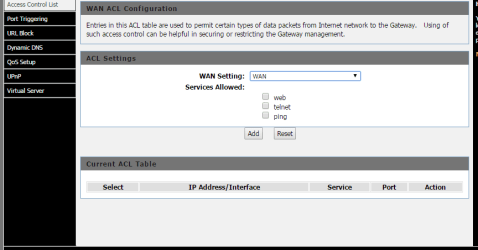
router.PNG

router1.PNG

router2.PNG

router3.PNG
 

My Computer My Computer

Computer type
PC/Desktop
OS
windows 7 Ultimate x32
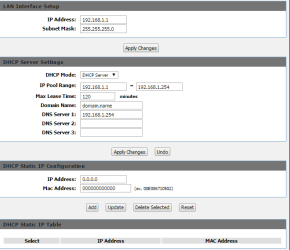
In the "DHCP server settings" above delete:
domain.name

and see if it helps
 

My Computer My Computer

Computer type
PC/Desktop
Computer Manufacturer/Model Number
Custom Build
OS
Windows 7 Ultimate x64 SP1
CPU
AMD Phenom 2 1090T
Motherboard
Gigabyte GA-890FXA-UD5
Memory
2x8GB Kingston HyperX Fury Black 1600Mhz Unganged
Graphics Card(s)
MSI GTX 970 Gaming 4G
Sound Card
Realtek On-Board HD 7.1 Audio / Logitech G35
Monitor(s) Displays
3xAcer GD245HQ
Screen Resolution
1920x1080
Hard Drives
Samsung 850 Pro 512GB SSD - OS /
WD Caviar Black SATA 3 - 1 TBx2 - Dynamic RAID 0 /
WD Caviar Green SATA 2 - 640GBx2 - Dynamic RAID 0 /
WD Caviar Green SATA 2 - 640GB - Internal Backup /
Seagate Barracude SATA 3 - 3TB - External Backup/ Sync
PSU
HighPower 1000W
Case
Cooler Master HAF 932
Cooling
Noctua NH-D14
Keyboard
Logitech G19
Mouse
Logitech G500
Internet Speed
100/4 Mbit Cable (100GB quota)
Antivirus
ZoneAlarm Extreme Security / MBAM Pro / MBAE Free / SAS Free
Browser
IE 11 - Firefox - Chrome
Other Info
Logitech F710/ G27/ G940/ Z5500 // TrackIR 5 // Nvidia 3D Surround Vision
Back
Top