Win 7 older machine, cannot connect to internet issue

netrate

New member
Member
VIP
Local time
4:38 PM
Messages
174
I have an older win 7 machine. The OS is great, but the machine is older because it has the integrated Serial port on the motherboard which I need for peripherals which require it.
I don't have a wifi option on this system so I decided to connect it directly to the internet via the ethernet cable. The lights on the back of the system are flashing green and amber, however it will not connect to the internet. I have tried to troubleshoot it the best I could, but I cannot find the cause or the solution.

I have both a 2.4gz router and a modem (from my ISP). I have tried connecting the older system to each of these via ethernet (not at the same time), but nothing is gained. The computer recognizes the internet connect, however it won't bring any webpages up on the internet.

I have connected my laptop using the same ethernet cable (to test the ethernet cable) and all of the connections come up (names of the networks) and it connects perfectly (win 10 laptop) , however when I try with this older system, "broadband" connection comes up and not the name of the network for the router or the modem.

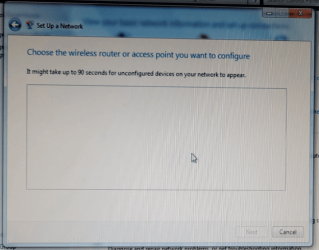
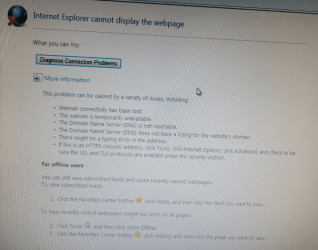
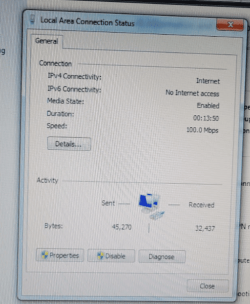
I have taken some random pics to maybe show my attempts.
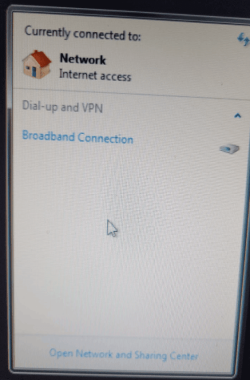
connection1.pngconnection2.pngconnection3.pngconnection4.png
 

My Computer

Computer type
PC/Desktop
OS
Win 7 dual boot with win 10
Motherboard
Gigabyte GA-970A-d3
Memory
16gig
Graphics Card(s)
GTX
Monitor(s) Displays
3
Hard Drives
500 gig ssd Samsung
Your last pic looks ok.

You wont get far using IE. Try a different browser. You probably need at least SP1 ( service pack 1 ) for a more recent browser.

What is the make and model of the machine ?
 

My Computers

System One System Two

  • Computer type
    PC/Desktop
    OS
    7 X64
    CPU
    i5 8400
    Motherboard
    gigabyte b365m ds3h
    Memory
    2x8gb 3200mhz
    Hard Drives
    various
    PSU
    pure power 11 400w cm
    Case
    Coolermaster
    Cooling
    cryorig m9i
  • Computer type
    PC/Desktop
    OS
    7x64
    CPU
    g5400
    Motherboard
    ga b365m ds3h
    Memory
    8gb ddr4 2400
    PSU
    xfx pro 450w
I will have to use a USB drive to get service pack 3 if that is possible. I will have to also get a non-web version of chrome because I cannot connect to the internet to download that.
 

My Computer

Computer type
PC/Desktop
OS
Win 7 dual boot with win 10
Motherboard
Gigabyte GA-970A-d3
Memory
16gig
Graphics Card(s)
GTX
Monitor(s) Displays
3
Hard Drives
500 gig ssd Samsung
just download the Browser you want to a USB as well
 

My Computer

Computer type
PC/Desktop
Computer Manufacturer/Model Number
medionl/Aspire 6930G/acer x55a
OS
W7 home premium 32bit/W7HP 64bit/w10 tp insider ring
CPU
E5300 dual core
Motherboard
medion MS7366
Memory
3gb
Graphics Card(s)
Nvidia Geforce 7100 Nforce 630i
Monitor(s) Displays
avixc
Internet Speed
n (isp resticted to 72)
Antivirus
mse/pands
Browser
palemoon
Other Info
Belkin Fd7050 n USB using Railink RT2870 drivers, more upto date
Well, it isn't looking good. I have sp1 and that is it. I can only install portable chrome, but that gets me on the internet. Now, upgrading is impossible it seems. I am using a P5GC-MX 1333 Asus motherboard (old). I need a video card that fits it now so I can do something with the machine. It won't even run the intel driver assistant without getting an error.
 

My Computer

Computer type
PC/Desktop
OS
Win 7 dual boot with win 10
Motherboard
Gigabyte GA-970A-d3
Memory
16gig
Graphics Card(s)
GTX
Monitor(s) Displays
3
Hard Drives
500 gig ssd Samsung
For windows 7 sp1 is it. Most browsers have discontinued support for Windows 7 & 8. Supermium and r3dfox are backported versions of Chrome and Firefox that are still being updated.

GitHub - win32ss/supermium: Chromium fork for Windows XP/2003 and up . GitHub
GitHub - Eclipse-Community/r3dfox: r3dfox is a modern Firefox based web browser for Windows Vista & 7. SourceForge link for downloading with older browsers. Just a moment...

You should use simplix to make sure the computer is up to date. Download Simplix UpdatePack 7 - MajorGeeks
 

My Computers

System One System Two

My Computer

Computer type
PC/Desktop
Computer Manufacturer/Model Number
Gateway GT5656
OS
Windows 7 x64 SP1
CPU
AMD Athlon 64 X2 6000+ / 3.0 GHz
Motherboard
NVIDIA GeForce 6150 SE
Memory
6 GB
Monitor(s) Displays
Lenovo LED
Screen Resolution
1920 X 1080
Hard Drives
Windows on 500 GB spinner; Ubuntu 16 on Sandisk 250GB SSD; Bodhi5 on Samsung 250GB SSD; another old spinner for fooling around.
PSU
Original that came with computer
Keyboard
Logitech wireless
Mouse
Logitech wireless
Antivirus
Microsoft Sec Essentials
Browser
Vivaldi

My Computers

System One System Two

  • Computer type
    PC/Desktop
    OS
    7 X64
    CPU
    i5 8400
    Motherboard
    gigabyte b365m ds3h
    Memory
    2x8gb 3200mhz
    Hard Drives
    various
    PSU
    pure power 11 400w cm
    Case
    Coolermaster
    Cooling
    cryorig m9i
  • Computer type
    PC/Desktop
    OS
    7x64
    CPU
    g5400
    Motherboard
    ga b365m ds3h
    Memory
    8gb ddr4 2400
    PSU
    xfx pro 450w
I found simplix to be incredibly convenient when building out my Windows 7 install versus round after round of batches of updates waiting a good 10+ minutes to just check for updates and that's after finding the certificate update. I just downloaded it and ran it. It saved me a lot of time. Plus I knew that there would be some updates I wouldn't want and others that include telemetry. Plus the esu updates are in it. It was a no brainer. The full think is a kind of a hefty download at 800+ mb but it contains a good 11 gb of updates. I remember using a similar program on XP. I think it was autopatcher.
 

My Computers

System One System Two

SIW2 is right of course, Legacy Update is intended for older systems than W7. Sorry about that!
 

My Computer

Computer type
PC/Desktop
Computer Manufacturer/Model Number
Gateway GT5656
OS
Windows 7 x64 SP1
CPU
AMD Athlon 64 X2 6000+ / 3.0 GHz
Motherboard
NVIDIA GeForce 6150 SE
Memory
6 GB
Monitor(s) Displays
Lenovo LED
Screen Resolution
1920 X 1080
Hard Drives
Windows on 500 GB spinner; Ubuntu 16 on Sandisk 250GB SSD; Bodhi5 on Samsung 250GB SSD; another old spinner for fooling around.
PSU
Original that came with computer
Keyboard
Logitech wireless
Mouse
Logitech wireless
Antivirus
Microsoft Sec Essentials
Browser
Vivaldi
Back
Top