Win7 XP Mode will not join home network

Elnido

New member
Local time
5:36 AM
Messages
1
XP Mode runs my old programs fine, but I can't get them to communicate with my Win 7 Home Network. Host Win 7 CPU is connected fine. XP Mode is showing IP address 192.168.151.2 and host Win 7 is 192.168.2.4 Router does not show XP mode client, so where did XP get its IP address from? XP is connected to broadband OK. How can I get the XP on to my Win 7 home network as it appears to be on a different network?
 

My Computer

OS
Win 7
Xp mode should get it's IP from the router. Not sure why you xp mode has different ip rang than you host w7. Is your router and xp mode tcp/ip4 set to auto ip detect?
 

My Computer

Computer Manufacturer/Model Number
Lenovo ThinkPad T60
OS
Windows 7 Ultimate 64Bit
CPU
GenuineIntel Intel(R) Core(TM) DuoCore T2400 @ 1.83GHz
Motherboard
Intel(R) 82801G (ICH7 Family)
Memory
2.00 GB
Graphics Card(s)
Mobile Intel(R) 945 Express Chipset
Sound Card
SoundMAX Integrated Digital HD Audio
Monitor(s) Displays
ThinkPad Display
Screen Resolution
1400x1050
Hard Drives
100Gb SATA
Keyboard
Standard Keyboard
Mouse
HID-compliant Mouse
Internet Speed
Cable Broadband - 54Mbps
Other Info
Intel(R) PRO/1000 PL Network Connection
11a/b/g Wireless LAN Mini PCI Express Adapter
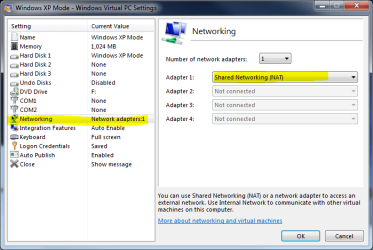
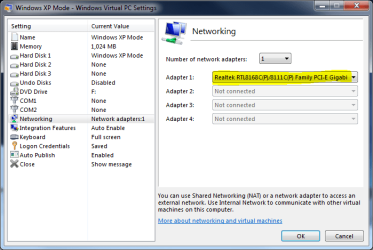
By default, XP Mode uses Virtual PC NAT, using its own IP addresses outside your home network (image 1). To change it, you have to change XP Mode network settings to use your host's NIC (image 2).

To do this, turn off the XP Mode (do not hibernate). Change the settings, click OK, reboot your host and start XP Mode.

Should work now.

Kari

Image 1:
XPMode_networking_1.PNG

Image 2:
XPMode_networking_2.PNG
 

My Computer

Computer type
Laptop
Computer Manufacturer/Model Number
HP ENVY 17-1150eg
OS
Windows 10 Pro x64 EN-GB
CPU
1.6 GHz Intel Core i7-720QM Processor
Memory
6 GB
Graphics Card(s)
ATI Mobility Radeon HD 5850 Graphics
Sound Card
Beats sound system with integrated subwoofer
Monitor(s) Displays
17" laptop display, 22" LED and 32" Full HD TV through HDMI
Screen Resolution
1600*900 (1), 1920*1080 (2&3)
Hard Drives
Internal: 2 x 500 GB SATA Hard Disk Drive 7200 rpm
External: 2TB for backups, 3TB USB3 network drive for media
Cooling
As Envy runs a bit warm, I have it on a Cooler Master pad
Keyboard
Logitech diNovo Media Desktop Laser (bluetooth)
Mouse
Logitech Performance Mouse MX
Internet Speed
50/10 Mbps VDSL
Antivirus
Windows Defender 4.3.9431.0
Browser
Maxthon 3.5.2., IE11
Hi Kari, I tried to follow you directions exactly. I had to change the settings with XPM operating. into settings, to Networking and changed it from: Shared Networking (NAT) To: Realtek PCIe GBE Family Controller
I then shut down XPM and rebooted windows 7.
When I went into XPM mode it held the Network change but made no difference in recognizing the D or E cd/dvd drives. In XPM Internet still connects, USB, works, but no physical drives..... Any Ideas?
Thanks, Doug
 

My Computer

Computer Manufacturer/Model Number
Self Made
OS
Windows 7
CPU
i7 920
Motherboard
P6T
Memory
6GB
Graphics Card(s)
ENGTS250
Hard Drives
WD 750 Black edition
SEA 750
Set in Raid 0 Super-Speed
Internet Speed
1.5 mbs download and 750 kbs upload
Back
Top