Holy Moses
Banned
Not sure if I labelled this post right, or if I am even posting this in the right category/forum.
If admins could direct this if need be, that would be cool.
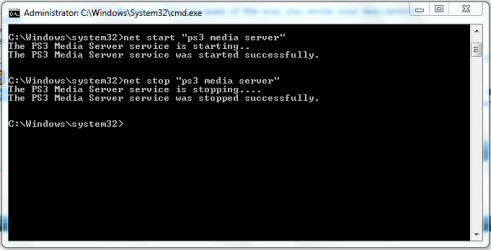
What I would like to do is have some kind of .cmd or .bat file that will turn on or restart my PS3 Media Server service, just by clicking it.
Maybe one that stops the service as well, or even one that can restart it.
I currently have a shortcut to services on the desktop, but it can be annoying when I have to restart the server numerous times because of various issues, and I have to scroll thru all the services, find PS3 Media Serve service, right click, restart.
When I start PS3 Media server as a task (so you can see the GUI), with the .exe file, you simply save your settings, hit Quit, then click the .exe on the desktop and VOILA, settings saved, and server restarted.
With the service installed and enabled, you can't quickly access the GUI and see your buffer or other values as running two instances of javaw.exe makes things go all screwy.
So, with the service, in order to change settings, I have to disable the service, then click the PMS.exe on my desktop so that PMS opens as a task. I then change any settings, save them, quit the GUI, then open services, and restart the service.
And the "restart http server" option has been broke for some time now. There are so many issues right now with PMS that many people don't want the extra headache of solving service issues, and most use a shortcut copy of their .exe in their shell:startup folder.
I figure if I can have some kind of quick way to make the service stop, click the .exe, do my thing with settings in the GUI (task startup), then close and click something to make the service start again.
I know this sounds like I am being lazy, but if someone could point me in the right direction on how to do this, my serving world would be greatly improved.
First off is this possible? Second, where and what would I even look up. Creating working .cmd or .bat files is WAAAY out of my league. I have learned how to edit some in PMS for Java heap settings to maximize my buffer capacity, but starting/creating such an option is beyond me.
If anyone needs anymore info, glad to give it. I asked a while back in the forums over there, but my thread got overlooked, and I find that stuff like this is better left to....well.....the pros.
Any ideas, and thanks in advance. Looking forward to learning something new.
If admins could direct this if need be, that would be cool.
What I would like to do is have some kind of .cmd or .bat file that will turn on or restart my PS3 Media Server service, just by clicking it.
Maybe one that stops the service as well, or even one that can restart it.
I currently have a shortcut to services on the desktop, but it can be annoying when I have to restart the server numerous times because of various issues, and I have to scroll thru all the services, find PS3 Media Serve service, right click, restart.
When I start PS3 Media server as a task (so you can see the GUI), with the .exe file, you simply save your settings, hit Quit, then click the .exe on the desktop and VOILA, settings saved, and server restarted.
With the service installed and enabled, you can't quickly access the GUI and see your buffer or other values as running two instances of javaw.exe makes things go all screwy.
So, with the service, in order to change settings, I have to disable the service, then click the PMS.exe on my desktop so that PMS opens as a task. I then change any settings, save them, quit the GUI, then open services, and restart the service.
And the "restart http server" option has been broke for some time now. There are so many issues right now with PMS that many people don't want the extra headache of solving service issues, and most use a shortcut copy of their .exe in their shell:startup folder.
I figure if I can have some kind of quick way to make the service stop, click the .exe, do my thing with settings in the GUI (task startup), then close and click something to make the service start again.
I know this sounds like I am being lazy, but if someone could point me in the right direction on how to do this, my serving world would be greatly improved.
First off is this possible? Second, where and what would I even look up. Creating working .cmd or .bat files is WAAAY out of my league. I have learned how to edit some in PMS for Java heap settings to maximize my buffer capacity, but starting/creating such an option is beyond me.
If anyone needs anymore info, glad to give it. I asked a while back in the forums over there, but my thread got overlooked, and I find that stuff like this is better left to....well.....the pros.
Any ideas, and thanks in advance. Looking forward to learning something new.
Last edited:
My Computer
- Computer Manufacturer/Model Number
- Acer Aspire 6930///Compaq Presario SR5152NX
- OS
- Windows 7 Professional 32-bit///Vista Home Premium 32-bit
- Memory
- 3GB RAM///2GB RAM
- Graphics Card(s)
- Built-in, crap///NVIDIA GeForce 6150SE nForce 430
- Sound Card
- Built-in, alright///Realtek HD audio
- Monitor(s) Displays
- Built in and 26" LCD/40" LCD (VGA splitter)
- Screen Resolution
- Laptop: 1366X768 26"Mon: 1366X768 40"Mon:1920X1080
- Hard Drives
- Internal 350GB///250GB
2 Seagate 1TB HDD Ext.
1 Verbatim 500GB HDD Ext.
- Cooling
- Stock fans
- Keyboard
- Intelli-Type Wireless multimedia keyboard
- Mouse
- MS Wireless Notebook Optical Mouse 3000
- Internet Speed
- 15Mbps Telus DSL
- Other Info
- 2 PS3's, 1 XBOX360, and a Panasonic Blu-Ray player rendering media to various locations in house via PS3 Media Server*****
DIR-655 Xtreme N Gb router w/DAP-1522 bridge/access point******Using Input Director to share keyboard and mouse across all screens and PC's in my room.



 It just drives me nuts.