Is it safe to use tools like ccleaner on an SSD?

DxxS

New member
Power User
Local time
3:36 PM
Messages
112
hi, I have just got myself an SSD, I know it is unwise to defrag it but can I use tools like ccleaner without damaging/harming it?

Thanks,
 

My Computer

OS
Windows 7 Ultimate 64-bit
CPU
Intel Core 2 Duo E8400 3GHz
Motherboard
ASUS P5Q PRO Turbo
Memory
OCZ Gold DDR2 1066MHz/PC2-8500 8GB (4x2GB)
Graphics Card(s)
BFG GTS250 OC 1GB GDDR3
Monitor(s) Displays
Dual (x2) Samsung SM2033SW 20"TFT
Hard Drives
120GB OCZ Agility 3 SSD (OS Drive)
350GB - Internal (Storage)
500GB - Internal (Storage)
1TB - Internal (Storage)
500GB - External (Storage)
PSU
OCZ Stealth XStream 700W PSU
Case
Casecom KB-5510 Black/Silver Blue LED Mid Tower Case
Cooling
Zalman CNPS7500-ALCU LED
Yes. It's safe. However it's not recommended to use CC's registry cleaner module... :)
 

My Computer

Computer Manufacturer/Model Number
Custom built machine
OS
W7 x64
CPU
Intel Q9300 2.5Ghz Quad LGA775 (Would like Q9650)
Motherboard
Gigabyte GA-EP45T-UD3R (F6 Bios)
Memory
4Gb OCZ Gold 1,333Mhz
Graphics Card(s)
Palit HD4850 O/C Sonic 512Mb DDR3, Dual DViD's
Sound Card
Azalia to twin Samson 50w Studio Monitors
Monitor(s) Displays
Twin Dell (E-IPS) U2311H 23.6" Screens
Screen Resolution
1920 x 1080 @ 60Hz
Hard Drives
Crucial M4 SSD, archives on twin Western Digital Caviar Black WD2002FAEX, 2TB, 7200rpm HDD's, Samsung Ritemaster CD/DVD Burner...
PSU
OCZ 600w
Case
Lian-Li PC8 acoustifoamed' aluminium tower
Cooling
Scythe 140mm Zipang
Keyboard
Cherry PS/2 custom model
Mouse
Lenovo USB laser "Thinkpad" Mouse
Internet Speed
ADSL2+ @14Mbps downstream & Cat6 Gigabit Ethernet
Antivirus
NOD32
Browser
Opera
Other Info
Silicon Dust HD Homerun Dual FTA (Ethernet) TV Tuners, Dray Tek Vigor 2850Vn router and 8x HP Gigabit Switch. Lian-Li CR26 Card Reader, Canon MF4430 iSensys laser printer/scanner.
Thanks, is it registry clearners in general or just the cc one?
 

My Computer

OS
Windows 7 Ultimate 64-bit
CPU
Intel Core 2 Duo E8400 3GHz
Motherboard
ASUS P5Q PRO Turbo
Memory
OCZ Gold DDR2 1066MHz/PC2-8500 8GB (4x2GB)
Graphics Card(s)
BFG GTS250 OC 1GB GDDR3
Monitor(s) Displays
Dual (x2) Samsung SM2033SW 20"TFT
Hard Drives
120GB OCZ Agility 3 SSD (OS Drive)
350GB - Internal (Storage)
500GB - Internal (Storage)
1TB - Internal (Storage)
500GB - External (Storage)
PSU
OCZ Stealth XStream 700W PSU
Case
Casecom KB-5510 Black/Silver Blue LED Mid Tower Case
Cooling
Zalman CNPS7500-ALCU LED
My advice is to leave any registry cleaner well alone... ;)
 

My Computer

Computer Manufacturer/Model Number
Custom built machine
OS
W7 x64
CPU
Intel Q9300 2.5Ghz Quad LGA775 (Would like Q9650)
Motherboard
Gigabyte GA-EP45T-UD3R (F6 Bios)
Memory
4Gb OCZ Gold 1,333Mhz
Graphics Card(s)
Palit HD4850 O/C Sonic 512Mb DDR3, Dual DViD's
Sound Card
Azalia to twin Samson 50w Studio Monitors
Monitor(s) Displays
Twin Dell (E-IPS) U2311H 23.6" Screens
Screen Resolution
1920 x 1080 @ 60Hz
Hard Drives
Crucial M4 SSD, archives on twin Western Digital Caviar Black WD2002FAEX, 2TB, 7200rpm HDD's, Samsung Ritemaster CD/DVD Burner...
PSU
OCZ 600w
Case
Lian-Li PC8 acoustifoamed' aluminium tower
Cooling
Scythe 140mm Zipang
Keyboard
Cherry PS/2 custom model
Mouse
Lenovo USB laser "Thinkpad" Mouse
Internet Speed
ADSL2+ @14Mbps downstream & Cat6 Gigabit Ethernet
Antivirus
NOD32
Browser
Opera
Other Info
Silicon Dust HD Homerun Dual FTA (Ethernet) TV Tuners, Dray Tek Vigor 2850Vn router and 8x HP Gigabit Switch. Lian-Li CR26 Card Reader, Canon MF4430 iSensys laser printer/scanner.
Hi there
Why on EARTH would you need to CCLEANER your machine --if your machine is that bad that you feel a need to do this then I would re-install W7 again from scratch on your nice new SSD and add applications as and when you need them.

Cheers
jimbo
 

My Computer

Computer type
PC/Desktop
Computer Manufacturer/Model Number
Custom built, several laptops HP/ASUS
OS
Linux CENTOS 7 / various Windows OS'es and servers
CPU
Intel i7 Intel i5
Memory
8GB, 16GB
Graphics Card(s)
On Motherboard
Sound Card
Realtek HD audio
Monitor(s) Displays
Apple Cinema display, Samsung LCD
Screen Resolution
1920 X 1080
Hard Drives
4 X 1TB SATA
Mouse
Toshiba wireless laser
Internet Speed
> 20MB up
er, jimbo - running ccleaner to get rid of some crap is slightly less time consuming than reinstalling the whole OS and software.
 

My Computer

Computer Manufacturer/Model Number
mickey megabyte 1234
OS
ultimate 64 sp1
CPU
i5 2500K [email protected]
Motherboard
MSI P67A-GD53
Memory
8 gigs GSkill Ripjaws 1600
Graphics Card(s)
amd hd6950
Sound Card
creative x-fi gamer
Monitor(s) Displays
samsung 24"
Screen Resolution
1920x1080
Hard Drives
ocz vertex 2e 60 gig, samsung f3 1tb, buffalo 2tb ext
PSU
antec 550
Case
antec three hundred
Cooling
i'm a cooling fan
Keyboard
saitek eclipse ii
Mouse
logitech g3
Internet Speed
about 4 Mbps
Other Info
i love win7
I have use Ccleaner on my ssd without any problems. I do not use any registry cleaner. IMHO if one doesn't keep a ssd clean it will fill up with a lot of junk very quickly. Due to the small size of most ssd's it doesn't take long.
 

My Computer

Computer type
PC/Desktop
Computer Manufacturer/Model Number
Home made Desktop
OS
Windows 10 Pro. 64/ version 1709 Windows 7 Pro/64
CPU
Intel i7-6800K @ 4.3
Motherboard
ASUS X-99 Deluxe II
Memory
Corsair Platinum 16 gig @2400
Graphics Card(s)
EVGA GTX 1070 OC
Monitor(s) Displays
Asus 27" LED LCD/VE278Q
Screen Resolution
1920-1080 or 1280-720 HDMI
Hard Drives
INTEL SSD 730-240 Gb Sata 3.0/
PSU
EVGA Platium 1200W
Case
Phanteks Luxe Tempered Glass 8 fans/ one radiator
Cooling
XSPC/ Water Cooled CPU
Keyboard
Das 4 Professional
Mouse
Logitech M705/MX Anywhere 2-S
Internet Speed
100 mbits
Antivirus
Microsoft Security Essentials/ Malwarebytes Premium 3.0/ SAS
Browser
I.E. 11 default/Firefox/ ISP Time Warner Cable/Spectrum
Other Info
LG BluRay Burner/
Sound system-KLipsch-THX/
Icy Dock ssd Hot Swap bays.
I have use Ccleaner on my ssd without any problems.

Same here with my Intel 320 SSD for almost a year now. Thanks to CCleaner there's still < 20GB on the drive.

MG9_.png
 

My Computer

Computer Manufacturer/Model Number
HP HPE 270f
OS
Windows 7 x64 Home Premium
CPU
Intel Core i7 930 @ 2.8 Ghz Socket 1366 LGA
Motherboard
Pegatron Truckee v1.04E41
Memory
8 GB 1366 Mhz DDR3 (PC3-10700) RAM
Graphics Card(s)
ATI Radeon 5770 1 GB DDR5 RAM
Sound Card
Realtech High Definition
Monitor(s) Displays
32" Sony Bravia
Screen Resolution
1366 X 768
Hard Drives
Intel 25nm 120 GB Series 320 SSD HD Tune- 265 MBps Read/ 130 MBps Write

LaCie 1TB + 1TB RAID 0 eSATA Drive HD Tune- 160 MBps Read/ 90 MBps Write
Keyboard
Logitech Illuminated
Mouse
Logitech MX Revolution
Internet Speed
36.4 Mbps Maximum on a 37 Mbps Motorola SB501 Modem
Use CCleaner regularly on my SSD with no issue. A Guy
 

My Computer

Computer type
PC/Desktop
OS
Windows 10 Home x64
CPU
INTEL Core i5-750 Quad-Core 3.37GHz
Motherboard
ASUS P7P55D
Memory
HyperX Fury Black Series 8GB (2 x 4GB) 1866Mhz
Graphics Card(s)
EVGA GeForce GTX 750 Superclocked 1GB 128-Bit GDDR5
Monitor(s) Displays
LG 32MA68HY 32" IPS
Screen Resolution
1920 x 1080
Hard Drives
Samsung 840 Evo 120GB, SEAGATE 500GB Barracuda® 7200.12, SATA 3 Gb/s, 7200 RPM, 16MB cache
PSU
ANTEC TruePower New TP-550, 80 PLUS, 550W
Case
ANTEC Three Hundred Illusion
Cooling
COOLER MASTER Hyper 212 Plus, 4 x 120mm 1 x 140mm Noctua's
Internet Speed
85 + Mbps
Antivirus
Avast
Browser
Vivaldi
It's safe but unless you know what to delete and what not to delete, it's probably best to not use registry cleaners :)
 

My Computer

Computer type
PC/Desktop
Computer Manufacturer/Model Number
HP
OS
Windows 7 Ultimate
CPU
DualCore Intel Pentium D 930, 3000 MHz (15 x 200)
Motherboard
Asus P5LP-LE (Emery)
Memory
3x512mb 1x1GB
Graphics Card(s)
NVIDIA GeForce 7800 GTX
Sound Card
Realtek ALC882/D/M @ Intel 82801GB ICH7
Monitor(s) Displays
Iiyama ProLite E2407HDS
Screen Resolution
1920 x 1080 70 Hz
Hard Drives
1TB WD10EARS-00Y5B1 ATA Device
Keyboard
Hewlett Packard Wireless Ergo
Mouse
Logitech USB Wheel Mouse
Internet Speed
20mbps Download - 2mbps Upload
Antivirus
Windows Defender - Malwarebytes Anti Malware
Browser
Google Chrome
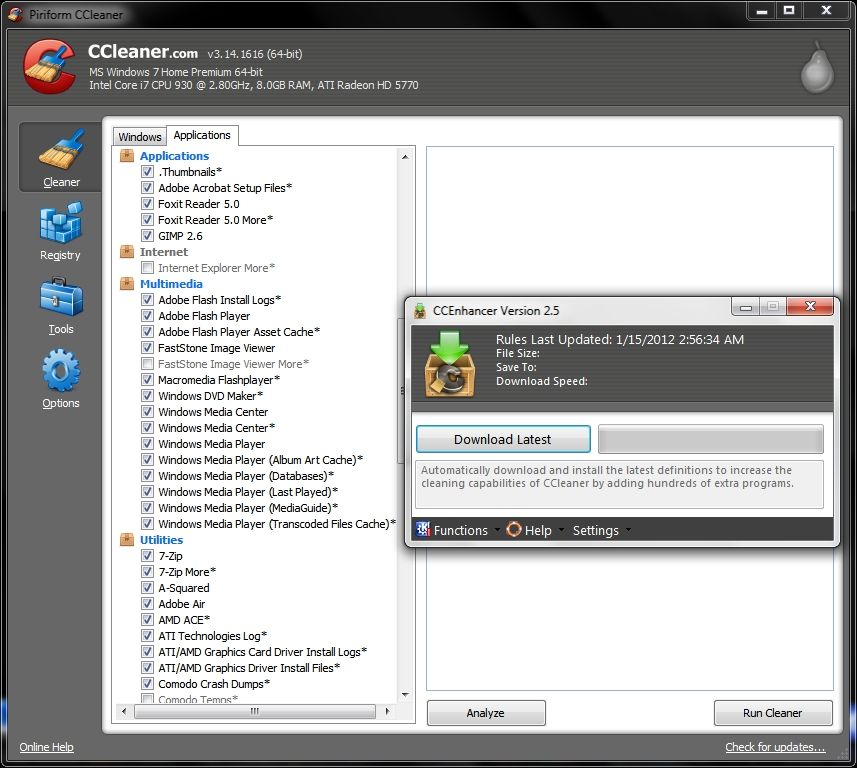
Exactly, and that's where it is so important to have CCleaner Enhancer which adds support for over 500 new programs in CCleaner. CCleaner Enhancer uses the winapp2.ini system built into CCleaner x32 and x64 to easily add new rules and definitions for programs. The rules were sourced mainly from the Piriform Support Forum.

CCleanerEnhancer25_.jpg


Each entry added to CCleaner's duty roster is designated with an *. As of this posting there are a total of 63 additional applications tasks which freeware CCleaner Enhancer has added to CCleaner's roster of duties on my Win 7 x64 computer the removal of which each accounts for more temp files that I do not need cluttering up my SSD.

MG9_.png
 
Last edited:

My Computer

Computer Manufacturer/Model Number
HP HPE 270f
OS
Windows 7 x64 Home Premium
CPU
Intel Core i7 930 @ 2.8 Ghz Socket 1366 LGA
Motherboard
Pegatron Truckee v1.04E41
Memory
8 GB 1366 Mhz DDR3 (PC3-10700) RAM
Graphics Card(s)
ATI Radeon 5770 1 GB DDR5 RAM
Sound Card
Realtech High Definition
Monitor(s) Displays
32" Sony Bravia
Screen Resolution
1366 X 768
Hard Drives
Intel 25nm 120 GB Series 320 SSD HD Tune- 265 MBps Read/ 130 MBps Write

LaCie 1TB + 1TB RAID 0 eSATA Drive HD Tune- 160 MBps Read/ 90 MBps Write
Keyboard
Logitech Illuminated
Mouse
Logitech MX Revolution
Internet Speed
36.4 Mbps Maximum on a 37 Mbps Motorola SB501 Modem
OK, I'm not hip to this stuff, but I was wondering the same thing . But wouldn't it be wasteful, pointless or maybe harmful to run ccleaner with the options set to Gutman method 35 passes? Because errrrr.... My dumbass has been doing that. It's a new SSD so I think I'll be ok, but I'm thinking that was dumb, no? And I suppose I'll look around some more, but I'm not really getting any definitive answers on securely deleting ANYTHING on my SSD. I get the jist of TRIM I suppose, but there's still info left behind. I don't know, maybe I sound like a dumbshit, but how would I make sure I can make something gone for good on my SSD?
 

My Computer

Computer Manufacturer/Model Number
HP Envy 14-2160se
OS
Windows 7 Ultimate 64 bit
CPU
Intel 2nd Gen Core i5-2430M / 2.4 GHz (Turbo up to 3.00 Ghz)
Memory
16 GB 1333MHz DDR3 SDRAM (2 DIMM)
Graphics Card(s)
AMD Radeon HD 6630M - 1 GB (Switchable) I KNOW IT SUCKS, ok
Sound Card
(Beats Audio) - I know, but I wanted to put that here.
Monitor(s) Displays
14.5" Diagonal High Definition HP BrightView Infinity LED
Screen Resolution
1366 x 768
Hard Drives
80 GB mSATA SSD
750 GB SATA (7200 rpm)
Case
Aluminum in black with soft-touch surfaces
Keyboard
Full-size island-style red backlit keyboard
Other Info
I'm not rich. I'm lucky to have this computer. So I don't really care if video game nerds diss my graphics card or yall think my computer sucks. I'm lucky to have what I got.
Here we go again with the "Anti-CCleaner Brigade".

I have used CCleaner for many years now. I have NEVER had a problem with either the 'Cleaner' or the 'Registry Cleaner' parts. However, before installing (and regularly updating) CC, I used another product. This Reg Cleaner screwed my system, I have never forgotten it. I also know others who have used CC after other products, with the same experiences.

Can anyone on the Forum provide hard evidence that CCleaner harmed their machine?

When using CC's Reg Cleaner, before actually carrying out the Clean, the programme asks if you want to make a Registry Copy and store it in Documents (or anywhere you like.) I do that.
 
Last edited:

My Computer

Computer type
PC/Desktop
Computer Manufacturer/Model Number
bertison
OS
Windows 7/64 HPremium.
CPU
AMD FX-6300.
Motherboard
Asus M5A78L-M LE/USB3.
Memory
Corsair (2x4) GB DDR3 CMXGX3M2A1337CL9.
Graphics Card(s)
NVidia/Gigabyte GT730 (2GB) GDDR5.
Sound Card
Onboard.
Monitor(s) Displays
Iiyama PLE2407HDS.
Screen Resolution
1920 x 1280
Hard Drives
Desktop: 1TB. WD10EZEX-00BN5A0.
Zyxel nsa310 NAS: 2TB Seagate Barracuda 7200.14.
Cache Drive: Sandisk SDSSDRC032G.
Laptop Lenovo B50/80 128 GB SSD.
PSU
Corsair 750M.
Case
Coolermaster N300.
Cooling
FRONT: (2X) 140mm. TOP: (1x) 120mm. REAR: (1x) 120mm.
Keyboard
Logitech K290
Mouse
Trust Optical Wired
Internet Speed
15 Mb Down, 0.55 Up.
Antivirus
Kaspersky Total Security 2017, Hitman Pro.
Browser
Firefox.
Other Info
NETWORK:
Sky "Q box" and router.
Desktop & NAS - 30 Metres Cat6 Ethernet wired, via TP-Link 4-port switch.
Lenovo B50/80 Laptop, 2x Wileyfox phones, Lenovo TAB3-8 tablet - all wireless.
Grandchildren, their parents and friends as bandwidth 'parasites' at various times!
It isn't about Anti-CCleaner. It's about running a secure deletion on a SSD. 35 passes of writes on a SSD will just shorten it's life unnecessarily. If you were going to run a secure erase program, then CCleaner would be as good as any. A Guy
 

My Computer

Computer type
PC/Desktop
OS
Windows 10 Home x64
CPU
INTEL Core i5-750 Quad-Core 3.37GHz
Motherboard
ASUS P7P55D
Memory
HyperX Fury Black Series 8GB (2 x 4GB) 1866Mhz
Graphics Card(s)
EVGA GeForce GTX 750 Superclocked 1GB 128-Bit GDDR5
Monitor(s) Displays
LG 32MA68HY 32" IPS
Screen Resolution
1920 x 1080
Hard Drives
Samsung 840 Evo 120GB, SEAGATE 500GB Barracuda® 7200.12, SATA 3 Gb/s, 7200 RPM, 16MB cache
PSU
ANTEC TruePower New TP-550, 80 PLUS, 550W
Case
ANTEC Three Hundred Illusion
Cooling
COOLER MASTER Hyper 212 Plus, 4 x 120mm 1 x 140mm Noctua's
Internet Speed
85 + Mbps
Antivirus
Avast
Browser
Vivaldi
Hi there
Why on EARTH would you need to CCLEANER your machine --if your machine is that bad that you feel a need to do this then I would re-install W7 again from scratch on your nice new SSD and add applications as and when you need them.

Cheers
jimbo

I know this is a relatively old response, but it seems many like to keep their machines so squeaky clean that they run CCleaner as a scheduled task at every boot up and shut down.


Can anyone on the Forum provide hard evidence that CCleaner harmed their machine?
Yes. I've had 2 incidents recently, 1 was only a big deal to my son.

#1). Ran ccleaner on a machine to test something and it wiped out all of his Angry Birds Chrome saved game data. As a 4 year old who had cleared tons of levels, this was devastating.

#2). I've run the reg cleaner tools in the past on machines that were either infected with spyware or viruses. After getting rid of the problems above and having the machine more or less working pretty good, a run of the reg cleaner to make it even better resulted in a machine that wouldn't boot up. Found out later, that system restore points wouldn't work either, as they would crap out before completion (might have been the result of the virus or malware). Ultimately had to fix with a repair install of the OS. Had I not just "tried" CCleaner to eek out some more performance, I would have saved myself about 4 hours of work...< and of course since it was family, it was unpaid time too.
 

My Computer

Computer Manufacturer/Model Number
Self-Built in July 2009
OS
Windows 7 Ultimate x64
CPU
Intel Q9550 2.83Ghz OC'd to 3.40Ghz
Motherboard
Gigabyte GA-EP45-UD3R rev. 1.1, F12 BIOS
Memory
8GB G.Skill PI DDR2-800, 4-4-4-12 timings
Graphics Card(s)
EVGA 1280MB Nvidia GeForce GTX570
Sound Card
Realtek ALC899A 8 channel onboard audio
Monitor(s) Displays
23" Acer x233H
Screen Resolution
1920x1080
Hard Drives
Intel X25-M 80GB Gen 2 SSD
Western Digital 1TB Caviar Black, 32MB cache. WD1001FALS
PSU
Corsair 620HX modular
Case
Antec P182
Cooling
stock
Keyboard
ABS M1 Mechanical
Mouse
Logitech G9 Laser Mouse
Internet Speed
15/2 cable modem
Other Info
Windows and Linux enthusiast. Logitech G35 Headset.
I used to use CCLeaner and CCenhancer, but CCEnhancer was too thorough and would often clear things that shouldn't be cleared (but, I had the settings on full blast) I don't use any optimization programs and my system still runs like new, correction, all of my computers (1 xp, 1 Win98, 1 Vista, and 2 Win7 pcs) run like new and I have NEVER used any tweaking/ optimization programs on them. Also, do NOT use the 35 pass wipe on an ssd. Maybe a 1 or 2 pass at most, but you would put a lot of wear on your ssd by doing 35 passes. I don't want ot start an arguement of Using CCLeaner vs not using ccleaner, but I felt the need to tell people that these aren't the 'ol XP days when people would get a bunch of viruses and 100's of updates and you would need to do that stuff. Windows 7 just doesn't need "cleaning" and "optimizing.".
 

My Computer

Computer type
PC/Desktop
Computer Manufacturer/Model Number
HP Pavilion P7-1010
OS
Windows 7 Professional x64 Service Pack 1
CPU
AMD Athlon X4 645
Motherboard
Foxxcon N-Alvorix RS880
Memory
6GB DDR3 1066
Graphics Card(s)
Sapphire Radeon HD 5670 512MB GDDR5
Sound Card
Realtek Integrated Audio
Monitor(s) Displays
HP 2011x
Screen Resolution
1600x900
Hard Drives
1. Crucial M4 128GB SSD
2. 1TB Seagate Barracuda 7200.12 RPM
3. 1TB Western Digital Caviar Green 5400RPM
PSU
Seasonic S12 II Bronze 380 Watt
Case
HP OEM
Cooling
Coolermaster Heatsink, AVC Case Fan
Keyboard
HP OEM- Made by Chicony
Mouse
HP OEM- Made by Logitech
Internet Speed
20MBit Down/4 Up
Antivirus
Microsoft Security Essentials
Browser
Internet Explorer 10
This is a necessarily long reply, as I wish to respond to 3 forumites.

A guy:
You are correct, I am in the wrong in missing the point. I have no experience of SSD's and should have kept my mind on the OP's point.

pparks:
(i) To wipe out your son's saved data (& I hope the little guy is over it) CCl settings must have been at more than Default.
(ii) "Not Booting" & "System Restore points not working" are common faults after a malware infection. CCl cannot be blamed for that. If an A.V. is good enough, malware should be killed at source.

I like to keep it simple too, which is why I use CCl. It is simple to setup and simple to use without harm, if used properly and settings are examined with care.

Windude:
CCenhancer, like CCl, is fine if not used on (full blast" - i.e. with all Setting boxes ticked. I didn't believe I needed it, so after examining it thoroughly, I removed it. I do use another good Piriform programme though - "Speccy" which is the most complete programme I know of, for displaying every specification, component and peripheral on my machines.
Win7 is great, I agree, but it does not remove all the kludge that gets left behind in various pockets in your system. I wish it did.
With any programme I might wish to install, my rule is to examine it first, by using the ReadMe, PDF guide, any Reviews available, or manual. Before installation, I can the decide if it is potentially harmfull, useful or necessary, and act upon the information to use or discard the programme.

 

My Computer

Computer type
PC/Desktop
Computer Manufacturer/Model Number
bertison
OS
Windows 7/64 HPremium.
CPU
AMD FX-6300.
Motherboard
Asus M5A78L-M LE/USB3.
Memory
Corsair (2x4) GB DDR3 CMXGX3M2A1337CL9.
Graphics Card(s)
NVidia/Gigabyte GT730 (2GB) GDDR5.
Sound Card
Onboard.
Monitor(s) Displays
Iiyama PLE2407HDS.
Screen Resolution
1920 x 1280
Hard Drives
Desktop: 1TB. WD10EZEX-00BN5A0.
Zyxel nsa310 NAS: 2TB Seagate Barracuda 7200.14.
Cache Drive: Sandisk SDSSDRC032G.
Laptop Lenovo B50/80 128 GB SSD.
PSU
Corsair 750M.
Case
Coolermaster N300.
Cooling
FRONT: (2X) 140mm. TOP: (1x) 120mm. REAR: (1x) 120mm.
Keyboard
Logitech K290
Mouse
Trust Optical Wired
Internet Speed
15 Mb Down, 0.55 Up.
Antivirus
Kaspersky Total Security 2017, Hitman Pro.
Browser
Firefox.
Other Info
NETWORK:
Sky "Q box" and router.
Desktop & NAS - 30 Metres Cat6 Ethernet wired, via TP-Link 4-port switch.
Lenovo B50/80 Laptop, 2x Wileyfox phones, Lenovo TAB3-8 tablet - all wireless.
Grandchildren, their parents and friends as bandwidth 'parasites' at various times!
pparks:
(i) To wipe out your son's saved data (& I hope the little guy is over it) CCl settings must have been at more than Default.
It was not changed. I don't configure anything with Ccleaner. I just tested in a VM, with Angry Birds Chrome (chrome browser version of the game). Standard install of Ccleaner. Do a clean, save game progress GONE.

(ii) "Not Booting" & "System Restore points not working" are common faults after a malware infection. CCl cannot be blamed for that. If an A.V. is good enough, malware should be killed at source.
This is correct. However, the box "WAS" booting fine. I simply wanted to ensure that everything possible was removed and the box was running as best as it could, and after running ccleaner it was not booting any more. Trying to fix this problem using restore points was unsuccessful. Had I not used ccleaner and just left well enough alone, I could have saved these last few hours of work and just given them the machine back after I cleaned malware and it was booting ok.

I'm not universally saying to avoid ccleaner, but I'm saying that I have had experiences where Ccleaner was used on a machine and it started to have issues.
 

My Computer

Computer Manufacturer/Model Number
Self-Built in July 2009
OS
Windows 7 Ultimate x64
CPU
Intel Q9550 2.83Ghz OC'd to 3.40Ghz
Motherboard
Gigabyte GA-EP45-UD3R rev. 1.1, F12 BIOS
Memory
8GB G.Skill PI DDR2-800, 4-4-4-12 timings
Graphics Card(s)
EVGA 1280MB Nvidia GeForce GTX570
Sound Card
Realtek ALC899A 8 channel onboard audio
Monitor(s) Displays
23" Acer x233H
Screen Resolution
1920x1080
Hard Drives
Intel X25-M 80GB Gen 2 SSD
Western Digital 1TB Caviar Black, 32MB cache. WD1001FALS
PSU
Corsair 620HX modular
Case
Antec P182
Cooling
stock
Keyboard
ABS M1 Mechanical
Mouse
Logitech G9 Laser Mouse
Internet Speed
15/2 cable modem
Other Info
Windows and Linux enthusiast. Logitech G35 Headset.
how would I make sure I can make something gone for good on my SSD?

With what degree of certainty? How many decimal points? 3 nines? 444 nines?

Make sure someone with a net worth of 5000 dollars can't recover something? 5 million dollars?

Make sure the CIA can't recover something?

An SSD is worth only a few hundred bucks at most. If in doubt about security, consult a sledgehammer or blowtorch. You're only out a few hundred bucks and are 100% secure.

If you are unwilling to sledgehammer or blowtorch the drive, then you are by definition willing to settle for some degree of uncertainty. You've traded the last bit of certainty to save the few hundred dollars.

Mere mortals would use a drive wiper such as "clean all" from Diskpart within Windows.
 

My Computer

Computer type
PC/Desktop
Computer Manufacturer/Model Number
Ignatz Special; 4 speed manual gearbox; factory air conditioning; one of one
OS
Windows 7 Home Premium SP1, 64-bit
CPU
Intel Skylake i5-6600K, not overclocked
Motherboard
AsRock Z170M Extreme 4, micro ATX
Memory
8 GB HyperX DDR4-2666 (2 x 4 GB)
Graphics Card(s)
none; graphics are integrated on CPU
Sound Card
onboard: Realtek ALC1150; external: USB Behringer UF0-202
Monitor(s) Displays
Dell S2340M 23 inch IPS
Screen Resolution
1600 x 900
Hard Drives
System: Crucial MX100 series SSD, 128 GB;
Data: Samsung Spinpoint 103SJ, 1 TB;
Backup: WD Caviar Green WD30EZRX-00D8PB0, 3 TB
PSU
Rosewill SilentNight 500 watt fanless, semi-modular
Case
Antec Solo II
Cooling
Noctua NH-U12S; Noctua F12 intake, Noctua S12A exhaust
Keyboard
Microsoft 200 6JH-00001 USB
Mouse
Dell or Microsoft optical wired; USB
Antivirus
Microsoft Security Essentials and Malwarebytes Premium
Browser
Pale Moon
Other Info
All fans PWM; speeds at idle: CPU circa 500 rpm; intake circa 600 rpm; exhaust circa 600 rpm; CPU temps 27 idle and 47 C load in a warm room (27 C/81 F) when running Intel Extreme Tuning Utility stress test.
I can address the issue with CCleaner and Angry Birds Chrome. The data was saved in the web-browser's cache, so when CCleaner is instructed to clean that out....so does the saved games. It's done the same for me with Cut The Rope, IE version.

I'm glad the proper information was finally posted, that CCleaner is a perfectly safe and useful app, especially when left at it's defaults.
 

My Computer

OS
Windows 7 Ultimate x64 SP1
CPU
Intel Core i7-2600
Motherboard
Gigabyte GA-P67A-UD3P-B3
Memory
12 GB Patriot Extreme DDR3-1333
Graphics Card(s)
Nvidia GTX 470
Monitor(s) Displays
Dell UltraSharp 2209WA
Hard Drives
OCZ Agility3 240 GB, WD5001AALS, WD7501AALS
PSU
OCZ ModStream 700W
Case
CoolerMaster HAF 912 Advanced
Cooling
CoolerMaster Hyper 212 Plus
Back
Top