Scan of an external drive error and found file

Melissa

New member
Power User
Local time
4:52 PM
Messages
394
Dear Forum,

I have accidentally had my external hard drive disconnect.

When I went to reconnect the external drive it asked me to scan it.

I have gone into the error checking section and noticed that it went from an Expansion Drive to a Local Disk.

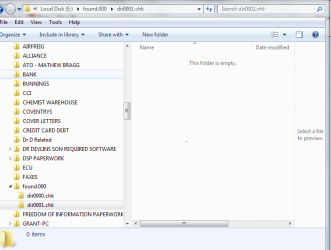
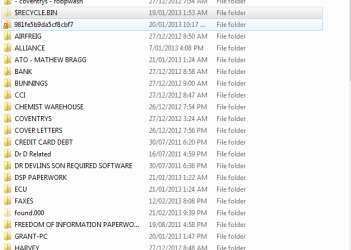
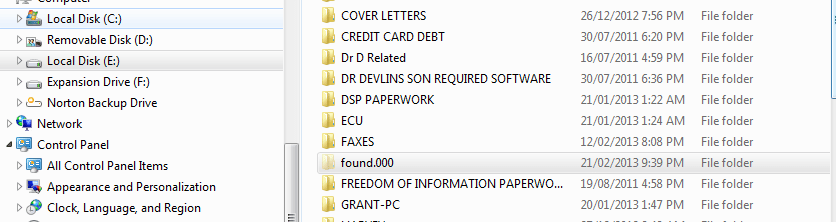
I also see that when I had to stop the computer as I turned it by accident - it has a file called Found.000

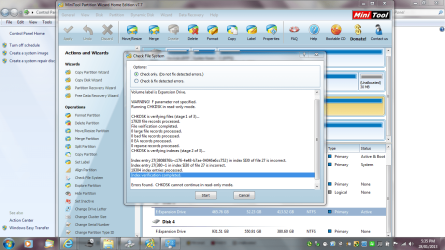
I have attached the copy of the error code. I do not know what it means.

I am scared to do anything as many people have told me that I am not great at computers
 

Attachments
Last edited:

My Computer My Computer

Computer type
Laptop
Computer Manufacturer/Model Number
Sony VAIO / E Series VPCEB46FG
OS
Windows 7 Home Premium 64bit
CPU
Windows 7 Service Pack 1 x86 NTFS
Motherboard
AMD E-350 Processor
Memory
4 GB
Hard Drives
500GB
Other Info
1.6GHz
I see that I have had a few views - but I may not be welcome on here anymore. I need as much assistance as possible. Trying to do a complete reinstall.

I have been given a hard time in other forums.
 

Attachments

  • fdrive prop.PNG
    fdrive prop.PNG
    9.3 KB · Views: 11
  • fdrive.doc
    fdrive.doc
    281 KB · Views: 4

My Computer My Computer

Computer type
Laptop
Computer Manufacturer/Model Number
Sony VAIO / E Series VPCEB46FG
OS
Windows 7 Home Premium 64bit
CPU
Windows 7 Service Pack 1 x86 NTFS
Motherboard
AMD E-350 Processor
Memory
4 GB
Hard Drives
500GB
Other Info
1.6GHz
Hang on Melissa of course you are welcome in SF and mate for what it is worth I have had my share of flaming and ridicule on other forums so don't get disheartened, because you will not get it in here.:)

Mate what security are you using as my Kaspersky always asks if I want to do a scan on every mortal thing I hook up but that doesn't mean there is something wrong with.

From that it looks like the drive is not accessible is that right?
 

My Computer My Computer

Computer type
PC/Desktop
Computer Manufacturer/Model Number
Own build (new) Desk1 / Asus ROG Win 7 / Desk2 1st build
OS
Desk1 7 Home Prem / Desk2 10 Pro / Main lap Asus ROG 10 Pro 2 laptop Toshiba 7 Pro Asus P2520 7 & 10
CPU
Desk1 i5 3750K / Laptop i7 GTX 860M / Desk2 i5 2500
Motherboard
Desk1 Asus P877-V / Desk2 Gigabyte H67 UD3H / Laptop ?
Memory
Desk1 8GB (1866) / Desk2 16GB (1333) / Laptop 8Gb DDR3
Graphics Card(s)
Desk 1& 2NVidia GTX 650 & Laptops on board Intel
Sound Card
Desk 1 & 2 -XONAR DG Realtek High Def audio Laptop
Monitor(s) Displays
Desk 1 Benq HD 2450 / Desk2 Philips 24" / Laptop 17.5"
Screen Resolution
1920x1080 D1 & D2 & Laptop 1
Hard Drives
Desk1 Samsung 120GB 830 SSD
Asus ROG 256GB 850 Pro SSD
Desk2 Samsung 840 256 SSD
Toshiba 120GB EVO
PSU
Desk 1 Corsair HX 1050/ Laptop ? / Desk 2 Corsair HX 650
Case
Desk 1 Cooler HAF XM ? Toshiba laptop / Desk2 Coolermaster
Cooling
Fans on all Desk1 -2 Desk2 - all Coolermasters 5 Laptop ?
Keyboard
Desk 1 MS Sidewinder X6 Desk 2 MS Sidewinder X 4
Mouse
Desk 1&2 - Gigabyte MS 900 gamer - laptop - Logitec wireless
Internet Speed
ADSL2+
Other Info
One other Desktop (tester) and spare Toshba laptop both with SSD's
Running Kaspersky 2016 ISS on all machines config'd identically
Logitec audio stereo systems on each machine (x3)
Canon MG5250MFC
Router/modem TP-Link running WPA2SK
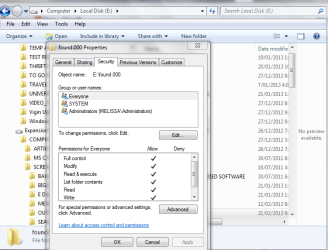
That is correct - but I went on a forum as someone gave me a link to go to on here - I changed the security so that everyone could access the contents - looking at the contents - I am not sure what I am looking at.

This is how I unlocked it

How to access a found.000 folder that is locked - Microsoft Community

I am also not sure if I should scan the External hard drive or not.

Thanks for your reply. I just feel embarassed if I have made a silly mistake.

I also am advised to reinstall Windows 7 as my system is stuffed - my doing I think.

Thank you
 

Attachments

  • f drive chk files.PNG
    f drive chk files.PNG
    46.3 KB · Views: 2

My Computer My Computer

Computer type
Laptop
Computer Manufacturer/Model Number
Sony VAIO / E Series VPCEB46FG
OS
Windows 7 Home Premium 64bit
CPU
Windows 7 Service Pack 1 x86 NTFS
Motherboard
AMD E-350 Processor
Memory
4 GB
Hard Drives
500GB
Other Info
1.6GHz
Ok now one thing you NEVER do mate is let everyone in past your security unless you mean the security on that drive.

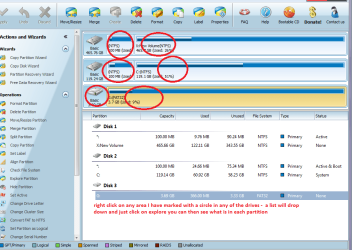
Now if you are trying to see inside that drive and you cannot access it via Computer in Windows try this app Best Free Partition Manager Freeware and free partition magic for Windows 7, Windows 8, Windows Vista and Windows XP 32 bit & 64 bit. MiniTool Free Partition Manager Software Home Edition. < free edition is fine.

when the drives are all listed right click on that drive and then click Explore it will show you what is in there. You can click on each one but it will not open that particular file it will only show you what is listed but at least it is a start.
 

Attachments

  • MINI.PNG
    MINI.PNG
    55.5 KB · Views: 7

My Computer My Computer

Computer type
PC/Desktop
Computer Manufacturer/Model Number
Own build (new) Desk1 / Asus ROG Win 7 / Desk2 1st build
OS
Desk1 7 Home Prem / Desk2 10 Pro / Main lap Asus ROG 10 Pro 2 laptop Toshiba 7 Pro Asus P2520 7 & 10
CPU
Desk1 i5 3750K / Laptop i7 GTX 860M / Desk2 i5 2500
Motherboard
Desk1 Asus P877-V / Desk2 Gigabyte H67 UD3H / Laptop ?
Memory
Desk1 8GB (1866) / Desk2 16GB (1333) / Laptop 8Gb DDR3
Graphics Card(s)
Desk 1& 2NVidia GTX 650 & Laptops on board Intel
Sound Card
Desk 1 & 2 -XONAR DG Realtek High Def audio Laptop
Monitor(s) Displays
Desk 1 Benq HD 2450 / Desk2 Philips 24" / Laptop 17.5"
Screen Resolution
1920x1080 D1 & D2 & Laptop 1
Hard Drives
Desk1 Samsung 120GB 830 SSD
Asus ROG 256GB 850 Pro SSD
Desk2 Samsung 840 256 SSD
Toshiba 120GB EVO
PSU
Desk 1 Corsair HX 1050/ Laptop ? / Desk 2 Corsair HX 650
Case
Desk 1 Cooler HAF XM ? Toshiba laptop / Desk2 Coolermaster
Cooling
Fans on all Desk1 -2 Desk2 - all Coolermasters 5 Laptop ?
Keyboard
Desk 1 MS Sidewinder X6 Desk 2 MS Sidewinder X 4
Mouse
Desk 1&2 - Gigabyte MS 900 gamer - laptop - Logitec wireless
Internet Speed
ADSL2+
Other Info
One other Desktop (tester) and spare Toshba laptop both with SSD's
Running Kaspersky 2016 ISS on all machines config'd identically
Logitec audio stereo systems on each machine (x3)
Canon MG5250MFC
Router/modem TP-Link running WPA2SK

My Computer My Computer

Computer type
Laptop
Computer Manufacturer/Model Number
MSI GE72VR Apache Pro-416
OS
Windows 10x64 Build 1709
CPU
Intel i7 7700HQ Kaby Lake
Motherboard
Micro-Star Intl. MS-179B (U3C1)
Memory
16 GB DDR4 @2400
Graphics Card(s)
Nvidia Geforce GTX 1060
Screen Resolution
1920x1080 120Hz
Hard Drives
256 GB Nvme M.2 SSD

1TB HDD@7200
Cooling
Cooler Blast 4
Keyboard
Steel Series
Antivirus
Bit Defender Free
Browser
Edge
Thank you for that extra information.

I now know what the FOUND.000.

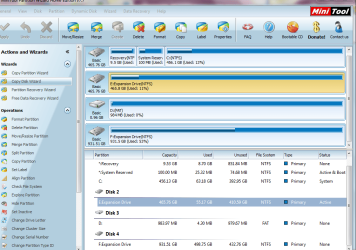
I have used Partition Wizard before and noticed that the properties have changed.

It used to be an Expansion Drive - now - Local Disk - not too sure on that.
 

Attachments

  • f drive security.PNG
    f drive security.PNG
    37.6 KB · Views: 3
  • f drive partion.PNG
    f drive partion.PNG
    66.1 KB · Views: 3
  • E DRIVE FROM PARTION WIZARD.PNG
    E DRIVE FROM PARTION WIZARD.PNG
    130.4 KB · Views: 4
  • E DRIVE FROM PARTION WIZARD SECOND SCAN.PNG
    E DRIVE FROM PARTION WIZARD SECOND SCAN.PNG
    129 KB · Views: 4

My Computer My Computer

Computer type
Laptop
Computer Manufacturer/Model Number
Sony VAIO / E Series VPCEB46FG
OS
Windows 7 Home Premium 64bit
CPU
Windows 7 Service Pack 1 x86 NTFS
Motherboard
AMD E-350 Processor
Memory
4 GB
Hard Drives
500GB
Other Info
1.6GHz
I read it with the comments - but it does not explain the change from Expansion Drive to Local Disk.

Does that usually happen?
 

My Computer My Computer

Computer type
Laptop
Computer Manufacturer/Model Number
Sony VAIO / E Series VPCEB46FG
OS
Windows 7 Home Premium 64bit
CPU
Windows 7 Service Pack 1 x86 NTFS
Motherboard
AMD E-350 Processor
Memory
4 GB
Hard Drives
500GB
Other Info
1.6GHz
I am just also enquiring should I change back the security and forget it. I found the information on a Microsoft Forum and thought I would try it out.

That is why I put in the link.

Thank you
 

My Computer My Computer

Computer type
Laptop
Computer Manufacturer/Model Number
Sony VAIO / E Series VPCEB46FG
OS
Windows 7 Home Premium 64bit
CPU
Windows 7 Service Pack 1 x86 NTFS
Motherboard
AMD E-350 Processor
Memory
4 GB
Hard Drives
500GB
Other Info
1.6GHz
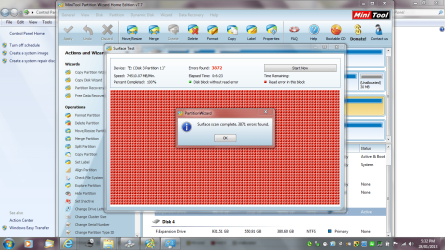
Sorry late reply Melissa that surface test is looking suspicious what brand of hard drive are you using as I think a site specific test on it might be in order as this could be something as simple as the drive packing it in.
 

My Computer My Computer

Computer type
PC/Desktop
Computer Manufacturer/Model Number
Own build (new) Desk1 / Asus ROG Win 7 / Desk2 1st build
OS
Desk1 7 Home Prem / Desk2 10 Pro / Main lap Asus ROG 10 Pro 2 laptop Toshiba 7 Pro Asus P2520 7 & 10
CPU
Desk1 i5 3750K / Laptop i7 GTX 860M / Desk2 i5 2500
Motherboard
Desk1 Asus P877-V / Desk2 Gigabyte H67 UD3H / Laptop ?
Memory
Desk1 8GB (1866) / Desk2 16GB (1333) / Laptop 8Gb DDR3
Graphics Card(s)
Desk 1& 2NVidia GTX 650 & Laptops on board Intel
Sound Card
Desk 1 & 2 -XONAR DG Realtek High Def audio Laptop
Monitor(s) Displays
Desk 1 Benq HD 2450 / Desk2 Philips 24" / Laptop 17.5"
Screen Resolution
1920x1080 D1 & D2 & Laptop 1
Hard Drives
Desk1 Samsung 120GB 830 SSD
Asus ROG 256GB 850 Pro SSD
Desk2 Samsung 840 256 SSD
Toshiba 120GB EVO
PSU
Desk 1 Corsair HX 1050/ Laptop ? / Desk 2 Corsair HX 650
Case
Desk 1 Cooler HAF XM ? Toshiba laptop / Desk2 Coolermaster
Cooling
Fans on all Desk1 -2 Desk2 - all Coolermasters 5 Laptop ?
Keyboard
Desk 1 MS Sidewinder X6 Desk 2 MS Sidewinder X 4
Mouse
Desk 1&2 - Gigabyte MS 900 gamer - laptop - Logitec wireless
Internet Speed
ADSL2+
Other Info
One other Desktop (tester) and spare Toshba laptop both with SSD's
Running Kaspersky 2016 ISS on all machines config'd identically
Logitec audio stereo systems on each machine (x3)
Canon MG5250MFC
Router/modem TP-Link running WPA2SK
It is a Shintaro 2.5" External HDD Drive - I will try the website and see what is happening.

Do not apologise - I am usually late with my replies - I must frustrate people.

Attached is another screen shot - just another issue.

Having issues dismounting the external drives - but Googling such things as I have been told I ask basic troubleshooting issues.
 

Attachments

  • f drive recycle bin.PNG
    f drive recycle bin.PNG
    14.1 KB · Views: 6

My Computer My Computer

Computer type
Laptop
Computer Manufacturer/Model Number
Sony VAIO / E Series VPCEB46FG
OS
Windows 7 Home Premium 64bit
CPU
Windows 7 Service Pack 1 x86 NTFS
Motherboard
AMD E-350 Processor
Memory
4 GB
Hard Drives
500GB
Other Info
1.6GHz
Hum Melissa I cannot find a specific tester for Shintaro but after a few Googles there seems to be quite a few people with problems that involve how the drive is formatted ie NTFS or FAT.
I also found this http://www.shintaro.com.au/assets/support/05_external_hdd_enclosures/FAQ-EXTERNAL-HDD.pdf

Now my first instinct is to say try testing using Seatools SeaTools | Seagate however this may not work with the brand that you have but worth a try.

Personally I prefer Seagate drives for spinners both internal and external - an option would be to recover what data you can from this Shintaro and ditch it I know this is a pain but maybe the best option.

Anyway run the test from Seatools first and lets see what happens.
 

My Computer My Computer

Computer type
PC/Desktop
Computer Manufacturer/Model Number
Own build (new) Desk1 / Asus ROG Win 7 / Desk2 1st build
OS
Desk1 7 Home Prem / Desk2 10 Pro / Main lap Asus ROG 10 Pro 2 laptop Toshiba 7 Pro Asus P2520 7 & 10
CPU
Desk1 i5 3750K / Laptop i7 GTX 860M / Desk2 i5 2500
Motherboard
Desk1 Asus P877-V / Desk2 Gigabyte H67 UD3H / Laptop ?
Memory
Desk1 8GB (1866) / Desk2 16GB (1333) / Laptop 8Gb DDR3
Graphics Card(s)
Desk 1& 2NVidia GTX 650 & Laptops on board Intel
Sound Card
Desk 1 & 2 -XONAR DG Realtek High Def audio Laptop
Monitor(s) Displays
Desk 1 Benq HD 2450 / Desk2 Philips 24" / Laptop 17.5"
Screen Resolution
1920x1080 D1 & D2 & Laptop 1
Hard Drives
Desk1 Samsung 120GB 830 SSD
Asus ROG 256GB 850 Pro SSD
Desk2 Samsung 840 256 SSD
Toshiba 120GB EVO
PSU
Desk 1 Corsair HX 1050/ Laptop ? / Desk 2 Corsair HX 650
Case
Desk 1 Cooler HAF XM ? Toshiba laptop / Desk2 Coolermaster
Cooling
Fans on all Desk1 -2 Desk2 - all Coolermasters 5 Laptop ?
Keyboard
Desk 1 MS Sidewinder X6 Desk 2 MS Sidewinder X 4
Mouse
Desk 1&2 - Gigabyte MS 900 gamer - laptop - Logitec wireless
Internet Speed
ADSL2+
Other Info
One other Desktop (tester) and spare Toshba laptop both with SSD's
Running Kaspersky 2016 ISS on all machines config'd identically
Logitec audio stereo systems on each machine (x3)
Canon MG5250MFC
Router/modem TP-Link running WPA2SK
I think I will give it a go. The internals used to be Seagate - just different casing.

I am trying it out for a friends computer. If that works I will do mine. I have a lot of data on the thing. Then to do a back up.

Pretty basic HDD (Shintaro) - that is what you get when you can not afford deluxe top of the range items I dream of.

I read some people's spec's and wish.

I appreciate your time and effort looking at the website.

Seagate have now also suggested that I call them. I am gathering I will get nothing out of them. You have been fantastic.

I have a rheem of paper that I print off each post - brain not what it used to be.
 

My Computer My Computer

Computer type
Laptop
Computer Manufacturer/Model Number
Sony VAIO / E Series VPCEB46FG
OS
Windows 7 Home Premium 64bit
CPU
Windows 7 Service Pack 1 x86 NTFS
Motherboard
AMD E-350 Processor
Memory
4 GB
Hard Drives
500GB
Other Info
1.6GHz
Hum Melissa the Seagates I buy from Office Works are not that expensive and at the moment they do some Imations at extremely good prices these are from my local OW External Hard Drives | Officeworks# they don't list the 500GB (a size I like cos if it goes south I haven't lost much) but they very often have them in the store.

Well I don't know why Seagate want you to call them you should be able just to download that tester and use it - seems a little odd:confused:

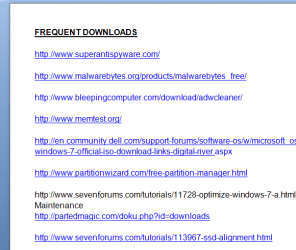
Just as matter of curiosity why do you print everything off after every post ? If I ever want to save anything I see or want to refer to later on I keep it in a Word document ie refs to download sites SF tutorials etc etc so that if I need to read or quote them I just pull up the Word doc and copy and paste - easy peasy:) see pic and I keep the doc minimised for easy access too while on the net:)
 

Attachments

  • DOWN.PNG
    DOWN.PNG
    12.3 KB · Views: 6

My Computer My Computer

Computer type
PC/Desktop
Computer Manufacturer/Model Number
Own build (new) Desk1 / Asus ROG Win 7 / Desk2 1st build
OS
Desk1 7 Home Prem / Desk2 10 Pro / Main lap Asus ROG 10 Pro 2 laptop Toshiba 7 Pro Asus P2520 7 & 10
CPU
Desk1 i5 3750K / Laptop i7 GTX 860M / Desk2 i5 2500
Motherboard
Desk1 Asus P877-V / Desk2 Gigabyte H67 UD3H / Laptop ?
Memory
Desk1 8GB (1866) / Desk2 16GB (1333) / Laptop 8Gb DDR3
Graphics Card(s)
Desk 1& 2NVidia GTX 650 & Laptops on board Intel
Sound Card
Desk 1 & 2 -XONAR DG Realtek High Def audio Laptop
Monitor(s) Displays
Desk 1 Benq HD 2450 / Desk2 Philips 24" / Laptop 17.5"
Screen Resolution
1920x1080 D1 & D2 & Laptop 1
Hard Drives
Desk1 Samsung 120GB 830 SSD
Asus ROG 256GB 850 Pro SSD
Desk2 Samsung 840 256 SSD
Toshiba 120GB EVO
PSU
Desk 1 Corsair HX 1050/ Laptop ? / Desk 2 Corsair HX 650
Case
Desk 1 Cooler HAF XM ? Toshiba laptop / Desk2 Coolermaster
Cooling
Fans on all Desk1 -2 Desk2 - all Coolermasters 5 Laptop ?
Keyboard
Desk 1 MS Sidewinder X6 Desk 2 MS Sidewinder X 4
Mouse
Desk 1&2 - Gigabyte MS 900 gamer - laptop - Logitec wireless
Internet Speed
ADSL2+
Other Info
One other Desktop (tester) and spare Toshba laptop both with SSD's
Running Kaspersky 2016 ISS on all machines config'd identically
Logitec audio stereo systems on each machine (x3)
Canon MG5250MFC
Router/modem TP-Link running WPA2SK
Great idea.

Some of the links - I guess after posting over 200 posts and trying to find which one had a great link to a tutorial a Word document would be easier.

I try and remember in my head or look at my favourites in Internet Explorer. But when your computer crashes - well that can go south too.

With my condition that may be a great option to do - I am no computer guru.

My computer is running pretty slow - so investigating that.

But will copy and paste links into a Word document from some of the pages that I have open, so I do no foget.
Make it a paperless society.

I understand about the OW have cheap hard drives cheap - you are not on disability and paying off debts and medication is not cheap.

Thank you for your research and time.
 

My Computer My Computer

Computer type
Laptop
Computer Manufacturer/Model Number
Sony VAIO / E Series VPCEB46FG
OS
Windows 7 Home Premium 64bit
CPU
Windows 7 Service Pack 1 x86 NTFS
Motherboard
AMD E-350 Processor
Memory
4 GB
Hard Drives
500GB
Other Info
1.6GHz
My computer is running pretty slow - so investigating that.
But Melissa are you no nearer to doing the Clean Install with Greg as previously much talked about? This will cure your slow PC. The slowness is probably due to all the unnecessary small programs that you have. Once they are gone and everything is clean all your little problems will be solved. Have you finished creating the backup of your data files?
 

My Computer My Computer

Computer type
PC/Desktop
OS
Microsoft Windows 7 Home Premium 64-bit 7601 Multiprocessor Free Service Pack 1
CPU
Intel(R) Core(TM) i7-3770 CPU @ 3.40GHz
Motherboard
ASUSTeK COMPUTER INC. P8H77-M
Memory
8.00 GB
Graphics Card(s)
Intel(R) HD Graphics 4000
Sound Card
On Board
Monitor(s) Displays
Dell 24"
Screen Resolution
1920 x 1080
Hard Drives
(1) INTEL SSDSC2CT180A3 ATA Device (2) ST500DM002-1BD142 ATA Device (3) WDC WD3200AAKS-75L9A0 ATA Device (4) Generic- Compact Flash USB Device (5) Generic- MS/MS-Pro USB Device (6) Generic- SD/MMC USB Device (7) Generic- SM/xD-Picture USB
PSU
500w Corsair
Case
Cooler Master
Cooling
3 Fans
Keyboard
Logitech MK300
Mouse
Logitech WOM
Internet Speed
75Mb
Antivirus
Norton 360
Browser
Firefox, Opera, IE
Great idea.

Some of the links - I guess after posting over 200 posts and trying to find which one had a great link to a tutorial a Word document would be easier.

I try and remember in my head or look at my favourites in Internet Explorer. But when your computer crashes - well that can go south too.

With my condition that may be a great option to do - I am no computer guru.

My computer is running pretty slow - so investigating that.

But will copy and paste links into a Word document from some of the pages that I have open, so I do no foget.
Make it a paperless society.

I understand about the OW have cheap hard drives cheap - you are not on disability and paying off debts and medication is not cheap.

Thank you for your research and time.
No problem Melissa and I fully understand your position as I work in the health system mate and have quite a good idea of what you are up against.
Now as Mitchell says the thing that will speed up the machine is a clean install (when you are ready) and while you are at it take a look at this http://www.sevenforums.com/tutorials/11728-optimize-windows-7-a.html point 1 is probably the one thing that will blow you away but given your situation not an option right now but the rest work through very methodically and it will make the machine not only a bit faster but more efficient.
You will lose a bit of the "bling" like transparency but in my mind that is not a necessity.
Another little app that will give a you a break too is CCleaner if you haven't got it already. It will keep the system clear of rubbish if used regularly.
It is free and real easy to use CCleaner - Download < download from piriform. If you are not sure of how to run it post back there are plenty of folks in here that will only be too happy to run through it with you in fact I have seen a tutorial on it somewhere and I will try and find it as you need to keep some cookies for sites that you use passwords for.
I am also only too happy to help if you want.
For favourites have you got the favourites bar up? if not get it by right click on an empty space at the top of the screen and tick favourites bar.
Once you have done that right click on one of the added favourites and choose customise title widths and choose short titles - see the pic.
 

Attachments

  • BAR.PNG
    BAR.PNG
    40.6 KB · Views: 2

My Computer My Computer

Computer type
PC/Desktop
Computer Manufacturer/Model Number
Own build (new) Desk1 / Asus ROG Win 7 / Desk2 1st build
OS
Desk1 7 Home Prem / Desk2 10 Pro / Main lap Asus ROG 10 Pro 2 laptop Toshiba 7 Pro Asus P2520 7 & 10
CPU
Desk1 i5 3750K / Laptop i7 GTX 860M / Desk2 i5 2500
Motherboard
Desk1 Asus P877-V / Desk2 Gigabyte H67 UD3H / Laptop ?
Memory
Desk1 8GB (1866) / Desk2 16GB (1333) / Laptop 8Gb DDR3
Graphics Card(s)
Desk 1& 2NVidia GTX 650 & Laptops on board Intel
Sound Card
Desk 1 & 2 -XONAR DG Realtek High Def audio Laptop
Monitor(s) Displays
Desk 1 Benq HD 2450 / Desk2 Philips 24" / Laptop 17.5"
Screen Resolution
1920x1080 D1 & D2 & Laptop 1
Hard Drives
Desk1 Samsung 120GB 830 SSD
Asus ROG 256GB 850 Pro SSD
Desk2 Samsung 840 256 SSD
Toshiba 120GB EVO
PSU
Desk 1 Corsair HX 1050/ Laptop ? / Desk 2 Corsair HX 650
Case
Desk 1 Cooler HAF XM ? Toshiba laptop / Desk2 Coolermaster
Cooling
Fans on all Desk1 -2 Desk2 - all Coolermasters 5 Laptop ?
Keyboard
Desk 1 MS Sidewinder X6 Desk 2 MS Sidewinder X 4
Mouse
Desk 1&2 - Gigabyte MS 900 gamer - laptop - Logitec wireless
Internet Speed
ADSL2+
Other Info
One other Desktop (tester) and spare Toshba laptop both with SSD's
Running Kaspersky 2016 ISS on all machines config'd identically
Logitec audio stereo systems on each machine (x3)
Canon MG5250MFC
Router/modem TP-Link running WPA2SK
Hey Thank you for all the replies.

I have looked at my computer and perhaps looked at some programs that I no longer need and could delete them from my hard drive - like the one that the Norton remote access program.

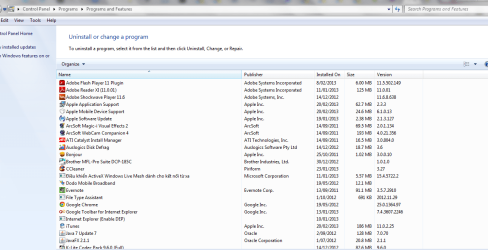
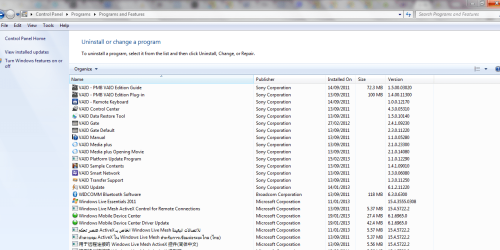
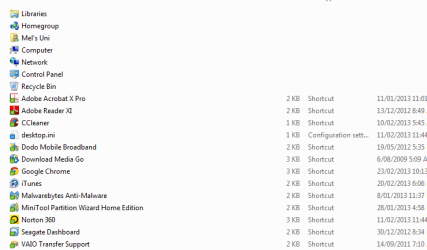
I have included a list of my control panel - give me any handy hints.

After having surgery - I am in a world of pain. And if I want to do the clean install I want to do it correctly.

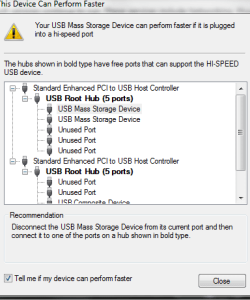
I just picked up my computer for instance a second ago and - yes - the USB cable came out - no wonder I get such problems like I am posting about FOUND.000. But that I will leave alone as I am trying to win friends and influence people.:cool:

I know people may get frustrated with me. But it they saw how I am psychically - well I think that may think again. I was in ICU for three months and had to write my will.

I a just about to finish the back up of my data files - what a mess - no wonder I had issues with my brain.

What operating systems do you prefer - IE or Google? I am working on both. People commented at my first screen shots as I posted full screen shots as I had a lot open at the same time. The favourites a great idea and history. Sometimes hard to remember what you saved it as - but that is just age.

Thanks for bearing with me. I am just glad and happy to be alive and posting. If I am not - you know what may have happened to me.

I know that I stress too much as well. So I apologise
 

Attachments

  • contol panel 1.PNG
    contol panel 1.PNG
    49.9 KB · Views: 2
  • contol panel 2.PNG
    contol panel 2.PNG
    57.8 KB · Views: 1
  • desktop shot.PNG
    desktop shot.PNG
    13 KB · Views: 1
  • DEVICE PORT - SEVEN FORUMS QUESTION.PNG
    DEVICE PORT - SEVEN FORUMS QUESTION.PNG
    11.4 KB · Views: 6

My Computer My Computer

Computer type
Laptop
Computer Manufacturer/Model Number
Sony VAIO / E Series VPCEB46FG
OS
Windows 7 Home Premium 64bit
CPU
Windows 7 Service Pack 1 x86 NTFS
Motherboard
AMD E-350 Processor
Memory
4 GB
Hard Drives
500GB
Other Info
1.6GHz
Just relax mate you are not frustrating anyone and stressing out is not the answer got to take it calmly and at a pace that suits you we have after all - all the time in the world :)

We can fix it it is just going to take some time and little effort on your part. As I said I work in health so I have a pretty good idea on what you have gone through - so seatbelt on, check mirror indicate and..... LOL!!:)

For uninstalling download the Revo app (below) all this this it is better than the Programs and Features and for the Norton stuff best done with the Norton removal tool. But before that you will need to download a security suite to replace that Norton so make a Downloads icon on the desktop by Start > type Downloads > right click > send to desktop - this makes it easy to find any downloads you have made.
So say for example you want Microsoft Security Essentials open a Google and pull up a download for it > download by "Save" - it will go into that Downloads icon on the desktop. Now after the Norton is gone go to Downloads and open it go to the MSE download and open / run it follow the prompts and it will install. The updates may take a fair time to do but it isn't going to cost a cent

Download: Microsoft Security Essentials - Microsoft Download Center - Download Details

:)

https://support.norton.com/sp/en/us/home/current/solutions/kb20080710133834EN_EndUserProfile_en_us;jsessionid=60F49672715F64A05052461695285F5C.4?entsrc=redirect_pubweb&product=home&pvid=f-home&version=1

and the other remover http://www.revouninstaller.com/revo_uninstaller_free_download.html < free version on the left. It takes a bit more time to remove stuff but does it thoroughly.

Now Google is your search engine the IE is the browser so Google works off IE:)

Just to recap
1. download and install the Revo
2. download and save the MSE
3. download and run the Norton remover tool
4. go to downloads and run the MSE from the list and wait for the updates to be loaded. That can always be changed at a alter date for another free anti virus program but for now this will get you a head start.

Last I see you have heaps of stuff in the Control Panel shot that need getting rid of but first things first:)
 

My Computer My Computer

Computer type
PC/Desktop
Computer Manufacturer/Model Number
Own build (new) Desk1 / Asus ROG Win 7 / Desk2 1st build
OS
Desk1 7 Home Prem / Desk2 10 Pro / Main lap Asus ROG 10 Pro 2 laptop Toshiba 7 Pro Asus P2520 7 & 10
CPU
Desk1 i5 3750K / Laptop i7 GTX 860M / Desk2 i5 2500
Motherboard
Desk1 Asus P877-V / Desk2 Gigabyte H67 UD3H / Laptop ?
Memory
Desk1 8GB (1866) / Desk2 16GB (1333) / Laptop 8Gb DDR3
Graphics Card(s)
Desk 1& 2NVidia GTX 650 & Laptops on board Intel
Sound Card
Desk 1 & 2 -XONAR DG Realtek High Def audio Laptop
Monitor(s) Displays
Desk 1 Benq HD 2450 / Desk2 Philips 24" / Laptop 17.5"
Screen Resolution
1920x1080 D1 & D2 & Laptop 1
Hard Drives
Desk1 Samsung 120GB 830 SSD
Asus ROG 256GB 850 Pro SSD
Desk2 Samsung 840 256 SSD
Toshiba 120GB EVO
PSU
Desk 1 Corsair HX 1050/ Laptop ? / Desk 2 Corsair HX 650
Case
Desk 1 Cooler HAF XM ? Toshiba laptop / Desk2 Coolermaster
Cooling
Fans on all Desk1 -2 Desk2 - all Coolermasters 5 Laptop ?
Keyboard
Desk 1 MS Sidewinder X6 Desk 2 MS Sidewinder X 4
Mouse
Desk 1&2 - Gigabyte MS 900 gamer - laptop - Logitec wireless
Internet Speed
ADSL2+
Other Info
One other Desktop (tester) and spare Toshba laptop both with SSD's
Running Kaspersky 2016 ISS on all machines config'd identically
Logitec audio stereo systems on each machine (x3)
Canon MG5250MFC
Router/modem TP-Link running WPA2SK
Hello my new friend

When I get to the MSE install - call me silly - I am not too sure which one to install. I have a Sony VAIO YPCYB16KG AMD Dual Core Processor E-350 1.6 GHz 2GB Windows 7 Home Premium 32-bit. Hard Disk Drive 320 GB.

When there are two choices - I am a femaile - I dont know which one to choose - may do both.

I used to work at a computer place and got a great deal on Norton - are you saying that my three year renewal is crap and I should use MSE instead?

I get mixed opinions on what is the best antivirus software. I used to work at HN before I got sick. Cheap software and games.

I should know most things - but they operate ship anchors in the office - so you don't get any up skilling.

Thanks for the easy to folllllloow instructions - better than the Programs and Features function indeed. May pay and see how much the renewal is after the trail period.

Thanks mate.....
 

My Computer My Computer

Computer type
Laptop
Computer Manufacturer/Model Number
Sony VAIO / E Series VPCEB46FG
OS
Windows 7 Home Premium 64bit
CPU
Windows 7 Service Pack 1 x86 NTFS
Motherboard
AMD E-350 Processor
Memory
4 GB
Hard Drives
500GB
Other Info
1.6GHz
Back
Top