Using Norton 360 with Windows 7 for a long time, with no obvious problems.
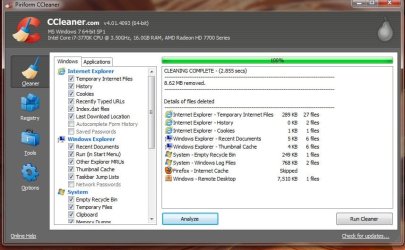
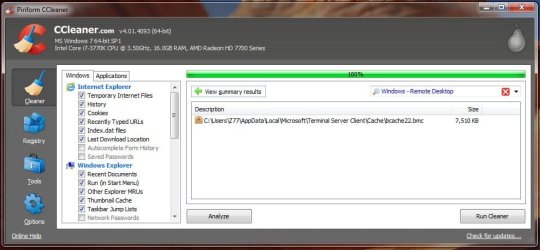
Recently, however, Remote Desktop shows up when I clean files with CCleaner. This is apparently unrelated to a particular website.
Norton 360 is fully enabled.
Norton 360 controls the Windows 7 firewall.
Remote Desktop is disabled via Control Panel.
File sharing is disabled.
Remote Desktop still often appears in a CCleaner list of deleted files.
This occurs with Firefox or Chrome; haven't tried IE.
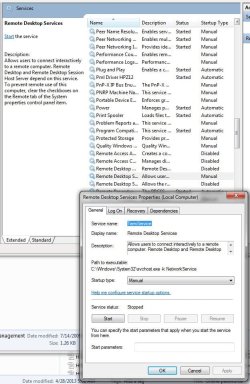
I have gone to Control Panel, Administrative Tools, Computer Management, Services and Applications, Services
There I have disabled Remote Desktop on three sequential places. HOWEVER something is resetting at least one of these.
I see no evidence on-screen of Remote Desktop, but wonder whether someone is accessing my computer.
What is going on, and how to stop it?
Recently, however, Remote Desktop shows up when I clean files with CCleaner. This is apparently unrelated to a particular website.
Norton 360 is fully enabled.
Norton 360 controls the Windows 7 firewall.
Remote Desktop is disabled via Control Panel.
File sharing is disabled.
Remote Desktop still often appears in a CCleaner list of deleted files.
This occurs with Firefox or Chrome; haven't tried IE.
I have gone to Control Panel, Administrative Tools, Computer Management, Services and Applications, Services
There I have disabled Remote Desktop on three sequential places. HOWEVER something is resetting at least one of these.
I see no evidence on-screen of Remote Desktop, but wonder whether someone is accessing my computer.
What is going on, and how to stop it?
My Computer
- Computer Manufacturer/Model Number
- Selfbuilt
- OS
- Windows 7 Professional 64bit
- CPU
- i7-2600K
- Motherboard
- ASUS P8Z68-V
- Memory
- 8GB Gskill DDR3
- Graphics Card(s)
- Sapphire HD5670
- Sound Card
- None
- Monitor(s) Displays
- Samsung 19"
- Hard Drives
- Crucial M4SSD 256GB
- PSU
- OCZ ModXStream 600
- Case
- Lian Li
- Cooling
- Cooler Master 212+



 .
.