apple byte
New member
Disk Partition Problem - not able to reclaim free space
I know that the above thread title has already been addressed in the past but none of them have solved my problem till now.
I have already read following threads-
http://www.sevenforums.com/hardware-devices/109301-can-t-delete-free-space-partition.htmlhttp://www.sevenforums.com/hardware-devices/109301-can-t-delete-free-space-partition.html
http://www.sevenforums.com/general-discussion/183502-can-t-delete-free-space-disk-management.html
http://www.sevenforums.com/performa...-management-can-t-delete-14gb-free-space.html
http://www.sevenforums.com/general-...sk-management-although-free-space-exists.html
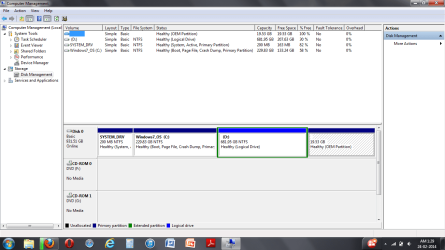
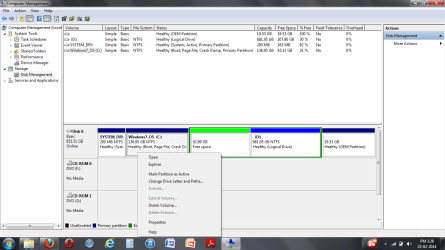
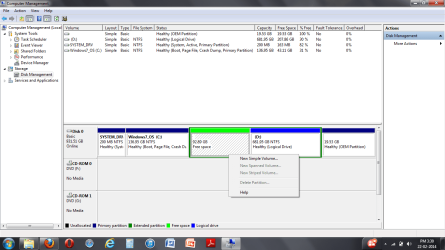
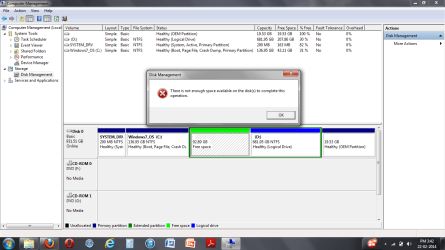
The problem is that the free space in the screenshot below cannot be deleted to make an unallocated space nor can it be used to create a new volume. Also the c: & d: drives are not able to extend from the free space available thus rendering those 92.89 GB useless.
I have also tried the help in the second link given above; i.e by using the partition wizard (i used a bootable usb for the same) i tried to convert the free space to primary partition, but that option(convert to primary) too was greyed out in the partition wizard when i tried to do so. The other option to resize the partition was also greyed out in the same partition wizard.
I also executed the chkdsk /f in an elevated command window as suggested in the first link. But no error was encountered and my laptop is working fine. I just want to recover that free space.
PN1: Previously I had ubuntu(root) installed on the partition which now is the free space of 92.89 GB. As I no longer required ubuntu i removed it as per the instructions in the given video, which i was successful in doing.
But the only problem is that the guy in the video easily deletes the free space converting it to unallocated(Actually he deletes two partitions see video at 3:27; one is of the root & the other might be the home folder, to get one free space which inturn gets converted to unallocated space after deleting). And the same is not happening in my case.
PN2: I too had two partitions for ubuntu; one for the /root & the other for the home folder. The /root is the now free space in the screen shot below & the home folder was successfully deleted and merged in the d: drive
I hope that i have been clear in explaining my problem.
Thanks in advance.
I know that the above thread title has already been addressed in the past but none of them have solved my problem till now.
I have already read following threads-
http://www.sevenforums.com/hardware-devices/109301-can-t-delete-free-space-partition.htmlhttp://www.sevenforums.com/hardware-devices/109301-can-t-delete-free-space-partition.html
http://www.sevenforums.com/general-discussion/183502-can-t-delete-free-space-disk-management.html
http://www.sevenforums.com/performa...-management-can-t-delete-14gb-free-space.html
http://www.sevenforums.com/general-...sk-management-although-free-space-exists.html
The problem is that the free space in the screenshot below cannot be deleted to make an unallocated space nor can it be used to create a new volume. Also the c: & d: drives are not able to extend from the free space available thus rendering those 92.89 GB useless.
I have also tried the help in the second link given above; i.e by using the partition wizard (i used a bootable usb for the same) i tried to convert the free space to primary partition, but that option(convert to primary) too was greyed out in the partition wizard when i tried to do so. The other option to resize the partition was also greyed out in the same partition wizard.
I also executed the chkdsk /f in an elevated command window as suggested in the first link. But no error was encountered and my laptop is working fine. I just want to recover that free space.
PN1: Previously I had ubuntu(root) installed on the partition which now is the free space of 92.89 GB. As I no longer required ubuntu i removed it as per the instructions in the given video, which i was successful in doing.
But the only problem is that the guy in the video easily deletes the free space converting it to unallocated(Actually he deletes two partitions see video at 3:27; one is of the root & the other might be the home folder, to get one free space which inturn gets converted to unallocated space after deleting). And the same is not happening in my case.
PN2: I too had two partitions for ubuntu; one for the /root & the other for the home folder. The /root is the now free space in the screen shot below & the home folder was successfully deleted and merged in the d: drive
I hope that i have been clear in explaining my problem.
Thanks in advance.
Attachments
Last edited:
My Computer
- Computer type
- Laptop
- Computer Manufacturer/Model Number
- Lenovo Z580
- OS
- Windows 7 Home Premium x64
- CPU
- i7-3612QM
- Memory
- 8GB RAM
- Graphics Card(s)
- Nvidia GeForce GT 630M
- Hard Drives
- Samsung 1TB
- Antivirus
- Quick Heal Total Security