Solved How do I add space to my OS Partitions ?

dan99t

New member
Local time
12:08 PM
Messages
30
Hi,

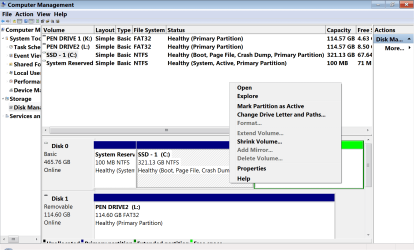
I am using Win-7 & has Partitions as shown.

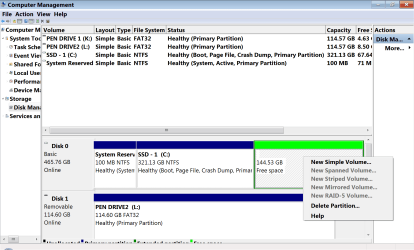
In disc 0, I want to add all free space ( 144.53 GB ) in adjacent partition to Boot Partition C:

I right clicked C: & it gave me options as shown in Image - 2

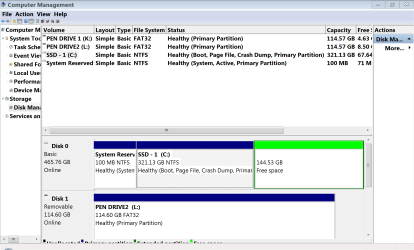
Similarly I right clicked Free Space & it gave me the options as shown in Image - 3

So what should I do ?

Thank You


Attachments
  • Img - 1.png
    Img - 1.png
    56.9 KB · Views: 1
  • Img - 2.png
    Img - 2.png
    65.1 KB · Views: 0
  • Img - 3.png
    Img - 3.png
    61.3 KB · Views: 0

My Computer My Computer

At a glance

windows 7
OS
windows 7
That is an extended partition. Select Delete Partition to create unallocated space.

Then you will be able to extend your os partition into the unallocated space.
 

My Computers My Computers

  • At a glance

    7 X64i5 84002x8gb 3200mhz
    Computer type
    PC/Desktop
    OS
    7 X64
    CPU
    i5 8400
    Motherboard
    gigabyte b365m ds3h
    Memory
    2x8gb 3200mhz
    Hard Drives
    various
    PSU
    pure power 11 400w cm
    Case
    Coolermaster
    Cooling
    cryorig m9i
  • At a glance

    7x64g54008gb ddr4 2400
    Computer type
    PC/Desktop
    OS
    7x64
    CPU
    g5400
    Motherboard
    ga b365m ds3h
    Memory
    8gb ddr4 2400
    PSU
    xfx pro 450w
Thank You SIW2

Really appreciate your help.
 

My Computer My Computer

At a glance

windows 7
OS
windows 7
Back
Top