
Cant cleanup system files

Fish44

New member
Local time
1:52 AM
Messages
10
Hi all,
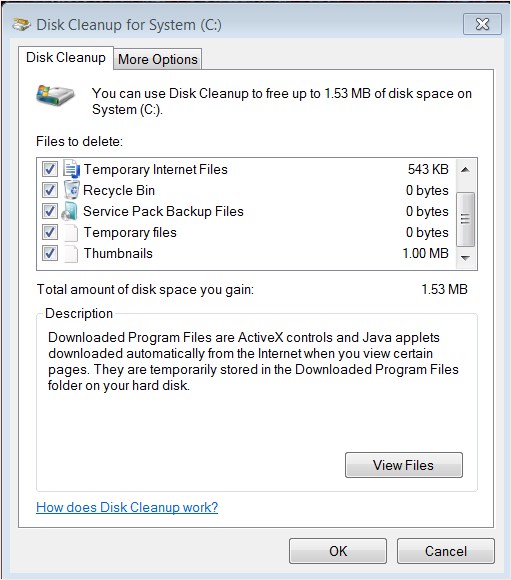
I've just migrated to an SSD and need to recover space. My winsxs contains 9gb. I don't see the option to clean up the system files, as described in several threads. I ran diskclean in admin mode. I also navigated to the addon for the update, (Windows6.1-KB2852386-x64.msu), which said i had it installed already. All updates are installed (except langauge packs).

Not sure the cause, but any help welcome
Office14_142.jpg


Office14_143.jpg
 
Last edited:

My Computer

Computer Manufacturer/Model Number
Home built
OS
windows 7 ultimate
CPU
Q9650
Motherboard
GA P35-DS4
Memory
2x2gb PC 8500CLS5 G.Skill
Graphics Card(s)
ATI 5870 1gb.
Sound Card
On board
Monitor(s) Displays
Generic
Hard Drives
WD.
PSU
Antec 560watts
Case
Antec 900 case
Cooling
Air

My Computer

Computer type
PC/Desktop
Computer Manufacturer/Model Number
Lenovo IdeaCenter 450
OS
Windows 10 Pro X64
CPU
Intel Quad Core i7-4770 @ 3.4Ghz
Memory
16.0GB PC3-12800 DDR3 SDRAM 1600 MHz
Graphics Card(s)
Intel Integrated HD Graphics
Sound Card
Realtek HD Audio
Monitor(s) Displays
HP 22" LCD
Screen Resolution
1680 x 1050
Hard Drives
250GB Samsung EVO SATA-3 SSD
2TB Seagate ST2000DM001 SATA-2
1.5TB Seagate ST3150041AS SATA
Keyboard
Dell USB
Mouse
Lenovo USB
Internet Speed
Cable via Road Runner 3MB Upload, 30MB Download
Antivirus
Windows Defender, MBAM Pro, MBAE
Browser
Seamonkey
Other Info
UEFI/GPT
PLDS DVD-RW DH16AERSH
Windows 7 is trying to protect itself that is why winsxs is not shown.
Just leave winsxs alone and let Windows 7 take care of it.
You will find many things that Windows 7 doesn't want the owner/operator to fool with for good reasons.
 

My Computer

Computer type
PC/Desktop
Computer Manufacturer/Model Number
Home made Desktop
OS
Windows 10 Pro. 64/ version 1709 Windows 7 Pro/64
CPU
Intel i7-6800K @ 4.3
Motherboard
ASUS X-99 Deluxe II
Memory
Corsair Platinum 16 gig @2400
Graphics Card(s)
EVGA GTX 1070 OC
Monitor(s) Displays
Asus 27" LED LCD/VE278Q
Screen Resolution
1920-1080 or 1280-720 HDMI
Hard Drives
INTEL SSD 730-240 Gb Sata 3.0/
PSU
EVGA Platium 1200W
Case
Phanteks Luxe Tempered Glass 8 fans/ one radiator
Cooling
XSPC/ Water Cooled CPU
Keyboard
Das 4 Professional
Mouse
Logitech M705/MX Anywhere 2-S
Internet Speed
100 mbits
Antivirus
Microsoft Security Essentials/ Malwarebytes Premium 3.0/ SAS
Browser
I.E. 11 default/Firefox/ ISP Time Warner Cable/Spectrum
Other Info
LG BluRay Burner/
Sound system-KLipsch-THX/
Icy Dock ssd Hot Swap bays.
The large size of the winsxs is more apparent than real. The NTFS file system has long had the capability of having a single copy of a file appear in more than one folder. Vista and later systems use this feature quite a bit. It saves quite a bit of disk space.

Leave the winsxs folder alone. Improper modification can have serious consequences.
 

My Computer

Computer type
PC/Desktop
Computer Manufacturer/Model Number
HP
OS
Windows 7 Pro 64 bit
CPU
Xeon W3520
Memory
8 GB
Graphics Card(s)
Nvidia Geforce 210
Thanks for the replies.

However the question i'm asking is why i can't see the option to 'cleanup system files' on the diskcleanup tool. This post indicates it should be possible from diskcleanup. However I don't see this option on any of my windows 7 machines, despite the fact that they indicate that the update is installed.

Cheers
 

My Computer

Computer Manufacturer/Model Number
Home built
OS
windows 7 ultimate
CPU
Q9650
Motherboard
GA P35-DS4
Memory
2x2gb PC 8500CLS5 G.Skill
Graphics Card(s)
ATI 5870 1gb.
Sound Card
On board
Monitor(s) Displays
Generic
Hard Drives
WD.
PSU
Antec 560watts
Case
Antec 900 case
Cooling
Air

My Computer

Computer type
PC/Desktop
Computer Manufacturer/Model Number
Custom Built
OS
Windows 10 Pro
CPU
AMD Ryzen 5 2400G Processor with Radeon RX Vega 11 Graphics
Motherboard
ASRock X470 Master SLI/AC AM4 AMD Promontory X470 SATA 6Gb/s
Memory
G.SKILL Ripjaws V Series 16GB (2 x 8GB) 288-Pin DDR4 SDRAM D
Graphics Card(s)
2047MB NVIDIA GeForce GTX 1060 6GB (EVGA)
Sound Card
Motherboard Built in
Monitor(s) Displays
Acer R240HY bidx 23.8-Inch IPS HDMI DVI VGA (1920 x 1080) Wi
Screen Resolution
1920 x 1080
Hard Drives
1TB Sandisk SSD PLUS (Main drive)
500 GB Seagate 7200 RPM (Games)
500 GB Western Digital 7200 RPM (Virtual Machines)
PSU
CORSAIR TX Series TX650M 650W 80+ Gold Modular Power Supply
Case
CORSAIR CARBIDE SPEC-02 Mid-Tower Gaming Case, Red LED Fan
Cooling
220mm, two 120mm, and four 60mm fans
Keyboard
Wired Dell keyboard
Mouse
Wireless Logitech mouse
Internet Speed
250mb down, 30mb up
Antivirus
Panda Cloud Antivirus
Browser
Chrome-ish x64
Other Info
Your awesome for reading this.
Advanced disk cleanup

Microsoft made winxs cleanup available via an update as you mentioned. If you want to see the option to clean then go to

Start> Run then type

cleanmgr.exe sageset10

Press Enter:

(Replace sagest10 with any number you like - for example sageset5) just remember the number that you used as when you run disk cleanup using this setting number it will remember those specific settings.

Make your choices by ticking the checkboxes.

To run the cleanup go to

Start> Run then type

cleanmgr.exe sagerun10

Replace sagerun10 with sagerun followed by whatever number you chose.

Download Update for Windows 7 for x64-based Systems (KB2852386) from Official Microsoft Download Center

Edit:

I've corrected spelling errors! Also if the above doesn't work for you (it has always worked for me) then use the info in Ztruker's link and try:

cleanmgr.exe /sageset:1
cleanmgr.exe /sagerun:1

instead of:

cleanmgr.exe sageset10
cleanmgr.exe sagerun10

Also note that cleaning up Winsxs will free up lots of space but will leave you unable to uninstall some windows updates or service packs so make sure that your machine is in good working order before going ahead.
 
Last edited:

My Computer

Computer type
Laptop
Computer Manufacturer/Model Number
ASUS
OS
Microsoft Windows 7 Home Premium 64-bit 7601 Multiprocessor Free Service Pack 1
CPU
AMD C-60 APU with Radeon(tm) HD Graphics
Motherboard
ASUSTeK COMPUTER INC. X501U
Memory
4.00 GB
Graphics Card(s)
AMD Radeon HD 6290 Graphics
Sound Card
(1) AMD High Definition Audio Device (2) Realtek High Defi
Screen Resolution
1366 x 768 x 32 bits (4294967296 colors) @ 60 Hz
Hard Drives
Hitachi HTS545050A7E380 SATA Disk Device
Antivirus
Comodo CIS & FW, SecureAplus App Whitelisting, Threatfire
Browser
Cyberfox 64bit, Opera 64bit, Airfox
Other Info
Spy-The-Spy, HitmanPro.Alert, Norton Connect Safe, MJRegWatcher, BitDefender TrafficLight, Voodoo Shield, Zemana AntiMalware
Never heard of that before. Google gives a bit more info:

If you use the advanced switches to run Disk Cleanup it actually offers a lot more choices. In the /sageset:1 switch, “1” is just an arbitrary number. You can enter any number you want, but make sure /sagerun:”x” corresponds to the number you used in /sageset:”x”. So you can customize the switches for different types of files you want to clean in Disk Cleanup Settings.

For example, maybe you only want to clean Temp Internet files during a cleanup session, then you could do /sageset:1 and /sagerun:1 for that. Then if you want to clean up all files you could use /sageset:10 and /sagerun:10 for that. The switches give you more flexibility in the types of files that are deleted during the Disk Cleanup session.
Found here: How to Schedule Disk Cleanup in Windows 7 & Vista
 

My Computer

Computer type
PC/Desktop
Computer Manufacturer/Model Number
Lenovo IdeaCenter 450
OS
Windows 10 Pro X64
CPU
Intel Quad Core i7-4770 @ 3.4Ghz
Memory
16.0GB PC3-12800 DDR3 SDRAM 1600 MHz
Graphics Card(s)
Intel Integrated HD Graphics
Sound Card
Realtek HD Audio
Monitor(s) Displays
HP 22" LCD
Screen Resolution
1680 x 1050
Hard Drives
250GB Samsung EVO SATA-3 SSD
2TB Seagate ST2000DM001 SATA-2
1.5TB Seagate ST3150041AS SATA
Keyboard
Dell USB
Mouse
Lenovo USB
Internet Speed
Cable via Road Runner 3MB Upload, 30MB Download
Antivirus
Windows Defender, MBAM Pro, MBAE
Browser
Seamonkey
Other Info
UEFI/GPT
PLDS DVD-RW DH16AERSH
Back
Top