Solved Disk Cleanup does not delete windows update files

Laffer

New member
Local time
11:37 PM
Messages
9
Hi!

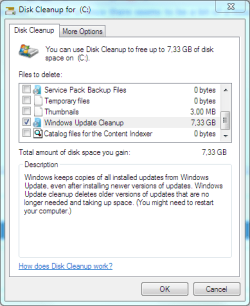
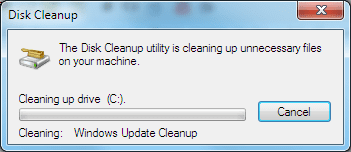
The windows directory on my installation has gotten extremely bloated and I would like to free up some space. The Disk Cleanup utility nicely offers to free up 7 GBs of windows update data. However, when I run it, I only see a progress bar for a while and then it disappears. The amount of free space is the same. When I run Disk Cleanup again, it offers to free up the same 7 GBs again. I have tryed running it in safe mode, but the results are same. The user running the Disk Cleanup utility has administrator privileges. The utility itself gives no error messages whatsoever.

Any ideas on what might be causing this behaviour and how to solve it?
 

My Computer

Computer type
PC/Desktop
OS
Windows 7 Ultimate x64
Did you check clean up system files?
If that does not work, download the free Ccleaner, it works even better than disc cleanup
 

My Computer

Computer type
PC/Desktop
Computer Manufacturer/Model Number
Dell XPS 420
OS
Windows 10, Home Clean Install
CPU
Intel Core2 processsor Q8200(2.33Ghz 1333FSB) Quad Core Tech
Motherboard
Dell
Memory
6 gb
Graphics Card(s)
ATI Radeon 256MB HD3650
Sound Card
Intergrated 7.1 Channel Audio
Monitor(s) Displays
Dell SP2009W 20"
Hard Drives
640 GB Serial ATA Hard drive
Cooling
Fan
Keyboard
Dell USB Keyboard
Mouse
Dell Premium Optical USB
Internet Speed
DSL 2.85

My Computer

Computer type
PC/Desktop
Computer Manufacturer/Model Number
Home made Desktop
OS
Windows 10 Pro. 64/ version 1709 Windows 7 Pro/64
CPU
Intel i7-6800K @ 4.3
Motherboard
ASUS X-99 Deluxe II
Memory
Corsair Platinum 16 gig @2400
Graphics Card(s)
EVGA GTX 1070 OC
Monitor(s) Displays
Asus 27" LED LCD/VE278Q
Screen Resolution
1920-1080 or 1280-720 HDMI
Hard Drives
INTEL SSD 730-240 Gb Sata 3.0/
PSU
EVGA Platium 1200W
Case
Phanteks Luxe Tempered Glass 8 fans/ one radiator
Cooling
XSPC/ Water Cooled CPU
Keyboard
Das 4 Professional
Mouse
Logitech M705/MX Anywhere 2-S
Internet Speed
100 mbits
Antivirus
Microsoft Security Essentials/ Malwarebytes Premium 3.0/ SAS
Browser
I.E. 11 default/Firefox/ ISP Time Warner Cable/Spectrum
Other Info
LG BluRay Burner/
Sound system-KLipsch-THX/
Icy Dock ssd Hot Swap bays.
Did you check clean up system files?
If that does not work, download the free Ccleaner, it works even better than disc cleanup

I agree, CCleaner is great, however I'm not sure if I dare to use it for deleting windows update data yet.
Disk Cleanup many times will not complete unless you reboot.

Here is a nice little tutorial by Bare Foot Kid.

http://www.sevenforums.com/tutorials/76383-disk-cleanup-extended.html


Another one by Brink.

http://www.sevenforums.com/tutorials/818-disk-cleanup-open-use.html

I have tryed rebooting after running the disk cleanup utility, no results. I also tryed running the command as administrator in the 2nd tutorial and cleaning windows update files then, made no change.
 

My Computer

Computer type
PC/Desktop
OS
Windows 7 Ultimate x64
Go to search
type %temp%
Then delete the ones you are comfy with
To be more comfy make a system restore point first
You can make a system restore before Ccleaner, too. Which is the way I would go.
 

My Computer

Computer type
PC/Desktop
Computer Manufacturer/Model Number
Dell XPS 420
OS
Windows 10, Home Clean Install
CPU
Intel Core2 processsor Q8200(2.33Ghz 1333FSB) Quad Core Tech
Motherboard
Dell
Memory
6 gb
Graphics Card(s)
ATI Radeon 256MB HD3650
Sound Card
Intergrated 7.1 Channel Audio
Monitor(s) Displays
Dell SP2009W 20"
Hard Drives
640 GB Serial ATA Hard drive
Cooling
Fan
Keyboard
Dell USB Keyboard
Mouse
Dell Premium Optical USB
Internet Speed
DSL 2.85
Go to search
type %temp%
Then delete the ones you are comfy with
To be more comfy make a system restore point first
You can make a system restore before Ccleaner, too. Which is the way I would go.

I am really only talking about the windows update data here, not temporary files etc. It seems CCleaner has removed the feature to remove old windows update data all in all.
 

My Computer

Computer type
PC/Desktop
OS
Windows 7 Ultimate x64
Why do you think that Windows Update files were not cleaned? If it's because you expect to see an option showing how much space will be freed - you won't see that. You need to run disk cleanup extended (with all required options checked other than Windows Update) then make a note of free space. Then run disk cleanup extended again to include only Windows Update. Then you need to compare space before and after cleanup.
 

My Computer

Computer type
Laptop
Computer Manufacturer/Model Number
ASUS
OS
Microsoft Windows 7 Home Premium 64-bit 7601 Multiprocessor Free Service Pack 1
CPU
AMD C-60 APU with Radeon(tm) HD Graphics
Motherboard
ASUSTeK COMPUTER INC. X501U
Memory
4.00 GB
Graphics Card(s)
AMD Radeon HD 6290 Graphics
Sound Card
(1) AMD High Definition Audio Device (2) Realtek High Defi
Screen Resolution
1366 x 768 x 32 bits (4294967296 colors) @ 60 Hz
Hard Drives
Hitachi HTS545050A7E380 SATA Disk Device
Antivirus
Comodo CIS & FW, SecureAplus App Whitelisting, Threatfire
Browser
Cyberfox 64bit, Opera 64bit, Airfox
Other Info
Spy-The-Spy, HitmanPro.Alert, Norton Connect Safe, MJRegWatcher, BitDefender TrafficLight, Voodoo Shield, Zemana AntiMalware
Why do you think that Windows Update files were not cleaned? If it's because you expect to see an option showing how much space will be freed - you won't see that. You need to run disk cleanup extended (with all required options checked other than Windows Update) then make a note of free space. Then run disk cleanup extended again to include only Windows Update. Then you need to compare space before and after cleanup.

Actually it does show me about 7GB of disk space will be cleaned. When I run the tool later, it still shows me 7 GB of space can be freed. Clearly it's doing nothing.
 

My Computer

Computer type
PC/Desktop
OS
Windows 7 Ultimate x64
I made some screenshots just to clarify what the issue is since there seems to be a bit of a misunderstanding, I hope this will clear it up.
 

Attachments

  • cleanup.PNG
    cleanup.PNG
    43.4 KB · Views: 133
  • cleanup2.PNG
    cleanup2.PNG
    26.8 KB · Views: 129

My Computer

Computer type
PC/Desktop
OS
Windows 7 Ultimate x64

My Computer

Computer type
Laptop
Computer Manufacturer/Model Number
ASUS
OS
Microsoft Windows 7 Home Premium 64-bit 7601 Multiprocessor Free Service Pack 1
CPU
AMD C-60 APU with Radeon(tm) HD Graphics
Motherboard
ASUSTeK COMPUTER INC. X501U
Memory
4.00 GB
Graphics Card(s)
AMD Radeon HD 6290 Graphics
Sound Card
(1) AMD High Definition Audio Device (2) Realtek High Defi
Screen Resolution
1366 x 768 x 32 bits (4294967296 colors) @ 60 Hz
Hard Drives
Hitachi HTS545050A7E380 SATA Disk Device
Antivirus
Comodo CIS & FW, SecureAplus App Whitelisting, Threatfire
Browser
Cyberfox 64bit, Opera 64bit, Airfox
Other Info
Spy-The-Spy, HitmanPro.Alert, Norton Connect Safe, MJRegWatcher, BitDefender TrafficLight, Voodoo Shield, Zemana AntiMalware
I have tryed running disk cleanup as administrator and I also tryed the method from the extended tutorial. If I'm correct, the extended method just gives you a bit more options to delete. Anyway, it didn't work. I have also tryed rebooting after cleanup, no effect.
 

My Computer

Computer type
PC/Desktop
OS
Windows 7 Ultimate x64
Okay try it this way:

Start> Run

then type

cleanmgr

Press Enter.

In the window that opens select your windows partition - ususally C drive.

Click on "Clean up system files"

Scroll down to Windows Update Cleanup and make sure it's selected.

Click OK.

Reboot when complete.

Let us know what happens.
 

My Computer

Computer type
Laptop
Computer Manufacturer/Model Number
ASUS
OS
Microsoft Windows 7 Home Premium 64-bit 7601 Multiprocessor Free Service Pack 1
CPU
AMD C-60 APU with Radeon(tm) HD Graphics
Motherboard
ASUSTeK COMPUTER INC. X501U
Memory
4.00 GB
Graphics Card(s)
AMD Radeon HD 6290 Graphics
Sound Card
(1) AMD High Definition Audio Device (2) Realtek High Defi
Screen Resolution
1366 x 768 x 32 bits (4294967296 colors) @ 60 Hz
Hard Drives
Hitachi HTS545050A7E380 SATA Disk Device
Antivirus
Comodo CIS & FW, SecureAplus App Whitelisting, Threatfire
Browser
Cyberfox 64bit, Opera 64bit, Airfox
Other Info
Spy-The-Spy, HitmanPro.Alert, Norton Connect Safe, MJRegWatcher, BitDefender TrafficLight, Voodoo Shield, Zemana AntiMalware
I know both the tutorials I posted work if done correctly and that the other information that has been suggested works because I use the same methods several times a on two different computers.

It might help if we see a little more information. Please post this information as per this tutorial by Golden.

http://www.sevenforums.com/tutorials/274797-disk-management-post-screen-capture-image.html


Are you using some sort of Raid?

Have you moved the Update files to some other location other than where Windows 7 put them?
 

My Computer

Computer type
PC/Desktop
Computer Manufacturer/Model Number
Home made Desktop
OS
Windows 10 Pro. 64/ version 1709 Windows 7 Pro/64
CPU
Intel i7-6800K @ 4.3
Motherboard
ASUS X-99 Deluxe II
Memory
Corsair Platinum 16 gig @2400
Graphics Card(s)
EVGA GTX 1070 OC
Monitor(s) Displays
Asus 27" LED LCD/VE278Q
Screen Resolution
1920-1080 or 1280-720 HDMI
Hard Drives
INTEL SSD 730-240 Gb Sata 3.0/
PSU
EVGA Platium 1200W
Case
Phanteks Luxe Tempered Glass 8 fans/ one radiator
Cooling
XSPC/ Water Cooled CPU
Keyboard
Das 4 Professional
Mouse
Logitech M705/MX Anywhere 2-S
Internet Speed
100 mbits
Antivirus
Microsoft Security Essentials/ Malwarebytes Premium 3.0/ SAS
Browser
I.E. 11 default/Firefox/ ISP Time Warner Cable/Spectrum
Other Info
LG BluRay Burner/
Sound system-KLipsch-THX/
Icy Dock ssd Hot Swap bays.
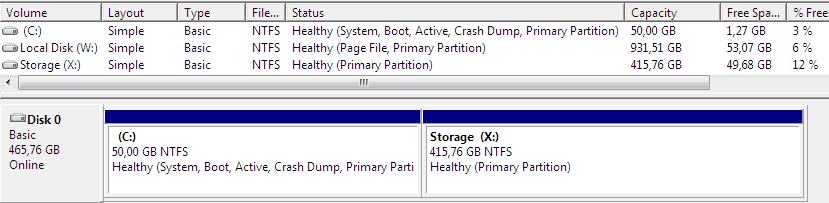
The system files seem to be divided among 2 partitions. However, Disk Cleanup specifically asks which partition to clean up, it doesn't offer to clean up windows update files on other partitions than C:.
 

Attachments

  • diskmgmt.PNG
    diskmgmt.PNG
    14.1 KB · Views: 7

My Computer

Computer type
PC/Desktop
OS
Windows 7 Ultimate x64
You have 2 Active partitions and that is a problem, there should only be 1 Active partition.
Your DM screen print doesn't show everything.
Post a new DM screen print using the instructions in Step 5 of
http://www.sevenforums.com/tutorials/274797-disk-management-post-screen-capture-image.html

To mark a partition not active see this tutorial:
http://www.sevenforums.com/tutorials/197157-partition-mark-inactive.html

Make sure you have a bootable disc or OEM preinstalled recovery options before making any changes so you can do a Startup Repair. See this tutorial:
http://www.sevenforums.com/tutorials/681-startup-repair.html

If you do have update files in each of the Active partitions you might need to mark each partition as the only Active partition and run the cleanup.
I'm just guessing with that, I've never had 2 Active partitions.
Wait for others with more setup knowledge than me to advise with the best approach, I'm not a installation/setup expert.
 

My Computer

Computer type
PC/Desktop
Computer Manufacturer/Model Number
home built
OS
Multi-Boot W7_Pro_x64 W8.1_Pro_x64 W10_Pro_x64 +Linux_VMs +Chromium_VM
CPU
AMD Athlon II x4 620
Motherboard
Gigabyte GA-MA785G-UD3H
Memory
6GB GSkill DDR2 800
Graphics Card(s)
AMD 4670 GPU + AMD 4200 IGP
Sound Card
on board Realtek ALC889A
Monitor(s) Displays
RCA 40" LCD TV, Insignia 32" LCD TV, HP 15" LCD monitor
Screen Resolution
1680 x 1050
Hard Drives
OCZ Vertex 3 120GB,
Samsung F3 1TB (3),
Several others - WD, Seagate, Hitachi, ...
PSU
Corsair 500 W
Case
Rosewill mid tower
Cooling
CM 90mm rifle
Keyboard
Gyration wireless, Logitech wireless, Dell USB wired
Mouse
Gyration wireless, Logitech wireless, V7 USB wired
Internet Speed
Spectrum - 100Mbps D / 10Mbps U
Antivirus
Avast, MBAM3, EMET, WinPatrol
Browser
Pale Moon, Firefox, IE
Other Info
2 multi-boot PC's
Mainly HTPC/Office/Gen purpose (no gaming).
Trendnet USB KVM.
LG DVD burner/Blue Ray Player.
Tray system for removable SATA backup drives.

Not currently OCd, under-volted.
I use Hybrid sleep, rarely re-boot or shutdown.

Hauppauge HD-PVR, Avermedia PCIe TV Tuner, Hauppauge PCI TV Tuner.

My Computer

Computer type
Laptop
Computer Manufacturer/Model Number
Dell Precision 15 7550 Workstation
OS
Windows 10 22H2 Pro
CPU
Intel(R) Xeon W-10885M
Motherboard
Dell
Memory
2x 32 GB DDR4 ECC memory (128 GB max)
Graphics Card(s)
Intel onboard GPU 1080p - Quadro RTX 5000 Max-Q GPU 4K
Hard Drives
500 GB Corsair T500 main M2 SSD
1 TB Intel storage M2 SSD (6 TB max)
Mouse
Logitech MX-25 Bluetooth
Internet Speed
slow
Antivirus
MS
Browser
Pale Moon 33.3.x x64 AVX2 build
Okay now 2+2 is getting closer to 4.

I request this tutorial because we need to see the whole picture not just part of it.


Disk Management - Post a Screen Capture Image


Please read post #15 by DavidE. Lot of good information.
 

My Computer

Computer type
PC/Desktop
Computer Manufacturer/Model Number
Home made Desktop
OS
Windows 10 Pro. 64/ version 1709 Windows 7 Pro/64
CPU
Intel i7-6800K @ 4.3
Motherboard
ASUS X-99 Deluxe II
Memory
Corsair Platinum 16 gig @2400
Graphics Card(s)
EVGA GTX 1070 OC
Monitor(s) Displays
Asus 27" LED LCD/VE278Q
Screen Resolution
1920-1080 or 1280-720 HDMI
Hard Drives
INTEL SSD 730-240 Gb Sata 3.0/
PSU
EVGA Platium 1200W
Case
Phanteks Luxe Tempered Glass 8 fans/ one radiator
Cooling
XSPC/ Water Cooled CPU
Keyboard
Das 4 Professional
Mouse
Logitech M705/MX Anywhere 2-S
Internet Speed
100 mbits
Antivirus
Microsoft Security Essentials/ Malwarebytes Premium 3.0/ SAS
Browser
I.E. 11 default/Firefox/ ISP Time Warner Cable/Spectrum
Other Info
LG BluRay Burner/
Sound system-KLipsch-THX/
Icy Dock ssd Hot Swap bays.
How about cleaning it up manually?
run this commands on an elevated command prompt.

net stop wuauserv
rmdir %windir%\softwaredistribution /s /q
net start wuauserv

exit

but before you do that, let's ask some experts here if it is safe.
please take down this reply if it is not helpful.

thanks
 

My Computer

Computer type
PC/Desktop
Computer Manufacturer/Model Number
HP
OS
Windows 7 Pro 32bit
CPU
Dual Core
Antivirus
Trend Micro
I did not include the other partition on the screenshot, because it was not relevant (merely primary partition, no additional statuses). Anyway, I acted as was recommended: set the W: partition as inactive, so only C: remained active. Windows wouldn't boot anymore so I had to copy the boot files to the windows partition again (using bcdboot C:\Windows) after which it booted again. I tryed running the cleanup utility as administrator again with a restart after, but it still wouldn't actually remove anything. I have included a screenshot of the current status.
 

Attachments

  • diskmgmtafter.PNG
    diskmgmtafter.PNG
    16.6 KB · Views: 1

My Computer

Computer type
PC/Desktop
OS
Windows 7 Ultimate x64
I did not include the other partition on the screenshot, because it was not relevant (merely primary partition, no additional statuses). Anyway, I acted as was recommended: set the W: partition as inactive, so only C: remained active. Windows wouldn't boot anymore so I had to copy the boot files to the windows partition again (using bcdboot C:\Windows) after which it booted again. I tryed running the cleanup utility as administrator again with a restart after, but it still wouldn't actually remove anything. I have included a screenshot of the current status.

I don't know why you're saying it was not relevant and no additional statuses.
It's obvious the "status" of [W] did change, and that did make a difference.
Why won't you post the full screen print of Disk Management as requested ?

How and why was [W] an Active partition, and had the Boot code earlier ?

Anyway, now that you have 1 Active partition and can boot, run a System File Check.
http://www.sevenforums.com/tutorials/1538-sfc-scannow-command-system-file-checker.html
 

My Computer

Computer type
PC/Desktop
Computer Manufacturer/Model Number
home built
OS
Multi-Boot W7_Pro_x64 W8.1_Pro_x64 W10_Pro_x64 +Linux_VMs +Chromium_VM
CPU
AMD Athlon II x4 620
Motherboard
Gigabyte GA-MA785G-UD3H
Memory
6GB GSkill DDR2 800
Graphics Card(s)
AMD 4670 GPU + AMD 4200 IGP
Sound Card
on board Realtek ALC889A
Monitor(s) Displays
RCA 40" LCD TV, Insignia 32" LCD TV, HP 15" LCD monitor
Screen Resolution
1680 x 1050
Hard Drives
OCZ Vertex 3 120GB,
Samsung F3 1TB (3),
Several others - WD, Seagate, Hitachi, ...
PSU
Corsair 500 W
Case
Rosewill mid tower
Cooling
CM 90mm rifle
Keyboard
Gyration wireless, Logitech wireless, Dell USB wired
Mouse
Gyration wireless, Logitech wireless, V7 USB wired
Internet Speed
Spectrum - 100Mbps D / 10Mbps U
Antivirus
Avast, MBAM3, EMET, WinPatrol
Browser
Pale Moon, Firefox, IE
Other Info
2 multi-boot PC's
Mainly HTPC/Office/Gen purpose (no gaming).
Trendnet USB KVM.
LG DVD burner/Blue Ray Player.
Tray system for removable SATA backup drives.

Not currently OCd, under-volted.
I use Hybrid sleep, rarely re-boot or shutdown.

Hauppauge HD-PVR, Avermedia PCIe TV Tuner, Hauppauge PCI TV Tuner.
Back
Top