Solved Ever Changing Brightness?

Valor D

New member
Power User
Local time
4:59 PM
Messages
80
What's up with the Brightness on my Laptop constantly changing? It seems to get brighter then dimmer whenever it feels like it, and it's getting very annoying! I've tried changing the Brightness plans in the Display menu, but it still does it. What's the best way to set the brightness just the way I want it, and stop it from ever changing? I don't want it to dim or brighten when I unplug it, or plug it back in, or reboot, or anything. I just want it to always stay the same.
 

My Computer

Computer Manufacturer/Model Number
DELL Inspiron 1564
OS
Windows 7 64 bit
CPU
Intel Core Processor i3-330M
Motherboard
4 GB
Memory
320 GB Harddrive
Graphics Card(s)
Integrated Intel Graphics Media Accelerator HD
Sound Card
Realtek HD Audio
Keyboard
Standard PS/2
Mouse
DELL Touchpad
its not a new laptop with one of those light sensors in it is it? they automatically dim or get brighter according to the ambient brightness.

try disabling the associated service (adaptive brightness)

start/programs/accesories/run , in the box type services.msc and hit return

look for adaptive brightness double click it and under startup type select disabled , then apply etc and reboot
 

My Computer

Computer type
PC/Desktop
Computer Manufacturer/Model Number
Custom
OS
Win 10 Home Premium 64 Bit
CPU
I7 5930K @ 4.5
Motherboard
Asus X99 s
Memory
16GB Kingston Hyper X Fury DDR4
Graphics Card(s)
EVGA 980ti SC + ACX 2.0
Sound Card
Onboard
Monitor(s) Displays
ROG Swift PG278Q
Screen Resolution
2560x1440
Hard Drives
Kingston Hyper X 250gb SSD
Samsung 2TB mechanical
PSU
Corsair RM 850
Case
NZXT H440 Red
Cooling
Corsair H100i GTX
Keyboard
Razer Reclusa
Mouse
Logitech G5 Gamer
Internet Speed
34mb
Antivirus
Eset Smart Security
Browser
Firefox
Hello Valor,

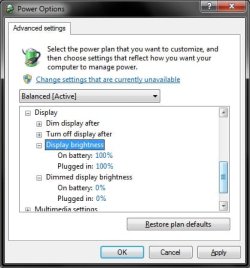
In addition, in your Advanced Power Plan Settings, you should have a option to set for this. Next, set the "Dim display after" settings to "Never", and the others like below for both on battery and plugged in.

Power_plan.jpg

Hope this helps,
Shawn
 

My Computer

Computer type
PC/Desktop
Computer Manufacturer/Model Number
Self built custom
OS
64-bit Windows 11 Pro for Workstations
CPU
Intel i7-8700K OC'd to 5 GHz
Motherboard
ASUS ROG Maximus XI Formula Z390
Memory
64 GB (4x16GB) G.SKILL TridentZ RGB DDR4 3600 MHz
Graphics Card(s)
ASUS ROG-STRIX-GTX1080TI-O11G-GAMING
Sound Card
Integrated
Monitor(s) Displays
2 x Samsung Odyssey G7 27"
Screen Resolution
2560x1440
Hard Drives
1TB Samsung 990 PRO M.2,
4TB Samsung 990 PRO PRO M.2,
TerraMaster F8 SSD Plus NAS
PSU
Seasonic Prime Titanium 850W
Case
Thermaltake Core P3
Cooling
Corsair Hydro H115i
Keyboard
Logitech wireless K800
Mouse
Logitech MX Master 4
Internet Speed
2 Gb/s Download and 100 Mb/s Upload
Antivirus
Malwarebyte Anti-Malware Premium
Browser
Google Chrome
Other Info
Logitech Z625 speaker system,
Logitech BRIO 4K Pro webcam,
HP Color LaserJet Pro MFP M477fdn,
APC SMART-UPS RT 1000 XL - SURT1000XLI,
Galaxy S23 Plus phone
I have no idea if it has an ambient light sensor or not. I made the changes the way that Brink suggested. Hopefully that works. Thanx!
 

My Computer

Computer Manufacturer/Model Number
DELL Inspiron 1564
OS
Windows 7 64 bit
CPU
Intel Core Processor i3-330M
Motherboard
4 GB
Memory
320 GB Harddrive
Graphics Card(s)
Integrated Intel Graphics Media Accelerator HD
Sound Card
Realtek HD Audio
Keyboard
Standard PS/2
Mouse
DELL Touchpad
Alright, I think I fixed the brightness problem.
 
Last edited by a moderator:

My Computer

Computer Manufacturer/Model Number
DELL Inspiron 1564
OS
Windows 7 64 bit
CPU
Intel Core Processor i3-330M
Motherboard
4 GB
Memory
320 GB Harddrive
Graphics Card(s)
Integrated Intel Graphics Media Accelerator HD
Sound Card
Realtek HD Audio
Keyboard
Standard PS/2
Mouse
DELL Touchpad
That's great news Valor. Thank you for posting back with your results.
 

My Computer

Computer type
PC/Desktop
Computer Manufacturer/Model Number
Self built custom
OS
64-bit Windows 11 Pro for Workstations
CPU
Intel i7-8700K OC'd to 5 GHz
Motherboard
ASUS ROG Maximus XI Formula Z390
Memory
64 GB (4x16GB) G.SKILL TridentZ RGB DDR4 3600 MHz
Graphics Card(s)
ASUS ROG-STRIX-GTX1080TI-O11G-GAMING
Sound Card
Integrated
Monitor(s) Displays
2 x Samsung Odyssey G7 27"
Screen Resolution
2560x1440
Hard Drives
1TB Samsung 990 PRO M.2,
4TB Samsung 990 PRO PRO M.2,
TerraMaster F8 SSD Plus NAS
PSU
Seasonic Prime Titanium 850W
Case
Thermaltake Core P3
Cooling
Corsair Hydro H115i
Keyboard
Logitech wireless K800
Mouse
Logitech MX Master 4
Internet Speed
2 Gb/s Download and 100 Mb/s Upload
Antivirus
Malwarebyte Anti-Malware Premium
Browser
Google Chrome
Other Info
Logitech Z625 speaker system,
Logitech BRIO 4K Pro webcam,
HP Color LaserJet Pro MFP M477fdn,
APC SMART-UPS RT 1000 XL - SURT1000XLI,
Galaxy S23 Plus phone

My Computer

Computer type
PC/Desktop
Computer Manufacturer/Model Number
Self Built
OS
Win 10 Pro x64
CPU
Intel I5-2500K @3.3GHz
Motherboard
Asrock P67 Extreme4
Memory
16GB G.Skill Ripjaws X (4x4GB)
Graphics Card(s)
EVGA GeForce 750 Ti SC 2GB
Sound Card
ASUS Xonar DG 5.1 Channels 24-bit 96KHz PCI Interface Sound
Monitor(s) Displays
auria eq2367
Screen Resolution
1920 x 1080
Hard Drives
250GB Samsung 850 EVO SSD
1TB WD Blue
1TB Hitachi
PSU
SeaSonic X 650W 80 Plus Gold
Case
Corsair Obsidian 750D
Cooling
Corsair H60, Three 140mm case fans
Keyboard
Logitech Wireless Keyboard K520
Mouse
Logitech Wireless Mouse M310
Internet Speed
Wave Broadband ~ 100 dn 5 up
Antivirus
Windows Defender, Malwarebytes Premium
Browser
Edge, IE11, Chrome
Other Info
Laptop specs: HP g7-1365dx /
CPU: AMD A6-3420M APU with Radeon(tm) HD Graphics /
RAM: Crucial 8Gb (2x4Gb) /
SSD: Crucial M4-CT128M4SSD2 ATA Device/ FW 000F /
GFX: AMD Radeon HD 6520G /
OS: Windows 10 Pro x64
Back
Top