
Still learning the nuances of Win 7... so much appreciated if someone can shed some light.
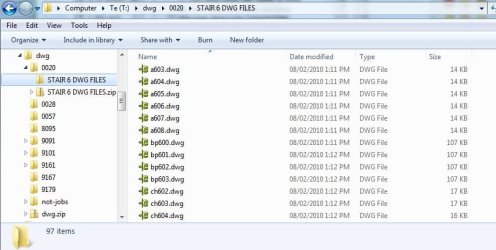
In most folders, Windows Explorer shows me the list of files with sizes and dates as expected. (see image "Typical" below)
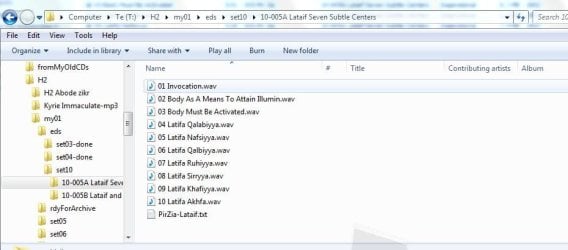
But (new in Win 7) on some folders it seems to have some knowledge that the folder is music related, and substitutes in some alternate column headings. (see image "LibFmt" below). This is what I'm a bit confused about, and how to control to turn it off. Those headings are rarely useful, whereas size and date headings are fundamental to my version control.
(FWIW, I prefer not add these folders to my music library since it is a great bunch of constantly fluctuating audio and txt/pdf/doc files that I manage between my external hard drives, and various CD/DVD offline storage.)
Changed some Folder Options > View settings so the following are checked:
always show menus
display file icon on thumbnails
display file size information in folder tips
display the full path in the title bar (Classic theme only)
show hidden files, folders, and drives
show drive letters
show encrypted or compressed NTFS files in color
show pop-up description for folders and desktop items
show preview handlers in preview pane
use sharing wizard
select the typed item in the view
In most folders, Windows Explorer shows me the list of files with sizes and dates as expected. (see image "Typical" below)
But (new in Win 7) on some folders it seems to have some knowledge that the folder is music related, and substitutes in some alternate column headings. (see image "LibFmt" below). This is what I'm a bit confused about, and how to control to turn it off. Those headings are rarely useful, whereas size and date headings are fundamental to my version control.
(FWIW, I prefer not add these folders to my music library since it is a great bunch of constantly fluctuating audio and txt/pdf/doc files that I manage between my external hard drives, and various CD/DVD offline storage.)
Changed some Folder Options > View settings so the following are checked:
always show menus
display file icon on thumbnails
display file size information in folder tips
display the full path in the title bar (Classic theme only)
show hidden files, folders, and drives
show drive letters
show encrypted or compressed NTFS files in color
show pop-up description for folders and desktop items
show preview handlers in preview pane
use sharing wizard
select the typed item in the view
Attachments
My Computer
- Computer Manufacturer/Model Number
- custom
- OS
- Win 7 Pro64
- CPU
- AMD Phenom II X2 550 3.1GHz 7MB
- Motherboard
- Gigabyte MA790GPT
- Memory
- 4GB mushkin blackline
- Graphics Card(s)
- ATI Radeon HD 3300
- Sound Card
- ATI HDMI Audio
- Monitor(s) Displays
- Samsung Syncmaster 920N
- Screen Resolution
- 1280x1024
- Hard Drives
- WD 1TB WD1002FAEX
- PSU
- Thermaltake 500W
- Case
- coolermaster RC-330
- Keyboard
- US102 PS2
- Mouse
- Logitech USB wired
- Internet Speed
- DSL
- Other Info
- no registry hacks (yet)


