
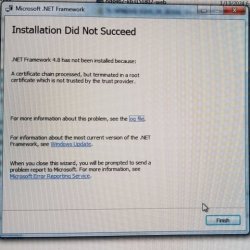
I recently had a need to do a clean re-install of Windows 7 Pro on a Dell 7010 PC and need to re-install .NET Framework 4.8 using the Standalone Installer however the install starts but fails before completion. See image attached for details.
Is there a way to fix this?
Thanks.
- - - Updated - - -
Here is the info from the installer log file:
OS Version = 6.1.7601, SP = 1.0, Platform 2, Service Pack 1OS Description = Win7 - x64 Service Pack 1MSI = 5.0.7601.17514Windows version = amd64_windowsfoundation_31bf3856ad364e35_6.1.7601.17514_none_615fdfe2a739474c.manifestWindows servicing = 6.1.7601.17514CommandLine = E:\f042f8d778e6f5c93c\\Setup.exe /x86 /x64 /redistTimeZone = Eastern Standard TimeInitial LCID = 1033Using Simultaneous Download and Install mechanismOperation: InstallingPackage Name = Microsoft .NET Framework 4.8 SetupPackage Version = 4.8.04115User Experience Data Collection Policy: DisabledNumber of applicable items: 10E:\f042f8d778e6f5c93c\SetupUtility.exe - Signature verification for file SetupUtility.exe (E:\f042f8d778e6f5c93c\SetupUtility.exe) failed with error 0x800b0109 (A certificate chain processed, but terminated in a root certificate which is not trusted by the trust provider.)No FileHash provided. Cannot perform FileHash verification for SetupUtility.exeFile SetupUtility.exe (E:\f042f8d778e6f5c93c\SetupUtility.exe), failed authentication. (Error = -2146762487). It is recommended that you delete this file and retry setup again.Final Result: Installation failed with error code: (0x800B0109), "A certificate chain processed, but terminated in a root certificate which is not trusted by the trust provider. " (Elapsed time: 0 00:00:27).
Is there a way to fix this?
Thanks.
- - - Updated - - -
Here is the info from the installer log file:
OS Version = 6.1.7601, SP = 1.0, Platform 2, Service Pack 1OS Description = Win7 - x64 Service Pack 1MSI = 5.0.7601.17514Windows version = amd64_windowsfoundation_31bf3856ad364e35_6.1.7601.17514_none_615fdfe2a739474c.manifestWindows servicing = 6.1.7601.17514CommandLine = E:\f042f8d778e6f5c93c\\Setup.exe /x86 /x64 /redistTimeZone = Eastern Standard TimeInitial LCID = 1033Using Simultaneous Download and Install mechanismOperation: InstallingPackage Name = Microsoft .NET Framework 4.8 SetupPackage Version = 4.8.04115User Experience Data Collection Policy: DisabledNumber of applicable items: 10E:\f042f8d778e6f5c93c\SetupUtility.exe - Signature verification for file SetupUtility.exe (E:\f042f8d778e6f5c93c\SetupUtility.exe) failed with error 0x800b0109 (A certificate chain processed, but terminated in a root certificate which is not trusted by the trust provider.)No FileHash provided. Cannot perform FileHash verification for SetupUtility.exeFile SetupUtility.exe (E:\f042f8d778e6f5c93c\SetupUtility.exe), failed authentication. (Error = -2146762487). It is recommended that you delete this file and retry setup again.Final Result: Installation failed with error code: (0x800B0109), "A certificate chain processed, but terminated in a root certificate which is not trusted by the trust provider. " (Elapsed time: 0 00:00:27).
Attachments
My Computer
- Computer type
- Laptop
- Computer Manufacturer/Model Number
- Sony VGNZ
- OS
- Windows 7 64 bit
- CPU
- Centrino 2
- Hard Drives
- 1 TB
- Browser
- Chrome; IE.

