SB Audigy SE - Not Working in Windows 7

redjeep

New member
Member
Local time
9:14 AM
Messages
32
Not sure if anyone can help on this one, but I have been trying to get my sound card working after installing Windows 7. I have been going back and forth with the support pers from Creative for over a month and now it looks like they are dumping me because I cannot find the receipt for my purchase.
I have followed everything they have told me, uninstall and re-install, trying in a different PCI slot, but all I keep getting is that its installed, but in device manager I get the yellow triangle with an exclamation point and when I open it, I get the message "Windows cannot load the device driver for this hardware. The driver may be corrupted or missing. (Code 39)"
They instructed me to use the file SB24_PCDRV_LB_1_04_0090 to do the install.
I know its not a very expensive card, but its all I require and it worked fine when I was running Windows XP.
I hope someone can help, because I have run out of idea's to try.

The other thing about this is that I got so made, I just went and bought another sound card and nope it wouldnt work either??
 

My Computer My Computer

At a glance

Windows 7 32bitIntel Core 2 DuoOCZ Platinum Revision 2 2GB (2 x 1GB) 240-Pin...Nvidia GeForce 9500 GT
OS
Windows 7 32bit
CPU
Intel Core 2 Duo
Motherboard
Asus P5B Deluxe
Memory
OCZ Platinum Revision 2 2GB (2 x 1GB) 240-Pin DDR2 SDRAM DDR
Graphics Card(s)
Nvidia GeForce 9500 GT
Sound Card
Creative Sound Blaster Audigy SE
Monitor(s) Displays
ViewSonic
Not sure if anyone can help on this one, but I have been trying to get my sound card working after installing Windows 7. I have been going back and forth with the support pers from Creative for over a month and now it looks like they are dumping me because I cannot find the receipt for my purchase.
I have followed everything they have told me, uninstall and re-install, trying in a different PCI slot, but all I keep getting is that its installed, but in device manager I get the yellow triangle with an exclamation point and when I open it, I get the message "Windows cannot load the device driver for this hardware. The driver may be corrupted or missing. (Code 39)"
They instructed me to use the file SB24_PCDRV_LB_1_04_0090 to do the install.
I know its not a very expensive card, but its all I require and it worked fine when I was running Windows XP.
I hope someone can help, because I have run out of idea's to try.

The other thing about this is that I got so made, I just went and bought another sound card and nope it wouldnt work either??

I know audigy will work in win 7 because I am using one now. why it and another card wont work sounds like an OS problem.

I would run a system file check

http://www.sevenforums.com/tutorials/1538-sfc-scannow-command-system-file-checker.html?ltr=S


Ken
 

My Computer My Computer

At a glance

Win 8 Release candidate 8400[email protected]4 gigsNvidia 9600M
Computer Manufacturer/Model Number
HP Pavillion dv-7 1005 Tx
OS
Win 8 Release candidate 8400
CPU
[email protected]
Memory
4 gigs
Graphics Card(s)
Nvidia 9600M
Sound Card
HD built-in
Monitor(s) Displays
17" Wxga
Screen Resolution
1440x900
Cooling
none
Internet Speed
45Mb down 5Mb up
Hello redjeep Welsome to the Seven Forums!

Which model card are you running? There are several Audigy, Audigy 2, Audigy 4 and other models to choose from when looking for updates. The models that particular driver set is intended for are listed here.

Sound Blaster Live! 24-bit
Sound Blaster Audigy Value/SE/LS
Sound Blaster 5.1 VX

If yours isn't one of those they pointed you at the wrong update which never helps from the start.

Another item would be checking to see if the card is lifted up in the slot any in case you didn't see the new one seated down fully. By the looks of any yellow marks Windows isn't able to see any drivers fully installed and made active.

Also recheck the bios setting to be sure the onboard audio if present hasn't been re-enabled since that will hamper sound from an expansion card installed separately.
 

My Computers My Computers

  • At a glance

    W7 Ultimate x64/W10 Pro x64/W11 Pro Triple Bo...AMD Phenom II X4 975 Deneb 3.6ghz - 965 2nd r...Kingston Hyper X DDR3 1600 1.5v 16gb - Hyper ...MSI HD Radeon 5750 1gb - MSI HD Radeon 6450 o...
    Computer type
    PC/Desktop
    Computer Manufacturer/Model Number
    Custom builds = 2
    OS
    W7 Ultimate x64/W10 Pro x64/W11 Pro Triple Boot - Main PC W7 Remote PC Micro ATX W7 Pro x64/W11 Pro
    CPU
    AMD Phenom II X4 975 Deneb 3.6ghz - 965 2nd remote pc
    Motherboard
    Gigabyte GA-790XTA-UD4-Gigabyte GA-880GM-D2H remote pc
    Memory
    Kingston Hyper X DDR3 1600 1.5v 16gb - Hyper X Fury 8gb 2nd
    Graphics Card(s)
    MSI HD Radeon 5750 1gb - MSI HD Radeon 6450 on mini tower
    Sound Card
    Creative Labs X-Fi Xtreme Audio P - Realtek onooard 2nd case
    Monitor(s) Displays
    ASUS VW199T-P 19" HP 2082a Main-HP 2082a 20" remote pc
    Screen Resolution
    Asus 1440x900 - HP 1600x900
    Hard Drives
    WD Black 1TB HD per OS W7, W10, and pending W11 presently on 500gb OS Drive - Pending Triple 1TB HDs for Spanned Storage/backup volume
    Single 2TB external USB enclosure, single 1TB System 7 Host/Boot drive, Pending 8TB external HD for system image b
    PSU
    Corsair 750TX - primary / Corsair CX600 - second
    Case
    Antec 900-2 - SSD compatible / NZXT Vulcan mini tower
    Cooling
    Zalman CNPS9900A
    Keyboard
    AZIO L70 Backlit Letters Gaming - ONN Cordless/USB
    Mouse
    MSI DS200 Programmable, Logitech Cordless
    Internet Speed
    30mbps upgrade - primary hard wired - mini tower usb WiFi
    Antivirus
    GFI VIPRE Internet Security 2014 on W7 2016 beta on W10,
    Browser
    Cyberfox, WaterFox 64bit FF variants, FireFox x64, Pale Moon
    Other Info
    Accomdata fan cooled usb 2.0 PIDE/Sata II, III external enclosure.
    Sambient usb/eSata PATA/Sata II, III external enclosure.
  • At a glance

    W7 Pro x64/W11 ProAMD Deneb 3.6ghz - 965Kingston Hyper X Fury 8gbMSI HD Radeon 6450 DVI Output
    Computer type
    PC/Desktop
    System Manufacturer/Model Number
    CUSTOM ASSEMBLY
    OS
    W7 Pro x64/W11 Pro
    CPU
    AMD Deneb 3.6ghz - 965
    Motherboard
    Gigabyte GA-880GM-D2H remote pc
    Memory
    Kingston Hyper X Fury 8gb
    Graphics Card(s)
    MSI HD Radeon 6450 DVI Output
    Sound Card
    Realtek onooard Creative or Other separate PENDING
    Monitor(s) Displays
    VIZIO 32" LCD TV Separate LCD Pending
    Screen Resolution
    1600x1080
    Hard Drives
    WD 500GB OS Host/Boot WD Green 1TB Storage/Backup
    PSU
    Corsair 600W - THERMALTAKE 600W spare case
    Case
    NZXT Vulcan mini tower
    Cooling
    Twin 120mm Top Fans - 240mm Side Cover
    Keyboard
    ONN Cordless/USB Logitech Cordless
    Mouse
    ONN USB/Cordless - Logitech Cordless
    Internet Speed
    DSL 5G
    Browser
    MS Edge, FireFox, WaterFox x64, FireFox Nightly
    Other Info
    OS Testing-Remote Access to Main TeamViewer
ZigZag, thanks for the reply, I checked the files, no problems.

Nighthawk, I have the Sound Blaster Audigy SE. I checked the seating of the card and its in good. The on board audio has been disabled. I even tried enabling it and then disabling it. This is the message I get in the sound card properties

Windows cannot load the device driver for this hardware. The driver may be corrupted or missing. (Code 39)
 

My Computer My Computer

At a glance

Windows 7 32bitIntel Core 2 DuoOCZ Platinum Revision 2 2GB (2 x 1GB) 240-Pin...Nvidia GeForce 9500 GT
OS
Windows 7 32bit
CPU
Intel Core 2 Duo
Motherboard
Asus P5B Deluxe
Memory
OCZ Platinum Revision 2 2GB (2 x 1GB) 240-Pin DDR2 SDRAM DDR
Graphics Card(s)
Nvidia GeForce 9500 GT
Sound Card
Creative Sound Blaster Audigy SE
Monitor(s) Displays
ViewSonic
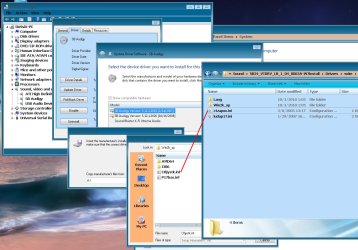
Try this one "SB24_VTDRV_LB_1_04_0065A.exe"
I also have audigy se and tried anything to make it work.
It is also the last driver that support "what u hear" recording.
Installed it through device manager update driver.
(rename exe to zip and extract)

-system
-dev. manager
-update
Drivers/wdm/
-ctzapxx.ini
 

My Computer My Computer

At a glance

7 Ultimate x64 sp1Intel i5-4690K16Gb HyperX furyR9-270x 2Gb
Computer type
PC/Desktop
Computer Manufacturer/Model Number
696
OS
7 Ultimate x64 sp1
CPU
Intel i5-4690K
Motherboard
GA Z97X Gaming 5
Memory
16Gb HyperX fury
Graphics Card(s)
R9-270x 2Gb
Sound Card
On Board
Monitor(s) Displays
2443NW
Screen Resolution
1920x1200
Hard Drives
WD5000 -
WD5001 -
WD1002
PSU
Cft-650-14cs
Case
Very Big Case
Cooling
stock
Keyboard
G11
Mouse
Logitech
Internet Speed
Adsl
Browser
FF
Other Info
RWD
If you have Intel board check to make sure have installed INF drivers for your board. Also I used the drivers for Vista and worked fine.
 

My Computer My Computer

At a glance

W7 Prem 64 on Dell, Home Build W7 Pro 64 1drv...
Computer type
PC/Desktop
Computer Manufacturer/Model Number
1 Dell XPS8300, 1 home build
OS
W7 Prem 64 on Dell, Home Build W7 Pro 64 1drv, XP Pro 1 drv
Try this one "SB24_VTDRV_LB_1_04_0065A.exe"
I also have audigy se and tried anything to make it work.
It is also the last driver that support "what u hear" recording.
Installed it through device manager update driver.
(rename exe to zip and extract)

-system
-dev. manager
-update
Drivers/wdm/
-ctzapxx.ini

Six, thanks for the reply, I tried it, but when I go to drivers/wdm I dont see the file ctzapxx.ini

Should I be able to see this file??
 

My Computer My Computer

At a glance

Windows 7 32bitIntel Core 2 DuoOCZ Platinum Revision 2 2GB (2 x 1GB) 240-Pin...Nvidia GeForce 9500 GT
OS
Windows 7 32bit
CPU
Intel Core 2 Duo
Motherboard
Asus P5B Deluxe
Memory
OCZ Platinum Revision 2 2GB (2 x 1GB) 240-Pin DDR2 SDRAM DDR
Graphics Card(s)
Nvidia GeForce 9500 GT
Sound Card
Creative Sound Blaster Audigy SE
Monitor(s) Displays
ViewSonic
If you have Intel board check to make sure have installed INF drivers for your board. Also I used the drivers for Vista and worked fine.

Thanks for the reply, I have an Asus motherboard P5B deluxe and after doing a new install of Windows 7, I updated all the drivers for the motherboard
 

My Computer My Computer

At a glance

Windows 7 32bitIntel Core 2 DuoOCZ Platinum Revision 2 2GB (2 x 1GB) 240-Pin...Nvidia GeForce 9500 GT
OS
Windows 7 32bit
CPU
Intel Core 2 Duo
Motherboard
Asus P5B Deluxe
Memory
OCZ Platinum Revision 2 2GB (2 x 1GB) 240-Pin DDR2 SDRAM DDR
Graphics Card(s)
Nvidia GeForce 9500 GT
Sound Card
Creative Sound Blaster Audigy SE
Monitor(s) Displays
ViewSonic
I see
have disk search not show that name like in explorer
try this
 

Attachments

  • audigy-se.jpg
    audigy-se.jpg
    145.4 KB · Views: 189

My Computer My Computer

At a glance

7 Ultimate x64 sp1Intel i5-4690K16Gb HyperX furyR9-270x 2Gb
Computer type
PC/Desktop
Computer Manufacturer/Model Number
696
OS
7 Ultimate x64 sp1
CPU
Intel i5-4690K
Motherboard
GA Z97X Gaming 5
Memory
16Gb HyperX fury
Graphics Card(s)
R9-270x 2Gb
Sound Card
On Board
Monitor(s) Displays
2443NW
Screen Resolution
1920x1200
Hard Drives
WD5000 -
WD5001 -
WD1002
PSU
Cft-650-14cs
Case
Very Big Case
Cooling
stock
Keyboard
G11
Mouse
Logitech
Internet Speed
Adsl
Browser
FF
Other Info
RWD

My Computer My Computer

At a glance

Windows 7 32bitIntel Core 2 DuoOCZ Platinum Revision 2 2GB (2 x 1GB) 240-Pin...Nvidia GeForce 9500 GT
OS
Windows 7 32bit
CPU
Intel Core 2 Duo
Motherboard
Asus P5B Deluxe
Memory
OCZ Platinum Revision 2 2GB (2 x 1GB) 240-Pin DDR2 SDRAM DDR
Graphics Card(s)
Nvidia GeForce 9500 GT
Sound Card
Creative Sound Blaster Audigy SE
Monitor(s) Displays
ViewSonic
The best option now is to remove what you have on and run a manual check for Windows updates. Use the "custom" not "express" option and check on the optional updates for hardwares and softwares to see if the updates will match the correct set.

Typically the web updater part of the installer will see the correct drivers go on when running the installer. The other thing that would explain the new card not working if you are no longer seeing yellow marks is the need to go into the Control Panel>Sound and set the default playback device if found other then the card as well as the audio console launcher's mixer.

If you didn't get into a bad replacement card and everything else seems to be installed correctly the configuration as well as going over the WMPlayer wizard should get the sound working.
 

My Computers My Computers

  • At a glance

    W7 Ultimate x64/W10 Pro x64/W11 Pro Triple Bo...AMD Phenom II X4 975 Deneb 3.6ghz - 965 2nd r...Kingston Hyper X DDR3 1600 1.5v 16gb - Hyper ...MSI HD Radeon 5750 1gb - MSI HD Radeon 6450 o...
    Computer type
    PC/Desktop
    Computer Manufacturer/Model Number
    Custom builds = 2
    OS
    W7 Ultimate x64/W10 Pro x64/W11 Pro Triple Boot - Main PC W7 Remote PC Micro ATX W7 Pro x64/W11 Pro
    CPU
    AMD Phenom II X4 975 Deneb 3.6ghz - 965 2nd remote pc
    Motherboard
    Gigabyte GA-790XTA-UD4-Gigabyte GA-880GM-D2H remote pc
    Memory
    Kingston Hyper X DDR3 1600 1.5v 16gb - Hyper X Fury 8gb 2nd
    Graphics Card(s)
    MSI HD Radeon 5750 1gb - MSI HD Radeon 6450 on mini tower
    Sound Card
    Creative Labs X-Fi Xtreme Audio P - Realtek onooard 2nd case
    Monitor(s) Displays
    ASUS VW199T-P 19" HP 2082a Main-HP 2082a 20" remote pc
    Screen Resolution
    Asus 1440x900 - HP 1600x900
    Hard Drives
    WD Black 1TB HD per OS W7, W10, and pending W11 presently on 500gb OS Drive - Pending Triple 1TB HDs for Spanned Storage/backup volume
    Single 2TB external USB enclosure, single 1TB System 7 Host/Boot drive, Pending 8TB external HD for system image b
    PSU
    Corsair 750TX - primary / Corsair CX600 - second
    Case
    Antec 900-2 - SSD compatible / NZXT Vulcan mini tower
    Cooling
    Zalman CNPS9900A
    Keyboard
    AZIO L70 Backlit Letters Gaming - ONN Cordless/USB
    Mouse
    MSI DS200 Programmable, Logitech Cordless
    Internet Speed
    30mbps upgrade - primary hard wired - mini tower usb WiFi
    Antivirus
    GFI VIPRE Internet Security 2014 on W7 2016 beta on W10,
    Browser
    Cyberfox, WaterFox 64bit FF variants, FireFox x64, Pale Moon
    Other Info
    Accomdata fan cooled usb 2.0 PIDE/Sata II, III external enclosure.
    Sambient usb/eSata PATA/Sata II, III external enclosure.
  • At a glance

    W7 Pro x64/W11 ProAMD Deneb 3.6ghz - 965Kingston Hyper X Fury 8gbMSI HD Radeon 6450 DVI Output
    Computer type
    PC/Desktop
    System Manufacturer/Model Number
    CUSTOM ASSEMBLY
    OS
    W7 Pro x64/W11 Pro
    CPU
    AMD Deneb 3.6ghz - 965
    Motherboard
    Gigabyte GA-880GM-D2H remote pc
    Memory
    Kingston Hyper X Fury 8gb
    Graphics Card(s)
    MSI HD Radeon 6450 DVI Output
    Sound Card
    Realtek onooard Creative or Other separate PENDING
    Monitor(s) Displays
    VIZIO 32" LCD TV Separate LCD Pending
    Screen Resolution
    1600x1080
    Hard Drives
    WD 500GB OS Host/Boot WD Green 1TB Storage/Backup
    PSU
    Corsair 600W - THERMALTAKE 600W spare case
    Case
    NZXT Vulcan mini tower
    Cooling
    Twin 120mm Top Fans - 240mm Side Cover
    Keyboard
    ONN Cordless/USB Logitech Cordless
    Mouse
    ONN USB/Cordless - Logitech Cordless
    Internet Speed
    DSL 5G
    Browser
    MS Edge, FireFox, WaterFox x64, FireFox Nightly
    Other Info
    OS Testing-Remote Access to Main TeamViewer
The best option now is to remove what you have on and run a manual check for Windows updates. Use the "custom" not "express" option and check on the optional updates for hardwares and softwares to see if the updates will match the correct set.

Typically the web updater part of the installer will see the correct drivers go on when running the installer. The other thing that would explain the new card not working if you are no longer seeing yellow marks is the need to go into the Control Panel>Sound and set the default playback device if found other then the card as well as the audio console launcher's mixer.

If you didn't get into a bad replacement card and everything else seems to be installed correctly the configuration as well as going over the WMPlayer wizard should get the sound working.

Updates done, but I still have the yellow triangle with the exclamation mark on my sound card in device manager. I get the same results when I went and bought a new different card, I keep getting the same message

Windows cannot load the device driver for this hardware. The driver may be corrupted or missing. (Code 39)
 

My Computer My Computer

At a glance

Windows 7 32bitIntel Core 2 DuoOCZ Platinum Revision 2 2GB (2 x 1GB) 240-Pin...Nvidia GeForce 9500 GT
OS
Windows 7 32bit
CPU
Intel Core 2 Duo
Motherboard
Asus P5B Deluxe
Memory
OCZ Platinum Revision 2 2GB (2 x 1GB) 240-Pin DDR2 SDRAM DDR
Graphics Card(s)
Nvidia GeForce 9500 GT
Sound Card
Creative Sound Blaster Audigy SE
Monitor(s) Displays
ViewSonic
At past times when there was any headache getting the drivers and application on for the different model series by Creative I would wipe what was on totally and restart a few times even before going to install from the cd or download off their support site. Once the installer is running then the new hardware found message is commonly seen.

The right click on the DM items never seemed to work out while the web installer should see the card right away if good and proceed to install the correct drivers without any yellow marks to find later. The updates are first downloaded into a designated folder for keeping onhand and installed from there where you can fall back to that when browsing with the right click option if a driver gets knocked out not before they are first on and initialzied.

One thing found that matches the idea of completely removing the drivers and registry entries for them followed by full system restarts to clear any still loaded is Code 39 Error Resolution

That reference has several branch offs to other definitions to cover typical registry errors usually seen with a bad download or bad install. Here ir used to be a problem seen more often with XP then Vista or 7 as far as getting the drivers to take and installing the audio console laucher and volume control panel shortcut made from that.

Follow the steps seen there and remember to reboot as you go along. It's usually a minor reg value hanging things up where the restart inbetween each step suddenly sees the web installer/updater get things going unless the new as well as original card are both bad to begin with having the first quit and the new one defective. Besides any registry errors a pair of bad cards can gum up the works too and explain the constant error unless you have a bad slot on the board itself.
 

My Computers My Computers

  • At a glance

    W7 Ultimate x64/W10 Pro x64/W11 Pro Triple Bo...AMD Phenom II X4 975 Deneb 3.6ghz - 965 2nd r...Kingston Hyper X DDR3 1600 1.5v 16gb - Hyper ...MSI HD Radeon 5750 1gb - MSI HD Radeon 6450 o...
    Computer type
    PC/Desktop
    Computer Manufacturer/Model Number
    Custom builds = 2
    OS
    W7 Ultimate x64/W10 Pro x64/W11 Pro Triple Boot - Main PC W7 Remote PC Micro ATX W7 Pro x64/W11 Pro
    CPU
    AMD Phenom II X4 975 Deneb 3.6ghz - 965 2nd remote pc
    Motherboard
    Gigabyte GA-790XTA-UD4-Gigabyte GA-880GM-D2H remote pc
    Memory
    Kingston Hyper X DDR3 1600 1.5v 16gb - Hyper X Fury 8gb 2nd
    Graphics Card(s)
    MSI HD Radeon 5750 1gb - MSI HD Radeon 6450 on mini tower
    Sound Card
    Creative Labs X-Fi Xtreme Audio P - Realtek onooard 2nd case
    Monitor(s) Displays
    ASUS VW199T-P 19" HP 2082a Main-HP 2082a 20" remote pc
    Screen Resolution
    Asus 1440x900 - HP 1600x900
    Hard Drives
    WD Black 1TB HD per OS W7, W10, and pending W11 presently on 500gb OS Drive - Pending Triple 1TB HDs for Spanned Storage/backup volume
    Single 2TB external USB enclosure, single 1TB System 7 Host/Boot drive, Pending 8TB external HD for system image b
    PSU
    Corsair 750TX - primary / Corsair CX600 - second
    Case
    Antec 900-2 - SSD compatible / NZXT Vulcan mini tower
    Cooling
    Zalman CNPS9900A
    Keyboard
    AZIO L70 Backlit Letters Gaming - ONN Cordless/USB
    Mouse
    MSI DS200 Programmable, Logitech Cordless
    Internet Speed
    30mbps upgrade - primary hard wired - mini tower usb WiFi
    Antivirus
    GFI VIPRE Internet Security 2014 on W7 2016 beta on W10,
    Browser
    Cyberfox, WaterFox 64bit FF variants, FireFox x64, Pale Moon
    Other Info
    Accomdata fan cooled usb 2.0 PIDE/Sata II, III external enclosure.
    Sambient usb/eSata PATA/Sata II, III external enclosure.
  • At a glance

    W7 Pro x64/W11 ProAMD Deneb 3.6ghz - 965Kingston Hyper X Fury 8gbMSI HD Radeon 6450 DVI Output
    Computer type
    PC/Desktop
    System Manufacturer/Model Number
    CUSTOM ASSEMBLY
    OS
    W7 Pro x64/W11 Pro
    CPU
    AMD Deneb 3.6ghz - 965
    Motherboard
    Gigabyte GA-880GM-D2H remote pc
    Memory
    Kingston Hyper X Fury 8gb
    Graphics Card(s)
    MSI HD Radeon 6450 DVI Output
    Sound Card
    Realtek onooard Creative or Other separate PENDING
    Monitor(s) Displays
    VIZIO 32" LCD TV Separate LCD Pending
    Screen Resolution
    1600x1080
    Hard Drives
    WD 500GB OS Host/Boot WD Green 1TB Storage/Backup
    PSU
    Corsair 600W - THERMALTAKE 600W spare case
    Case
    NZXT Vulcan mini tower
    Cooling
    Twin 120mm Top Fans - 240mm Side Cover
    Keyboard
    ONN Cordless/USB Logitech Cordless
    Mouse
    ONN USB/Cordless - Logitech Cordless
    Internet Speed
    DSL 5G
    Browser
    MS Edge, FireFox, WaterFox x64, FireFox Nightly
    Other Info
    OS Testing-Remote Access to Main TeamViewer
At past times when there was any headache getting the drivers and application on for the different model series by Creative I would wipe what was on totally and restart a few times even before going to install from the cd or download off their support site. Once the installer is running then the new hardware found message is commonly seen.

The right click on the DM items never seemed to work out while the web installer should see the card right away if good and proceed to install the correct drivers without any yellow marks to find later. The updates are first downloaded into a designated folder for keeping onhand and installed from there where you can fall back to that when browsing with the right click option if a driver gets knocked out not before they are first on and initialzied.

One thing found that matches the idea of completely removing the drivers and registry entries for them followed by full system restarts to clear any still loaded is Code 39 Error Resolution

That reference has several branch offs to other definitions to cover typical registry errors usually seen with a bad download or bad install. Here ir used to be a problem seen more often with XP then Vista or 7 as far as getting the drivers to take and installing the audio console laucher and volume control panel shortcut made from that.

Follow the steps seen there and remember to reboot as you go along. It's usually a minor reg value hanging things up where the restart inbetween each step suddenly sees the web installer/updater get things going unless the new as well as original card are both bad to begin with having the first quit and the new one defective. Besides any registry errors a pair of bad cards can gum up the works too and explain the constant error unless you have a bad slot on the board itself.

Night, thanks, tried the above, but I did not have any UpperFilters and LowerFilters values to delete?

I'm starting to think that my only opition is to do a windows repair??
 

My Computer My Computer

At a glance

Windows 7 32bitIntel Core 2 DuoOCZ Platinum Revision 2 2GB (2 x 1GB) 240-Pin...Nvidia GeForce 9500 GT
OS
Windows 7 32bit
CPU
Intel Core 2 Duo
Motherboard
Asus P5B Deluxe
Memory
OCZ Platinum Revision 2 2GB (2 x 1GB) 240-Pin DDR2 SDRAM DDR
Graphics Card(s)
Nvidia GeForce 9500 GT
Sound Card
Creative Sound Blaster Audigy SE
Monitor(s) Displays
ViewSonic
Ok, not sure if this is going to work, but I think Im going to try a PCI express sound card, it more money, but its worth a try.

Anybody have any comments??
 

My Computer My Computer

At a glance

Windows 7 32bitIntel Core 2 DuoOCZ Platinum Revision 2 2GB (2 x 1GB) 240-Pin...Nvidia GeForce 9500 GT
OS
Windows 7 32bit
CPU
Intel Core 2 Duo
Motherboard
Asus P5B Deluxe
Memory
OCZ Platinum Revision 2 2GB (2 x 1GB) 240-Pin DDR2 SDRAM DDR
Graphics Card(s)
Nvidia GeForce 9500 GT
Sound Card
Creative Sound Blaster Audigy SE
Monitor(s) Displays
ViewSonic
Try (RevoUninstaller) it may help to look for and remove left over files. Then try just installing the drivers for Vista and not Win 7. The Vista drivers worked fine for me with other installs.
 

My Computer My Computer

At a glance

W7 Prem 64 on Dell, Home Build W7 Pro 64 1drv...
Computer type
PC/Desktop
Computer Manufacturer/Model Number
1 Dell XPS8300, 1 home build
OS
W7 Prem 64 on Dell, Home Build W7 Pro 64 1drv, XP Pro 1 drv
I was going to suggest a wipe of the drivers not the present Windows installation and trying out the downloads available for the previous version which is still compatible. On the other hand it can take a few extra attempts at times as well as making sure you see a full system restart for each step of the way to insure a full uninstall has taken place.

The older Audigy 2 series cards saw some problems there at times where you had to fight to get to take. But that was also seen with older installers. And then suddenly all went on well.

If you bought the new card retail you should have both an XP and Vista cd included with the card unless they finally have added one for 7 in. Generally the installer on disk will get everything going without fuss already being the correct app and drivers for that model series card.
 

My Computers My Computers

  • At a glance

    W7 Ultimate x64/W10 Pro x64/W11 Pro Triple Bo...AMD Phenom II X4 975 Deneb 3.6ghz - 965 2nd r...Kingston Hyper X DDR3 1600 1.5v 16gb - Hyper ...MSI HD Radeon 5750 1gb - MSI HD Radeon 6450 o...
    Computer type
    PC/Desktop
    Computer Manufacturer/Model Number
    Custom builds = 2
    OS
    W7 Ultimate x64/W10 Pro x64/W11 Pro Triple Boot - Main PC W7 Remote PC Micro ATX W7 Pro x64/W11 Pro
    CPU
    AMD Phenom II X4 975 Deneb 3.6ghz - 965 2nd remote pc
    Motherboard
    Gigabyte GA-790XTA-UD4-Gigabyte GA-880GM-D2H remote pc
    Memory
    Kingston Hyper X DDR3 1600 1.5v 16gb - Hyper X Fury 8gb 2nd
    Graphics Card(s)
    MSI HD Radeon 5750 1gb - MSI HD Radeon 6450 on mini tower
    Sound Card
    Creative Labs X-Fi Xtreme Audio P - Realtek onooard 2nd case
    Monitor(s) Displays
    ASUS VW199T-P 19" HP 2082a Main-HP 2082a 20" remote pc
    Screen Resolution
    Asus 1440x900 - HP 1600x900
    Hard Drives
    WD Black 1TB HD per OS W7, W10, and pending W11 presently on 500gb OS Drive - Pending Triple 1TB HDs for Spanned Storage/backup volume
    Single 2TB external USB enclosure, single 1TB System 7 Host/Boot drive, Pending 8TB external HD for system image b
    PSU
    Corsair 750TX - primary / Corsair CX600 - second
    Case
    Antec 900-2 - SSD compatible / NZXT Vulcan mini tower
    Cooling
    Zalman CNPS9900A
    Keyboard
    AZIO L70 Backlit Letters Gaming - ONN Cordless/USB
    Mouse
    MSI DS200 Programmable, Logitech Cordless
    Internet Speed
    30mbps upgrade - primary hard wired - mini tower usb WiFi
    Antivirus
    GFI VIPRE Internet Security 2014 on W7 2016 beta on W10,
    Browser
    Cyberfox, WaterFox 64bit FF variants, FireFox x64, Pale Moon
    Other Info
    Accomdata fan cooled usb 2.0 PIDE/Sata II, III external enclosure.
    Sambient usb/eSata PATA/Sata II, III external enclosure.
  • At a glance

    W7 Pro x64/W11 ProAMD Deneb 3.6ghz - 965Kingston Hyper X Fury 8gbMSI HD Radeon 6450 DVI Output
    Computer type
    PC/Desktop
    System Manufacturer/Model Number
    CUSTOM ASSEMBLY
    OS
    W7 Pro x64/W11 Pro
    CPU
    AMD Deneb 3.6ghz - 965
    Motherboard
    Gigabyte GA-880GM-D2H remote pc
    Memory
    Kingston Hyper X Fury 8gb
    Graphics Card(s)
    MSI HD Radeon 6450 DVI Output
    Sound Card
    Realtek onooard Creative or Other separate PENDING
    Monitor(s) Displays
    VIZIO 32" LCD TV Separate LCD Pending
    Screen Resolution
    1600x1080
    Hard Drives
    WD 500GB OS Host/Boot WD Green 1TB Storage/Backup
    PSU
    Corsair 600W - THERMALTAKE 600W spare case
    Case
    NZXT Vulcan mini tower
    Cooling
    Twin 120mm Top Fans - 240mm Side Cover
    Keyboard
    ONN Cordless/USB Logitech Cordless
    Mouse
    ONN USB/Cordless - Logitech Cordless
    Internet Speed
    DSL 5G
    Browser
    MS Edge, FireFox, WaterFox x64, FireFox Nightly
    Other Info
    OS Testing-Remote Access to Main TeamViewer
Try (RevoUninstaller) it may help to look for and remove left over files. Then try just installing the drivers for Vista and not Win 7. The Vista drivers worked fine for me with other installs.

Hi, thanks for the reply, I have tried what you are saying using the Revo, but still not luck, not even having it run in Vista mode
 

My Computer My Computer

At a glance

Windows 7 32bitIntel Core 2 DuoOCZ Platinum Revision 2 2GB (2 x 1GB) 240-Pin...Nvidia GeForce 9500 GT
OS
Windows 7 32bit
CPU
Intel Core 2 Duo
Motherboard
Asus P5B Deluxe
Memory
OCZ Platinum Revision 2 2GB (2 x 1GB) 240-Pin DDR2 SDRAM DDR
Graphics Card(s)
Nvidia GeForce 9500 GT
Sound Card
Creative Sound Blaster Audigy SE
Monitor(s) Displays
ViewSonic
I was going to suggest a wipe of the drivers not the present Windows installation and trying out the downloads available for the previous version which is still compatible. On the other hand it can take a few extra attempts at times as well as making sure you see a full system restart for each step of the way to insure a full uninstall has taken place.

The older Audigy 2 series cards saw some problems there at times where you had to fight to get to take. But that was also seen with older installers. And then suddenly all went on well.

If you bought the new card retail you should have both an XP and Vista cd included with the card unless they finally have added one for 7 in. Generally the installer on disk will get everything going without fuss already being the correct app and drivers for that model series card.

Night, I'm not sure of what your saying here? Believe me, I have been at this for over a month now, with emails back and forth to Creative, nothing has worked. I think its a problem with my windows 7 installation, but who knows........
 

My Computer My Computer

At a glance

Windows 7 32bitIntel Core 2 DuoOCZ Platinum Revision 2 2GB (2 x 1GB) 240-Pin...Nvidia GeForce 9500 GT
OS
Windows 7 32bit
CPU
Intel Core 2 Duo
Motherboard
Asus P5B Deluxe
Memory
OCZ Platinum Revision 2 2GB (2 x 1GB) 240-Pin DDR2 SDRAM DDR
Graphics Card(s)
Nvidia GeForce 9500 GT
Sound Card
Creative Sound Blaster Audigy SE
Monitor(s) Displays
ViewSonic
Guys, this is driving me crazy, I have my Windows 7 all setup the way I want it, took lots of time, I dont want to do a another fresh install, can someone please help me..................
 

My Computer My Computer

At a glance

Windows 7 32bitIntel Core 2 DuoOCZ Platinum Revision 2 2GB (2 x 1GB) 240-Pin...Nvidia GeForce 9500 GT
OS
Windows 7 32bit
CPU
Intel Core 2 Duo
Motherboard
Asus P5B Deluxe
Memory
OCZ Platinum Revision 2 2GB (2 x 1GB) 240-Pin DDR2 SDRAM DDR
Graphics Card(s)
Nvidia GeForce 9500 GT
Sound Card
Creative Sound Blaster Audigy SE
Monitor(s) Displays
ViewSonic
Back
Top